Welcome Guest ( Log In | Register )

Outline · [ Standard ] · Linear+

 Samsung Galaxy 5 - CyanogenMod 7.1 Thread #2, Cyanogen Rom for GT-I5503/GT-I5500

views
     
TSalexysc
post Nov 18 2011, 03:16 PM, updated 15y ago

Getting Started
**
Junior Member
60 posts

Joined: Jan 2011
Hi Guys,

This is a continuous thread (thread #2) from Samsung Galaxy 5 - CyanogenMod 7.1 Thread

________________________________________________________________________

All Credits to Psyke83, the ROM developer of MadTeam

Latest release: v1.7.2 [7 November 2011]

Latest hotfix: v1.7.2 Hotfix 1
Latest Google Apps package: official [minimal]: 20110828 | unofficial [minimal / full]: 20110815 | all versions: ROM Manager.

Link : MadTeam Forum

NOTE : It is HIGHLY RECOMMENDED to BACKUP with CWM before updating/flashing to a newer ROM version.
________________________________________________________________________

ClockWorkMod/Psyke's ROMS


Installation/Guide for update/flashing for those who are currently using CM7 version 7 and above with CWM :
» Click to show Spoiler - click again to hide... «


Installation guide/procedure flashing/upgrade to CyanogenMod 7.1 latest version 1.7.2 and Hotfix1 from Madteam v.2.0.9 Final, Stock Froyo, Eclair, or any Madteam's roms CM versions 6 and below :
» Click to show Spoiler - click again to hide... «


This post has been edited by alexysc: Nov 22 2011, 02:17 PM
TSalexysc
post Nov 18 2011, 03:22 PM

Getting Started
**
Junior Member
60 posts

Joined: Jan 2011
Battery tips (Compiled from different sources) and Thanks to MadTeam member, chintan who shared this :
» Click to show Spoiler - click again to hide... «


PAPAGO :
» Click to show Spoiler - click again to hide... «


TWEAKS :
» Click to show Spoiler - click again to hide... «


LAUNCHERS, THEMES & BOOT ANIMATIONS :
» Click to show Spoiler - click again to hide... «


This post has been edited by alexysc: Nov 23 2011, 01:04 AM
vccy
post Nov 18 2011, 04:33 PM

Getting Started
**
Junior Member
227 posts

Joined: Oct 2007
From: MELAKA


Reporting in. biggrin.gif
kimimaro_kun
post Nov 18 2011, 05:09 PM

I Am Whatever You Say I Am
****
Senior Member
669 posts

Joined: Jan 2006
From: Anfield


New house yo...
Schuan
post Nov 19 2011, 04:22 PM

Getting Started
**
Junior Member
69 posts

Joined: Jan 2011


Thanks for the new thread. Hope to get more information regarding G5 here.
TSalexysc
post Nov 19 2011, 07:04 PM

Getting Started
**
Junior Member
60 posts

Joined: Jan 2011
Thanks and Welcome, Buddies. notworthy.gif

If anyone of you have any nice apps, ideas, etc., etc. you are most welcome to share here and I'll place them
in the second post for everyone's convenience.

And I'll be updating the 1st and 2nd posts from time to time.

Enjoy! tongue.gif nod.gif rclxm9.gif thumbup.gif notworthy.gif

This post has been edited by alexysc: Nov 19 2011, 07:13 PM
gastacopz
post Nov 19 2011, 09:58 PM

Newbie
*******
Senior Member
4,928 posts

Joined: Feb 2008
From: /K/opitiam Pak Hang Status: Permaban


was thinking to flash to this....

any tutorial for noobz?


Added on November 19, 2011, 10:13 pmdownloaded the file...where to put it in sd card???

This post has been edited by gastacopz: Nov 19 2011, 10:13 PM
TSalexysc
post Nov 20 2011, 01:57 AM

Getting Started
**
Junior Member
60 posts

Joined: Jan 2011
QUOTE(gastacopz @ Nov 19 2011, 09:58 PM)
was thinking to flash to this....

any tutorial for noobz?


Added on November 19, 2011, 10:13 pmdownloaded the file...where to put it in sd card???
*
What rom version are you using now?

Just put the downloaded files anywhere in the sdcard. This means not into any folder.
and.inc
post Nov 20 2011, 02:37 AM

Casual
***
Junior Member
351 posts

Joined: Jun 2011
From: MYS of Asia Pacific


You forgotten to add wipe n clear cache i.e factory reset prior to delvik
TSalexysc
post Nov 20 2011, 02:50 AM

Getting Started
**
Junior Member
60 posts

Joined: Jan 2011
QUOTE(and.inc @ Nov 20 2011, 02:37 AM)
You forgotten to add wipe n clear cache i.e factory reset prior to delvik
*
If flashing from stock roms (Eclair or Froyo) to CM7 roms, Yes, you need to wipe data/factory reset, wipe battery stats and dalvik cache.

But if flashing/upgrading from CM7 to the current version 1.7.2, it is not necessary to wipe data/factory reset. Just wipe dalvik cache.
and.inc
post Nov 20 2011, 03:10 AM

Casual
***
Junior Member
351 posts

Joined: Jun 2011
From: MYS of Asia Pacific


Agreed this is to benefit the newbies / first timer on rooting as CM7 releases signed ROM periodica lly as compared to Nightbuilds released on daily basis.
TSalexysc
post Nov 20 2011, 04:09 PM

Getting Started
**
Junior Member
60 posts

Joined: Jan 2011
QUOTE(gastacopz @ Nov 19 2011, 09:58 PM)
was thinking to flash to this....

any tutorial for noobz?


Added on November 19, 2011, 10:13 pmdownloaded the file...where to put it in sd card???
*
I've wrote the tutorial for flashing in the 2nd post. Feel free to ask if there is any doubt. tongue.gif

EDIT : Oops, sorry, it's the 1st post, not the 2nd. rclxub.gif


Added on November 20, 2011, 4:15 pmOut of topic - Lately my post count increases. Formerly it was stuck at certain count. rclxub.gif

This post has been edited by alexysc: Nov 20 2011, 04:15 PM
zam_changloon
post Nov 20 2011, 04:39 PM

Getting Started
**
Junior Member
71 posts

Joined: Feb 2009


QUOTE(alexysc @ Nov 15 2011, 06:24 PM)
No, don't remove the malaysia (map) folder.

In the NAVISEA folder, you should have these folders :

1) MagaNaviser -------> mine is empty
2) Maps -----------> this is where you put the malaysia (map) folder.
3) MFM-PPG-110823C
4) Organic
5) Photo --------> also empty
6) Save ------------> where you've saved your location, etc, etc.
7) Sounds

and these 2 scripts :

1) libpapago.so
2) morphemeXD.tbl
*
Hi Alex.. just wanna ask u only 1 question.. When UPDATING maps (malaysian Maps) which folder I suppose to paste the files?? Inside Maps-Malaysia? OR Replace inside MFM-PPG-110823C?
koonghx
post Nov 20 2011, 04:41 PM

Enthusiast
*****
Senior Member
888 posts

Joined: Sep 2008
Hey, how to show only sim contacts in CM7?
I know there's a import sim contacts option but that would create duplicates.
Now it can only display either google contacs and viber, but no sim

Thanks
TSalexysc
post Nov 20 2011, 06:35 PM

Getting Started
**
Junior Member
60 posts

Joined: Jan 2011
QUOTE(zam_changloon @ Nov 20 2011, 04:39 PM)
Hi Alex.. just wanna ask u only 1 question.. When UPDATING maps (malaysian Maps) which folder I suppose to paste the files?? Inside Maps-Malaysia? OR Replace inside MFM-PPG-110823C?
*
Put (replace) it in the Maps-Malaysia folder.

I just realize that MFM-PPG-110823C is also actually the Map-Malaysia.

So I deleted the MFM-PPG-110823C folder.
amedeto8
post Nov 22 2011, 09:57 AM

Getting Started
**
Junior Member
155 posts

Joined: Jan 2011
Thanks alexys n other initiate new thread biggrin.gif

latest cm v1.7.2 + hf1 rite?? is it stable for daily used??
what about optimization mention by psyke?? need to do dat coz it seems complicated for me blink.gif
currently in v1.7..

This post has been edited by amedeto8: Nov 22 2011, 10:30 AM
TSalexysc
post Nov 22 2011, 01:13 PM

Getting Started
**
Junior Member
60 posts

Joined: Jan 2011
QUOTE(amedeto8 @ Nov 22 2011, 09:57 AM)
Thanks alexys n other initiate new thread  biggrin.gif

latest cm v1.7.2 + hf1 rite?? is it stable for daily used??
what about optimization mention by psyke?? need to do dat coz it seems complicated for me  blink.gif
currently in v1.7..
*
Yes, the current v.1.7.2 + hf1 is stable, fast, responsive and the best of all CM7 roms so far. tongue.gif

Don't worry about the optimization. Once you installed the current version, most of the default settings are
fine and working well.

You can add some tweaks and battery optimizations' settings which are optional. (see above 1st and 2nd posts).

Enjoy, buddy! rclxms.gif
technod
post Nov 22 2011, 06:27 PM

Getting Started
**
Junior Member
58 posts

Joined: Mar 2007


QUOTE(amedeto8 @ Nov 22 2011, 09:57 AM)
Thanks alexys n other initiate new thread  biggrin.gif

latest cm v1.7.2 + hf1 rite?? is it stable for daily used??
1) my wifi connection will auto disconnect when the screen inactive but auto connect when active back.

2) my standard notification for sound icon hang. Cannot change to vibrate. So i manually press the volume button until vibrate.

3) others working fine.
TSalexysc
post Nov 22 2011, 06:47 PM

Getting Started
**
Junior Member
60 posts

Joined: Jan 2011
QUOTE(technod @ Nov 22 2011, 06:27 PM)
1) my wifi connection will auto disconnect when the screen inactive but auto connect when active back.

2) my standard notification for sound icon hang. Cannot change to vibrate. So i manually press the volume button until vibrate.

3) others working fine.
*
1) Go to > settings > Wireless & networks > Wi-Fi settings > Press > Menu button > Advanced >
Wi-fi sleep policy > NEVER

2) Go to > CyanogenMod settings > Input > Haptic feedback tweaks > Select Haptic feedback main and also

Go to > settings > sound > vibrate > Always

BTW, what rom version are you using? If v.1.7.2 + hf1 should be fine.
al0n9
post Nov 22 2011, 06:57 PM

New Member
*
Junior Member
6 posts

Joined: Jul 2007
TIP : you can cut the papago instalation size up to 70mb by removing unsupported screen size in the "Organic" folder .. i left only the "EN" & "MY" folder with only the 240X320 (default size for G5 and remove all other dimension & language pack) ... this is before adding the map for malaysia making total space saved around 350mb

full papago x5 = around 450mb
after removing unsupported screen size & optional language = around 70mb

p/s : will this thread support 2.0.9 or 2.2.1 roms?
technod
post Nov 22 2011, 08:47 PM

Getting Started
**
Junior Member
58 posts

Joined: Mar 2007


QUOTE(alexysc @ Nov 22 2011, 06:47 PM)
1) Go to > settings > Wireless & networks > Wi-Fi settings > Press > Menu button > Advanced >
Wi-fi sleep policy > NEVER

2) Go to > CyanogenMod settings > Input > Haptic feedback tweaks > Select Haptic feedback main and also

Go to > settings > sound > vibrate > Always

BTW, what rom version are you using? If v.1.7.2 + hf1 should be fine.
*
1) corrected. Thx.
2) after set into 'always', when press the icon it will set into 'silent only vibrate' and the icon will hang.

Yup the current versio smile.gif
TSalexysc
post Nov 23 2011, 12:56 AM

Getting Started
**
Junior Member
60 posts

Joined: Jan 2011
QUOTE(al0n9 @ Nov 22 2011, 06:57 PM)
TIP : you can cut the papago instalation size up to 70mb by removing unsupported screen size in the "Organic" folder .. i left only the "EN" & "MY" folder with only the 240X320 (default size for G5 and remove all other dimension & language pack) ... this is before adding the map for malaysia making total space saved around 350mb

full papago x5 = around 450mb
after removing unsupported screen size & optional language = around 70mb

p/s : will this thread support 2.0.9 or 2.2.1 roms?
*
Thanks for the tips about papago. rclxms.gif I'll add your tips into the 2nd post about Papago.

This thread is solely for CyanogenMod 7 as I think most of G5 users are now using it.

Perhaps somebody who is still on 2.0.9 or 2.2.1 ROMS would like to open a new thread for these ROMS?

This post has been edited by alexysc: Nov 23 2011, 12:57 AM
al0n9
post Nov 23 2011, 05:59 AM

New Member
*
Junior Member
6 posts

Joined: Jul 2007
thanks alexysc

just to update for those that haven't heard (like me @_@)

user posted image

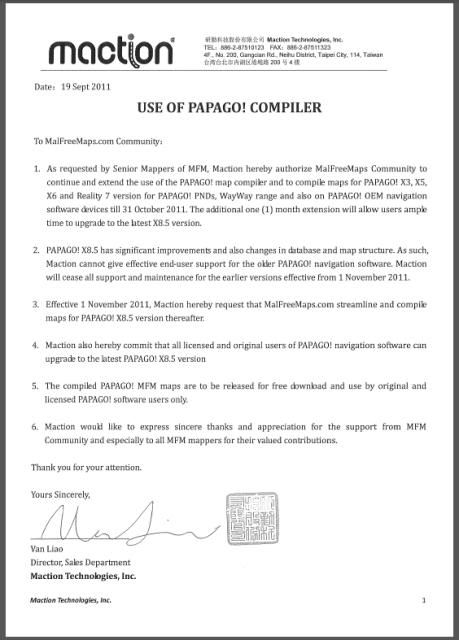
the makers of Papago made MFM (http://www.malfreemaps.com) stop support for X5 making http://www.mediafire.com/file/08fp8ryivd5k...PPG-111004C.exe the last of X5 map released by MFM. My personal advice, stick to Papago X5 and this latest (and last) map before upgrading to the new version.


Added on November 23, 2011, 6:26 amcomparing 2.0.9, 2.2.1, 2.3, 2.4 & CM7.1 .. which is the most stable for daily usage (longer battery life, bigger storage space options, compass fix, stable bluetooth & wifi, etc)

This post has been edited by al0n9: Nov 23 2011, 06:26 AM
Schuan
post Nov 23 2011, 12:08 PM

Getting Started
**
Junior Member
69 posts

Joined: Jan 2011


QUOTE(al0n9 @ Nov 23 2011, 05:59 AM)
thanks alexysc

just to update for those that haven't heard (like me @_@)

user posted image

the makers of Papago made MFM (http://www.malfreemaps.com) stop support for X5 making http://www.mediafire.com/file/08fp8ryivd5k...PPG-111004C.exe the last of X5 map released by MFM. My personal advice, stick to Papago X5 and this latest (and last) map before upgrading to the new version.


Added on November 23, 2011, 6:26 amcomparing 2.0.9, 2.2.1, 2.3, 2.4 & CM7.1 .. which is the most stable for daily usage (longer battery life, bigger storage space options, compass fix, stable bluetooth & wifi, etc)
*
Thats the reason I wondering, can our phone can support papago M8? because i want to keep my map update form time to time.
TSalexysc
post Nov 24 2011, 01:04 AM

Getting Started
**
Junior Member
60 posts

Joined: Jan 2011
QUOTE(al0n9 @ Nov 23 2011, 05:59 AM)
thanks alexysc

the makers of Papago made MFM (http://www.malfreemaps.com) stop support for X5 making http://www.mediafire.com/file/08fp8ryivd5k...PPG-111004C.exe the last of X5 map released by MFM. My personal advice, stick to Papago X5 and this latest (and last) map before upgrading to the new version.


Added on November 23, 2011, 6:26 amcomparing 2.0.9, 2.2.1, 2.3, 2.4 & CM7.1 .. which is the most stable for daily usage (longer battery life, bigger storage space options, compass fix, stable bluetooth & wifi, etc)
*
1) Stable for daily usage - 2.0.9 and CM7.1 v1.7.2 + hotfix1.
2) Battery life - almost the same.
3) Storage space - 2.0.9 with mad2sd bigger than CM7.1 with S2E. But CM7.1 is much more faster as it uses Ext4 partition for as storage.
4) For others, compass, bluetooth both similar.
5) Wifi better and stronger in CM7 current version.
6) GPS locking is almost immediate in CM7 current version.
7) Faster performance and responsiveness in CM7 current version than 2.0.9.
8) CM7 has more tweaks and options for performance settings, like overclock and etc.

My personal choice - CM7 version 1.7.2 + hotfix1. tongue.gif

Thanks for the info about Papago. rclxms.gif

This post has been edited by alexysc: Nov 24 2011, 01:14 AM
TSalexysc
post Nov 24 2011, 01:05 AM

Getting Started
**
Junior Member
60 posts

Joined: Jan 2011
QUOTE(Schuan @ Nov 23 2011, 12:08 PM)
Thats the reason I wondering, can our phone can support papago M8? because i want to keep my map update form time to time.
*
Can you share the link to download Papago M8? Then I can test it. tongue.gif

Thanks.
al0n9
post Nov 24 2011, 12:01 PM

New Member
*
Junior Member
6 posts

Joined: Jul 2007
Papago M8 for Iphone if not mistaken .. the new version is X8.5 but some reports shows that its still buggy ..
Schuan
post Nov 24 2011, 04:16 PM

Getting Started
**
Junior Member
69 posts

Joined: Jan 2011


QUOTE(alexysc @ Nov 24 2011, 01:05 AM)
Can you share the link to download Papago M8? Then I can test it.  tongue.gif

Thanks.
*
Yes. the link is here:

http://www.multiupload.com/TVMOJFI4DE
Hope to get your feedback soon!


zam_changloon
post Nov 24 2011, 05:05 PM

Getting Started
**
Junior Member
71 posts

Joined: Feb 2009


QUOTE(Schuan @ Nov 24 2011, 04:16 PM)
Yes. the link is here:

http://www.multiupload.com/TVMOJFI4DE
Hope to get your feedback soon!
*
Compatible with our G5?? flex.gif
x132755
post Nov 25 2011, 01:39 PM

How To Own A Property Without Spending Your Money? Got 1 Way....
********
All Stars
13,313 posts

Joined: Jan 2008


another upgrade ver is landed d, call Galaxy Y S5360...

amedeto8
post Nov 25 2011, 04:38 PM

Getting Started
**
Junior Member
155 posts

Joined: Jan 2011
QUOTE(alexysc @ Nov 22 2011, 01:13 PM)
Yes, the current v.1.7.2 + hf1 is stable, fast, responsive and the best of all CM7 roms so far.  tongue.gif

Don't worry about the optimization. Once you installed the current version, most of the default settings are
fine and working well.

You can add some tweaks and battery optimizations' settings which are optional. (see above 1st and 2nd posts).

Enjoy, buddy! rclxms.gif
*
Tqtq.. about theme u posted, cannot find any .apk.. how hahh??
TSalexysc
post Nov 25 2011, 05:21 PM

Getting Started
**
Junior Member
60 posts

Joined: Jan 2011
QUOTE(amedeto8 @ Nov 25 2011, 04:38 PM)
Tqtq.. about theme u posted, cannot find any .apk.. how hahh??
*
If you meant the MIUI.apk, yes, I've just tested and able to download the .apk file.

Just install the .apk like normal installation, then go to > Theme Chooser and select the them.

_______________________________________________

Note : Just downloaded the Papago M8....testing - will update the result.
amedeto8
post Nov 25 2011, 06:59 PM

Getting Started
**
Junior Member
155 posts

Joined: Jan 2011
QUOTE(alexysc @ Nov 25 2011, 05:21 PM)
If you meant the MIUI.apk, yes, I've just tested and able to download the .apk file.

Just install the .apk like normal installation, then go to > Theme Chooser and select the them.

_______________________________________________

Note : Just downloaded the Papago M8....testing - will update the result.
*
yup the MIUI.apk.. tiz is my 3rd time dload but still d same..
it is zip file n after xtract it got 2 folder n 2 files but no .apk cry.gif
i wonder y doh.gif
TSalexysc
post Nov 25 2011, 07:17 PM

Getting Started
**
Junior Member
60 posts

Joined: Jan 2011
QUOTE(amedeto8 @ Nov 25 2011, 06:59 PM)
yup the MIUI.apk.. tiz is my 3rd time dload but still d same..
it is zip file n after xtract it got 2 folder n 2 files but no .apk  cry.gif
i wonder y  doh.gif
*
It's this link : http://www.multiupload.com/WFD25FO3M4

Did you get the wrong link from the 2nd post? It's not a zip file, it's .apk file, no need to extract.

I think you most probably got the wrong link and hence wrong file.
amedeto8
post Nov 26 2011, 05:16 PM

Getting Started
**
Junior Member
155 posts

Joined: Jan 2011
QUOTE(alexysc @ Nov 25 2011, 07:17 PM)
It's this link : http://www.multiupload.com/WFD25FO3M4

Did you get the wrong link from the 2nd post? It's not a zip file, it's .apk file, no need to extract.

I think you most probably got the wrong link and hence wrong file.
*
Yup, tiz is d rite 1 hehehe..
tq fren..
chonkit
post Dec 3 2011, 12:21 PM

Casual
***
Junior Member
419 posts

Joined: Feb 2010


hey guys..do u encounter the icon on status bar sometime overlap when using miui theme?? is this normal??
al0n9
post Dec 3 2011, 10:00 PM

New Member
*
Junior Member
6 posts

Joined: Jul 2007
CyanogenMod
1. [SOLVED] - cannot flash CWM v0.6 using odin
2. cannot display sim contacts without importing
3. not very happy with stock camera . no panoramic mode .

This post has been edited by al0n9: Dec 5 2011, 11:11 AM
amedeto8
post Dec 7 2011, 03:06 PM

Getting Started
**
Junior Member
155 posts

Joined: Jan 2011
QUOTE(chonkit @ Dec 3 2011, 12:21 PM)
hey guys..do u encounter the icon on status bar sometime overlap when using miui theme?? is this normal??
*
yup i do encounter dat n now using NTSense blue n love it rclxms.gif

senyap jeeee.. where is our guru??
pspadiktus
post Dec 8 2011, 01:25 PM

New Member
*
Newbie
1 posts

Joined: Dec 2011
I successfully updated my madteams i5500 Froyo 2.2 to CM7 v1.7.2 well it seems to be running just fine so far but Im having some problems regarding to this matter:
1. Havent installed s2e can't find a way how to download it using my laptop.
2. Gallery seems to load pictures slowly, why?
3. and lastly, ADW launcher is activated does it consume more battery than normal? can't turn it off though. >.<

Please answer. thankyou.

EDIT:
Aside from my problems mentioned above I found much MORE ALARMING problem with this ROM. It eats up my SD cards memory when I put some music and pictures on it. I found out that it automatically saves "thumbnails" which approximately has 4.15mb size for each song. so I suppose it ate 400-500mb of my SD cards memory. How will I deal with this problem? please help me.

This post has been edited by pspadiktus: Dec 8 2011, 05:16 PM
al0n9
post Dec 8 2011, 04:20 PM

New Member
*
Junior Member
6 posts

Joined: Jul 2007
1. install gapp tak?
2. try quickpic
3. try zeam / go launcher ex
slaughterer
post Dec 9 2011, 08:21 AM

Getting Started
**
Junior Member
102 posts

Joined: Apr 2011


I have some problem...some SMS didn't received by my phone...i can send SMS to my friends, but their reply cannot be received...few time it occurred, and quite worried me..
i dont know whether problem with Celcom or the phone & ROM....
anyone encounter this problem before?
al0n9
post Dec 12 2011, 07:15 AM

New Member
*
Junior Member
6 posts

Joined: Jul 2007
Problems
1. Wifi not strong.
2. Bluetooth pair but not connected
3. Spare Parts cannot home, and sleep
pepsin
post Dec 19 2011, 12:31 PM

Getting Started
**
Junior Member
233 posts

Joined: Dec 2011
Hi. I'm using Latest release: v1.7.2 [7 November 2011]

Latest hotfix: v1.7.2 Hotfix 1 Latest Google Apps package: official [minimal]: 20110828
on my galaxy5 I found issue where no one ever post. I found there is noise on my original samsung earphone when the earphone is in use like calling and listening to music. When listen to music, adjust the volume to 0 you can hear it very clearly in quiet place. But the sound is less noticeable when volume is higher but the mouse still there. Is there anyone whoface the same problem as mine or just me alone. How can I fix it. Btw I'm using jp2 baseband.and my dspmanager will always force close too when using earphone. Thx. I hope I can get some help here.


Added on December 19, 2011, 12:32 pmBut the noise still there(not mouse)

This post has been edited by pepsin: Dec 19 2011, 12:32 PM
chonkit
post Dec 20 2011, 10:01 PM

Casual
***
Junior Member
419 posts

Joined: Feb 2010


QUOTE(pepsin @ Dec 19 2011, 12:31 PM)
Hi. I'm using Latest release: v1.7.2 [7 November 2011]

Latest hotfix: v1.7.2 Hotfix 1 Latest Google Apps package: official [minimal]: 20110828
on my galaxy5 I found issue where no one ever post. I found there is noise on my original samsung earphone when the earphone is in use like calling and listening to music. When listen to music, adjust the volume to 0 you can hear it very clearly in quiet place. But the sound is less noticeable when volume is higher but the mouse still there. Is there anyone whoface the same problem as mine or just me alone. How can I fix it. Btw I'm using jp2 baseband.and my dspmanager will always force close too when using earphone. Thx. I hope I can get some help here.


Added on December 19, 2011, 12:32 pmBut the noise still there(not mouse)
*
got try use other earphone?? other earphone will have the same situation happen?


Added on December 20, 2011, 10:05 pmHey guys.. mad team had release ics pre alpha rom for our phone. for now, the working thing is touch screen, wifi(partially), h/w acclerate(not 100%)..if u guys wanna try can try it..i just try a while just now..but since not yet fully working, i switch back to cm 7 dy..

This post has been edited by chonkit: Dec 20 2011, 10:05 PM
pepsin
post Dec 21 2011, 10:44 AM

Getting Started
**
Junior Member
233 posts

Joined: Dec 2011
QUOTE(chonkit @ Dec 20 2011, 10:01 PM)
got try use other earphone?? other earphone will have the same situation happen?


Added on December 20, 2011, 10:05 pmHey guys.. mad team had release ics pre alpha rom for our phone. for now, the working thing is touch screen, wifi(partially), h/w acclerate(not 100%)..if u guys wanna try can try it..i just try a while just now..but since not yet fully working, i switch back to cm 7 dy..
*
Yes problem still exist on what ever brand earphone. Even normal earphone still have background noise. I even try to flash back to froyo. In froyo, earphone is fine, but after I flash back to cm7, problem come again. How?
eerick
post Jan 5 2012, 05:53 PM

New Member
*
Junior Member
10 posts

Joined: Nov 2009
From: KL


Hey guys may i reccomend you all to install 'Startup Auditor' to your g5? it needs roots byt since using cynogen so kau tim liao...

Startup Auditor on Market

ive used it since it was running on motafoca's ROM...
Schuan
post Jan 6 2012, 02:35 PM

Getting Started
**
Junior Member
69 posts

Joined: Jan 2011


Guys, V 1.8 is out!

But it is not yet available on ROM Manager due to server problems

sad.gif
zam_changloon
post Jan 9 2012, 11:39 AM

Getting Started
**
Junior Member
71 posts

Joined: Feb 2009


QUOTE(Schuan @ Jan 6 2012, 02:35 PM)
Guys, V 1.8 is out!

But it is not yet available on ROM Manager due to server problems

sad.gif
*
Still can flash by saving the file to pc & copy paste to sd card then flash right?


Added on January 9, 2012, 12:06 pmNew Release for ClockWork Mode v0.7 - 6 January 2012 [CWM Ver. 5.0.2.7]

http://www.multiupload.com/N8VH6IUWOP (Need to flash via ODIN since it only has .tar format) nod.gif

This post has been edited by zam_changloon: Jan 9 2012, 03:15 PM
Schuan
post Jan 9 2012, 08:52 PM

Getting Started
**
Junior Member
69 posts

Joined: Jan 2011


QUOTE(zam_changloon @ Jan 9 2012, 11:39 AM)
Still can flash by saving the file to pc & copy paste to sd card then flash right?


Added on January 9, 2012, 12:06 pmNew Release for ClockWork Mode v0.7 - 6 January 2012 [CWM Ver. 5.0.2.7]

http://www.multiupload.com/N8VH6IUWOP (Need to flash via ODIN since it only has .tar format)  nod.gif
*
Yes. Flash it in normal way. I have been using it for 2 days, so far so good smile.gif
zam_changloon
post Jan 10 2012, 09:13 AM

Getting Started
**
Junior Member
71 posts

Joined: Feb 2009


QUOTE(Schuan @ Jan 9 2012, 08:52 PM)
Yes. Flash it in normal way. I have been using it for 2 days, so far so good smile.gif
*
Yeah.. I've flashed yesterday.. So far so good..

For those who want to change their theme through theme chooser, belows are some of themes i've tried..

NeonBlueAcev30


Rover


GlassMix


CortiisTheme

* I'll post screenshoot later..

This post has been edited by zam_changloon: Jan 10 2012, 04:17 PM
cubex
post Jan 10 2012, 10:36 AM

tolong jangan main main...yaranaika?
*****
Senior Member
839 posts

Joined: Jan 2003
From: KK City


1.8 not working on mine T.T
zam_changloon
post Jan 10 2012, 10:48 AM

Getting Started
**
Junior Member
71 posts

Joined: Feb 2009


QUOTE(cubex @ Jan 10 2012, 10:36 AM)
1.8 not working on mine T.T
*
What's the problem???

Note :- It's advisable to BACKUP ur handphone via CWM before flashing.. Anything happen you can restore back to previous version.. nod.gif
cubex
post Jan 10 2012, 10:55 AM

tolong jangan main main...yaranaika?
*****
Senior Member
839 posts

Joined: Jan 2003
From: KK City


QUOTE(zam_changloon @ Jan 10 2012, 10:48 AM)
What's the problem???

Note :- It's advisable to BACKUP ur handphone via CWM before flashing.. Anything happen you can restore back to previous version..  nod.gif
*
I restored mine back.
I did clean my caches but dont know why it hang on main screen. Cyanogen android keep skate boarding over and over again.
zam_changloon
post Jan 10 2012, 11:37 AM

Getting Started
**
Junior Member
71 posts

Joined: Feb 2009


QUOTE(cubex @ Jan 10 2012, 10:55 AM)
I restored mine back.
I did clean my caches but dont know why it hang on main screen. Cyanogen android keep skate boarding over and over again.
*
Actually i'm also having problem.. My phone stuck on "android" logo.. I've restart 2-3 times but it still stuck.. Then i've tried the following steps:-

- take out batery
- restart phone on "downloading mode"
- re-update latest CWM via odin.. Then it will restart to recovery mode..
- Next I wipe data/factory reset + wipe cache partition + dalvik cache
- Reboot my phone & see whether is'it still stuck on "android" logo.. Thank God my phone ONLINE back... (With default theme & application) rclxms.gif
- Next I restart back on recovery mode and RESTORE previous version and restart to see whether it will stuck again. - My phone successfully online with previous version
- Then I restart once again to recovery mode and reflash to 1.8 version (Without data wipe)..
> install update 1.8 version
> install hotfix 1
> install gapps-gb-20110613 & reboot

Finally my phone working on 1.8.. icon_idea.gif


Added on January 10, 2012, 5:15 pm
QUOTE(zam_changloon @ Jan 10 2012, 09:13 AM)
Yeah.. I've flashed yesterday.. So far so good..

For those who want to change their theme through theme chooser, belows are some of themes i've tried..

NeonBlueAcev30
Rover
GlassMix
CortiisTheme

* I'll post screenshoot later..
*
NeonBlueAcev30
user posted imageuser posted image


Rover
user posted imageuser posted image


GlassMix
user posted imageuser posted image

CortiisTheme
user posted imageuser posted image

This post has been edited by zam_changloon: Jan 10 2012, 05:15 PM
amedeto8
post Jan 13 2012, 10:03 PM

Getting Started
**
Junior Member
155 posts

Joined: Jan 2011
found Motafoca working n ICS.. hooo sooo long no update on G5 hehhehhe..
v1.8 suitable for daily use??
zam_changloon
post Jan 13 2012, 10:27 PM

Getting Started
**
Junior Member
71 posts

Joined: Feb 2009


QUOTE(amedeto8 @ Jan 13 2012, 10:03 PM)
found Motafoca working n ICS.. hooo sooo long no update on G5 hehhehhe..
v1.8 suitable for daily use??
*
What do tou mean by daily use.. I use 1.8 every day tongue.gif
Just the battery notification is the current issue.. especially when charging the battery.. Some user has problem whereby the time taken too short for battery to fully charged.. To see the accurate battery status, need to check through spare part - battery information.. Other function working good..

amedeto8
post Jan 14 2012, 12:14 AM

Getting Started
**
Junior Member
155 posts

Joined: Jan 2011
QUOTE(zam_changloon @ Jan 13 2012, 10:27 PM)
What do tou mean by daily use.. I use 1.8 every day  tongue.gif
Just the battery notification is the current issue.. especially when charging the battery.. Some user has problem whereby the time taken too short for battery to fully charged.. To see the accurate battery status, need to check through spare part - battery information.. Other function working good..
*
hahhaha i mean all functioning / working not alpha/beta test biggrin.gif
zam_changloon
post Jan 14 2012, 10:45 AM

Getting Started
**
Junior Member
71 posts

Joined: Feb 2009


QUOTE(amedeto8 @ Jan 14 2012, 12:14 AM)
hahhaha i mean all functioning / working not alpha/beta test  biggrin.gif
*
As far as i concern... Sim card Tool is stil not functionng for celcom prepaid...

amedeto8
post Jan 14 2012, 04:21 PM

Getting Started
**
Junior Member
155 posts

Joined: Jan 2011
QUOTE(zam_changloon @ Jan 14 2012, 10:45 AM)
As far as i concern... Sim card Tool is stil not functionng for celcom prepaid...
*
Mind share v1.8 link would like 2 try
zam_changloon
post Jan 16 2012, 12:58 PM

Getting Started
**
Junior Member
71 posts

Joined: Feb 2009


QUOTE(amedeto8 @ Jan 14 2012, 04:21 PM)
Mind share v1.8 link would like 2 try
*
CyanogenMod 7.2.0-RC0 V.1.8

Hotfix 1


New version of CWM also available.. CWM Ver. 5.0.2.7. Flash using ODIN since it's on .tar format...
arafat
post Jan 18 2012, 05:34 PM

ROCK ON!
******
Senior Member
1,747 posts

Joined: Nov 2004
From: serdang selangor

hi
i dont understand this,pls enlighten me

i on stock eclair,this mod is better than stock froyo?

QUOTE
PROCEDURES :

Note - Make sure you have back up your stuffs like your pics, videos, music, etc. etc., before proceeding.

1) Remove mad2sd using Terminal Emulator (for Madteam's ROMS or if you are using it) -
#su
#mad2sd off
#reboot

amedeto8
post Jan 18 2012, 09:36 PM

Getting Started
**
Junior Member
155 posts

Joined: Jan 2011
QUOTE(zam_changloon @ Jan 16 2012, 12:58 PM)
CyanogenMod 7.2.0-RC0 V.1.8

Hotfix 1
New version of CWM also available..  CWM Ver. 5.0.2.7. Flash using ODIN since it's on .tar format...
*
Tq my fren biggrin.gif

This post has been edited by amedeto8: Jan 24 2012, 03:38 PM
zam_changloon
post Jan 19 2012, 10:01 AM

Getting Started
**
Junior Member
71 posts

Joined: Feb 2009


QUOTE(arafat @ Jan 18 2012, 05:34 PM)
hi
i dont understand this,pls enlighten me

i on stock eclair,this mod is better than stock froyo?
*
This one is custom roms.. void warranty u know.. Off course its better in term of performance.. Like a perodua kancil using Daihatsu Engine... thumbup.gif

Note - Make sure you have back up your stuffs like your pics, videos, music, etc. etc., before proceeding.
Means you have copy n paste all data in ur sd card to ur PC or laptop.. If not all data will lost when u proceed to PARTITION sdcard step.. For applications you have installed to your phone.. You need to back-up all ur applications installed using back-up application (i use titanium backup). Then after flashing to new roms, u can restore back ur applications and transfer back all data from ur pc to your sd card.. As conclusion for back-up process...
- back-up ur application using back-up application then
- copy paste all data inside ur sd card to ur pc/laptop


1) Remove mad2sd using Terminal Emulator (for Madteam's ROMS or if you are using it) -
#su
#mad2sd off
#reboot
This one is for those who're currently using Madteam's ROMS.. For stock eclair just ignore..


arafat
post Jan 19 2012, 02:27 PM

ROCK ON!
******
Senior Member
1,747 posts

Joined: Nov 2004
From: serdang selangor

i have followed guide on 1st page and and from here http://www.madteam.co/2011/10/02/cyanogenm...e-for-g5-users/
but after i reboot it just repeat samsung welcome screen & android forever
pls guide me


Added on January 19, 2012, 2:37 pmwe should use EUROPA_v1.0.ops for the odin right?

This post has been edited by arafat: Jan 19 2012, 02:37 PM
technod
post Jan 19 2012, 07:17 PM

Getting Started
**
Junior Member
58 posts

Joined: Mar 2007


QUOTE(arafat @ Jan 18 2012, 05:34 PM)
hi
i dont understand this,pls enlighten me

i on stock eclair,this mod is better than stock froyo?
*
Eclair<Froyo<Gingerbread
amedeto8
post Jan 19 2012, 10:11 PM

Getting Started
**
Junior Member
155 posts

Joined: Jan 2011
QUOTE(zam_changloon @ Jan 10 2012, 11:37 AM)
Actually i'm also having problem.. My phone stuck on "android" logo.. I've restart 2-3 times but it still stuck.. Then i've tried the following steps:-

- take out batery
- restart phone on "downloading mode"
- re-update latest CWM via odin.. Then it will restart to recovery mode..
- Next I wipe data/factory reset + wipe cache partition + dalvik cache
- Reboot my phone & see whether is'it still stuck on "android" logo.. Thank God my phone ONLINE back... (With default theme & application)  rclxms.gif
- Next I restart back on recovery mode and RESTORE previous version and restart to see whether it will stuck again. - My phone successfully online with previous version
- Then I restart once again to recovery mode and reflash to 1.8 version (Without data wipe)..
> install update 1.8 version
> install hotfix 1
> install gapps-gb-20110613 & reboot

Finally my phone working on 1.8..  icon_idea.gif


Added on January 10, 2012, 5:15 pm


Rover
user posted imageuser posted image
zam how do i get battery indicator like tiz one.. more easier to monitor how much longer b4 charging..


Added on January 24, 2012, 3:39 pmi can see a lot of error on new cmw background compare to cmw 5026.. is it normal?? "can't open/cache..., can't mount/cache..."

This post has been edited by amedeto8: Jan 24 2012, 03:48 PM
Schuan
post Jan 26 2012, 12:39 PM

Getting Started
**
Junior Member
69 posts

Joined: Jan 2011


QUOTE(amedeto8 @ Jan 19 2012, 10:11 PM)


Added on January 24, 2012, 3:39 pmi can see a lot of error on new cmw background compare to cmw 5026.. is it normal?? "can't open/cache..., can't mount/cache..."
*
Yes, I also got the same error on new CMW. According to other users, it is ok if they do a full wipe.

BTW, Cyanogen V1.9 is realeased!

http://www.madteam.co/forum/development/%2...alaxy5%27-port/

25 January 2012:

Data wipe?: only if you have problems.
Updated CyanogenMod source (7.2-RC0)
Now using ICS transition and rotation animations
Fix for "stuck" notification items
Kernel: remove SCHED_HRTICK patches due to instability
Kernel: tweak smartassV2 scheduler to use more appropriate CPU frequencies for idle and awake states
Use safer mount options to reduce chances of data corruption
Reduce default compcache usage to 10% of memory
Tweaked TCP buffer for wifi device to improve performance
Improved Bluetooth reliability (enable HFP, increase max connections 1 -> 3).
amedeto8
post Jan 29 2012, 02:41 AM

Getting Started
**
Junior Member
155 posts

Joined: Jan 2011
QUOTE(Schuan @ Jan 26 2012, 12:39 PM)
Yes, I also got the same error on new CMW. According to other users, it is ok if they do a full wipe.

BTW, Cyanogen V1.9 is realeased!

http://www.madteam.co/forum/development/%2...alaxy5%27-port/

25 January 2012:

    Data wipe?: only if you have problems.
    Updated CyanogenMod source (7.2-RC0)
    Now using ICS transition and rotation animations
    Fix for "stuck" notification items
    Kernel: remove SCHED_HRTICK patches due to instability
    Kernel: tweak smartassV2 scheduler to use more appropriate CPU frequencies for idle and awake states
    Use safer mount options to reduce chances of data corruption
    Reduce default compcache usage to 10% of memory
    Tweaked TCP buffer for wifi device to improve performance
    Improved Bluetooth reliability (enable HFP, increase max connections 1 -> 3).
*
done dat but still d same huhuhu..
hav u try v1.9?? how was it??
Schuan
post Jan 29 2012, 11:13 PM

Getting Started
**
Junior Member
69 posts

Joined: Jan 2011


QUOTE(amedeto8 @ Jan 29 2012, 02:41 AM)
done dat but still d same huhuhu..
hav u try v1.9?? how was it??
*
v1.9 is quite stable (provided that u have installed hotfix 3).


chonkit
post Jan 30 2012, 12:42 PM

Casual
***
Junior Member
419 posts

Joined: Feb 2010


hey..u guys got try use ICS launcher from market?? i try to use it but the label for the icon can only see half only..
slaughterer
post Jan 30 2012, 10:46 PM

Getting Started
**
Junior Member
102 posts

Joined: Apr 2011


have any problem with v1.9 so far?? ^^
zam_changloon
post Jan 31 2012, 10:14 AM

Getting Started
**
Junior Member
71 posts

Joined: Feb 2009


QUOTE(amedeto8 @ Jan 19 2012, 10:11 PM)
zam how do i get battery indicator like tiz one.. more easier to monitor how much longer b4 charging..
Battery indicator? you mean the battery icon on the up right side??? That was my theme.. "Rover".
--> http://www.4shared.com/android/Xpw4cMXq/Rover.html

Why don't u just install "battery widget" from market.. I'm using Battery Widget by JH Jeong..


QUOTE(slaughterer @ Jan 30 2012, 10:46 PM)
have any problem with v1.9 so far?? ^^
*
So far so good for me... except 4 battery consumption.. icon_rolleyes.gif icon_rolleyes.gif

[ [/b]

This post has been edited by zam_changloon: Feb 1 2012, 12:30 PM
chintl
post Feb 10 2012, 08:39 AM

New Member
*
Junior Member
20 posts

Joined: Jul 2010
Cyanogen V2.0 hotfix 2 anybody?
chonkit
post Feb 10 2012, 11:35 AM

Casual
***
Junior Member
419 posts

Joined: Feb 2010


QUOTE(chintl @ Feb 10 2012, 08:39 AM)
Cyanogen V2.0 hotfix 2 anybody?
*
i m using it...quite ok actually, better battery life for me..
ex999
post Feb 10 2012, 11:10 PM

New Member
*
Junior Member
17 posts

Joined: Jul 2007
cwm 0.7 link is dead....
any 1 can help upload the ClockWorkMod Recovery (CWM Ver. 5.0.2.7) tar ver?

slaughterer
post Feb 16 2012, 05:22 PM

Getting Started
**
Junior Member
102 posts

Joined: Apr 2011


any link to download hotfix2 for cyanogen v2.0??
chintl
post Feb 18 2012, 04:54 PM

New Member
*
Junior Member
20 posts

Joined: Jul 2010
QUOTE(slaughterer @ Feb 16 2012, 05:22 PM)
any link to download hotfix2 for cyanogen v2.0??
*
Here is the link, v2.0 hotfix2.
slaughterer
post Feb 19 2012, 06:29 PM

Getting Started
**
Junior Member
102 posts

Joined: Apr 2011


Thanx... already found it after read the second post on madteam forum.. ^^
So far, v2.0+hotfix2 is far better than v1.9+htfix3...

But some problem occur, which after close some app and going back to home screen, the screen was empty at first and take few seconds to back to normal setting with the apps... don't know why, before this on v1.7 is ok..
amedeto8
post Feb 20 2012, 03:35 PM

Getting Started
**
Junior Member
155 posts

Joined: Jan 2011
QUOTE(slaughterer @ Feb 19 2012, 06:29 PM)
Thanx... already found it after read the second post on madteam forum.. ^^
So far, v2.0+hotfix2 is far better than v1.9+htfix3...

But some problem occur, which after close some app and going back to home screen, the screen was empty at first and take few seconds to back to normal setting with the apps... don't know why, before this on v1.7 is ok..
*
Still no luck after 3-4x trying using rom manager n normal cwm recovery..
FC happen after restore my app using Titanium backup..
now in v1.9.. any idea y o any suggestion??

slaughterer
post Feb 20 2012, 08:19 PM

Getting Started
**
Junior Member
102 posts

Joined: Apr 2011


i didn't use rom manager... i manually download the files from madteam forum and transfer it to my phone.. then reboot recovery..and install it.. ^^
amedeto8
post Feb 20 2012, 11:47 PM

Getting Started
**
Junior Member
155 posts

Joined: Jan 2011
QUOTE(slaughterer @ Feb 20 2012, 08:19 PM)
i didn't use rom manager... i manually download the files from madteam forum and transfer it to my phone.. then reboot recovery..and install it.. ^^
*
i did try both way but same FC msg come out ".......android.process"..
it happen rite after my 1st reboot after restore my apps.. i've read sum1 have same issue but cannot recall hmm.gif
o it happen due to s2e setting??
eerick
post Feb 23 2012, 11:36 PM

New Member
*
Junior Member
10 posts

Joined: Nov 2009
From: KL


anyone can help me and guild me with PAPAGO? with the downloads and installation and stuff?
Schuan
post Mar 2 2012, 04:19 PM

Getting Started
**
Junior Member
69 posts

Joined: Jan 2011


QUOTE(eerick @ Feb 23 2012, 11:36 PM)
anyone can help me and guild me with PAPAGO? with the downloads and installation and stuff?
*
hi erik , please refer this link for Papago X5, M7 & M8 Taiwan version or other GPS.

So far, X5 is the most stable in galaxy 5, M8 always force close.

http://www.android.ooo.com.my/forum.php?mo...mdisplay&fid=27


Added on March 2, 2012, 4:21 pm
QUOTE(amedeto8 @ Feb 20 2012, 11:47 PM)
i did try both way but same FC msg come out ".......android.process"..
it happen rite after my 1st reboot after restore my apps.. i've read sum1 have same issue but cannot recall  hmm.gif
o it happen due to s2e setting??
*
Which baseband are u using? try do a full wipe and reflash again. It should be fine then.

This post has been edited by Schuan: Mar 2 2012, 04:21 PM
eastwest
post May 18 2012, 09:47 AM

Regular
******
Senior Member
1,608 posts

Joined: Nov 2007
guys, for g5 with stock rom, how do I revert back to standard g5 keyboard?
charkuoi
post May 21 2012, 09:36 PM

New Member
*
Junior Member
27 posts

Joined: Apr 2010
From: Land Below The Breeze..


I don't know to upgrade.. Can't understand the procedure~
chonkit
post May 21 2012, 09:45 PM

Casual
***
Junior Member
419 posts

Joined: Feb 2010


QUOTE(charkuoi @ May 21 2012, 09:36 PM)
I don't know to upgrade.. Can't understand the procedure~
*
did u read the guide at madteam forum??
http://madteam.co/forum/development-8/(dev...1-galaxy5-port/

Pre-requisites:
Visit the Basebands thread and make sure that you are using a baseband that is recommended for CyanogenMod. If you are still using an Eclair ROM, you must update your baseband or you will experience boot loops.
Visit the ClockworkMod thread and install the latest ClockworkMod build via Odin.
Install the GooManager application from the Google Play store.


Installation (first time/new users):
Open the GooManager application.
Navigate to psyke83 -> roms -> galaxy5.
Click on the build you wish to install from the list.
If needed, click the Download Gapps button to download the Google Apps package. The most recent (and most suitable) version will always be selected for you automatically.
Click on the Download button to download the rom.
Once the download(s) are complete, reboot into recovery and install the update package, followed by the Google Apps package.
Important: if you are updating from a stock or custom ROM, choose the data wipe option before rebooting.

This post has been edited by chonkit: May 21 2012, 09:46 PM
slaughterer
post Jun 19 2012, 11:49 AM

Getting Started
**
Junior Member
102 posts

Joined: Apr 2011


this threat been quite for almost a month...huhu...

anyone have tried CM9? is it stable enough ? ^^
Schuan
post Jun 24 2012, 11:00 PM

Getting Started
**
Junior Member
69 posts

Joined: Jan 2011


I have been using 20120610 [v2.5] since it release and everything is just perfect. The battery can last for 3 days!! Haven't try the CM9 as the wifi, camera, bluetooth and fm radio is not stable yet.
speedrider
post Jul 12 2012, 05:35 PM

Casual
***
Junior Member
403 posts

Joined: Jul 2005
From: in front of your house.... peeping


Hi,

Im looking forward to flash my G5 with standard rom.

Im confused.... What to set the ONE PACKAGE and OPS files? The files downloaded from samhardware only have 4 md5 files
chonkit
post Jul 12 2012, 06:13 PM

Casual
***
Junior Member
419 posts

Joined: Feb 2010


QUOTE(speedrider @ Jul 12 2012, 05:35 PM)
Hi,

Im looking forward to flash my G5 with standard rom.

Im confused.... What to set the ONE PACKAGE and OPS files? The files downloaded from samhardware only have 4 md5 files
*
what rom you currently using ?? cm or stock rom? the standard rom u mean u wan to flash to is what rom?
czai84
post Jul 14 2012, 11:12 PM

Getting Started
**
Junior Member
190 posts

Joined: Nov 2004
From: KK,Sabah


is there any guide to flash from a stock rom to cm with picture guide?
i try to read the guide on 1st page but still kinda confuse ...
Schuan
post Jul 16 2012, 10:35 AM

Getting Started
**
Junior Member
69 posts

Joined: Jan 2011


QUOTE(czai84 @ Jul 14 2012, 11:12 PM)
is there any guide to flash from a stock rom to cm with picture guide?
i try to read the guide on 1st page but still kinda confuse ...
*
Hi, please refer to this page :http://madteam.co/forum/development-8/%28dev%29-cyanogenmod-7-2-0-rc1-galaxy5-port/

if u need helps, dont hestitate to contact me!
Currently im in Cyanogen Vanilla mode. Superb performances. =)
slaughterer
post Jul 21 2012, 11:22 PM

Getting Started
**
Junior Member
102 posts

Joined: Apr 2011


Cyanogen vanilla by psyke? Is it already stable?
Coz i read it still in testing...
What the improvement compared to prev CM7?
czai84
post Jul 22 2012, 08:43 AM

Getting Started
**
Junior Member
190 posts

Joined: Nov 2004
From: KK,Sabah


QUOTE(Schuan @ Jul 16 2012, 10:35 AM)
Hi, please refer to this page :http://madteam.co/forum/development-8/%28dev%29-cyanogenmod-7-2-0-rc1-galaxy5-port/

if u need helps, dont hestitate to contact me!
Currently im in Cyanogen Vanilla mode. Superb performances. =)
*
Hi Schuan, thx for the help. will look forward to Cyanogen vanilla mode in the URL soon. rclxms.gif
Schuan
post Aug 3 2012, 02:45 PM

Getting Started
**
Junior Member
69 posts

Joined: Jan 2011


QUOTE(slaughterer @ Jul 21 2012, 11:22 PM)
Cyanogen vanilla by psyke? Is it already stable?
Coz i read it still in testing...
What the improvement compared to prev CM7?
*
Cyanogen Vanilla is still in testing, but in overall, it is suitable for daily use. The developer , Psyke need more people to test it and gives feedback so he can come out with a stable kernel. After that , only he can use that stable kernel to develope Ice cream (4.0). So if u want to use Cyanogenmod9 faster, please use the vanilla mode and gives whatever bug report and feedback. this is for your own good as well. =)
speedrider
post Aug 5 2012, 01:50 PM

Casual
***
Junior Member
403 posts

Joined: Jul 2005
From: in front of your house.... peeping


QUOTE(chonkit @ Jul 12 2012, 06:13 PM)
what rom you currently using ?? cm or stock rom? the standard rom u mean u wan to flash to is what rom?
*
Hi I want to use the original one provided by Samsung. Im not using CM Rom, now running on Android 2.2
chonkit
post Aug 5 2012, 09:22 PM

Casual
***
Junior Member
419 posts

Joined: Feb 2010


QUOTE(speedrider @ Aug 5 2012, 01:50 PM)
Hi I want to use the original one provided by Samsung. Im not using CM Rom, now running on Android 2.2
*
i c..hmm..u can put the file u downloaded from samfirmware into one package and ops file i forget what the file name already ..sorry ..
Schuan
post Aug 13 2012, 03:25 PM

Getting Started
**
Junior Member
69 posts

Joined: Jan 2011


QUOTE(speedrider @ Aug 5 2012, 01:50 PM)
Hi I want to use the original one provided by Samsung. Im not using CM Rom, now running on Android 2.2
*
Hi , If you are using original Samsung rom, there is no need to re-flash again to original rom. it is pointless.

However, You have to flash to downgrade.tar first if you're using CyanogenMod and want to revert back to Stock Roms.

Files required :

1) Downgrade .tar (Europe Froyo) Link : http://www.multiupload.com/OW3LQG8PZB
2) Malaysia Official Froyo Link : http://www.mediafire.com/?si659w0w9d9pt40 (password : malaysia)

Procedures :

1) Download the above Europe Froyo which is in German Language (don't worry about this).
b) Make sure you remove your SIM card. Flashing doesn't concern the SIM card but it would consume your credits unless you have monthly data package with your phone service provider.
c) Flash it with Odin.
d) After completed flashing, and reboot, don't set anything as it's in German (unless you know German).
e) Switch off Odin and also your phone.

2) Open back Odin and flash the 2nd File, i.e. Malaysia Official Froyo.


NOTE : After you have flashed the downgrade .tar, you can flash to any roms you want.

kimimaro_kun
post Aug 31 2012, 09:24 AM

I Am Whatever You Say I Am
****
Senior Member
669 posts

Joined: Jan 2006
From: Anfield


hi guys,

plan to play with my G5 and flash to latest and stable rom..
currently i'm running on official 2.2..

mind to share step by step as i already lost..
sweat.gif
Schuan
post Sep 3 2012, 03:57 PM

Getting Started
**
Junior Member
69 posts

Joined: Jan 2011


QUOTE(kimimaro_kun @ Aug 31 2012, 09:24 AM)
hi guys,

plan to play with my G5 and flash to latest and stable rom..
currently i'm running on official 2.2..

mind to share step by step as i already lost..
sweat.gif
*
Please refer to this post: http://madteam.co/forum/development-8/%28d...1-galaxy5-port/

it is pretty simple!

Just make sure ur battery is fully charged and remove sim card.
zam_changloon
post Dec 24 2012, 02:50 PM

Getting Started
**
Junior Member
71 posts

Joined: Feb 2009


Hello my galaxy 5 frens.. Have u tried CM9? CM10 also available..
Clareen
post Jan 14 2013, 09:43 PM

Workaholic~*
*******
Senior Member
2,603 posts

Joined: May 2006
From: USJ Taipan + PJ SS2


Anyone looking for Samsung Galaxy 5 Sun Global Battery? We're offering at price RM45
Schuan
post Mar 14 2013, 08:36 PM

Getting Started
**
Junior Member
69 posts

Joined: Jan 2011


Since Psyke has announced that he will not update Cyanogen 9 or 10, I think it is time to move on. I am Currently using MIUI rom , it is new and stable, with weekly updates available. http://madteam.co/forum/development-8/%28d...-galaxy-5-port/

The interface is not as nice as cyanogen, but performance is almost the same. So far no bugs found, battery stable and fast enough.
Schuan
post Mar 14 2013, 08:37 PM

Getting Started
**
Junior Member
69 posts

Joined: Jan 2011


QUOTE(Clareen @ Jan 14 2013, 09:43 PM)
Anyone looking for Samsung Galaxy 5 Sun Global Battery? We're offering at price RM45
*
who needs battery when cheaper power bank available? rclxm9.gif


Change to:
| Lo-Fi Version
0.0555sec    0.58    5 queries    GZIP Disabled
Time is now: 7th December 2025 - 08:41 AM