


Nvidia GeForce 9600GT 512MB Problem, Blackscreen when playing game
Nvidia GeForce 9600GT 512MB Problem, Blackscreen when playing game
|
|
  Nov 15 2011, 04:48 PM, updated 15y ago Nov 15 2011, 04:48 PM, updated 15y ago
Show posts by this member only | Post
#1
|
 
Senior Member
830 posts Joined: May 2007 From: Melaka, MALAYSIA   
|
hi guys, im using Nvidia Geforce 9600GT 512 MB... the problem is when I playing the game, it will become a blackscreen death.. i need to restart my pc after blackscreen... i already update my graphic driver but still goes the same thing... i just playing Pro Evolution Soccer 2011 and after i check with game requirement, my rig can run this game smoothly... how to fix this?
|
|
|
|
|
|
Nov 15 2011, 06:42 PM
Show posts by this member only | Post
#2
|

Senior Member
946 posts Joined: Apr 2011 From: In a world full of disappointment
|
Overheat problem?
try check your temperature mate  |
|
|
Nov 15 2011, 08:01 PM
Show posts by this member only | Post
#3
|

Senior Member
6,730 posts Joined: Jan 2003 From: Zion
|
i have the same card now. Also faced the same problem and found out that the heat sink fan has stopped. U nee to open up the casing, power up the pc and see if the graphics card fan is spinning or not. If it doesn't , u need to change the heatsink and fan.
|
|
|
Nov 15 2011, 08:15 PM
Show posts by this member only | Post
#4
|
|
Senior Member
830 posts Joined: May 2007 From: Melaka, MALAYSIA
|
QUOTE(Zhen-Wei-10 @ Nov 15 2011, 06:42 PM) Overheat problem? can u please tell me what is good temp for my gc?try check your temperature mate  |
|
|
Nov 15 2011, 09:40 PM
Show posts by this member only | Post
#5
|
|
Senior Member
946 posts Joined: Apr 2011 From: In a world full of disappointment
|
QUOTE(ApoKalypse @ Nov 15 2011, 08:15 PM) can u please tell me what is good temp for my gc? If Idle Should be around 40~43cgaming should be around 50c-60c i had 9600GT before |
|
|
Nov 16 2011, 11:19 AM
Show posts by this member only | Post
#6
|
|
Senior Member
830 posts Joined: May 2007 From: Melaka, MALAYSIA
|
QUOTE(Zhen-Wei-10 @ Nov 15 2011, 09:40 PM) If Idle Should be around 40~43c when u use this GC, have u faced the same problem with me?gaming should be around 50c-60c i had 9600GT before |
|
|
|
|
|
Nov 16 2011, 12:05 PM
Show posts by this member only | Post
#7
|
|
Senior Member
946 posts Joined: Apr 2011 From: In a world full of disappointment
|
QUOTE(ApoKalypse @ Nov 16 2011, 11:19 AM) when u use this GC, have u faced the same problem with me? nope |
|
|
Nov 16 2011, 06:17 PM
Show posts by this member only | Post
#8
|

Senior Member
3,586 posts Joined: Apr 2008 From: Desert
|
Is it a OC version?
|
|
|
Nov 16 2011, 08:41 PM
Show posts by this member only | Post
#9
|
|
Senior Member
830 posts Joined: May 2007 From: Melaka, MALAYSIA
|
QUOTE(sanderz @ Nov 16 2011, 06:17 PM) Is it a OC version? Im using Nvidia GeForce 9600GT 512MB GDDR3 and ive not OC my card... |
|
|
Nov 16 2011, 08:44 PM
|
|
Senior Member
946 posts Joined: Apr 2011 From: In a world full of disappointment
|
QUOTE(ApoKalypse @ Nov 16 2011, 08:41 PM) Im using Nvidia GeForce 9600GT 512MB GDDR3 and ive not OC my card... dude, did you do what i asked that day  please download HWMonitor and see your temperature you seem like no effort to solve your problem  |
|
|
Nov 16 2011, 09:15 PM
|
|
Senior Member
830 posts Joined: May 2007 From: Melaka, MALAYSIA
|
ok see image below, im really dummy for this
 Attached thumbnail(s) 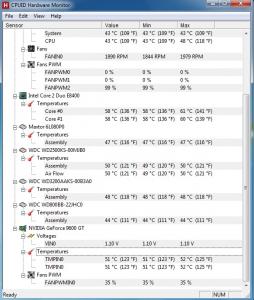
|
|
|
Nov 16 2011, 09:20 PM
|
|
Senior Member
946 posts Joined: Apr 2011 From: In a world full of disappointment
|
QUOTE(ApoKalypse @ Nov 16 2011, 09:15 PM) ok see image below, im really dummy for this Processor : 58cGraphic Card : 51c Seems like your processor too hot for idle temperature..my brother core 2 duo working around 38c on idle but yours way to high already your graphic card is in normal temperature..but maybe a little bit warm than normal temperature (should be around 46-48c) try update your graphic card driver and adjust your air flow in the casing This post has been edited by Zhen-Wei-10: Nov 16 2011, 09:23 PM |
|
|
Nov 16 2011, 09:41 PM
|
|
Senior Member
830 posts Joined: May 2007 From: Melaka, MALAYSIA
|
i dont know is this bcoz of my rig or gc... bcoz i search google, i found many user got this problems n still no solution....
http://forums.nvidia.com/index.php?showtopic=99483&st=20 |
|
|
|
|
|
Nov 16 2011, 09:57 PM
|
|
Senior Member
830 posts Joined: May 2007 From: Melaka, MALAYSIA
|
this is when i playing pes 2012.....
Attached thumbnail(s) 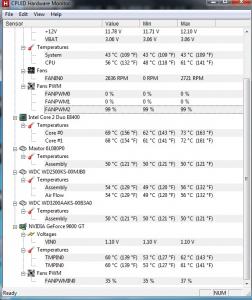
|
|
|
Nov 16 2011, 10:38 PM
|
|
Senior Member
946 posts Joined: Apr 2011 From: In a world full of disappointment
|
I think it's not your graphic card problem..
60c should be fine for 9600GT since 9600GT need some heat to run smoothly my card sometime run about 65c on Modern Wafare 3 Most likely...your processor overheat..reaching 70c is very bad |
|
|
Nov 16 2011, 10:51 PM
|
 
Elite
15,694 posts Joined: Mar 2008
|
QUOTE Most likely...your processor overheat..reaching 70c is very bad Looks normal to me. I have tried E8200, in cap ayam casing. It did reach such high temperature with freshly cleaned stock heatsink + freshly applied thermal paste. This post has been edited by kingkingyyk: Nov 16 2011, 10:51 PM |
|
|
Nov 16 2011, 11:15 PM
|
|
Senior Member
830 posts Joined: May 2007 From: Melaka, MALAYSIA
|
im still confuse what is the causes of this probs....
|
|
|
Nov 17 2011, 01:23 PM
|
|
Junior Member
346 posts Joined: Aug 2011
|
try having VGA mode..i solve this problem a few days ago- -|||~tap F8 when restart your pc
|
|
|
Nov 17 2011, 05:45 PM
|
|
Senior Member
830 posts Joined: May 2007 From: Melaka, MALAYSIA
|
QUOTE(eddytan95 @ Nov 17 2011, 01:23 PM) try having VGA mode..i solve this problem a few days ago- -|||~tap F8 when restart your pc did u use the same card? |
|
|
Nov 17 2011, 08:21 PM
|

Senior Member
1,073 posts Joined: Oct 2011
|
what kind of WINDOW are u using ??
if u are using window XP > then it might be a lot problem for gaming -- i prefer u to use window 7 -- |
|
|
Nov 17 2011, 08:57 PM
|
|
Senior Member
830 posts Joined: May 2007 From: Melaka, MALAYSIA
|
Im using windows 7... b4 this im using win xp n still have this probs...
|
|
|
Nov 17 2011, 09:00 PM
|
|
Senior Member
946 posts Joined: Apr 2011 From: In a world full of disappointment
|
QUOTE(munlok30 @ Nov 17 2011, 08:21 PM) what kind of WINDOW are u using ?? Windows XP is the most stable Windows by Microsoft if u are using window XP > then it might be a lot problem for gaming -- i prefer u to use window 7 --  |
|
|
Nov 17 2011, 10:30 PM
|

Senior Member
5,697 posts Joined: Nov 2007 From: A Place Where God And Master Of TroubleMaker Exist
|
dust its the culprit
clean it before your rig dies |
|
|
Nov 18 2011, 09:37 AM
|
|
Junior Member
433 posts Joined: Jan 2003
|
Looks like one of my old agp card. Works on 2D, when play games and require the use of DirectX, it just show you black screen.
What i concluded on my card was the chip for 3D or DirectX, is screwed. Rendering it workable in normal windows 2D mode, when comes to graphic processing, it just goes kaput. The one i own was China made one thought, so quality is not really one of it's strong point. |
|
|
Nov 18 2011, 11:13 AM
|
|
Senior Member
946 posts Joined: Apr 2011 From: In a world full of disappointment
|
QUOTE(Madgeiser @ Nov 18 2011, 09:37 AM) Looks like one of my old agp card. Works on 2D, when play games and require the use of DirectX, it just show you black screen. What related with TS?What i concluded on my card was the chip for 3D or DirectX, is screwed. Rendering it workable in normal windows 2D mode, when comes to graphic processing, it just goes kaput. The one i own was China made one thought, so quality is not really one of it's strong point. TS using 9600GT which fully support 3D and Directx10 |
|
|
Nov 18 2011, 11:31 AM
|
|
Junior Member
433 posts Joined: Jan 2003
|
QUOTE(Zhen-Wei-10 @ Nov 18 2011, 11:13 AM) What related with TS? It is related in a way, that it both work in normal mode, just doesn't work during games. So it could be the chip internally developed some fault which is preventing it from working with games. I am no graphic card guru, but that was my prognosis of the matter.TS using 9600GT which fully support 3D and Directx10 |
|
|
Nov 18 2011, 12:57 PM
|
|
Senior Member
946 posts Joined: Apr 2011 From: In a world full of disappointment
|
Owh..okay thanks for sharing
This post has been edited by Zhen-Wei-10: Nov 18 2011, 12:58 PM |
| Change to: |  0.0992sec 0.0992sec
 0.50 0.50
 6 queries 6 queries
 GZIP Disabled GZIP Disabled
Time is now: 8th December 2025 - 01:12 AM |
 Quote
Quote