


Nvidia GeForce 9600GT 512MB Problem, Blackscreen when playing game
Nvidia GeForce 9600GT 512MB Problem, Blackscreen when playing game
|
|
  Nov 15 2011, 04:48 PM, updated 15y ago Nov 15 2011, 04:48 PM, updated 15y ago
Show posts by this member only | Post
#1
|
 
Senior Member
830 posts Joined: May 2007 From: Melaka, MALAYSIA   
|
hi guys, im using Nvidia Geforce 9600GT 512 MB... the problem is when I playing the game, it will become a blackscreen death.. i need to restart my pc after blackscreen... i already update my graphic driver but still goes the same thing... i just playing Pro Evolution Soccer 2011 and after i check with game requirement, my rig can run this game smoothly... how to fix this?
|
|
|
|
|
|
Nov 15 2011, 06:42 PM
Show posts by this member only | Post
#2
|

Senior Member
946 posts Joined: Apr 2011 From: In a world full of disappointment
|
Overheat problem?
try check your temperature mate  |
|
|
Nov 15 2011, 08:01 PM
Show posts by this member only | Post
#3
|

Senior Member
6,728 posts Joined: Jan 2003 From: Zion
|
i have the same card now. Also faced the same problem and found out that the heat sink fan has stopped. U nee to open up the casing, power up the pc and see if the graphics card fan is spinning or not. If it doesn't , u need to change the heatsink and fan.
|
|
|
Nov 15 2011, 08:15 PM
Show posts by this member only | Post
#4
|
|
Senior Member
830 posts Joined: May 2007 From: Melaka, MALAYSIA
|
QUOTE(Zhen-Wei-10 @ Nov 15 2011, 06:42 PM) Overheat problem? can u please tell me what is good temp for my gc?try check your temperature mate  |
|
|
Nov 15 2011, 09:40 PM
Show posts by this member only | Post
#5
|
|
Senior Member
946 posts Joined: Apr 2011 From: In a world full of disappointment
|
QUOTE(ApoKalypse @ Nov 15 2011, 08:15 PM) can u please tell me what is good temp for my gc? If Idle Should be around 40~43cgaming should be around 50c-60c i had 9600GT before |
|
|
Nov 16 2011, 11:19 AM
Show posts by this member only | Post
#6
|
|
Senior Member
830 posts Joined: May 2007 From: Melaka, MALAYSIA
|
QUOTE(Zhen-Wei-10 @ Nov 15 2011, 09:40 PM) If Idle Should be around 40~43c when u use this GC, have u faced the same problem with me?gaming should be around 50c-60c i had 9600GT before |
|
|
|
|
|
Nov 16 2011, 12:05 PM
Show posts by this member only | Post
#7
|
|
Senior Member
946 posts Joined: Apr 2011 From: In a world full of disappointment
|
QUOTE(ApoKalypse @ Nov 16 2011, 11:19 AM) when u use this GC, have u faced the same problem with me? nope |
|
|
Nov 16 2011, 06:17 PM
Show posts by this member only | Post
#8
|

Senior Member
3,586 posts Joined: Apr 2008 From: Desert
|
Is it a OC version?
|
|
|
Nov 16 2011, 08:41 PM
Show posts by this member only | Post
#9
|
|
Senior Member
830 posts Joined: May 2007 From: Melaka, MALAYSIA
|
QUOTE(sanderz @ Nov 16 2011, 06:17 PM) Is it a OC version? Im using Nvidia GeForce 9600GT 512MB GDDR3 and ive not OC my card... |
|
|
Nov 16 2011, 08:44 PM
|
|
Senior Member
946 posts Joined: Apr 2011 From: In a world full of disappointment
|
QUOTE(ApoKalypse @ Nov 16 2011, 08:41 PM) Im using Nvidia GeForce 9600GT 512MB GDDR3 and ive not OC my card... dude, did you do what i asked that day  please download HWMonitor and see your temperature you seem like no effort to solve your problem  |
|
|
Nov 16 2011, 09:15 PM
|
|
Senior Member
830 posts Joined: May 2007 From: Melaka, MALAYSIA
|
ok see image below, im really dummy for this
 Attached thumbnail(s) 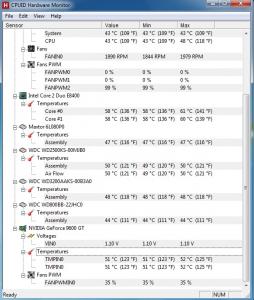
|
|
|
Nov 16 2011, 09:20 PM
|
|
Senior Member
946 posts Joined: Apr 2011 From: In a world full of disappointment
|
QUOTE(ApoKalypse @ Nov 16 2011, 09:15 PM) ok see image below, im really dummy for this Processor : 58cGraphic Card : 51c Seems like your processor too hot for idle temperature..my brother core 2 duo working around 38c on idle but yours way to high already your graphic card is in normal temperature..but maybe a little bit warm than normal temperature (should be around 46-48c) try update your graphic card driver and adjust your air flow in the casing This post has been edited by Zhen-Wei-10: Nov 16 2011, 09:23 PM |
|
|
Nov 16 2011, 09:41 PM
|
|
Senior Member
830 posts Joined: May 2007 From: Melaka, MALAYSIA
|
i dont know is this bcoz of my rig or gc... bcoz i search google, i found many user got this problems n still no solution....
http://forums.nvidia.com/index.php?showtopic=99483&st=20 |
|
|
|
|
|
Nov 16 2011, 09:57 PM
|
|
Senior Member
830 posts Joined: May 2007 From: Melaka, MALAYSIA
|
this is when i playing pes 2012.....
Attached thumbnail(s) 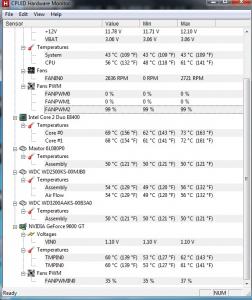
|
|
|
Nov 16 2011, 10:38 PM
|
|
Senior Member
946 posts Joined: Apr 2011 From: In a world full of disappointment
|
I think it's not your graphic card problem..
60c should be fine for 9600GT since 9600GT need some heat to run smoothly my card sometime run about 65c on Modern Wafare 3 Most likely...your processor overheat..reaching 70c is very bad |
|
|
Nov 16 2011, 10:51 PM
|
 
Elite
15,694 posts Joined: Mar 2008
|
QUOTE Most likely...your processor overheat..reaching 70c is very bad Looks normal to me. I have tried E8200, in cap ayam casing. It did reach such high temperature with freshly cleaned stock heatsink + freshly applied thermal paste. This post has been edited by kingkingyyk: Nov 16 2011, 10:51 PM |
|
|
Nov 16 2011, 11:15 PM
|
|
Senior Member
830 posts Joined: May 2007 From: Melaka, MALAYSIA
|
im still confuse what is the causes of this probs....
|
|
|
Nov 17 2011, 01:23 PM
|
|
Junior Member
346 posts Joined: Aug 2011
|
try having VGA mode..i solve this problem a few days ago- -|||~tap F8 when restart your pc
|
|
|
Nov 17 2011, 05:45 PM
|
|
Senior Member
830 posts Joined: May 2007 From: Melaka, MALAYSIA
|
QUOTE(eddytan95 @ Nov 17 2011, 01:23 PM) try having VGA mode..i solve this problem a few days ago- -|||~tap F8 when restart your pc did u use the same card? |
|
|
Nov 17 2011, 08:21 PM
|

Senior Member
1,073 posts Joined: Oct 2011
|
what kind of WINDOW are u using ??
if u are using window XP > then it might be a lot problem for gaming -- i prefer u to use window 7 -- |
| Change to: |  0.0185sec 0.0185sec
 0.85 0.85
 6 queries 6 queries
 GZIP Disabled GZIP Disabled
Time is now: 2nd December 2025 - 02:03 PM |
 Quote
Quote