


Wireless Access Point [WTS] MikroTik RB951G-2HnD/RB951U-2HnD WiFi Router, High Power Wireless Router, 3G/4G LTE
Wireless Access Point [WTS] MikroTik RB951G-2HnD/RB951U-2HnD WiFi Router, High Power Wireless Router, 3G/4G LTE
|
|
 Nov 7 2013, 11:58 PM Nov 7 2013, 11:58 PM
Return to original view | Post
#1
|
 
Junior Member
95 posts Joined: Aug 2005 From: Petaling Jaya  
|
Thanks CloudComputer. Fast deliver and awesome service. I'm happily using my Huawei E3276 LTE Modem with my RB951G-2HND
|
|
|
|
|
|
Nov 28 2013, 08:42 PM
Return to original view | Post
#2
|
|
Junior Member
95 posts Joined: Aug 2005 From: Petaling Jaya
|
Anybody who wants to configure mikrotik RB951G-2HnD with Huawei E3276 you can try this steps.
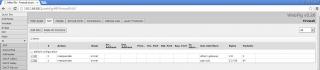
1. Plug on your huawei E3276 modem to your mikrotik. Your Mikrotik will detect it as E3276 correct. NOTE: You should see ppp-out1 in the "Interfaces" link. If it doesn't, then add one. 2. Configure your mikrotik device most likely with the name (ppp-out1) with the following settings (example only): APN: maxisbb PIN: wap Port: usb1 Type: pppclient User: maxis Password: wap https://drive.google.com/file/d/0B5RZp8Mfy3...dit?usp=sharing 3. Configure masquerading for your. Goto "IP" --> "Firewall" --> "NAT" --> "Masquerade" --> "Add New" with these settings: Chain: srcnat Out Intf: ppp-out1 https://drive.google.com/file/d/0B5RZp8Mfy3...dit?usp=sharing And finally enjoy  To verify your internet access. When you plugged in your E3276, and do a firmware update. If it works, most likely your internet breaks at your natting .Attached thumbnail(s) 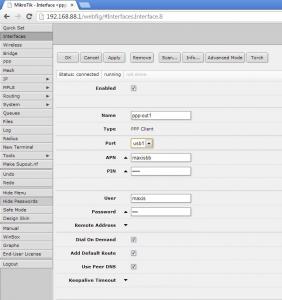
|
|
|
Feb 25 2014, 08:56 PM
Return to original view | Post
#3
|
|
Junior Member
95 posts Joined: Aug 2005 From: Petaling Jaya
|
For those of you who wants to configure Android USB tethering with Mikrotik (I did mine on RB951-2HnD)
Step 1. Make sure your android phone is plugged into your Mikrotik. Step 2. Power on your Mikrotik. Step 3. Enable USB tethering on your Android phone when the check box is active. Step 4. Noticed that in your "Interfaces" will show "lte1" Step 5. Go to IP-> DHCP Client an obtain IP address for your "lte1" device. Step 6. Go to IP-> Firewall and masquerade your "lte1" device. NOTE: Don't specify your in-interface on your masquerading rules or you'll get burnt. Cheers, Aik 
This post has been edited by dragoncity99: Feb 25 2014, 08:57 PM |
|
|
 Mar 2 2014, 01:25 PM Mar 2 2014, 01:25 PM
Return to original view | Post
#4
|
|
Junior Member
95 posts Joined: Aug 2005 From: Petaling Jaya
|
QUOTE(CloudComputer @ Feb 26 2014, 11:04 AM) Hi Aik, Hi CloudComputer Really appreciate your sharing on Android tethering here. Do you mind to share us your phone model and Android version too? Thank you.  Cloud Computer  You're welcome. Just trying to help make everyone's life easier using it. I'm using Samsung Galaxy S4 to test. Samsung Galaxy S4 Active, S2 and S3 should work seamlessly too. Only owners of Galaxy Nexus will have issue as per reported.  Cheers, Aik |
|
|
Dec 24 2015, 11:45 AM
Return to original view | Post
#5
|
|
Junior Member
95 posts Joined: Aug 2005 From: Petaling Jaya
|
Interested in another unit of Mikrotik RB951. Please check PM
Cheers This post has been edited by dragoncity99: Dec 24 2015, 11:45 AM |
|
Topic ClosedOptions
|
| Change to: |  0.0181sec 0.0181sec
 0.68 0.68
 7 queries 7 queries
 GZIP Disabled GZIP Disabled
Time is now: 12th December 2025 - 10:21 AM |
 Quote
Quote