Welcome Guest ( Log In | Register )

Bump Topic Topic Closed RSS Feed

Outline · [ Standard ] · Linear+

 『Official N45/N55 Club ♥ V4 』, Updating in progress

views
     
Starsie
post Dec 11 2011, 04:08 AM

New Member
*
Newbie
0 posts

Joined: Dec 2011
From: New York, NY USA


Hi everyone!

I just became a new member of this club with my brand spanking new N55SF-DH71 (Loving it!!!)
Just to let everyone know, i'm a PC tech with 16+ years of experience, so if i can help anyone, i'll be more than glad to =)!

Peace!

This post has been edited by Starsie: Dec 11 2011, 04:10 AM
Starsie
post Dec 11 2011, 02:55 PM

New Member
*
Newbie
0 posts

Joined: Dec 2011
From: New York, NY USA


QUOTE
Lehrry,Dec 10 2011, 10:30 PM]
may i ask? why my unit n55sf when playing video/music, the sound "Crak Crak Crak"? like speaker broken? if i enable sonicmaster, it become more WORST!!!!!
is that the problem cause my software or hardware?
since this is 2nd unit, 1st unit same problem also and i go to 1 to 1 exchange and try everything on the spot, no problem at all...
once i got back and install all my things, then the crak crak crak sound back sad.gif anyone know wat problem cause this? help sad.gif


It is an audio overload resulting in CLIPPING.

CLIPPING is when your audio signal is being pushed way above 0db mark resulting in CLICK sounds and mashed noise.

In most cases (like yours) it happens because of audio/video players' (the ones that you are using) EQ or NORMALIZE settings.
SonicMaster is only going to make it worse because IT by itself IS a very powerful software based NORMALIZER/COMPRESSOR.
NORMALIZERS (software or hardware based) usually pump up/down your audio signal to a certain average loudness with 0db cap and
they tend to compress anything that tries to go above 0db mark. But when user is pushing signal (volume) level too high with EQ
or Volume Boost in players, NORMALIZERS fail to compress the sound without distortion and that's when you hear CLICK... CLICK CLICK... CLICK smile.gif

I know you are trying to adjust the sound of your players to your taste, but keep in mind that Bang & Olufsen's ICEPower chip is
designed to push your laptop speakers potential to the maximum. We have some of the best speakers on the market in N45/N55
laptops with very wide frequency range and ICEPower already uses 90-95% of that range to begin with.
So LOUDER you make your sound, less room you're gonna have for EQ adjustment without CLIPPING (or sound boosting on bad quality music or video).
The reason why you don't get that problem in the store, 'cos you are using stock players with NULLED EQ (non altered EQ/no sound boost) settings.

SOLUTION 1

Turn off ALL EQ or Volume Boost you have in your players. Use ONLY SonicMaster. IT IS LOUD AND CLEAR ENOUGH ALREADY!!! rclxm9.gif

SOLUTION 2

Turn OFF Volume Boost in all your players, but if you HAVE to use EQ adjust it by pulling it DOWN from 0 marks, not UP.
In other words instead of upping desired frequencies, LOWER undesired ones.

Peace cool.gif

This post has been edited by Starsie: Dec 11 2011, 06:03 PM
Starsie
post Dec 11 2011, 03:27 PM

New Member
*
Newbie
0 posts

Joined: Dec 2011
From: New York, NY USA


QUOTE(kivakuyad @ Dec 10 2011, 08:17 PM)
Congrats, dude..
Welcome to the club..

PC tech for 16+ yrs? I have an annoying problem wif my N55SF and i wonder if u could help me..

When I wanted to boot up my lappy, it doesnt boot up right away.. It has to blink once on the LED indicator panel, shut down and then begin the process again for 3 times.. After that you can see the Asus screen thus proceeding to windows. This is in A/C mode. If its in Battery mode, I have to press the power button 3 times to really boot up the PC.

Could it be due to the BIOS update from 203 to 207? the first few times after the BIOS update it was still ok..

Could it be a hardware (something to do wif power supply) problem?

Appreciate any help given..
*
From what you are telling me it is a hardware problem. One thing i'm sure of - BIOS UPDATE HAS NOTHING TO DO WITH IT shakehead.gif
If your BIOS was broken or update was unsuccessful you would not be able BOOT (into anything), but POWERING UP (turning on)
is a generic function and has nothing to do with software.

Of course i can't be 100% correct (since i don't physically see your unit), but it 100% sounds like DYING CAPACITORS on your motherboard.
It usually happens when capacitors come to an end of their lifespan (from 5 to 25+ years biggrin.gif), but since your laptop is new, they should be just DEFECTIVE.
Once it starts it's almost always a progressing process (on ANY motherboards).

CAPACITORS are like temporary rechargeable batteries. They collect electricity and stabilize the voltages when needed (very primitive way to put it hmm.gif )
When they go bad, it takes several times for the user to push the power button (it's when capacitors get that FIRST CHARGE) to give them
enough charge to start your motherboard. Otherwise your motherboard "thinks" that there is "not enough electricity" to start up.

If i'm right (and i THINK i am) then it is going to take more and more button pushes to turn your notebook on with time and some day it will stop turning on at all.

SOLUTION

On desktop motherboards it's an easy fix, you just replace the capacitors. They are visible (the BAD ones), cheap and
easy to replace. But since you got a notebook it equals a repair with special equipment or MOTHERBOARD REPLACEMENT.
Good thing you got warranty. So let ASUS deal with it (the sooner you do it the faster you'll stop worrying about it icon_idea.gif)

Good luck smile.gif


Added on December 11, 2011, 4:04 pm
QUOTE(CanonLee @ Dec 10 2011, 09:22 PM)
just done the flash bios to version 218, thanks to sifus.
Any recommended player to play RMVB format video?
*
VLC Player drool.gif

1. Plays 99.9% of all video and audio formats out of the box (no additional codecs required)

2. You don't have to install it (runs from a folder)

3. IT'S FREE rclxm9.gif !!!

Download it here http://www.videolan.org/vlc/download-windows.html

(Get the ZIP PACKAGE, unzip it anywhere you want, use it and be happy biggrin.gif)

Peace.

This post has been edited by Starsie: Dec 11 2011, 04:24 PM

Starsie
post Dec 11 2011, 04:56 PM

New Member
*
Newbie
0 posts

Joined: Dec 2011
From: New York, NY USA


I don't know if this was discussed before, but here is a little tip for people that like to have clean desktops with NO ICONS (with "Show Desktop Icons" off)

If you go and uncheck "Show Desktop Icons" from the desktop menu, they will disappear, BUT... restart or log off/on and WTF shocking.gif THEY ARE BACK!!!

A pretty piece of software called "Power 4 Gear" provided by ASUS prevents that setting from being saved. It rewrites the registry entry that saves that setting to "ON"
every time you log into windows.

SOLUTION

There is only one - UNINSTALL Power4Gear (that's what i did, it is almost useless whistling.gif ) OR... HAVE ICONS ON YOUR DESKTOP biggrin.gif

Peace.

This post has been edited by Starsie: Dec 12 2011, 12:36 AM
Starsie
post Dec 12 2011, 12:30 AM

New Member
*
Newbie
0 posts

Joined: Dec 2011
From: New York, NY USA


QUOTE(soloinruds @ Dec 11 2011, 07:30 AM)
Hi N users..

Anyone tried windows 8 skinpack on our N series??
Im planning to install it but afraid of any available system crash problem??  unsure.gif
*
You can use it. It's just a skin (graphical interface-lift), it's not doing nothing to your actual Windows core. It's like using Alienware skin packs or any other. Once you uninstall it it will be gone.

smile.gif
Starsie
post Dec 12 2011, 08:46 AM

New Member
*
Newbie
0 posts

Joined: Dec 2011
From: New York, NY USA


So i did some vodooing ( whistling.gif ) with the latest beta drivers for GT555M (290.36) and got some AMAZING results!!!
Not only they bring LOADS of improvements, but they are also optimized for Batman Arkham City and Skyrim.

Look at those Windows Experience Index numbers! HOLY CRAP! These N55SF laps are TERMINATORS cool2.gif!

This post has been edited by Starsie: Dec 12 2011, 09:10 AM


Attached thumbnail(s)
Attached Image
Starsie
post Dec 12 2011, 10:08 AM

New Member
*
Newbie
0 posts

Joined: Dec 2011
From: New York, NY USA


QUOTE(TerryZeroX @ Dec 11 2011, 09:16 PM)
I read through the release notes, it says Hybrid Power not supported in this release shocking.gif means it will use the GT555M all the time?  shocking.gif
*
Actually it's true, it doesn't support Hybrid Power. As a matter of fact NONE of the NVIDIA provided drivers for notebooks will work with N45/N55
series laptops properly (they will not even install properly) unless you do the trick suggested on the first page of this thread. Once you do that
and install the drivers, it force enables Optimus and you can then go and configure your GPU usage (from NVIDIA Control Panel). Instrutions for
that you can find on the first page also.

And NO, N45/N55 laptops CAN'T run on NVIDIA only. They are forced to run either on Intel GPU (only) or Intel+NVIDIA GPU (switching for various tasks).

This post has been edited by Starsie: Dec 12 2011, 10:10 AM
Starsie
post Dec 12 2011, 10:59 AM

New Member
*
Newbie
0 posts

Joined: Dec 2011
From: New York, NY USA


QUOTE(soloinruds @ Dec 11 2011, 10:46 PM)
thank u bro..  icon_rolleyes.gif
mm..
Is there any way to improve our HDD transfer rate other than upgrading HDD and turn on index search??
Is there any recommended program/utilities that can improve the HDD transfer rate in our WEI??   unsure.gif
*
As far as WEI goes the answer is - NO, THERE IS NOTHING WE CAN DO. cry.gif

No HDD (regardless of SATA2, SATA3 or even RAID) will ever score over 5.9. And that apllies both to notebooks AND desktops.
Software/Utilities - NO HELP. The only thing that passes 5.9 mark on WEI is SSD (or RAM drives). Even a single one will go over 5.9,
but it takes 2 (and VERY GOOD and EXPENSIVE ones rolleyes.gif ) in RAID to go up to 7.9

This post has been edited by Starsie: Dec 12 2011, 11:01 AM
Starsie
post Dec 13 2011, 03:30 AM

New Member
*
Newbie
0 posts

Joined: Dec 2011
From: New York, NY USA


QUOTE(htpkevin @ Dec 12 2011, 12:04 AM)
not really bro xD, i just use one crucial M4 128gb my WEI ady 7.9 xD
*
That's awesome! thumbup.gif The most i've got from a single one was 7.8 on an Intel SSD.
icon_rolleyes.gif
Starsie
post Dec 14 2011, 12:05 AM

New Member
*
Newbie
0 posts

Joined: Dec 2011
From: New York, NY USA


QUOTE(lee_what2004 @ Dec 13 2011, 11:22 AM)
Does the USB Charge has GUI for settings ?
I haven't seen the one for Asus, but for Acer, they can set it to charge when battery at certain power level and such..
*
Yes it does. Install and double click on it.

icon_rolleyes.gif


Added on December 14, 2011, 12:08 am
QUOTE(devour @ Dec 13 2011, 01:15 AM)
good news, current n55sf eol  already xD
*
Says WHO? Source please (or i'm considering it just a rumor).

This post has been edited by Starsie: Dec 14 2011, 12:08 AM
Starsie
post Dec 15 2011, 02:25 AM

New Member
*
Newbie
0 posts

Joined: Dec 2011
From: New York, NY USA


QUOTE(Mohammad.2mt @ Dec 14 2011, 02:24 AM)
WTF?!!!
I have updated my nVIDIA driver and this is the result  shocking.gif
user posted image
*
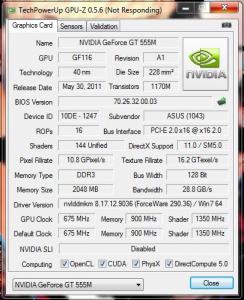
I don't even understand how you got that result. I have THE LATEST beta drivers installed now and it doesn't show any 635m. You can check the screenshot below.
Beside, what kind of DRIVER UPDATE is that... Latest official driver is 185.62 and latest BETA driver is 190.36. "Yours" shows 185.74 hmm.gif... What is that and where it came from?
Weird... rolleyes.gif


Peace.


Attached thumbnail(s)
Attached Image
Starsie
post Dec 15 2011, 02:34 AM

New Member
*
Newbie
0 posts

Joined: Dec 2011
From: New York, NY USA


QUOTE(freakjb @ Dec 14 2011, 10:48 AM)
mine n55sf..
bios series: 204

i dunno la my friend upgrade the bios then his lappy become so slow than before..
*
First of all - update the bios, it fixes some stuff with keyabord ans brings some other fixes also (you can rean the changelog on the ASUS site).
Second - PCs DON'T just become slower because of BIOS updates (unless BIOS in f**ked up). doh.gif It is just a fairy tale! I updated mine to 207,
and is as fast as ever. Stop assuming that ASUS (or any other brand's) engineers don't know how to do their job. They are WAY smarter than us cool2.gif

Peace.


Added on December 15, 2011, 2:39 am
QUOTE(lee_what2004 @ Dec 14 2011, 02:30 PM)
I guess... hmm.gif Well, i get mine from official NVIDIA site and they don't show no GT 635m. Besides, GT 635m is supposed to have
slightly higher bandwith, but his GPU-Z shot shows exactly the same as 555m (meaning that GPU-Z is just confusing one for other)... OBVIOUSLY laugh.gif


icon_rolleyes.gif

This post has been edited by Starsie: Dec 15 2011, 02:39 AM
Starsie
post Dec 15 2011, 02:50 AM

New Member
*
Newbie
0 posts

Joined: Dec 2011
From: New York, NY USA


QUOTE(jjgcxp @ Dec 14 2011, 02:41 PM)
Hello everyone.

I'm the owner of an ASUS N55SF-S1158V notebook and I have one question for you.

I need to buy an external monitor connected through HDMI, and I want that this monitor will have a resolución of 1920x1200 of above.

As far as I know, the GeForce 555M is capable of this resolution, the notebook has a 1.4 HDMI output, so, with this features, with a HDMI 1.4 cable that has support until 4K resolution, the monitor has to work without problems.

But ASUS Spain don't confirm me if the notebook can get more than 1920x1080 through HDMI, but I think that it's posible because the technical reasons above explained.

I know that some notebooks have "cut" the HDMI output to 1080p, but I don't know if the ASUS N55SF is one of them.

Also, I've been searching through some forums and I Know that some people, with an HDMI to DVI adapter, are capable of 1920x1200 resolution and above with other notebooks, but not with HDMI to HDMI only.

Please, if someone know for sure the answer at this queestion of has an external monitor working at this resolution, please answer me. The Dell Ultrasharp U2412M or the ASUS PA246Q are waiting for me wink.gif

Thanks.
*
First of all.

GET DELL ULTRA SHARP MONITOR (any size you like)!!! I'm an owner of U2410 and there is NOTHING ON THE MARKET that will surpass the quality in it's class.
Trust me, i owned Samsung, Gateway, Asus, LG and Acer (all of them being 24 inch) - DELL ULTRA SHARP IS THE KING and it's IPS/OS is unmached!!!

Second.

YES it DOES support 1080p over HDMI. I use it with my U2410 and it is gorgeous. thumbup.gif

icon_rolleyes.gif

This post has been edited by Starsie: Dec 15 2011, 03:02 AM
Starsie
post Dec 15 2011, 03:02 AM

New Member
*
Newbie
0 posts

Joined: Dec 2011
From: New York, NY USA


QUOTE(jjgcxp @ Dec 14 2011, 02:54 PM)
Thanks for your quick answer.

What resolution are you using with de N55 and that monitor?: 1920x1080 or 1920x1200
And a second question. What kind or cable?: HDMI to HDMI cable or HDMI to DVI.

Thanks again.
*
1920x1080 via HDMI (and it's also hooked to my desktop via DVI and running 1920x1200). Hdmi max output is 1080p.
To get it upscaled you need not just a HDMI to DVI cable, you need a CONVERTER like this:

http://www.sears.com/shc/s/p_10153_12605_S...ku=SPM506928101

But you can always use VGA out. You will never tell the difference (especially on U2410 rolleyes.gif ). And it supports video out up to 2048x1536.


icon_rolleyes.gif

This post has been edited by Starsie: Dec 15 2011, 03:05 AM
Starsie
post Dec 15 2011, 03:30 AM

New Member
*
Newbie
0 posts

Joined: Dec 2011
From: New York, NY USA


QUOTE(jjgcxp @ Dec 14 2011, 03:13 PM)
But if I convert the 1920x1080 signal via HDMI to 1920x1200 with that adapter, the final image will be blurried. It won't be a real 1920x1200 resolution.

If this is true, I'll have to look only 16:9 1920x1080 monitors and I want a 16:10 1920x1200 one or above.

What a powerful notebook and this limitation! I thought that with a HDMI 1.4 port I could get until 4K resolution.

Now I don't even think in a future Dell U2711 monitor at 2560x1440.

sad.gif  sad.gif  sad.gif  sad.gif  sad.gif
*
You are getting it a little wrong icon_idea.gif

Our notebooks CAN push 4k resolution (any GT555m equipped notebook can), but COMPUTER MONITORS CAN'T RECEIVE higher resolutions via HDMI.
Only via DVI or Display Port. It is not a notebook limitation, it's a COMPUTER MONITOR HDMI input limitation. If you connect (theoretically) your laptop
to a 4k TV with HDMI 1.4/1.4a cable (and there are TVs like that already), you will be able to push that resolution out. That's the difference.

icon_rolleyes.gif
Starsie
post Dec 16 2011, 01:52 PM

New Member
*
Newbie
0 posts

Joined: Dec 2011
From: New York, NY USA


QUOTE(ngkhanmein @ Dec 16 2011, 12:12 AM)

Added on December 16, 2011, 12:15 pm
hdmi 1.4 is for 3D support.
*
Not necessarily. Here is an example of a 4k TV (4096 x 2160) that runs on HDMI 1.4

http://www.youtube.com/watch?v=OAgqYuLwB3A

http://www.youtube.com/watch?v=u3iUjT2MXcg

and here is a 8k TV (7680 x 4320)

http://www.youtube.com/watch?v=9U7e_quvkPQ&feature=related


Peace.

This post has been edited by Starsie: Dec 16 2011, 05:53 PM
Starsie
post Dec 17 2011, 12:56 PM

New Member
*
Newbie
0 posts

Joined: Dec 2011
From: New York, NY USA


QUOTE(ngkhanmein @ Dec 16 2011, 11:08 PM)
but main purpose is for 3D if no mistake. i argued with the samsung guy b4. he insisted no point u get hdmi 1.4 port on hdtv that w/o support 3D.

correct me if my concept r wrong. 10S no offense.
*
I agree with you 100%.

It fully supports 3D, so there is no point in having HDMI 1.4 out to a NON 3D monitor or TV, 'cos unless it is 4K or higher it will be a waste of technology.

icon_rolleyes.gif

Topic ClosedOptions
 

Change to:
| Lo-Fi Version
0.0459sec    0.58    7 queries    GZIP Disabled
Time is now: 9th December 2025 - 02:42 PM