Outline ·
[ Standard ] ·
Linear+
『Official N45/N55 Club ♥ V4 』, Updating in progress
|
Acid_RuleZz
|
 Nov 11 2011, 02:53 PM Nov 11 2011, 02:53 PM
|

|
QUOTE(soloinruds @ Nov 11 2011, 02:11 PM) hi n series users.. have anyone tried overclock the core clock n shader clock to its highest setting or all the way max in MSI afterburner ? wondering whats the outcome? notebookcheck.net stated below.. Core Speed * 590-753 MHz Shader Speed * 1180-1505 MHz Memory Speed * 785-900 MHz are those the highest limits for the gt555 GC.. can we go higher clocking in the msi afterburner? Actually those are not the limit of overclocking GT555M 753/900/1505 are actually the default core/memory/shader clock for GT555M with 96 shader cores and 128bit memory bus, the slowest version of GT555M u can find in Lenovo Y570. As for the limit of overclocking, u need to find it slowly. |
|
|
|
|
|
Acid_RuleZz
|
Nov 11 2011, 06:09 PM
|
|
|
QUOTE(kivakuyad @ Nov 11 2011, 06:05 PM) guys, it seems that i'm not able to detect the nvidia gt 555m in HWmonitor.. also, when i wanted to disable turbo boost using throttlestop, the option to disable it is grayed out.. I just realize this when i saw screenshots of others n55sf where the nvidia gt 555m shows the temp where as mine did not appear.. i'm using i5 processor, btw.. Another way to disable TurboBoost is to set Maximum Processor State to 99% in your Power Plan. |
|
|
|
|
|
Acid_RuleZz
|
Nov 11 2011, 08:21 PM
|
|
|
^ Calm down.. even my i7 bus speed is 100mhz.  Download Intel Burn Test and run a 1 threaded test. use CoreTemp or ThrottleStop to monitor your processor frequency. Why u have IntelTurbo service?  |
|
|
|
|
|
Acid_RuleZz
|
Nov 11 2011, 09:20 PM
|
|
|
ur proc oni run 98mhz?  |
|
|
|
|
|
Acid_RuleZz
|
Nov 11 2011, 10:00 PM
|
|
|
try use ThrottleStop 4.0 to force TurboBoost.  or go to Start Menu and type Power Options. Click Change Plan Settings for your current Power Scheme, and then click " Change Advanced Power Settings. Can't set Maximum Processor State to 100% in there? |
|
|
|
|
|
Acid_RuleZz
|
Nov 11 2011, 10:36 PM
|
|
|
Download and run Throttle Stop 4.0.
Tick Set Multiplier, set Multiplier to Turbo and click Turn On at bottom right of the window.
|
|
|
|
|
|
Acid_RuleZz
|
Nov 11 2011, 11:50 PM
|
|
|
Maybe Asus Power4Gear disable them. Open regedit and search for these 2 keys. 1. 893dee8e-2bef-41e0-89c6-b55d0929964c 2. bc5038f7-23e0-4960-96da-33abaf5935ec Do you have them both? |
|
|
|
|
|
Acid_RuleZz
|
Nov 13 2011, 06:21 PM
|
|
|
QUOTE(htpkevin @ Nov 13 2011, 06:05 PM) AppInit_DLLs C:\Windows\SysWOW64\nvinit.dll this stupid thing is causing all the problem, but i can't fix it. Anyone? revert back to older driver? QUOTE(Duckies @ Nov 13 2011, 06:05 PM) Just finished Modern Warfare 3  As I said earlier,no matter how u see it,the graphics r not as good as Battlefield 3.Eventhough Activision said they tune their game engine,I believe Frost Bite Enginie is much better. Nevertheless,the gameplay is better in Modern Warfare 3(more shooting and less cinematic) and the story is more exciting.The story line in Battlefied 3 is so boring.It's keep getting more and more interesting when u r catching up to Makarov. I think single player campaign was the last thing DICE throw into BF3. |
|
|
|
|
|
Acid_RuleZz
|
Nov 13 2011, 10:53 PM
|
|
|
L.A. Noire is thrill and horror? I thought its GTA-ish.
|
|
|
|
|
|
Acid_RuleZz
|
Nov 13 2011, 11:09 PM
|
|
|
QUOTE(Ikmal91 @ Nov 13 2011, 10:54 PM) L.A. Noire is somewhat a suspense thriller no? Investigations, murders, the whole nine yards of complete Sherlock-ing. Oh.. when i saw it was made by Rockstar quickly in my mind thinking off GTA spin off. Haven't try it yet. |
|
|
|
|
|
Acid_RuleZz
|
Nov 14 2011, 12:02 AM
|
|
|
Skyrim is both 1st and 3rd person RPG.  |
|
|
|
|
|
Acid_RuleZz
|
Nov 14 2011, 12:15 AM
|
|
|
U can switch to 3rd person view. |
|
|
|
|
|
Acid_RuleZz
|
Nov 16 2011, 02:33 PM
|
|
|
CPU usage = -1%  |
|
|
|
|
|
Acid_RuleZz
|
Nov 18 2011, 01:28 PM
|
|
|
QUOTE(htpkevin @ Nov 18 2011, 01:15 PM) this is my event log when i shut down, i list out here all the warnings and errors for error : The Superfetch service terminated with the following error: The system cannot find the file specified.(service control manager) Googling found this.. QUOTE Hey 1nana, I figured out what was wrong with my computer and why superfetch wouldn't start up. I had a program from IoBit that would lock out some important documents and hide them in my computer until i inputted the password to unlock them. Well what happened was the program was hiding the documents from superfetch when the computer started and it caused it to terminate. As soon as i got rid of the program, the superfetch service was working again and my computer instantly started up like it was new. If you have any similar programs like that, that would probably be your issue. Also, i learned that emptying your Prefetch folder under "C:/program files/windows" seemed to help the issue. Hope this helps buddy. Lemme know what happens.
-Sphios Do you have similar applications in your laptop? |
|
|
|
|
|
Acid_RuleZz
|
Nov 18 2011, 01:59 PM
|
|
|
QUOTE(htpkevin @ Nov 18 2011, 01:33 PM) i know why ady, coz i used SSD tweaker and it disable my superfetch. But i restore back to default, the error doesn't pop up now but i still cannot shut down/restart Then u should disable it back... SSD + Superfetch is not a good combo. |
|
|
|
|
|
Acid_RuleZz
|
Nov 19 2011, 12:37 AM
|
|
|
QUOTE(love-ing @ Nov 19 2011, 12:30 AM) @soloinruds yes I have succeeded to go in. And all the settings are ok.  TMNut router? |
|
|
|
|
|
Acid_RuleZz
|
Nov 19 2011, 01:17 AM
|
|
|
check your Wifi Channel setting in router.. if its on Auto, change it to 1 or 6 or 9 or 11.
Usually set to 1.
|
|
|
|
|
|
Acid_RuleZz
|
Nov 24 2011, 03:33 AM
|
|
|
The real size for "750GB" HDD should be 698GB. Open disk management and check if there is any hidden partition.
|
|
|
|
|
|
Acid_RuleZz
|
Nov 28 2011, 01:12 AM
|
|
|
QUOTE(9satan9 @ Nov 28 2011, 12:56 AM) btw i forgotten to mention that i have a problem ... my explorer.exe constantly need me to restart it .... i dunno why ... i plan to format the comp as soon as my semester ends <3 hoping it will solve it =D 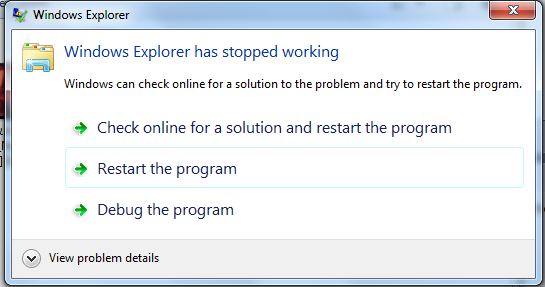 Asus Webstorage already removed? If not, uninstall it. |
|
|
|
|
|
Acid_RuleZz
|
Nov 29 2011, 11:19 PM
|
|
|
QUOTE(soloinruds @ Nov 29 2011, 07:35 PM) hi all, May i ask an out subject.. Does anyone facing below error when launching the BF3 game?? " The procedure entry point CreateDXGIFactory1 could not be located in dynamic link library dxgi.dll " then a windows will appear n force us to close the program as it has stopped working.. lappy spec: - compaq presario cq40 with updated BIOS~support windows 7 - windows vista 32bit - Nvidia geforce G 103m .. old driver / updated driver 285.62.. tested - directX 11~BF3 hope to hear from all the gamers...  Try set bf3.exe compatibility to Windows XP SP3. |
|
|
|
|



 Quote
Quote
 0.0239sec
 0.43
0.43
 7 queries
 GZIP Disabled