

I'm currently using 3G watchdog and it says I've used about 262MB of data but I just got a sms from Digi today saying that I've already used 75% of my 1GB quota.

SAMSUNG GALAXY S II Official thread V18, Be a SMART user - Pls read Page 1 first
|
|
 Nov 2 2011, 01:07 AM Nov 2 2011, 01:07 AM
Return to original view | Post
#1
|
 
Senior Member
534 posts Joined: Dec 2006  
|
Guys, any recommended app to track your data usage?
I'm currently using 3G watchdog and it says I've used about 262MB of data but I just got a sms from Digi today saying that I've already used 75% of my 1GB quota. |
|
|
|
|
|
Nov 2 2011, 08:14 AM
Return to original view | Post
#2
|
|
Senior Member
534 posts Joined: Dec 2006
|
QUOTE(RyoKenzaki @ Nov 2 2011, 12:42 AM) Anyone know whether digi package for sgs2 is with 9100 or 9100g processor 1? I just got my phone from DiGi last week and it's a 9100G. |
|
|
Nov 2 2011, 09:52 AM
Return to original view | Post
#3
|
|
Senior Member
534 posts Joined: Dec 2006
|
QUOTE(mH3nG @ Nov 2 2011, 01:07 AM) Guys, any recommended app to track your data usage? Anyone?I'm currently using 3G watchdog and it says I've used about 262MB of data but I just got a sms from Digi today saying that I've already used 75% of my 1GB quota. |
|
|
Nov 2 2011, 10:31 AM
Return to original view | Post
#4
|
|
Senior Member
534 posts Joined: Dec 2006
|
QUOTE(iori57 @ Nov 2 2011, 09:54 AM) Saya guna data counter widget.. easy to use and quite accurate i think Thanks. I'll try that app. Quite annoyed with the fact that digi does not provide a breakdown of your data usage. So I'm not sure if the app is not working or digi is up to something. |
|
|
Nov 2 2011, 10:45 AM
Return to original view | Post
#5
|
|
Senior Member
534 posts Joined: Dec 2006
|
QUOTE(TheLaptopDudeGuy @ Nov 2 2011, 10:36 AM) Thats weird, because on checkrom 2.0 and dk siyah 2.1, i've been experiencing GREAT battery life. last night standby nine hours, only drained 3% My stock 9100G rom drains 4% within 6 hours while I'm sleeping at night.  1% in 3 hours, thats a good record for me. really satisfied with this combo, not sure if its checkrom or the kernel that gives me great battery life 1% in 3 hours, thats a good record for me. really satisfied with this combo, not sure if its checkrom or the kernel that gives me great battery life |
|
|
Nov 2 2011, 11:18 AM
Return to original view | Post
#6
|
|
Senior Member
534 posts Joined: Dec 2006
|
QUOTE(TheLaptopDudeGuy @ Nov 2 2011, 10:55 AM) thats what i used to get on other roms. not sure abt stock rom for i9100, as once i got my phone, i flash to litening rom. is urs on 2.3.4 or 2.3.5? I'm using 2.3.5 and my phone is using data intermittently. QUOTE(iori57 @ Nov 2 2011, 10:56 AM) Let me know how data counter widget fairs compare to 3g watchdog ok Sure. I'll report back after using both for a while.  want to know how trustworthy it is because I'm on 100mb package lol need to monitor my usage.. want to know how trustworthy it is because I'm on 100mb package lol need to monitor my usage..But how do you survive with 100mb? |
|
|
|
|
|
Nov 2 2011, 11:32 AM
Return to original view | Post
#7
|
|
Senior Member
534 posts Joined: Dec 2006
|
QUOTE(TheLaptopDudeGuy @ Nov 2 2011, 11:19 AM) sleeping is my hobby Ok.  Added on November 2, 2011, 11:20 am try turning off data and see if battery drain becomes less QUOTE(Fallenangelz @ Nov 2 2011, 11:21 AM) 100mb is more than enuff for us who have wifi at home and at work. though my umobile is 500mb Lucky you. I only have wifi at home. |
|
|
Nov 2 2011, 09:25 PM
Return to original view | Post
#8
|
|
Senior Member
534 posts Joined: Dec 2006
|
QUOTE(Shizuru @ Nov 2 2011, 12:19 PM) you should try My Data Manager. doesn't gave me wakelocks so far and quite accurate to Did a short test on 3 data monitoring apps: 3G Watchdog, Data Counter and My Data Manager. 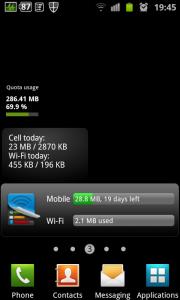
3G Watchdog on top followed by Data Counter and then My Data Manager. I quite like the My Data Manager. Clean layout of info and easy to interpret at a glance. As for the data tracking, all three gave me different values. 3G Watchdog gave me the lowest @ 19.87MB, Data Counter showed me 25.8MB while My Data Manager was @ 28.8MB. The values were based on my data usage ie surfing the web, checking emails, using whatsapp etc so I cannot conclude which is more accurate in terms of usage tracking. But I'm going to stick with My Data Manager for the moment since its better to err on the side of caution especially when you need to micro manage. |
|
|
Nov 2 2011, 09:58 PM
Return to original view | Post
#9
|
|
Senior Member
534 posts Joined: Dec 2006
|
QUOTE(XeactorZ @ Nov 2 2011, 09:37 PM) haha ya How do you check?but also can manually check mar |
|
|
Nov 3 2011, 07:37 AM
Return to original view | Post
#10
|
|
Senior Member
534 posts Joined: Dec 2006
|
Fully charged the phone and left it there for 6 hours with the data off. When I got up, the phone was still at 100% until i started doing some light surfing. Then the batt rapidly fell to 98% within 5 mins
|
|
|
Nov 7 2011, 07:31 PM
Return to original view | Post
#11
|
|
Senior Member
534 posts Joined: Dec 2006
|
I have to manually reboot the phone every day. (I never turn it off)
Is this normal? p.s. rebooting using the fast reboot app doesn't seem to help. |
|
|
Nov 7 2011, 07:41 PM
Return to original view | Post
#12
|
|
Senior Member
534 posts Joined: Dec 2006
|
QUOTE(xsaintzx @ Nov 7 2011, 07:37 PM) Why you want to reboot your phone everyday? I manually turn it off and then on again because if I don't it starts to get laggy.Or do you mean the phone turn on by itself and you have to manually turn it on everyday? |
|
|
Nov 7 2011, 07:51 PM
Return to original view | Post
#13
|
|
Senior Member
534 posts Joined: Dec 2006
|
QUOTE(waveweaver @ Nov 7 2011, 07:48 PM) ~~ duhh ~~ I only reboot it when it starts to lag. Usually it happens after I use it for a day.Your phone will get laggy if you keep on rebooting it o_O QUOTE(Bugeca @ Nov 7 2011, 07:48 PM) 1GB RAM... Didn't install any though. Did you installed any memory management program or have some "ahem" apps? Definitely no prawns inside my phone.  |
|
|
|
|
|
Nov 7 2011, 07:59 PM
Return to original view | Post
#14
|
|
Senior Member
534 posts Joined: Dec 2006
|
QUOTE(xsaintzx @ Nov 7 2011, 07:52 PM) Check your task manager, maybe there are some apps running in the background that you forgot to close. I'll try to check out the task manager the next time my phone slows down. |
|
|
Nov 7 2011, 09:04 PM
Return to original view | Post
#15
|
|
Senior Member
534 posts Joined: Dec 2006
|
QUOTE(antt00 @ Nov 7 2011, 08:48 PM) Which app are you using when it starts to get laggy? I don't need to start up any app because the moment I unlock the phone, the response suddenly becomes slower like when I want to access the notification drawer, it takes 2-3 seconds when it should be almost instant. |
|
|
Nov 7 2011, 09:59 PM
Return to original view | Post
#16
|
|
Senior Member
534 posts Joined: Dec 2006
|
QUOTE(antt00 @ Nov 7 2011, 09:07 PM) That does not sound normal. What rom you using? What widget you got on the home screens? Stock rom cos I'm using the G version.Edit: are you using program monitor widget. No program monitoring widget except for the built in task manager widget. |
|
|
Nov 7 2011, 10:10 PM
Return to original view | Post
#17
|
|
Senior Member
534 posts Joined: Dec 2006
|
QUOTE(antt00 @ Nov 7 2011, 10:04 PM) Remove the task manager widget and monitor. This widget is known to cause lag. Ok thanks.I hope it works. |
|
Topic ClosedOptions
|
| Change to: |  0.0393sec 0.0393sec
 0.43 0.43
 7 queries 7 queries
 GZIP Disabled GZIP Disabled
Time is now: 10th December 2025 - 07:48 PM |
 Quote
Quote