

QUOTE(yehlai @ Nov 1 2011, 10:45 PM)
Some G version user report their phone battery last longer and run at lower temperature.

most of the time g is running at 1ghz instead of 1.2ghz...thats why it last longer and coolerSAMSUNG GALAXY S II Official thread V18, Be a SMART user - Pls read Page 1 first
|
|
 Nov 1 2011, 10:52 PM Nov 1 2011, 10:52 PM
Return to original view | Post
#1
|
 
Senior Member
2,471 posts Joined: Jan 2003  
|
QUOTE(yehlai @ Nov 1 2011, 10:45 PM) Some G version user report their phone battery last longer and run at lower temperature. most of the time g is running at 1ghz instead of 1.2ghz...thats why it last longer and cooler |
|
|
|
|
|
Nov 2 2011, 02:25 PM
Return to original view | Post
#2
|
|
Senior Member
2,471 posts Joined: Jan 2003
|
QUOTE(mydragoon @ Nov 2 2011, 08:42 AM) i assume you have a G version? can do a test? coz i noticed a difference between mine (non-G) and a fren's one (G). tried on my g, it didnt come out immediatelybasically, just install this flashlight apps (https://market.android.com/details?id=com.devuni.flashlight) and then activate the flashlight. just to confirm... press the top right grey button... [attachmentid=2515117] and make sure the tochlight (the top left) is selected... [attachmentid=2515118] then try and activate the torchlight... on my non-G, the light came on immediately. on the non-G... i noticed it could take 2-3 seconds before the lights come on. or just my fren's phone is faulty?  |
|
|
Nov 2 2011, 05:22 PM
Return to original view | Post
#3
|
|
Senior Member
2,471 posts Joined: Jan 2003
|
QUOTE(antt00 @ Nov 2 2011, 04:13 PM) By right yes cos it just shorting the usb port to get into download mode (something like that). You have to buy / fabricate and try your self or wait for someone with G version and a jig. My own made usb jig can reset the counter on G with 2.3.5 |
|
|
Nov 2 2011, 10:00 PM
Return to original view | Post
#4
|
|
Senior Member
2,471 posts Joined: Jan 2003
|
what app u guy use to kill task behind background?
|
|
|
Nov 3 2011, 09:48 PM
Return to original view | Post
#5
|
|
Senior Member
2,471 posts Joined: Jan 2003
|
is it possible to use the slide to unlock the screen like iphone4? any apps can do that?
|
|
|
Nov 5 2011, 02:54 PM
Return to original view | Post
#6
|
|
Senior Member
2,471 posts Joined: Jan 2003
|
here is my G version TI OMAP4430 running at 1.2GHz, any non G user can share their cpu result?
Attached thumbnail(s) 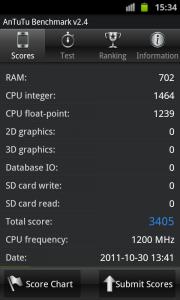
|
|
|
|
|
|
Nov 5 2011, 11:36 PM
Return to original view | Post
#7
|
|
Senior Member
2,471 posts Joined: Jan 2003
|
QUOTE(JayceOoi @ Nov 5 2011, 02:57 PM) I9100 seem both ram & cpu result for non G is better than G [attachmentid=2520081]  |
|
|
Nov 6 2011, 11:07 AM
Return to original view | Post
#8
|
|
Senior Member
2,471 posts Joined: Jan 2003
|
QUOTE(lolz1120 @ Nov 6 2011, 10:51 AM) Hey guys, KJ2 firmware gives 2.3.6. what's the blue glows issue that you mentioned?So far i've discovered that blue glows are back.. and... My device won't be detected!!  \ \[attachmentid=2521107] Problem resolved, there u go  not sure if you can root with DZKI1 insecure kernel and flashed back to DZKJ2 original kernel? |
|
|
Nov 6 2011, 11:12 AM
Return to original view | Post
#9
|
|
Senior Member
2,471 posts Joined: Jan 2003
|
QUOTE(lolz1120 @ Nov 6 2011, 11:11 AM) If that's the case u'll have to look for the KJ2 package on xda and flash it via odin one more question, KJ2 use the new bootloader? does the usb jig can remove the yellow triangle & reset the counter?Yes u can, as long as the kernel is compatible with your phone. So yes, KI1. |
|
|
Nov 6 2011, 11:38 AM
Return to original view | Post
#10
|
|
Senior Member
2,471 posts Joined: Jan 2003
|
QUOTE(lolz1120 @ Nov 6 2011, 11:34 AM) Im not sure about that. My phone was rooted long time ago. I thought when we upgrade to new firmware, we need to re-root again? so it mean my rooted S2 DZKI1 upgrade to DZKJ2, i no need to root again?Yes |
|
|
Nov 6 2011, 11:52 AM
Return to original view | Post
#11
|
|
Senior Member
2,471 posts Joined: Jan 2003
|
QUOTE(lolz1120 @ Nov 6 2011, 11:45 AM) Oh yea sorry i forgot about that. But i rmb one user rooted KI1 with KH4 kernel coz KI1 kernel wasn't available yet. So i think it's fine. how about yours? I thought you have upgraded to KJ2...? did your S2 still rooted? |
|
|
Nov 6 2011, 01:03 PM
Return to original view | Post
#12
|
|
Senior Member
2,471 posts Joined: Jan 2003
|
QUOTE(zenix @ Nov 6 2011, 12:40 PM) anyone using app2sd or data2sd? im using links2d |
|
|
Nov 6 2011, 03:41 PM
Return to original view | Post
#13
|
|
Senior Member
2,471 posts Joined: Jan 2003
|
tried on 2 pc, both cannot detect my S2... cannot upgrade to DZKJ2
|
|
|
|
|
|
Nov 6 2011, 04:27 PM
Return to original view | Post
#14
|
|
Senior Member
2,471 posts Joined: Jan 2003
|
for those kies cannot your S2, pls turn off your S2, connect to pc with USB and then on S2, then kies will detect it already
|
|
|
Nov 6 2011, 06:33 PM
Return to original view | Post
#15
|
|
Senior Member
2,471 posts Joined: Jan 2003
|
QUOTE(Shizuru @ Nov 6 2011, 06:12 PM) ignore the green dot. it does nothing. I always set both my setting to MMS only when I'm not using data. No green dot can send/received MMS without problem. i'm using maxis prepaid...still facing issue cannot received mms...Data packet enable already right? which telco you use? |
|
|
Nov 6 2011, 06:37 PM
Return to original view | Post
#16
|
|
Senior Member
2,471 posts Joined: Jan 2003
|
QUOTE(Shizuru @ Nov 6 2011, 06:34 PM) the DIGI internet one. can you send/received MMS if it is set to Internet+MMS? so it mean not setting problem but telco problem? i noticed #100*, when u select prepaid broadband, it return error.Usually if it didn't download automatically the MMS will come with a download button. Added on November 6, 2011, 6:35 pm Same with my Maxis. After change sim card got prob with the MMS. Umobile works fine though. |
|
|
Nov 6 2011, 06:57 PM
Return to original view | Post
#17
|
|
Senior Member
2,471 posts Joined: Jan 2003
|
QUOTE(waveweaver @ Nov 6 2011, 06:51 PM) Put both APN type to MMS only. You'll lose the 3G/H icon. That's okay just dont disable your data network. Then try send another mms. It should work :-) *100# -> 7 -> 3, it will return errorPut both on mms only. If internet+mms then your internet data still on and can drain your credit. Added on November 6, 2011, 6:53 pm *100# look under internet setting NOT broadband :-P |
|
|
Nov 6 2011, 07:11 PM
Return to original view | Post
#18
|
|
Senior Member
2,471 posts Joined: Jan 2003
|
QUOTE(waveweaver @ Nov 6 2011, 07:03 PM) *100*7*3# will give you broadband. Delete all your APN setting then go to *100*7*2# for phone setting :-P same, install the configure received, ON data, still show "downloading" |
|
|
Nov 6 2011, 08:09 PM
Return to original view | Post
#19
|
|
Senior Member
2,471 posts Joined: Jan 2003
|
QUOTE(Shizuru @ Nov 6 2011, 07:41 PM) Ok, change my sim back for the sake of testing and it miraculously can send/received MMS with no problem at all now i can sent as well,anyone can mms me?  p/s: the back cover was a s** of a b****h to pry open without long nails   |
|
|
Nov 7 2011, 11:32 AM
Return to original view | Post
#20
|
|
Senior Member
2,471 posts Joined: Jan 2003
|
QUOTE(geniuz @ Nov 7 2011, 11:26 AM) I did check via software update on my phone but it didnt find version 2.3.6. My phone G still stuck at version 2.3.5. I wanna update via Kies but after i updated from my previous version to 2.3.5, Kies no longer detected my phone. Please advice open kies, connect S2 to pc with usb cable, turn off S2 and then on S2 again. kies will detect your S2 |
|
Topic ClosedOptions
|
| Change to: |  0.0226sec 0.0226sec
 0.42 0.42
 7 queries 7 queries
 GZIP Disabled GZIP Disabled
Time is now: 2nd December 2025 - 05:05 AM |
 Quote
Quote