Welcome Guest ( Log In | Register )

Outline · [ Standard ] · Linear+

 Pre-test of Latest Intel Top-Level 4Cores i7-2700K

views
     
TSwindwithme
post Oct 24 2011, 03:25 PM, updated 15y ago

Enthusiast
*****
Senior Member
971 posts

Joined: Jul 2005
Intel released the new generation framework of Sandy Bridge at early January, 2011; meanwhile, LGA 1155 is provided for support.
Compared with the specifications of several platforms in the past, the LGA 1155 is provided with a lot of modifications in CPU overclocking (OC) at this time.
Firstly, when a CPU with the external frequency of 100 MHz is overclocking, the other surrounding clock rates will be increased accordingly, thus the upper limit will fall around 110 MHz.
Although the new 32nm process is introduced into the new generation 4 cores CPUs, overclocking can be only achieved by using frequency multiplication.
The model names of i5-2500K and i7-2600K that are two kinds of CPUs without lock frequency multiplication have been released for a long time, which are considered as the representatives of the overclocking line.
However, the overclocking can be only done by working with the chipset of overclocking frequency multiplication, i.e., P67 or Z68.

user posted image

The overclocking environment for LGA 1155 is simply declared above, hoping the users can aware of the hardware for the equipment clearly.
The middle-level CPU featured by overclocking is Core i5-2500K, while the advanced-level is Core i7-2600K.
The main difference between them is that the 2600K is provided with Hyper-Threading (HT) technology and an 8MB L3 cache, while the 2500K is only provided 6 MB L3 cache without HT.
This time I pursue Core i7-2700K which will appear on the market very soon and replace the advanced 2600 K.

The total clock rate of 2700K is 3.5 GHz, which supports the new generation Turbo Boost 2.0 and can reach the maximum performance of 3.9 GHz.
The real 4 Cores are incorporated into the Hyper-Threading technology, so that eight threading can be executed, 4C/8T for short.
With the 32 nm process, the power consumption of 95W and the 8-MB L3 Cache, the 2700K, surpassing the 2600K 100MHz, becomes the most advanced CPU of LGA 1155.
user posted image

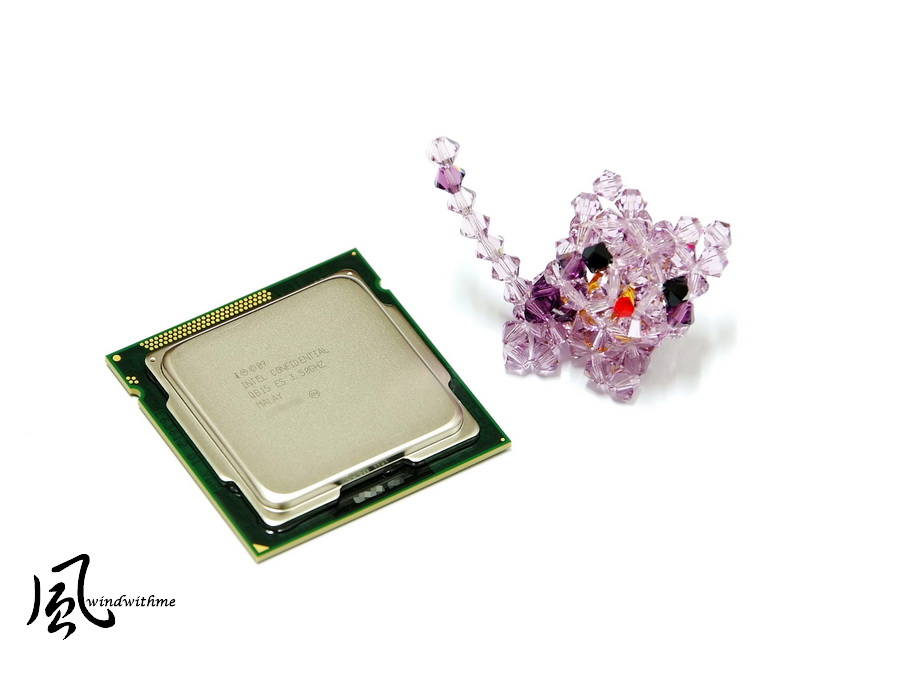
The rear side of the 2700K is still D2 Revision, so that there is little difference in appearance between the 2700K and the 2600K at this part.
user posted image

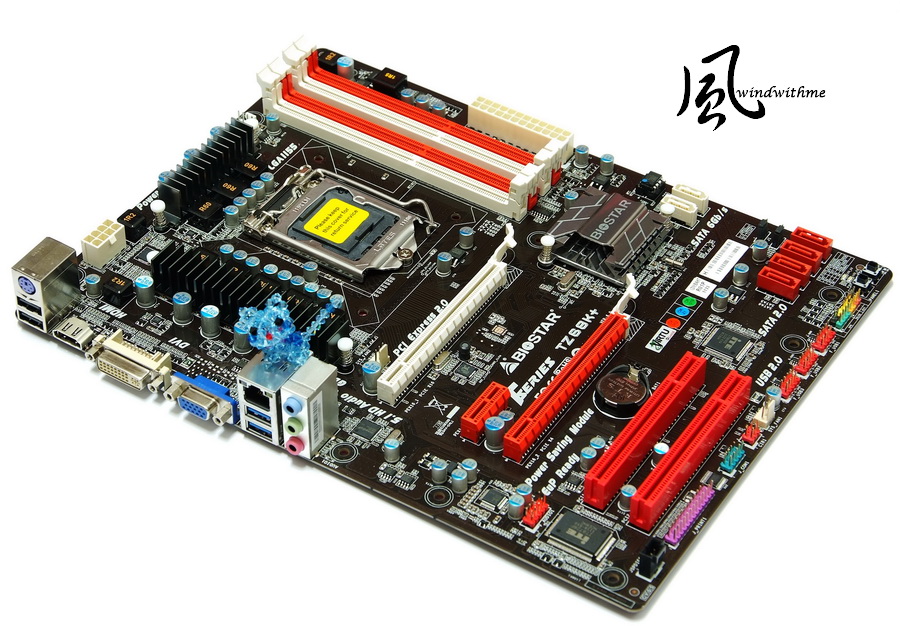
The MB is the latest Z68 high-level chipset of LGA 1155, i.e., the latest version TZ68K+ released by BIOSTAR.
The appearance and the specification are the same as that of the TZ68A+ shared before and the primary difference is supply voltage of CPU.
user posted image

Although the TZ68K+ is the new edition of BIOSTAR Z68, the price is still about US$99, thus it can challenge the low-price market of ATX Z68.
By using the well-marked red-black matching, it has the most specifications as that of the Z68 series with the built-in Power/Reset button and a simple debugging LED.
user posted image

With respect to IO, there are three types among which the two blue USBs 3.0 can provide high-speed transmission.
If provided two more USBs 2.0, it would be more perfect with respect to the scalability.
user posted image

The previous TZ68A+ is designed with four-phase power supply only, while the new edition TZ68K+ is provided with eight-phase power supply, which is the primary difference.
However, as mentioned before, one-phase power supply can provide about 30-40 W, so , the four-phase power supply is already quite enough for overclocking of power consumption of Intel CPU.
user posted image

The heat sinks above the Z68 chipset look good because of being cut by a special manner.
Two native SATA3 units of Z68 are positioned at the right side, which are used at a general environment or in a Raid0 state.
user posted image

Test platform
CPU: Intel Core i7-2700K
MB: BIOSTAR TSERIES TZ68K+
DRAM: CORSAIR CMZ8GX3M2A1866C9R
VGA: Intel HD Graphics 3000
HD: Intel 510 Series 120GB
POWER: Thermaltake TR2 450W
Cooler: CORSAIR Hydro Series H80
OS: Windows7 Ultimate 64bit
user posted image

Firstly, a performance test is performed by using the preset value of CPU.
Preset the performance
CPU 100 X 35 => 3500 MHz (booting Turbo Boost, and then C1E)
DDR3 1599.8 CL7 8-7-22 1T

Hyper PI 32M X8 => 15m 21.977s
CPUMARK 99 => 597
user posted image
hackcremo
post Oct 25 2011, 08:13 PM

Regular
******
Senior Member
1,299 posts

Joined: Dec 2007
From: Puchong Utama


when it will be arrive to malaysia?? i saw euro market already sell this procs..
sonicstream
post Oct 25 2011, 08:43 PM

Getting Started
**
Junior Member
145 posts

Joined: Mar 2011
From: Guam
BWAHAHAHA, i seriously kinda laugh so hard. Oh intel, you so crazy.

For 0.1 Ghz of difference, $55 dollar. LOL.

user posted image

Don't say me on the fact this is in US market. This is just a good reference of price cause I constantly dealing with member in international forum. 1 US = Approximately RM 3


This post has been edited by sonicstream: Oct 25 2011, 08:44 PM
yimingwuzere
post Oct 25 2011, 09:25 PM

Enthusiast
*****
Senior Member
990 posts

Joined: Sep 2005
From: Bolehland


Well, the AMD equivalent would be FX-8120 vs FX-8150. The latter model, like the 2700K is pointless to any enthusiast because both have unlocked multipliers and already overclock so well.
TSwindwithme
post Oct 26 2011, 12:50 AM

Enthusiast
*****
Senior Member
971 posts

Joined: Jul 2005
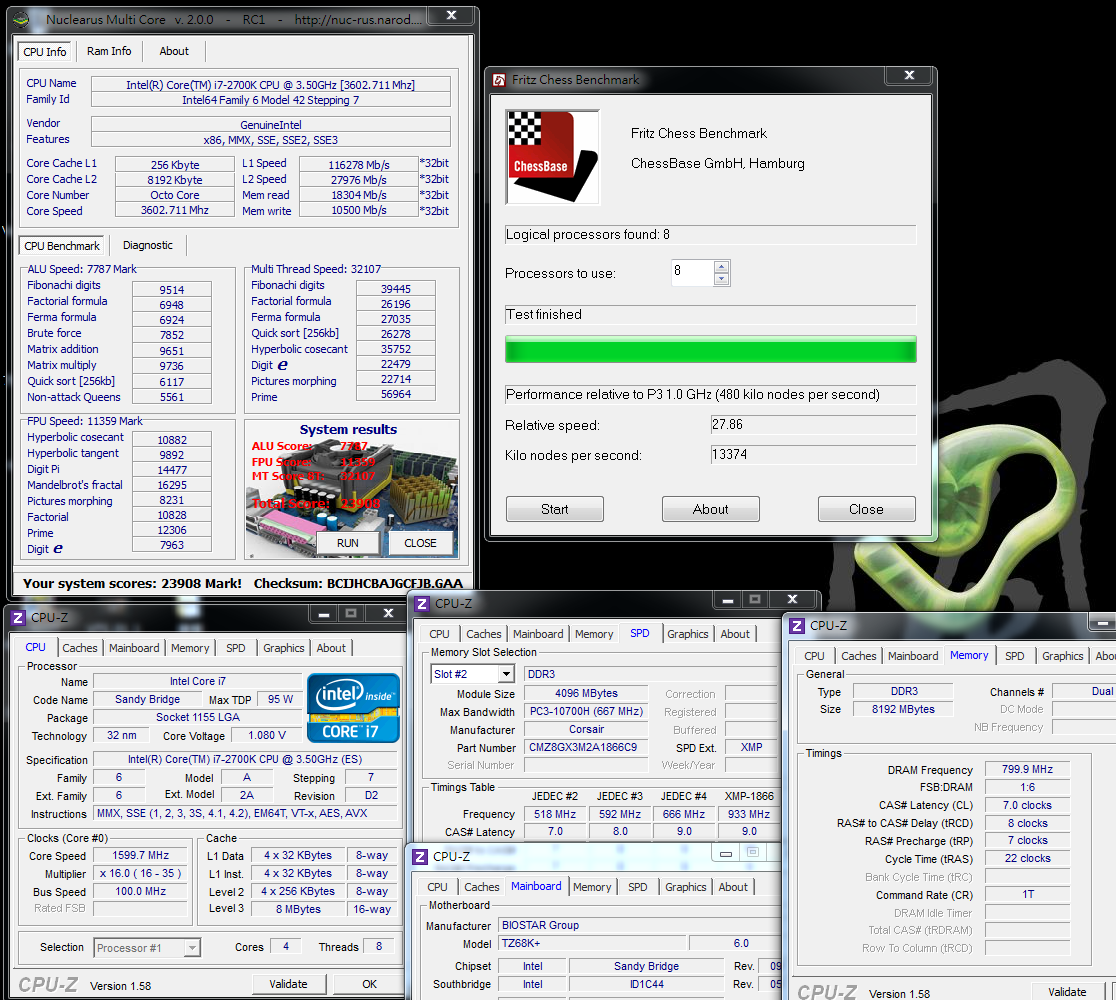
Nuclearus Multi Core => 23908
Fritz Chess Benchmark => 27.86/13374
user posted image

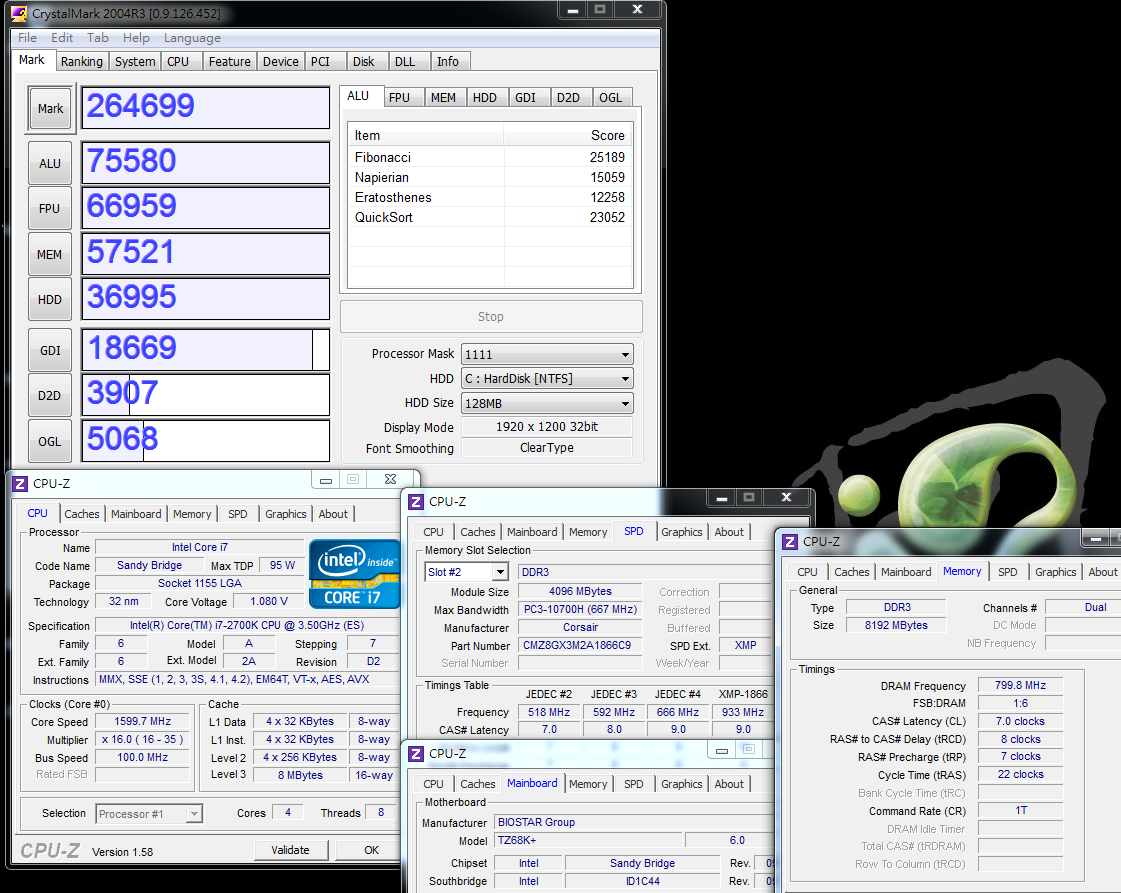
CrystalMark 2004R3 => 264699
user posted image

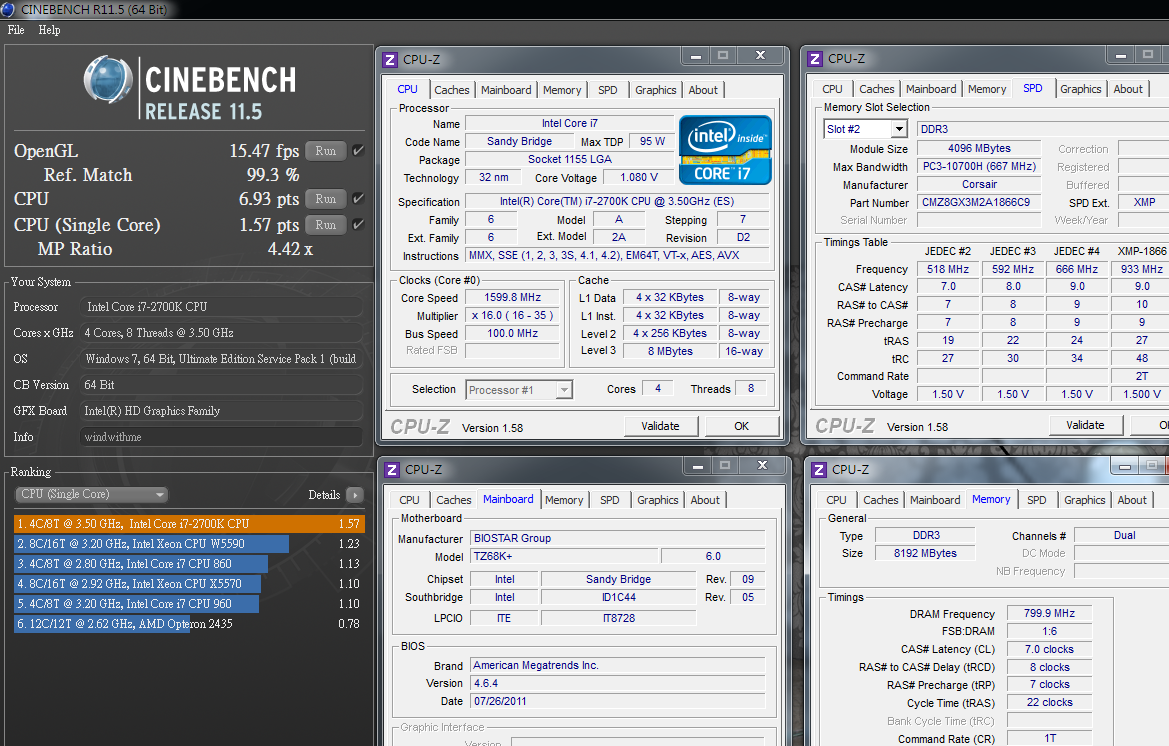
CINEBENCH R11.5
CPU => 6.93 pts
CPU(Single Core) => 1.57 pts
user posted image

Experience index of Windows- CPU 7.6

user posted image

PCMark Vantage => 19386
user posted image

The frequency multiplication of the 2700K in the mode of Turbo Boost 2.0 is 39, 38, 37 and 36 respectively; and the basic clock rate is 3.5 GHz.
The above specification is 100 MHz higher than that of the 2600 K, the performance of this part is presented in the test, but the improvement is not much.
Practically, both the 2600K and the 2700K are the highest-level CPUs in the framework of the Sandy Bridge, and the data obtained without overclocking is fairly high already.
For a general use environment, most of the software requirements can be met by using the high performance preset in 2700K.

DRAM bandwidth test
DDR3 1599.8 CL7 8-7-22 1T
ADIA64 Memory Read - 19618 MB/s
Sandra Memory Bandwidth - 21335 MB/s
MaXXMEM Memory-Copy - 21168 MB/s
user posted image

The DDR3bandwidth is much higher than that of our own platform or a competitor’s platform, which is the advantage of the improved LGA 1155.
The high transmission performance of nearly 20000 MB/s can be achieved only by using DDR3 1600, and the voltage is lower than that for the previous platforms.

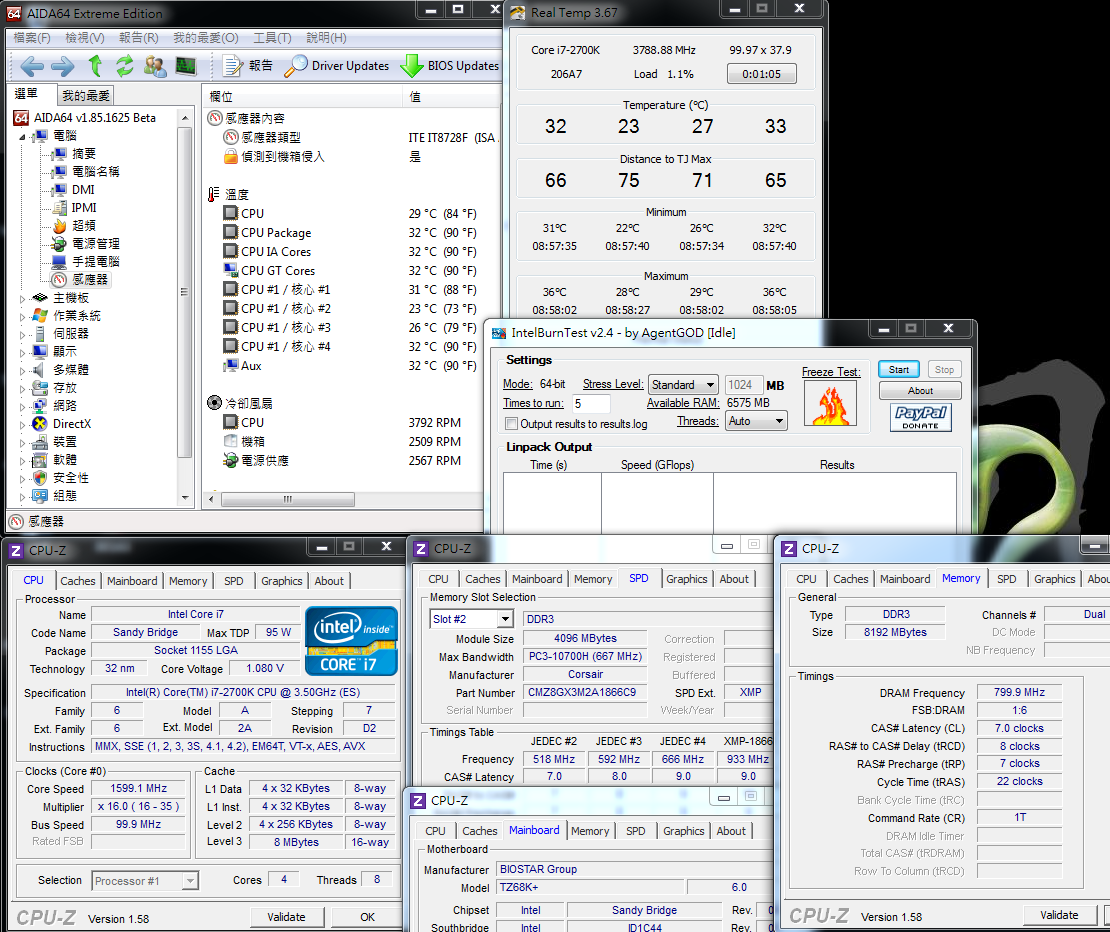
Temperature performance (about 26 DEG C at room temperature)
System standby - 23~33
user posted image

CPU full speed - 40~46
Intel Burn Test v2.4,Stress Level Maximum
user posted image

The temperature performance when system standby is good by enabling the energy-saving function of C1E.
With the latest Hydro Series H80 of CORSAIR and the high thermal diffusivity of the hydro-cooling framework, the temperature is only 46 DEG C at full speed.
Only by working with excellent air-cooling or hydro-cooling equipment, the state of the preset value on 2700K can still be lowered to a low temperature.

Power consumption test
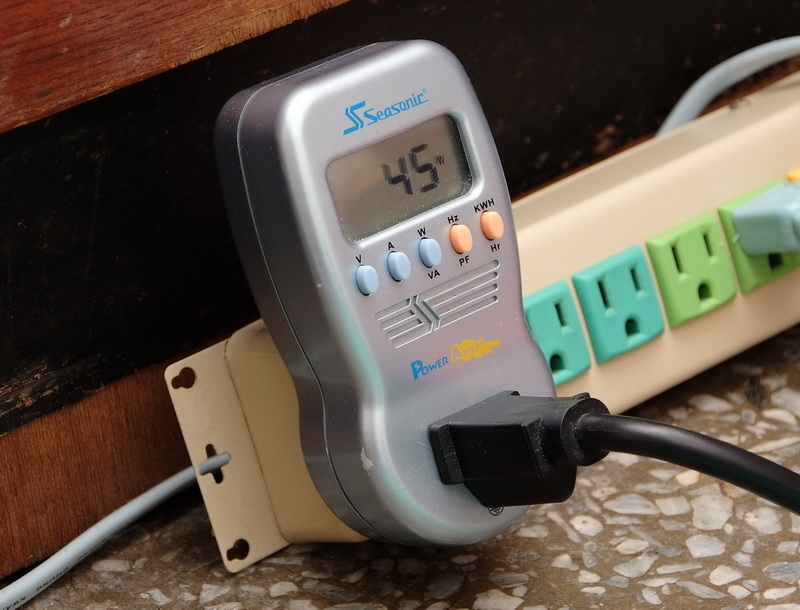
No software running on the OS desktop - 45W
user posted image

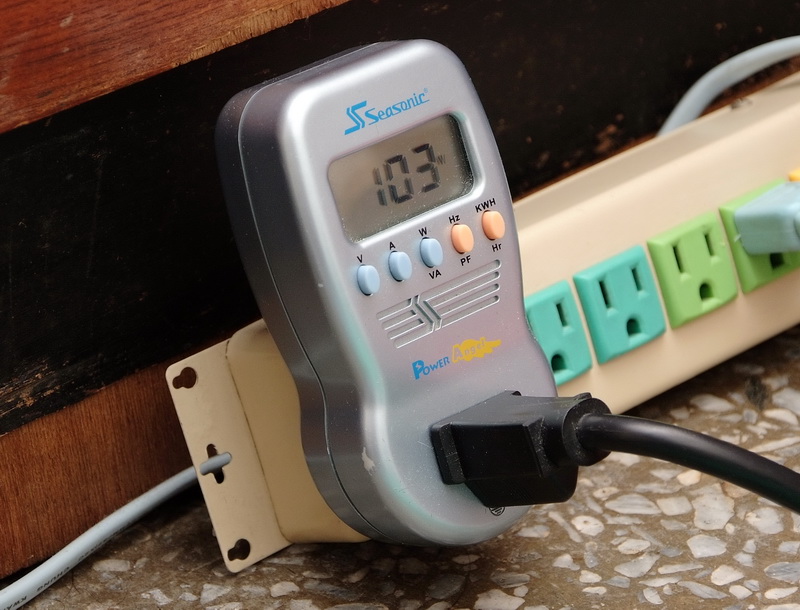
CPU full speed- 103W
user posted image

Due to introduction of 32nm, the power consumption is much lower than that of the previous generation Core i7-870 with the process of 45nm.
The power consumption of the clock rate at the environment of C1E is only 58W higher than that of the preset maximum clock rate.
Based on several articles about AMD APU shared by me recently, in a test with the same 32 nm and 4Cores, the power consumption of the APU platform is nearly twice that of AMD.
It is thus clear that the performance and the power consumption under the Intel’s framework have good advantages under the same process.
wildwestgoh
post Oct 26 2011, 08:07 AM

Look at all my stars!!
*******
Senior Member
2,215 posts

Joined: Jul 2005


Would like to see why Intel introduced this 2700K which only has 0.1GHz higher than 2600K and offer 55USD higher priced.
Any obvious performance comparison? Or any obvious features that's improved from 2600K that enthusiast will see?
TSwindwithme
post Oct 26 2011, 10:00 AM

Enthusiast
*****
Senior Member
971 posts

Joined: Jul 2005
Performance test for Intel HD Graphics HD3000
The preset value of GPU at BIOS is 30 which is equal to 1500 MHz after conversion.

3DMark Vantage => P2500
user posted image

StreetFighter IV Benchmark
1920 X 1080 => 30.58 FPS
user posted image

In the Sandy Bridge, two GPUs, i.e., HD2000/HD3000 are built in by Intel, thus the performance is much advanced than the previous edition.
The detailed test data are shared in several related articles shared by me recently (windwithme).
The HD3000 has about 6-7 times 3D performance of the previous platform built-in GPU of Intel, thus it is believed that the applicable range is wider.

The following part is about sharing of the overclocking for 2700K.
New-style UEFI graphical interfaces are introduced into the BIOS items by BIOSTAR.
user posted image

O.N.E debugging page
By changing 2700K at Turbo Mode to 50, the clock rate, i.e., 100 X 50 => 5GHz, will be executed.
The Internal PLL Voltage Override is a special Intel overclock option, which effectively strengthens the stability of the CPU after substantially overclocking.
It is suggested that the C1E should be powered off when overclocking, thereby facilitating control of clock rate and voltage of the CPU.
user posted image

When setting clock rate and parameters for DRAM, the smaller the numerical values are, the higher the performance is.
The following example is DDR3 1866 CL8 10-9-27 1T, and the set values for the other detailed options are adjusted for optimization.
User can perform miniature adjustment on the clock rate or the parameters according to the condition of the DDR3 on hand, so as to increase the performance of the DRAM.
user posted image

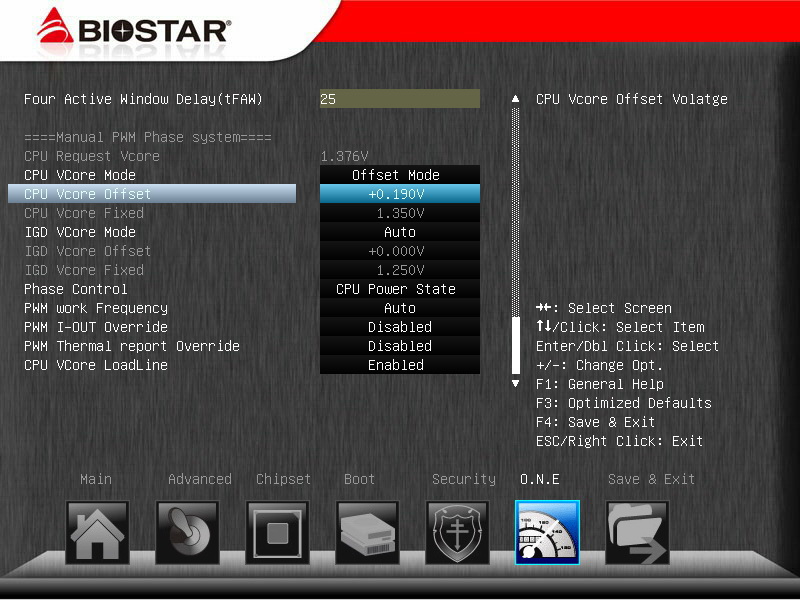
The CPU voltage adjustment is one of the key points for overclocking.
It can be adjusted according to the condition of CPU and the heat-dissipation system of the platform; and the CPU VCoce LoadLine is Enabled.
user posted image

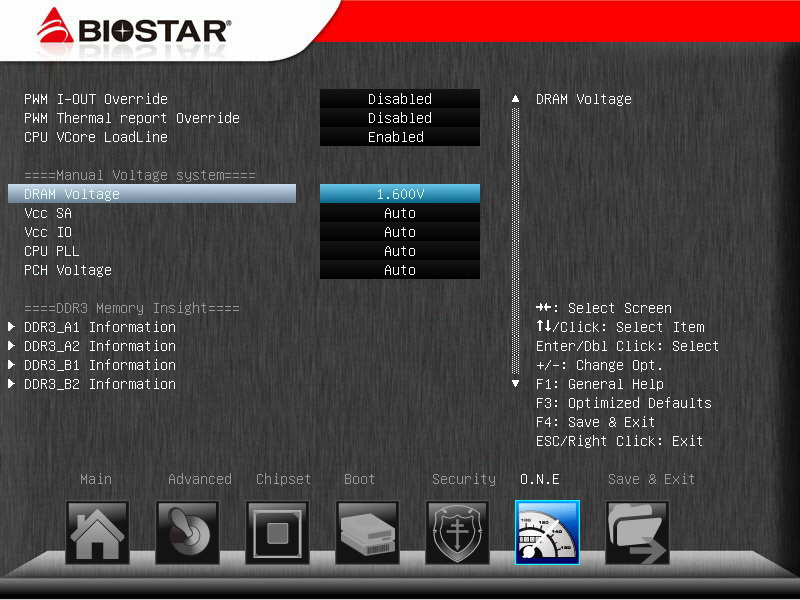
The DRAM voltage is another option to be adjusted for overclocking.
Substantially, the overclocking at the Sandy Bridge platform is much simpler than that of the previous platforms,
so the overclocking can be realized by grasping CPU frequency multiplication, DDR3 parameters, and voltage adjustment for both.
user posted image

PC Health Status
It’s still felt that the temperature test result for CPU is on the much higher side;
actually, the wind temperature of the heat sinks or the temperature of the software for measuring temperature are much lower.
user posted image

The above are personally stable set values for 2700K OC 5GHz, which may be readjusted for overclocking according to different hardware or difference between conditions individually.
However, the general direction is at least right, which can be considered as reference for setting BIOS for the overclocking users.

Overclocking performance
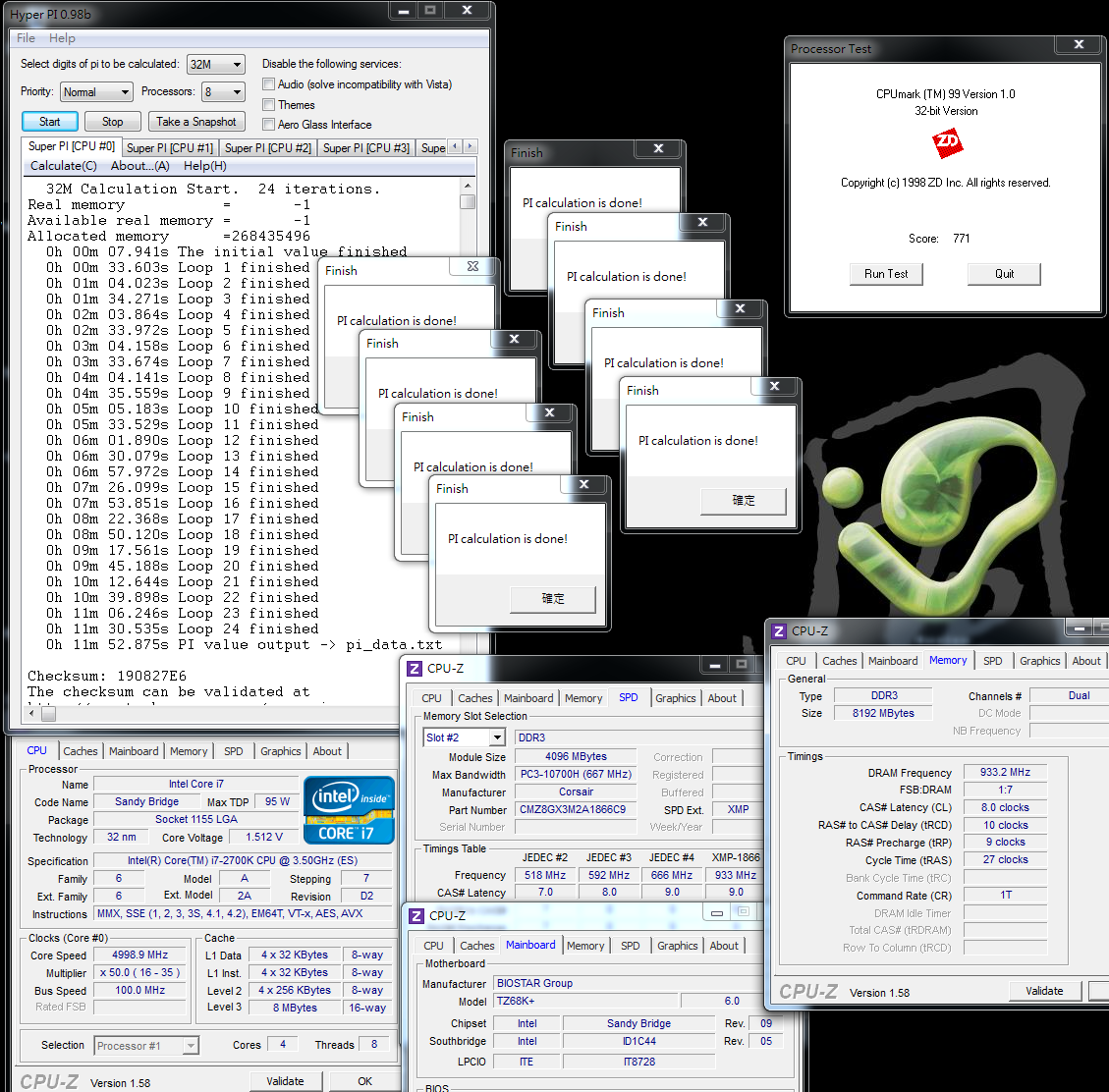
CPU 100 X 50 => 4998.9MHz, at full speed is 1.416V.
DDR3 1866.4 CL8 10-9-27 1T 1.600V

Hyper PI 32M X 4 => 11m 52.875s
CPUMARK 99 => 771
user posted image

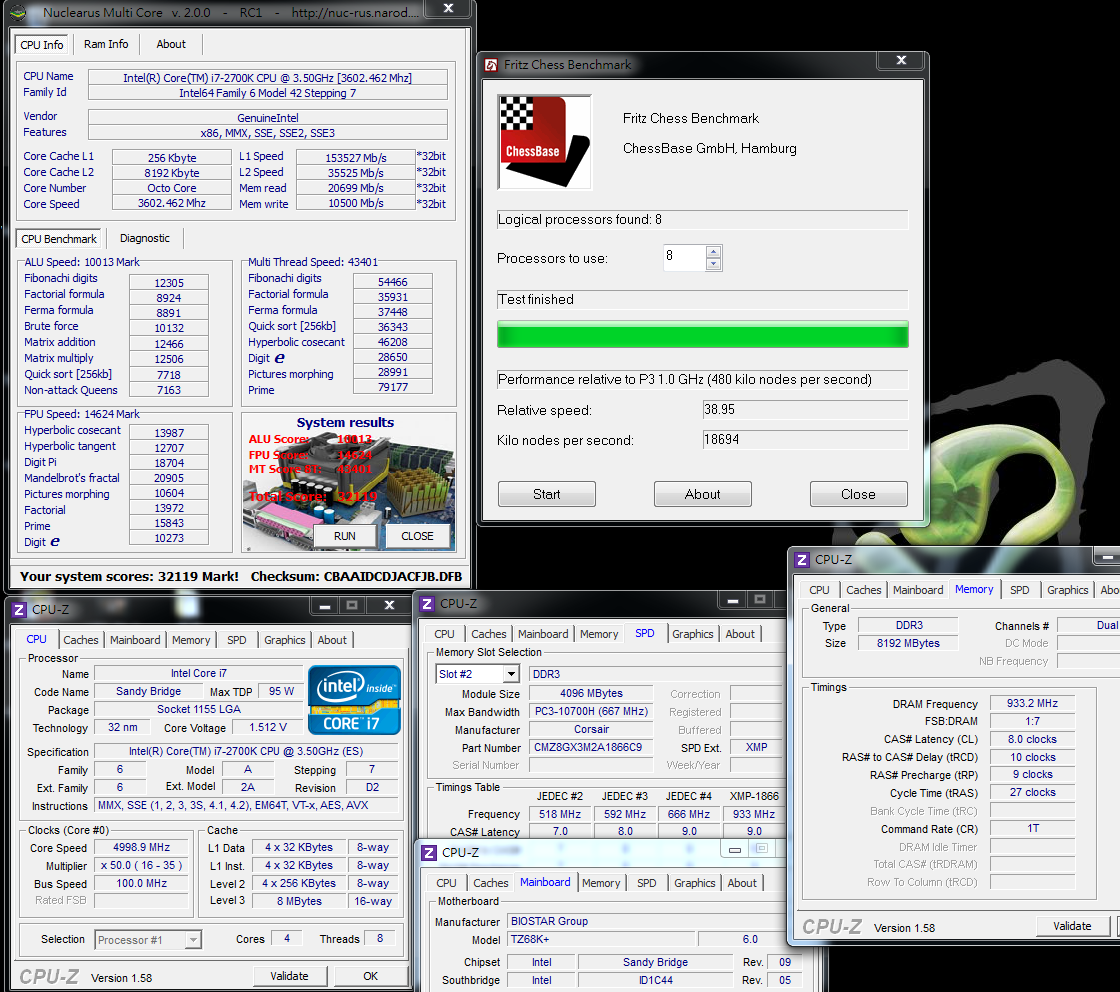
Nuclearus Multi Core => 32119
Fritz Chess Benchmark => 38.95/18694
user posted image


Change to:
| Lo-Fi Version
0.0198sec    0.55    5 queries    GZIP Disabled
Time is now: 13th December 2025 - 10:18 PM