Welcome Guest ( Log In | Register )

Bump Topic Topic Closed RSS Feed
4 Pages  1 2 3 > » Bottom

Outline · [ Standard ] · Linear+

 Nokia N8 - V32 - [The King of Camera Phones], Symbian Belle V111.030.0609 Released!!!!

views
     
TSsklchan
post Oct 24 2011, 01:20 PM, updated 14y ago

~~Life Goes On~~
*******
Senior Member
6,357 posts

Joined: Feb 2008
From: Penang


user posted image

Nokia N8 Official Videos
» Click to show Spoiler - click again to hide... «

Nokia N8 Recorded Movie & Stop-Motion
» Click to show Spoiler - click again to hide... «

Best Nokia N8 Recorded HD Sample
» Click to show Spoiler - click again to hide... «

Nokia N8 Filming Underwater
» Click to show Spoiler - click again to hide... «

Nokia N8 TV Ads
» Click to show Spoiler - click again to hide... «

Nokia N8 Specification
» Click to show Spoiler - click again to hide... «

Camera Information
» Click to show Spoiler - click again to hide... «

Nokia N8 Body Angle Info
» Click to show Spoiler - click again to hide... «

Firmware Release History
» Click to show Spoiler - click again to hide... «

Nokia N8 Product Codes List
» Click to show Spoiler - click again to hide... «

Nokia N8 Review
Phone Arena Review - http://www.phonearena.com/htmls/Nokia-N8-R...iew-r_2543.html
» Click to show Spoiler - click again to hide... «

GSM Arena Preview - http://www.gsmarena.com/nokia_n8-review-520.php
GSM Arena Review - http://www.gsmarena.com/nokia_n8-review-523.php
» Click to show Spoiler - click again to hide... «

All About Symbian Review Part 1 - http://www.allaboutsymbian.com/reviews/ite...dware_and_m.php
All About Symbian Review Part 2 - http://www.allaboutsymbian.com/reviews/ite...era_and_cam.php
All About Symbian Review Part 3 - http://www.allaboutsymbian.com/reviews/ite...-multimedia.php

Nokia N8 Teardown
http://www.ifixit.com/Teardown/Nokia-N8-Teardown/3641/1

Previous Nokia N8 LYN Threads
» Click to show Spoiler - click again to hide... «

Nokia N8 Demo Videos
» Click to show Spoiler - click again to hide... «

Nokia N8 GPS Testing
» Click to show Spoiler - click again to hide... «

Nokia N8 GPS Wiki
http://forum.lowyat.net/index.php?showtopi...post&p=37300306

Taiwan release @24th August 2010.
» Click to show Spoiler - click again to hide... «

Armin Van Buuren/N8 party in Dubai
» Click to show Spoiler - click again to hide... «

MobileTechReview Video review: Nokia N8 smartphone running Symbian 3
» Click to show Spoiler - click again to hide... «

MobileBurn Nokia N8 review
» Click to show Spoiler - click again to hide... «

Nokia N8 Ringtone
http://www.megaupload.com/?d=T4VH3WBQ

Sample Picture for Nokia N8
http://thehandheldblog.com/2010/10/04/shoo...anon-550d-dslr/ <--- thumbup.gif
http://www.flickr.com/photos/thenokiagalle...57624928852359/<--- thumbup.gif from our Ranger aspire2oo6 thumbup.gif
http://blog.gsmarena.com/new-nokia-n8-came...ow-up-your-mind
http://www.flickr.com/photos/nokia_uk/
http://thehandheldblog.com/2010/09/30/noki...camera-samples/
http://www.flickr.com/photos/hellmichael/s...57625081861328/
http://mynokiablog.com/2010/10/04/gallery-...non-flash-test/

Nokia N8 vs. Samsung Pixon12 vs. Sony HX5V Shootout
http://www.gsmarena.com/nokia_n8_vs_samsun...-review-519.php
http://www.gsmarena.com/nokia_n8_vs_samsun...eview-519p2.php

Low Light Photo Taken by N8
http://www.flickr.com/photos/sheridan01/49...in/photostream/

Release Price (RRP):
N8 - RM 1690

Status:
Officially Released

====================================================================================================

Nokia N8 Tips and Tricks

Getting start with the N8
» Click to show Spoiler - click again to hide... «

Hang and Dead Issue
» Click to show Spoiler - click again to hide... «

How to Sign App?
» Click to show Spoiler - click again to hide... «

My browser feels sluggish! Need help!!
» Click to show Spoiler - click again to hide... «

N8 AMOLED Screen Power Usage Table
» Click to show Spoiler - click again to hide... «

Lost your Ovi Map?
» Click to show Spoiler - click again to hide... «

How to take great pictures for beginners
» Click to show Spoiler - click again to hide... «

Nokia N8 photography – all the FAQs
» Click to show Spoiler - click again to hide... «

Nokia N8 Tips & How To
» Click to show Spoiler - click again to hide... «

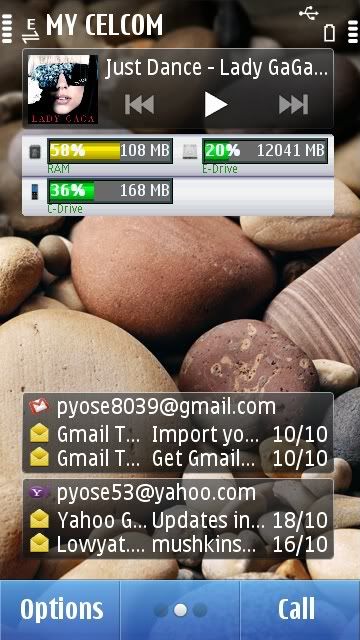
How to check your memory info
» Click to show Spoiler - click again to hide... «
Hate the Ovi Suite but prefer the Nokia PC Suite?
» Click to show Spoiler - click again to hide... «

How to download apps using your desktop
» Click to show Spoiler - click again to hide... «

How to type SMS fast
» Click to show Spoiler - click again to hide... «

How to check GPRS/EDGE/3G networks data usage
» Click to show Spoiler - click again to hide... «

Nokia N8 Screen Test (Dark Blend and Dark "Stains" during AMOLED near turn OFF mode)
» Click to show Spoiler - click again to hide... «

Nokia N8 multiple quick tips
» Click to show Spoiler - click again to hide... «

Useful Nokia N8 Secret Code
» Click to show Spoiler - click again to hide... «

Phone to PC non-compatible USB Tips
» Click to show Spoiler - click again to hide... «

Nokia N8 Hard Reset Methods
» Click to show Spoiler - click again to hide... «

How to DIRECT download from Ovi Store using PC Browser
» Click to show Spoiler - click again to hide... «

How to Setup Personal Remote Drive
» Click to show Spoiler - click again to hide... «

How to Resolve Screen Won't Off When Idling
» Click to show Spoiler - click again to hide... «

Nokia N8 Ultimate User Guide! From NokNok.tv
» Click to show Spoiler - click again to hide... «

Nokia N8 - Restoring Ovi Store on Nokia N8 (lost after Hard Reset)
» Click to show Spoiler - click again to hide... «

====================================================================================================

Nokia N8 Default Apps Installation

01. Social Networks Update v1.2.157
http://www.ziddu.com/download/12280753/Soc...update.zip.html

02. NatGeo Widget
http://www.box.net/shared/krrrf451kl

03. CNN Widget
http://www.box.net/shared/enbsn6z4xc

04. Original Included Media Files Credit: lagenda
http://forum.lowyat.net/index.php?showtopi...post&p=37970599

====================================================================================================

Nokia N8 Bugs Observation List

01. First Batch of N8 having about 5%~6% GENUINE MOBO defective. (CONFIRMED)
- these GENUINE defective units will give you a DEAD N8 issue where the device will failed to boot up.
- confirmed the battery is fully charged but the device will still failed to boot up.
- confirmed HARD RESET CANNOT solve the issue.
- IF POSSIBLE try to avoid the 1st batch of the N8 as have source pointing Nokia already stop all the 1st batch.

Niklas Savander discusses Nokia N8 quality!!!
» Click to show Spoiler - click again to hide... «

02. Missing Smart Dialling function, please refer below link for more detail on this feature. (CONFIRMED)
- http://www.gsmarena.com/nokia_n8-review-523p4.php
- http://www.i-symbian.com/nokia-n8-will-have-smart-dial/

03. Default browser randomly crash and causing an auto soft reboot. (CONFIRMED)
- when surfing mostly on those heavy site the browser will crash for no reason (confirm not cause by low resource).
- try disable the "Java/ECMA script" might help on some heavy scripted pages.

04. Call Logs missing even set to keep for 30 days. (CONFIRMED)
- Logs over flooded by network connection logs.
- Logs having limited overall entry although set to keep for 30 days.

05. Screen won't be fully turn OFF after the charging complete popup message. (CONFIRMED)
- Plug in the charger and let the phone to charge.
- After the charging complete, a message will popup, do not disturb it and let the phone to turn off the screen as usual.
- Turn off the surrounding light (a total darkness needed to observe the screen).
- When look the screen in total darkness, you can see a grayish screen with some dark spots (dirty stains).

06. Silence Profile together with Power Saving Mode will result in TOTAL silence phone without any vibration alert. (CONFIRMED)
- Select Silence Profile.
- Activate Power Saver Mode.
- Make a call to the phone.
- Your phone will only got display incoming call but without any sound nor vibration alert AT ALL!!!

07. Incoming call Ringing stopped (silence out) if phone slightly turned or shaked. (PENDING CONFIRMATION)
- Make sure the sensor setup disabled the "Silence Call" option.
- Let the phone in Power Saver Mode and idling state (screen turn off).
- Make a call to the phone and when the phone ring, slightly turn the phone or shake the phone lightly.
- In some occasion the phone ring will directly silence out but with the incoming calling still active.
- Please report back if you success to simulated the error.

08. Rapid charging with Nokia AC-8X charger intermittent stop charging in the middle. (PENDING CONFIRMATION)
- Let the phone battery left about 10%~20%.
- Use the Nokia AC-8X to charge the N8.
- Keep checking the phone after a while.
- Left the phone charge until full.
- If the bug occur during the charging process when you un-plug the charger the phone will indicate the battery not fully changed.

====================================================================================================

MUST READ!!! Nokia N8 that send to Nokia Care Center (NCC) for Repairing...

http://forum.lowyat.net/index.php?showtopi...post&p=38171290

====================================================================================================

REQUEST!! for 1 ON 1 Exchange for Initial Batch Genuine MoBo defective N8!!

sklchan starting a topic at the Nokia Malaysia FB discussions board to "REQUEST!! for 1 ON 1 Exchange for Initial Batch Genuine MoBo defective N8!!"Hope anyone from here also can support on the move... icon_question.gif

http://www.facebook.com/topic.php?uid=1130...06153&topic=352

Also include here the Nokia Support Discussion Board regarding the same Dead N8 issue!!

http://discussions.europe.nokia.com/t5/Nse...ing/td-p/778960

icon_question.gif CALLING FOR SUPPORT!!! icon_question.gif

This post has been edited by sklchan: Feb 7 2012, 11:07 PM
TSsklchan
post Oct 24 2011, 01:21 PM

~~Life Goes On~~
*******
Senior Member
6,357 posts

Joined: Feb 2008
From: Penang


Proud Nokia N8 Users List (288)

Nokia N8 Rangers:
» Click to show Spoiler - click again to hide... «

Dark Gray Team:
» Click to show Spoiler - click again to hide... «

Silver White Team:
» Click to show Spoiler - click again to hide... «

Green Team:
» Click to show Spoiler - click again to hide... «

Blue Team:
» Click to show Spoiler - click again to hide... «

Orange Team:
» Click to show Spoiler - click again to hide... «

Pink Team:
» Click to show Spoiler - click again to hide... «


Please PM me because I won't update it if I missed the name, thank you

Users on Molome (LYN Nick in brackets if different)

0001. Breakers
0002. sklchan
0003. alexlimco
0004. Lifeslotz84 (blurboy84)
0005. Acemaster15
0006. sampsonboey
0007. botakbin
0008. thenokiagallery (Aspire2006)
0009. alexsiong29 (alex_siong)
0010. moniqee
0011. asyrafzabani (Squidoo)
0012. twk2808 (zidane100)
0013. apexc92
0014. kae7
0015. eugenelim8888 (eugene88)
0016. ukiya21
0017. lagenda
0018. stimix
0019. KevinPinga (OH-)
0020. emino
0021. jomasonfcf (Noirstriker)
0022. KeiChaos
0023. jay2you
0024. xaiemanx
0025. -sLay-

Molome standalone installer (without smartinstaller)
http://www.multiupload.com/WINWKFZNQ4

This post has been edited by sklchan: Mar 21 2012, 05:17 PM
TSsklchan
post Oct 24 2011, 01:22 PM

~~Life Goes On~~
*******
Senior Member
6,357 posts

Joined: Feb 2008
From: Penang


Nokia N8 Users Personal Review Sharing

From Our Nokia Rangers

01. From our Ranger Andrekua: HERE

02. From our Ranger sklchan: HERE

03. From our Ranger nicholasbeh: HERE

04. From our Ranger BBXiong: HERE

05. From our Ranger Leo the Lion: HERE

06. From our Ranger apecx92: HERE

07. From our Ranger ViRaViRa: HERE

08. From our Ranger zero_kbom: HERE

09. From our Ranger PyOsE: HERE

From Forumers or Users

01. From our forumer jeremy0: HERE

02. From our forumer WhatMan: HERE

====================================================================================================

Add Extra Power on Your N8!

Telescope for Optical Zoom

Example for the 8x Telescope

====================================================================================================

3rd N8 Official Gathering

Host: NicholasBeh
Date: 16 January 2011
Time: 1PM
Venue: Carl's Junior Pavillion


Lunch is bao by Nokia~~~ Thanks to Nokia for the sponsorship!!!

Attendance List:
» Click to show Spoiler - click again to hide... «

Gathering Photos:
» Click to show Spoiler - click again to hide... «

» Click to show Spoiler - click again to hide... «

» Click to show Spoiler - click again to hide... «

» Click to show Spoiler - click again to hide... «


====================================================================================================

N8 KLCC Photo Shooting Gathering 17th April 2011

» Click to show Spoiler - click again to hide... «

====================================================================================================

~ LYN Nokia N8 Owners' Club ~

For permission to join, please PM Crys_Crys or alex_siong or sklchan... icon_rolleyes.gif

~ LYN Nokia N8 Owners' Club ~

====================================================================================================

~ Results of LYN Nokia N8 Putrajaya Photoshoot Contest 23 April 2011 ~

Close Up Theme
1st place – Moniqee - http://www.flickr.com/photos/moniqee_lowyat/5645750200/
2nd place – Agito 666 - http://www.flickr.com/photos/agito666/5650111080/

Architecture Theme
1st place – Jelaine - http://www.flickr.com/photos/62141560@N06/...ol-1679759@N23/
2nd place – Acemaster 15 - http://www.flickr.com/photos/60635633@N02/5649557951/

Figurines Theme
1st place – Acemaster 15 - http://www.flickr.com/photos/60635633@N02/5649635771/
2nd place – Agito 666 - http://www.flickr.com/photos/agito666/5649547139/

Landscape Theme
1st place – Botakbin - http://www.flickr.com/photos/55949857@N06/5649807754/
TSsklchan
post Oct 24 2011, 01:22 PM

~~Life Goes On~~
*******
Senior Member
6,357 posts

Joined: Feb 2008
From: Penang


flex.gif Symbian ANNA Multiple Mods v1.00 Released! (Hacked N8 Required! USE AT YOUR OWN RISK!!!) flex.gif


01. KS Improvement Recommended!
- Improve on Kinetic Scrolling, original KS mods by me now your ANNA will have easier/faster/longer on it's kinetic scrolling (NOT FOUND ANYWHERE ELSE!).

02. UI Improvement - Experiment Mod Recommended!
- Improve UI responsiveness, mods been fine tuned, changed the default FPS from 67FPS to 70FPS and max processing power from 75% to 90% (credit to faenil's mods).

03. Camera Sound Mute Recommended!
- Enable the camera sound to be mute when warning tone been turn off.

04. Camera Digital Zoom Recommended!
- Enable the dafault camera apps to have Digital Extended Zoom capability.

05. Custom Equalizer Editing Recommended!
- Enable to add/remove/edit the music player equalizer setting (credit to CODeRUS).

06. Diverts Note Disable Recommended!
- Disable the Active Diverts Note during call (credit to CODeRUS).

07. N8 Camera Quality Recommended!
- Photo quality change the compression ratio from original 85/75/60 to 92/85/75, video will change from 12mbps to 15mbps and the capture audio quality will change from 128kbps to 288kbps.

08. Photo Gallery Folders Recommended!
- Photo Gallery Folders excluded lots of folders path (please take note some of the folders path are hardcoded to be scan and can't be excluded from listing).

09. Music Gallery Folders Recommended!
- Music Gallery Folders excluded lots of folders path (please take note some of the folders path are hardcoded to be scan and can't be excluded from listing).

For Mods #10,#11, ONLY select 1 option, if multiple options selected the top most option will be use.

10. Browser's Cache (D:\)
- Change the default browser cache folder from C: to D: and set the amount to 32MB, actual effects need those HEAVY internet users feedback.

11. Browser's Cache (E:\) Recommended!
- Change the default browser cache folder from C: to E: and set the amount to 32MB, actual effects need those HEAVY internet users feedback.

For Mods #12,#13,#14, ONLY select 1 option, if multiple options selected the top most option will be use.

12. Start/Shut (C:\Animations)
- Redirect the phone to look for the Startup.gif and Startup.mp3 during startup in C:\Animations folder and look for the Shutdown.gif and Shutdown.mp3 during shutdown in C:\Animations folder. If none are found then the phone won't play any startup/shutdown animations at all.

13. Start/Shut (E:\Animations) Recommended!
- Redirect the phone to look for the Startup.gif and Startup.mp3 during startup in E:\Animations folder and look for the Shutdown.gif and Shutdown.mp3 during shutdown in E:\Animations folder. If none are found then the phone won't play any startup/shutdown animations at all.

14. Start/Shut (F:\Animations)
- Redirect the phone to look for the Startup.gif and Startup.mp3 during startup in F:\Animations folder and look for the Shutdown.gif and Shutdown.mp3 during shutdown in F:\Animations folder. If none are found then the phone won't play any startup/shutdown animations at all.

15. Start/Shut Vol 90% Recommended!
- Increase the Startup/Shutdown default volume from 40% to 90%.

16. Voice Recorder (12H/256kbps/Stereo) Recommended!
- Set the default Voice Recorder to high quality recording (from 64kbps to 256kbps) and increase the max duration of the recording clip from 60mins to 720mins.

17. Music Player Volumn/Heap Mods (100%/32MB) Recommended!
- Experiment mods, no significant effect after the mods.

18. Fast Screen Rotation Recommended!
- Can feel "a bit" faster but not lighting fast as the delay seem not from the sensor but rather from the UI.

19. Light Sensor Disable
- Totally disable the Light Sensor, LCD will have 100% brightness all the time (will dim ONLY in power safe mode)

20. N8 FM Transmitter RDS Recommended!
- The FM Transmitter now send RDS "Nokia N8" and not just "Nokia".

21. Six Home Screen Recommended!
- Add capability to get max 6 Home Screen. (Beware! All HS will be reset after reboot!)


Installation steps:

1. Install the Camera Update from betalabs.
5. REBOOT the phone.
2. Download the attachment.
3. Install the mods
4. Select the mods that you like to install.
5. REBOOT the phone.

V1.00

http://www.multiupload.com/CC85VIM6Z0


S^3 Multiple Mods v7.00 for PR1.1 & PR1.2 (USE AT YOUR OWN RISK!!!)

For Mods #01,#02 ONLY select 1 option, if multiple options selected the top most option will be use.

01. KS Type A Improvement Recommended!
- Improve on Kinetic Scrolling, original mods from previous version now your list will be easier/faster/longer on kinetic scroll (you wil SURE feel the different).

02. KS Type B Improvement
- Improve on Kinetic Scrolling, NEW KS mods from PimpJuice mods which make the kinetic scrolling very fast and won't slow down (credit to PimpJuice's mods).

03. UI Improvement - Experiment Mod Recommended!
- Improve UI responsiveness, mods been fine tuned, changed the default FPS from 67FPS to 72FPS and max processing power from 75% to 90% (credit to faenil's mods).

04. Camera Sound Mute Recommended!
- Enable the camera sound to be mute when warning tone been turn off.

For Mods #05,#06 ONLY select 1 option, if multiple options selected the top most option will be use.

05. N8 Continuous AutoFocus Recommended!
- You will have an EXTRA option under Video Setting that enable the Continuous AF during video.

06. E7/C7 Video Mods
- Mods for E7/C7/C6-01 video, enhance zoom steps and increase night mode FPS.

For Mods #07,#08,#09,#10,#11,#12,#13,#14,#15,#16 ONLY select 1 option, if multiple options selected the top most option will be use.

07. N8 Pic/Vid (100/30FPS)
- Photo quality change the compression ratio from original 85/75/60 to 100/85/75, video will change from 25FPS to 30FPS and the capture audio quality will change from 128kbps to 256kbps.

08. N8 Pic/Vid (097/30FPS)
- Photo quality change the compression ratio from original 85/75/60 to 97/85/75, video will change from 25FPS to 30FPS and the capture audio quality will change from 128kbps to 256kbps.

09. N8 Pic/Vid (095/30FPS) Recommended!
- Photo quality change the compression ratio from original 85/75/60 to 95/85/75, video will change from 25FPS to 30FPS and the capture audio quality will change from 128kbps to 256kbps.

10. N8 Pic/Vid (097/25FPS)
- Photo quality change the compression ratio from original 85/75/60 to 97/85/75, video remain 25FPS with capture audio quality will change from 128kbps to 256kbps.

11. N8 Pic/Vid (085/30FPS)
- Photo quality remain as original 85/75/60, video will change from 25FPS to 30FPS and the capture audio quality will change from 128kbps to 256kbps.

12. E7/C7 Pic/Vid (100/30FPS)
- Photo quality change the compression ratio from original 85/75/60 to 100/85/75, video will change from 25FPS to 30FPS and the capture audio quality will change from 128kbps to 256kbps.

13. E7/C7 Pic/Vid (097/30FPS)
- Photo quality change the compression ratio from original 85/75/60 to 97/85/75, video will change from 25FPS to 30FPS and the capture audio quality will change from 128kbps to 256kbps.

14. E7/C7 Pic/Vid (095/30FPS)
- Photo quality change the compression ratio from original 85/75/60 to 95/85/75, video will change from 25FPS to 30FPS and the capture audio quality will change from 128kbps to 256kbps.

15. E7/C7 Pic/Vid (097/25FPS)
- Photo quality change the compression ratio from original 85/75/60 to 97/85/75, video remain 25FPS with capture audio quality will change from 128kbps to 256kbps.

16. E7/C7 Pic/Vid (085/30FPS)
- Photo quality remain as original 85/75/60, video will change from 25FPS to 30FPS and the capture audio quality will change from 128kbps to 256kbps.

17. Photo Gallery Folders Recommended!
- Photo Gallery Folders excluded lots of folders path (please take note some of the folders path are hardcoded to be scan and can't be excluded from listing).

18. Music Gallery Folders Recommended!
- Music Gallery Folders excluded lots of folders path (please take note some of the folders path are hardcoded to be scan and can't be excluded from listing).

For Mods #19,#20, ONLY select 1 option, if multiple options selected the top most option will be use.

19. Browser's Cache (D:\)
- Change the default browser cache folder from C: to D: and set the amount to 32MB, actual effects need those HEAVY internet users feedback.

20. Browser's Cache (E:\) Recommended!
- Change the default browser cache folder from C: to E: and set the amount to 32MB, actual effects need those HEAVY internet users feedback.

For Mods #21,#22,#23, ONLY select 1 option, if multiple options selected the top most option will be use.

21. Start/Shut (C:\Animations)
- Redirect the phone to look for the Startup.gif and Startup.mp3 during startup in C:\Animations folder and look for the Shutdown.gif and Shutdown.mp3 during shutdown in C:\Animations folder. If none are found then the phone won't play any startup/shutdown animations at all.

22. Start/Shut (E:\Animations) Recommended!
- Redirect the phone to look for the Startup.gif and Startup.mp3 during startup in E:\Animations folder and look for the Shutdown.gif and Shutdown.mp3 during shutdown in E:\Animations folder. If none are found then the phone won't play any startup/shutdown animations at all.

23. Start/Shut (F:\Animations)
- Redirect the phone to look for the Startup.gif and Startup.mp3 during startup in F:\Animations folder and look for the Shutdown.gif and Shutdown.mp3 during shutdown in F:\Animations folder. If none are found then the phone won't play any startup/shutdown animations at all.

24. Start/Shut Vol 90% Recommended!
- Increase the Startup/Shutdown default volume from 40% to 90%.

25. Voice Recorder (12H/256kbps/Stereo) Recommended!
- Set the default Voice Recorder to high quality recording (from 64kbps to 256kbps) and increase the max duration of the recording clip from 60mins to 720mins.

26. Music Player Volumn/Heap Mods (100%/32MB) Recommended!
- Experiment mods, no significant effect after the mods.

27. Context Data Object Maximum Size Mod Recommended!
- Experiment mods, no significant effect after the mods.

28. Light Sensor Disable
- Totally disable the Light Sensor, LCD will have 100% brightness all the time (will dim ONLY in power safe mode)

29. Haptics Improvement Recommended!
- Lower the vibration and fine tune level 1/2/3 haptics feedback (not must different as i can tell)

30. Vibration Alert Improvement Recommended!
- Same goes with haptics mods, can't really feel big different

31. Camera Full Shutdown (RAM) Recommended!
- Camera apps will fully shutdown once you close the apps (won't remain in the memory), but the N8 have better camera apps as the total shutdown and without only make ~1Mb ram saving (not like what we see in 5800xm as it's camera apps are memory whore)

32. Message Full Shutdown (RAM)
- Message apps will fully shutdown once you close the apps (won't remain in the memory), no significant RAM saving and not sure it will causing others conflict or not (use at your own risk!).

33. Logs Full Shutdown (RAM)
- Logs apps will fully shutdown once you close the apps (won't remain in the memory), no significant RAM saving and not sure it will causing others conflict or not (use at your own risk!).

34. Calendar Full Shutdown (RAM)
- Calendar apps will fully shutdown once you close the apps (won't remain in the memory), no significant RAM saving and not sure it will causing others conflict or not (use at your own risk!).

35. Clock Full Shutdown (RAM)
- Clock apps will fully shutdown once you close the apps (won't remain in the memory), no significant RAM saving and not sure it will causing others conflict or not (use at your own risk!).

36. Contacts Full Shutdown (RAM)
- Contacts apps will fully shutdown once you close the apps (won't remain in the memory), no significant RAM saving and not sure it will causing others conflict or not (use at your own risk!).

37. Fast Screen Rotation Recommended!
- Can feel "a bit" faster but not lighting fast as the delay seem not from the sensor but rather from the UI.

For Mods #38,#39,#40,#41 ONLY select 1 option, if more then 1 option selected NOTHING will be install.

38. N8 FM Transmitter RDS Recommended!
- The FM Transmitter now send RDS "Nokia N8" and not just "Nokia".

39. E7 FM Transmitter RDS
- The FM Transmitter now send RDS "Nokia E7" and not just "Nokia".

40. C7 FM Transmitter RDS
- The FM Transmitter now send RDS "Nokia C7" and not just "Nokia".

41. C6-01 FM Transmitter RDS
- The FM Transmitter now send RDS "Nokia C6-01" and not just "Nokia".

42. Video Call FPS Improvement Recommended!
- Slightly change the video call setting fps from original min/norm/max of 5/10/15 to 10/15/20. Not tested as not really use video call.

43. Database Max Record Count Recommended!
- Experimental mod, Increase database from 20 to 50.

44. HWRM Process Priority Recommended!
- Experimental mod, Hardware sensor priority change from background to foreground.

45. Music Player Equalizer Recommended!
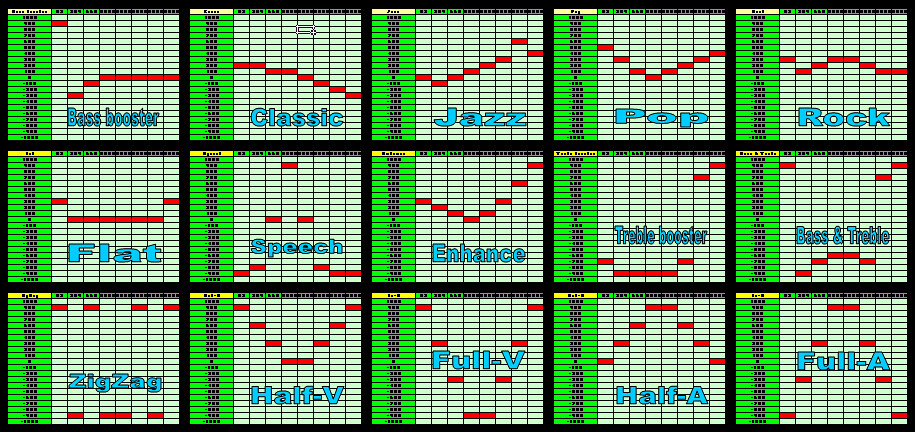
- Add in additional 10 EQ presets, Flat/Speech/Enhance/Treble booster/Bass & Treble/ZigZag/Half-V/Full-V/Half-A/Full-A

EQ Presets Overview
» Click to show Spoiler - click again to hide... «


For Mods #46,#47,#48, ONLY select 1 option, if multiple options selected the top most option will be use.

46. Auto Landscape/Portrait Screen
- Add in lots of apps (>500 apps) UID into the default apps orientaion to follow the hardware accelerometer sensor.
(not all apps will follow as not all of them are follow the cenrep configurations, won't work for the Call Screen)

47. Permanent Landscape Screen
- Add in lots of apps (>500 apps) UID into the default apps orientaion to be in Landscape and disable the accelerometer sensor within the setting.
(not all apps will follow as not all of them are follow the cenrep configurations, won't work for the Call Screen)

48. Permanent Portrait Screen
- Add in lots of apps (>500 apps) UID into the default apps orientaion to be in Portrait and disable the accelerometer sensor within the setting.
(not all apps will follow as not all of them are follow the cenrep configurations)

49. Charger Note Disable Recommended!
- Disable the Charger notification note.

50. PwrSave Note Disable Recommended!
- Disable the Power Saving mode notification note.

51. Camera Digital Zoom Recommended!
- Enable the dafault camera apps to have Digital Extended Zoom capability.

52. Max Volume Recommended!
- Change most of the apps default volume setting to 100%.

53. Voice Recognition Improvement Recommended!
- Experimental mod, change the default Voice Recognition sensitivity and accuracy.

54. Default Profiles Fix Recommended!
- Enhance all profiles default setting, add in extra "In Office", "Driving", "Church", "Sleeping" profiles (useful if you have Nokia Situation installed)
(This mods changed all profiles able to "VIBRATE" although in Power Saver mode, but the mods will be reset IF you re-trigger the Power Saver manually ONCE)

55. Battery Level Fix Recommended!
- Change the default battery indicator from 100>70>50>40>30>20>10 to 100>80>65>50>35>20>10
(This mods only for eye candy, no real changes regarding the devices NON-Linear battery indicator behaviour)

56. Popup UI Improvement Recommended!
- Experimental mod, change the default Popup UI delay.

57. XCAP Cache Increase Recommended!
- Experimental mod, increased the XCAP Cache size.

58. Critical System Apps Recommended!
- Experimental mod, included RAMBlow, PocketSensor and PocketLock UID into the critical system apps list.
Changelogs:

v7.00

- PR 1.0, PR 1.1, PR1.2 compatibility

- New default camera apps Digital Extended Zoom capability enable icon_rolleyes.gif

- New individual selectable for Critical Apps fully shutdown mods

- New screen orientation lock mods, all with extra >500 apps UID included

- New default Profiles fix, included extra profiles setting

- New KS Type B from PimpJuice mods

- New Startup/Shutdown volume mods

- New mods to disable the Charger and Power Saving notification note

- New Video FPS only mods included

- New E7/C7/C6-01 FM Transmitter RDS mods

- New multiple default apps max volume mods

- Included extra EQ setting (Half-V,Full-V,Half-A,Full-A)

- Fine tuned the UI Improvement mods and included Popup UI delay changes

- Some others extra experimental mods for testing purpose

v6.00

- Mods now compatible through out all S^3 devices, N8, E7, C7 and C6-01 icon_rolleyes.gif

- Changed mods title

v5.00

- PR 1.0 and PR 1.1 compatibility icon_rolleyes.gif

- Fine tune some of the mods to add stability

v4.00

- Bugfixes for Video gallery scan folder

- Extra EQ presets (lovely effects) icon_rolleyes.gif

- Fine tune some of the mods to add stability

- Voice recorder duration changed to max 12 hours recording (can record for whole day event)

- Fast screen rotation mod now only reduce it's sensor timing without changing it's original tilting setting

v3.30

- Included lots of Symbian S60V5 Cenrep mods

v3.00

- Included multiple choices during installation

- Clean up most of the code within the cenrep files

- All mods change back to .cre for better performance

For CAF setting below the recommendation of usage:

1. For close up object (10cm~1m) enable the CAF. (Macro Focus Mode)
2. For normal video capture (>30cm) disable the CAF. (DOF Focus Mode)

Just download the attachment and sign it with your cert then install. No hacked phone needed!! flex.gif

Installation steps:

1. Download the attachment.
2. Sign the .sis with your own cert.
3. Run the signed .sis.
4. Select the mods that you like to install.
5. REBOOT the phone.
Uninstall the mods:

1. Use normal uninstall apps method to uninstall the mods.
2. REBOOT the phone.
3. All will back to original state.
Modify or Re-select the mods:

1. Use normal uninstall apps method to uninstall the mods.
2. REBOOT the phone.
3. Run the signed .sis.
4. Select the mods that you like to install.
5. REBOOT the phone.
Update mods version:

1. Use normal uninstall apps method to uninstall the old mods.
2. REBOOT the phone.
3. Run the signed up-rev .sis.
4. Select the mods that you like to install.
5. REBOOT the phone.
Attachment: (updated to using multiple download sites)

V7.00

http://www.multiupload.com/Z52KQ5EWQO

sklchan_S^3_mods_v7.00.zip
TSsklchan
post Oct 24 2011, 01:23 PM

~~Life Goes On~~
*******
Senior Member
6,357 posts

Joined: Feb 2008
From: Penang


Tips & Solutions Sharing

New S^3 6 Home Screen Mods For Unhacked Phone:

USE AT YOUR OWN RISK!!! wink.gif

Please follow below steps to get the 6 home screen mods into your beloved N8/E7/C7/C6-01 (All S^3 devices):

01. Download the attached file 200159c0.zip, extract the folder into your PC (keep all the subfolders info intact).
02. Backup your phone contents for emergency use if anything go wrong.
03. Connect the Nokia N8 to the computer through USB MASS STORAGE Mode (very important).
04. From the computer, go to E:\Private\200159c0 folder in your phone (create it if it's not there).
05. Copy all those EXTRACTED files (both "import" & "install" subfolders) from your PC into phone E:\Private\200159c0 folder (replace/overwrite all existing files).
06. Properly disconnect your phone.
07. Wait for 1 minute.
08. Change your phone profile to OFFLINE Mode.
09. Now on your phone, go to Menu> Settings> Phone> Phone mgmt. > Factory Settings > Restore

After the phone will auto reboot, you lose all your settings (location of widgets, icons arrangement).
All applications and files will still keep intact (photos, videos, music, messages, contacts).

For users who used my S^3 Multiple Mods V6.00, you will need to reinstall the mods then reboot your phone after the factory setting restoration!!!

200159c0.zip

Please help to report back if it really can work out!!!

icon_rolleyes.gif

====================================================================================================

Nokia N8 QT Restoration After Hard Reset:

Who ever facing Ovi Store, Social Apps and Nokia Battery Monitor issue due to QT issues either after Hard Reset or after some mess up QT installations... please follow below instructions to Restore the QT apps:

1. Install qtdowngrade.sis to C:/Phone Memory (Important to install to correct drive!)

skipped steps 2 & 3 if you can't find the "QtExamples" folder to be delete
2. Go to application grid and select Options -> Organise.
3. Long-press on QtExamples folder and select Delete.

4. Go to Settings -> Application manager -> Installed apps
5. Long-press on qtdowngrade from the list and select Uninstall
6. Reboot

get the "qtdowngrade.sis" from here:

http://www.mediafire.com/?b4exmj0e6h8n9kj

Please help to report back if it really can work out!!!

icon_rolleyes.gif

====================================================================================================

Nokia Social Apps updating guide:

1. Uninstall both "Social" & "Social Installer" from the default Apps Manager.
2. Reboot the phone.
3. Download "Social Apps.zip".
4. Extract the zip and transfer the .wgz & .sisx to the phone (using file manager).
5. FIRST!! Install "Sosial Mixer v1.02.144.wgz" into E:\ drive then
6. Install "Social Networks v1.03.143.sisx" (wait until the Widget installation popup done!!)

Download:

Multiservers: http://www.multiupload.com/7GNQIJ1XEB

1. http://depositfiles.com/en/files/87q7542v5
2. http://hotfile.com/dl/99582866/f0354b6/Social_Apps.zip.html
3. http://www.zshare.net/download/857310236c564151/
4. http://uploading.com/files/9cbmd6fd/Social%2BApps.zip/

tada... there you have the latest Social Apps installed... thumbup.gif

Credit: sklchan thumbup.gif
TSsklchan
post Oct 24 2011, 02:07 PM

~~Life Goes On~~
*******
Senior Member
6,357 posts

Joined: Feb 2008
From: Penang


QUOTE(Agito666 @ Oct 24 2011, 01:29 PM)
wee.... report in new home...where is belle?  vmad.gif
*
agreed... the N8 now left waiting for BELLE to get fully mature... yawn.gif

after the BELLE i believe u really won't find any good replacement for the N8 for at least another year... as the coming mangga phones all seem will be having about the same spec as N9... sweat.gif
TSsklchan
post Oct 24 2011, 04:43 PM

~~Life Goes On~~
*******
Senior Member
6,357 posts

Joined: Feb 2008
From: Penang


QUOTE(deShinyDevil @ Oct 24 2011, 04:23 PM)
v32! the most active thread in the forum?
btw add me to the dark gray team. thnx =)
*
added... welcome... rclxms.gif

seen you around for a while, now only get the N8 kah? hmm.gif
TSsklchan
post Oct 24 2011, 05:05 PM

~~Life Goes On~~
*******
Senior Member
6,357 posts

Joined: Feb 2008
From: Penang


QUOTE(deShinyDevil @ Oct 24 2011, 05:01 PM)
btw our n8 play video in what format?
i have an avi video. can i play it?
*
just try to play, if can't that mean the codec having error... as avi only the container... nod.gif
TSsklchan
post Oct 25 2011, 10:05 AM

~~Life Goes On~~
*******
Senior Member
6,357 posts

Joined: Feb 2008
From: Penang


QUOTE(kyokusanagi @ Oct 25 2011, 09:58 AM)
Anybody here using sandisk microsd 32gb? what class you using?how much you bought it?
*
me! class4 RM165 (tested speed ~4-6MB/s Write, >18MB/s Read) but beware as there's lots of fade card out there... icon_rolleyes.gif

http://www.ebay.com.sg/itm/Sandisk-32GB-Mi...=item519b776b97


Added on October 25, 2011, 10:06 amdamn... it's already getting cheaper already... sweat.gif

This post has been edited by sklchan: Oct 25 2011, 10:06 AM
TSsklchan
post Oct 25 2011, 10:28 AM

~~Life Goes On~~
*******
Senior Member
6,357 posts

Joined: Feb 2008
From: Penang


QUOTE(kyokusanagi @ Oct 25 2011, 10:21 AM)
do you mind pm me you buy with who?
*
bought it through ebay, the link I've provided is the seller... nod.gif

This post has been edited by sklchan: Oct 25 2011, 10:29 AM
TSsklchan
post Oct 25 2011, 10:47 AM

~~Life Goes On~~
*******
Senior Member
6,357 posts

Joined: Feb 2008
From: Penang


QUOTE(kyokusanagi @ Oct 25 2011, 10:31 AM)
ok, thanks!Need take how long arrive to malaysia?How to claim warranty?
*
mine took 2 weeks... but i think u better contact the seller directly for all sort of question regarding his products... nod.gif
TSsklchan
post Oct 25 2011, 11:34 AM

~~Life Goes On~~
*******
Senior Member
6,357 posts

Joined: Feb 2008
From: Penang


QUOTE(kyokusanagi @ Oct 25 2011, 10:52 AM)
ok, you use paypal to pay him?
*
yup
TSsklchan
post Oct 25 2011, 03:38 PM

~~Life Goes On~~
*******
Senior Member
6,357 posts

Joined: Feb 2008
From: Penang


Call for support... smile.gif

Please help... notworthy.gif

http://www.ideasproject.com/ideas/12803
TSsklchan
post Oct 25 2011, 09:08 PM

~~Life Goes On~~
*******
Senior Member
6,357 posts

Joined: Feb 2008
From: Penang


QUOTE(andrekua @ Oct 25 2011, 08:42 PM)
You should ask me to help you buy... If I'm not mistaken, class 10 for about the same price... 10MB+ write speed...
*
andre... i get the card about 4 months ago loh... at that time it's consider cheap... sweat.gif
TSsklchan
post Oct 26 2011, 11:38 PM

~~Life Goes On~~
*******
Senior Member
6,357 posts

Joined: Feb 2008
From: Penang


QUOTE(macwai01 @ Oct 26 2011, 11:31 PM)
I don't get why they keep hyping about their polycarbonate design, even on their Lumia 800. It's almost exactly the same as the N9

One part nokia is getting right, their new devices are smoother and more responsive.
Hardware wise, still neglecting the processor, microsd, hdmi, 12mp camera...
*
agreed... let see will there be Lumia 900 in making or not... yawn.gif


Added on October 26, 2011, 11:40 pmrather go for n9 then lumia 800...

This post has been edited by sklchan: Oct 26 2011, 11:40 PM
TSsklchan
post Oct 28 2011, 01:08 PM

~~Life Goes On~~
*******
Senior Member
6,357 posts

Joined: Feb 2008
From: Penang


QUOTE(WhatMan @ Oct 28 2011, 10:03 AM)
I guess I will have to settle with N8 for a while. The bad photo quality of the Nokia Lumia 800 just turned me off completely:

http://crave.cnet.co.uk/mobiles/nokia-lumi...xy-s2-50005826/
*
then wait for the lumia 900 loh... whistling.gif


Added on October 28, 2011, 1:10 pm
QUOTE(aspire2oo6 @ Oct 28 2011, 12:57 AM)
Belle kinda laggy on Nokia N8. It will perform better on 1ghz  processor like the Nokia 600 , 700 , 701. My nokia N8 is not that laggy i just need a good camera phone to take amazing photos and also for my daily use stuff. Only bring my big gun for events or special occasion.
*
how we expect the 1.5liter run like 2.0??? sweat.gif

This post has been edited by sklchan: Oct 28 2011, 05:56 PM
TSsklchan
post Oct 29 2011, 11:13 PM

~~Life Goes On~~
*******
Senior Member
6,357 posts

Joined: Feb 2008
From: Penang


QUOTE(deShinyDevil @ Oct 29 2011, 11:11 PM)
emm. how i can watch youtube video with HD?
*
download it manually? as the n8 youtube viewer are all default using crappy stream quality and can'tt be change... sweat.gif
TSsklchan
post Oct 31 2011, 05:53 PM

~~Life Goes On~~
*******
Senior Member
6,357 posts

Joined: Feb 2008
From: Penang


QUOTE(Optiplex330 @ Oct 31 2011, 05:08 PM)
But why would the N8 change the location of the photos just at it's own fancy? Doesn't it keep to a proper filing system like Mass memory/Images/Camera/...then with automatically generated folder going by dates like 201108, 201109,201110 etc.

This is getting to be a pain in the neck.
*
it won't... those capture photos only have 1 FOLDER to save into but with Drive option...

either

E:\Images\Camera\

or

F:\Images\Camera\

so as long as you capture using the default camera apps these location are permanent... nod.gif
TSsklchan
post Nov 4 2011, 10:04 AM

~~Life Goes On~~
*******
Senior Member
6,357 posts

Joined: Feb 2008
From: Penang


QUOTE(tumira @ Nov 4 2011, 12:38 AM)
My N8 have a lot of red eye problems when taking pictures.. What did i do wrong ? Already updated the Camera App still the same. Maybe worse ?? Any tips ?
*
under flash option choose RED EYE REDUCTION mode... then when u take photo the flash will flash twice (remember to inform your friend to stay still after the first flash as the photo still not been capture during first flash)... icon_rolleyes.gif
TSsklchan
post Nov 9 2011, 10:19 AM

~~Life Goes On~~
*******
Senior Member
6,357 posts

Joined: Feb 2008
From: Penang


QUOTE(mrtresynth @ Nov 9 2011, 09:43 AM)
can exchange mine with new one? tongue.gif
*
if it's true then the 512MB ram would still sux big time... doh.gif

4 Pages  1 2 3 > » Top
Topic ClosedOptions
 

Change to:
| Lo-Fi Version
0.0545sec    0.70    7 queries    GZIP Disabled
Time is now: 2nd December 2025 - 03:26 PM