


SAMSUNG GALAXY S II Official thread V17, Be a SMART user - Pls read Page 1 first
SAMSUNG GALAXY S II Official thread V17, Be a SMART user - Pls read Page 1 first
|
|
 Oct 23 2011, 09:34 PM Oct 23 2011, 09:34 PM
Return to original view | Post
#1
|
 
Senior Member
534 posts Joined: Dec 2006  
|
Went to Digi's centre in Gardens today to get the phone but they ran outta of stock.
|
|
|
|
|
|
Oct 26 2011, 01:56 AM
Return to original view | Post
#2
|
|
Senior Member
534 posts Joined: Dec 2006
|
I got my phone from Digi yesterday.
Was using it throughout the whole day and I could barely get through half a day without charging it. |
|
|
Oct 26 2011, 02:04 AM
Return to original view | Post
#3
|
|
Senior Member
534 posts Joined: Dec 2006
|
QUOTE(waveweaver @ Oct 26 2011, 01:57 AM) Your battery will last longer as days goes by. Take about one week for your battery to stable and settledown :-) Really? Because I have the G set and I practically left my internet connection on 24/7 and I was using the social networking apps and browsing the net for several hours.  Disabling the auto sync didn't do much though. |
|
|
Oct 26 2011, 07:52 PM
Return to original view | Post
#4
|
|
Senior Member
534 posts Joined: Dec 2006
|
Guys, I have the 9100G version and I want to install CWM. Can I just download it from the market?
|
|
|
Oct 26 2011, 10:22 PM
Return to original view | Post
#5
|
|
Senior Member
534 posts Joined: Dec 2006
|
QUOTE(antt00 @ Oct 26 2011, 09:48 PM) No you cannot just download from market. CWM is implemented into the kernel. Look in the first page for rooting methods for G models. Read carefully as flashing the wrong kernel will soft brick your device. I've already rooted it but the kernel doesn't come with CWM.I saw a method to install CWM but it will definitely brick my phone and I want to try and avoid that in case I can't unbrick it. http://forum.xda-developers.com/showpost.p...77&postcount=79 |
|
|
Oct 26 2011, 10:47 PM
Return to original view | Post
#6
|
|
Senior Member
534 posts Joined: Dec 2006
|
QUOTE(antt00 @ Oct 26 2011, 10:25 PM) That method is very risky. Which root did you use? Did you try the insecure kernel? I followed I9100G's guide: http://forum.lowyat.net/index.php?act=ST&f...0#entry46266180Added on October 26, 2011, 10:27 pm Villian rom look is very much like stock rom. You wont see much diff. |
|
|
|
|
|
Oct 29 2011, 04:58 PM
Return to original view | Post
#7
|
|
Senior Member
534 posts Joined: Dec 2006
|
Guys, my I9100G can't even last a whole day without being charged. I just have whatsapp, and viber and the occasional facebook update. and the best part is that I've already installed juice defender and limited the processor to 800. Is it normal?
|
|
|
Oct 29 2011, 09:32 PM
Return to original view | Post
#8
|
|
Senior Member
534 posts Joined: Dec 2006
|
QUOTE(kazama82 @ Oct 29 2011, 04:59 PM) Do you browse very often? Trust me, first time user always says battery life short but they didn't they actually used their phone very often since they want to explore.so they will wake the phone every single minute.. If you just bought your phone, let the battery cycle few time to get the most of it QUOTE(TheLaptopDudeGuy @ Oct 29 2011, 05:28 PM) Do a few battery charge cycles,you'll see improvements. Ok thanks.QUOTE(destEX @ Oct 29 2011, 05:28 PM) check is your awake alot more than screen on in battery usage graph, if yes, then use better battery stats to see what causes it. Anyways chances of it lasting a whole day is slim. asia, msia hk, philippines etc 
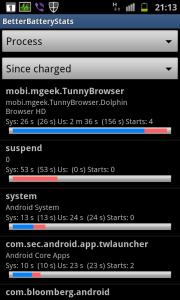
And now my battery is at 24%. p.s. How do I use better battery stats? |
|
|
Oct 29 2011, 10:19 PM
Return to original view | Post
#9
|
|
Senior Member
534 posts Joined: Dec 2006
|
QUOTE(antt00 @ Oct 29 2011, 09:33 PM) Change process to partial wakelocks in bbs and post screen. Click on the graph in the battery usage and post screen. QUOTE(destEX @ Oct 29 2011, 09:48 PM) yep, next time make sure to open and extract. some corrupted like kernels will still flash successfully but your phone wont boot Like this?do what antt00 advised, press the processes and click partial wakelocks, let the bottom remain same, 'since charged' then post screenshot. in battery usage click the graph. you've done well to figure out this far with my simple advice  Added on October 29, 2011, 9:51 pm ooh yea those wakelocks, dam bloody scary, i change launcher, and close it in services, its still giving me wakelocks  had to freeze had to freeze
QUOTE(blackrobin @ Oct 29 2011, 09:55 PM) what's ur screen on time? u on data 24/7.. battry drain during sleep? About 2 hours and 25mins.How do I determine when the phone is in sleep mode? |
|
|
Oct 29 2011, 10:27 PM
Return to original view | Post
#10
|
|
Senior Member
534 posts Joined: Dec 2006
|
QUOTE(destEX @ Oct 29 2011, 10:22 PM) you use that facebook app alot? dont use the chat, as you can see facebook.katana is at the top, it prevents your phone from going to sleep. its advised to use browser go fb or use ebuddy/trillian to chat in fb. another thing i noticed is you have a sudden drop in your battery graph, your phone got hot then hanged/rebooted? if so try to find out what app caused it and stop using it. I do use it quite often but I'll try using your alternatives. Is there anything else I need to disable? Haha, you managed to spot that?  I was using the phone when it suddenly hanged on me so I had to yank out the battery to restart it. Forgot what app I was using at that time though. |
|
|
Oct 29 2011, 10:32 PM
Return to original view | Post
#11
|
|
Senior Member
534 posts Joined: Dec 2006
|
QUOTE(blackrobin @ Oct 29 2011, 10:25 PM) ok... i think fb chat is giving u wakelock...erm try close all active chats .. or dun use them at all .. Yeah, I'm using digi right now.is data on 24/7 with HSPDA... what's ur line? digi? 3 things that will drain battery on anyphone 1)bad signal, using 3g all da time 2) screen brightness 3)apps running background preventing phone from going to sleep.. As for screen brightness, I'm leaving juice defender to decide it for me. |
|
|
Oct 29 2011, 11:00 PM
Return to original view | Post
#12
|
|
Senior Member
534 posts Joined: Dec 2006
|
QUOTE(blackrobin @ Oct 29 2011, 10:39 PM) things u have to differentiate.. battery drop during sleep (screen off) vs battery drop during screen on (usage with 3g,dun include games..tey are born to suck battery) vs both I've just tested EDGE and its way too slow. Feels like 56k.most of us here try to minimize the first... (priority 1) screen on usage is highly subjective (things that can be controlled ...brightness set to below 30% disabling autobrightness, using EDGE instead of 3G) |
|
|
Oct 29 2011, 11:27 PM
Return to original view | Post
#13
|
|
Senior Member
534 posts Joined: Dec 2006
|
QUOTE(destEX @ Oct 29 2011, 11:13 PM) for browsing better use 3g/hsdpa, if for chatting/sync/weather then edge will do, if not i suggest you change to 3g instead of hsdpa, dial this *#301279# then click change hsdpa revision, then select release r99(hsdpa off) then off ur data network, then on it back, you should see only 3G then u test the speed see, if ur using digi, the speed wont be affected as 3g is fast enough ad. Thanks for the tip.I did a quick test and the 3G speed is similar to HSPDA. EDGE of course was nowhere near either of them. But how come HSPDA's speed is similar to 3G? I thought HSPDA was faster than 3G? 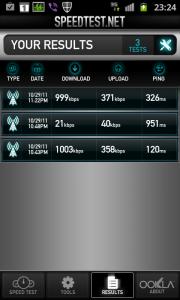
|
|
|
Oct 29 2011, 11:32 PM
Return to original view | Post
#14
|
|
Senior Member
534 posts Joined: Dec 2006
|
QUOTE(destEX @ Oct 29 2011, 11:29 PM) yes its maximum speed is higher, but if digi cant provide faster, higher also no use right? so might as well disable it for now I hope Digi's listening... We want HSPDA nao! |
|
Topic ClosedOptions
|
| Change to: |  0.0239sec 0.0239sec
 0.76 0.76
 7 queries 7 queries
 GZIP Disabled GZIP Disabled
Time is now: 8th December 2025 - 01:14 AM |
 Quote
Quote