

GOM player's error.
Tried almost every player...always ask for codec.
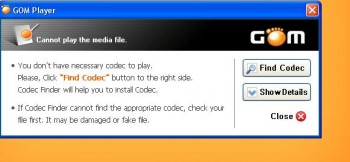
Playback Movie file - MPEG-4 file., Best software to play it?
|
|
 Oct 20 2011, 07:28 AM, updated 15y ago Oct 20 2011, 07:28 AM, updated 15y ago
Show posts by this member only | Post
#1
|
 
Senior Member
8,635 posts Joined: Jun 2006 From: Jeonju/Jeollabuk-do   
|
Morning.
GOM player's error. Tried almost every player...always ask for codec. |
|
|
|
|
|
Oct 20 2011, 07:32 AM
Show posts by this member only | Post
#2
|

Junior Member
882 posts Joined: Nov 2004
|
You got a missing codec. Not a player issue. Download the K-Lite Mega Codec Pack...
http://www.codecguide.com/download_mega.htm |
|
|
Oct 21 2011, 12:17 AM
Show posts by this member only | Post
#3
|

Junior Member
398 posts Joined: Jan 2010 From: Island of Tortuga
|
VLC Player
 |
|
|
Oct 21 2011, 01:58 AM
Show posts by this member only | Post
#4
|

Senior Member
1,431 posts Joined: Feb 2009 From: Seremban - Putrajaya 
|
QUOTE(Sridev Pro Designer @ Oct 21 2011, 12:17 AM) VLC Player yeah. i'm also using VLC,its very nice one. all format can run including mp3   |
|
|
Oct 21 2011, 02:19 PM
Show posts by this member only | Post
#5
|
|
Senior Member
8,635 posts Joined: Jun 2006 From: Jeonju/Jeollabuk-do
|
What version now?
Free ones of course  VLC 1.1.11 Win32. QUOTE No suitable decoder module: VLC does not support the audio or video format "undf". Unfortunately there is no way for you to fix this.  The video clearly can be played since got screenshots. But I need to find a good software to play it. This post has been edited by Raikkonen: Oct 21 2011, 02:29 PM |
|
|
Oct 21 2011, 02:35 PM
Show posts by this member only | Post
#6
|

Senior Member
706 posts Joined: Sep 2010 From: Pluto
|
Maybe the mp4 is using 10 bit version x264 so the old decoder cannot play properly. Try update your vlc or download latest k-lite codec pack.
|
|
|
|
|
|
Oct 21 2011, 06:21 PM
Show posts by this member only | Post
#7
|
|
Senior Member
8,635 posts Joined: Jun 2006 From: Jeonju/Jeollabuk-do
|
My k-lite codec pack.
Which one should I launch?  This post has been edited by Raikkonen: Oct 21 2011, 06:21 PM |
|
|
Oct 28 2011, 04:27 PM
Show posts by this member only | Post
#8
|

Senior Member
3,081 posts Joined: May 2011 From: ▁ ▂ ▃ ▄ ▅ ▆ █ 100 %
|
VLC,KMPLAYER or MPC classic
|
|
|
Oct 30 2011, 05:56 PM
Show posts by this member only | Post
#9
|

Senior Member
760 posts Joined: Apr 2008
|
QUOTE(Raikkonen @ Oct 21 2011, 06:21 PM) My k-lite codec pack. You didn't pick full install with media player classic?Which one should I launch? Well...uninstall that and try this one again. http://www.cccp-project.net/ |
|
|
Oct 31 2011, 08:28 AM
|
|
Senior Member
8,635 posts Joined: Jun 2006 From: Jeonju/Jeollabuk-do
|
QUOTE(rikimtasu @ Oct 30 2011, 05:56 PM) You didn't pick full install with media player classic? Thanks but still cannot view it.Well...uninstall that and try this one again. http://www.cccp-project.net/ 'Cannot render the file' |
|
|
Oct 31 2011, 05:37 PM
|

All Stars
19,321 posts Joined: Jan 2003 From: Klang
|
What video codec is that?
|
|
|
Oct 31 2011, 06:06 PM
|

Senior Member
6,612 posts Joined: Jan 2003 From: Tomorrow
|
corrupted video file?
 can u use tools like MediaInfo/VideoInspector/GSpot to verify the video file because Mpeg-4 is natively supported by Windows 7. WMP should be able to play it if its not corrupted. |
| Change to: |  0.0183sec 0.0183sec
 0.36 0.36
 5 queries 5 queries
 GZIP Disabled GZIP Disabled
Time is now: 22nd December 2025 - 08:00 AM |
 Quote
Quote