

Best is not to root if warranty is still your concern.
Rooting your Samsung Galaxy SII (I9100G), also updating/repairing a bricked one
Rooting your Samsung Galaxy SII (I9100G), also updating/repairing a bricked one
|
|
 Nov 2 2011, 06:14 PM Nov 2 2011, 06:14 PM
|
 
Senior Member
1,766 posts Joined: Jan 2003 From: Astana  
|
Best is not to root if warranty is still your concern.
|
|
|
|
|
|
Nov 2 2011, 11:57 PM
|

Junior Member
126 posts Joined: May 2010 From: Kuala Lumpur 
|
QUOTE(adrian0229 @ Nov 2 2011, 06:10 PM) dangerous la lik this bro u can unroot it back with using SuperOneClick,very easy...... if after i root n got prob of the phone, is there any way that i can unroot it and send back for claim?  so dont worry about warranty void.. |
|
|
Nov 3 2011, 01:00 AM
|

Junior Member
60 posts Joined: Jun 2011
|
lol hello people, hving some doubts about rooting my Galaxy S2...mainly about what someone said earlier in this thread about how you lose all apps once u root...is this true? Would phone contacts also be lost/deleted?
Furthermore, my phone has a baseband version of I9100GDZKH4 and Kernel Version 2.6.35.7 se.infra@SEI-30 #2 and after reading other places, it says that something here needs to match the firmware being flashed... Also why do you want to reset the binary counter? This post has been edited by toweroak: Nov 3 2011, 01:06 AM |
|
|
Nov 3 2011, 03:08 AM
|

Junior Member
132 posts Joined: Sep 2011
|
QUOTE(toweroak @ Nov 3 2011, 01:00 AM) lol hello people, hving some doubts about rooting my Galaxy S2...mainly about what someone said earlier in this thread about how you lose all apps once u root...is this true? Would phone contacts also be lost/deleted? I suggest you go read galaxy s2 thread post #5.Furthermore, my phone has a baseband version of I9100GDZKH4 and Kernel Version 2.6.35.7 se.infra@SEI-30 #2 and after reading other places, it says that something here needs to match the firmware being flashed... Also why do you want to reset the binary counter? |
|
|
Nov 4 2011, 11:19 AM
|

Junior Member
119 posts Joined: Jul 2006
|
QUOTE(toweroak @ Nov 3 2011, 01:00 AM) lol hello people, hving some doubts about rooting my Galaxy S2...mainly about what someone said earlier in this thread about how you lose all apps once u root...is this true? Would phone contacts also be lost/deleted? Dont worry. You can backup all your apps. I used Astro File Manager. You can synchronize all your contacts first. I have unending problem with Samsung Kies and Outlook 2010, so I got this free thing called myphoneexlporer. Using that you can synchronize all your contacts, back em up. So many ways to back up your contacts. U can even use netqin mobile guard.Furthermore, my phone has a baseband version of I9100GDZKH4 and Kernel Version 2.6.35.7 se.infra@SEI-30 #2 and after reading other places, it says that something here needs to match the firmware being flashed... Also why do you want to reset the binary counter? In my case, I took out my external SD card, i formatted internal memory, I factory reset everything and I started using the post # 1 guideline. Start clean, everything is easier. Then I re sync my contacts and re install my backed up apps. You should be able to follow that post # 1. I figured since I am only going to do it once, why not? With root: I am able to install a) Adfree ( removes adds from apps, some of these apps point to "gadis seksi" kind of links, I cant have my small kid clicking on them right, while playing games?" b)Autostarts - i can choose which programs start when. There is a lot of programs auto starting on their own. Why ? I dont know,maybe Android feels they will come in handy . I turn off most of them . With this I can turn on apps only when i want them to run and actually exit them when i dont need them anymore. c)Root Explorer - no use yet for it. Maybe soon. d) SetCPU - yes I bought this. e)Titanium Back up Pro - i freeze all the bloat ware and unnecessary stuff like Social Hub, maps, the samsung email client, samsung apps, and tonnes of other things I dont need. f) I also install Juicedefender but uninstall it based on xda thread for battery saving. By using BetterBatteryStats, I can tweak my apps / uninstall some unnecessary stuff for better battery life. Yesterday with MODERATE use, I can stretch 22 hours 47 mins . So my take is , dont worry about it. Go for it. Regarding binary counter, you dont want samsung to know you have been installing external firmware right? so if u reset the counter, they wouldnt know. I am not sure if they have any hidden way to know, but the visible way shows u have not install anything that's not official from them. How many times in past years have u visit phone co to get warranty claim? U can buy a jig and reset the counter if this is going to bug u. Otherwise just ignore the counter for now. Attached thumbnail(s) 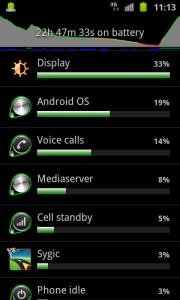
|
|
|
Nov 4 2011, 02:42 PM
|
|
Junior Member
60 posts Joined: Jun 2011
|
ack just started to root my phone...after i get into odin mode and connect by usb to computer, it says device driver software was not successfully installed. Does anyone know where i can get the driver installer?
This post has been edited by toweroak: Nov 4 2011, 02:49 PM |
|
|
|
|
|
Nov 4 2011, 02:53 PM
|

Junior Member
63 posts Joined: Sep 2011
|
QUOTE(toweroak @ Nov 4 2011, 02:42 PM) ack just started to root my phone...after i get into odin mode and connect by usb to computer, it says device driver software was not successfully installed. Does anyone know where i can get the driver installer? Google "samsung kies", install the whole package. But remember to close kies before continuing. |
|
|
Nov 4 2011, 03:14 PM
|

Junior Member
421 posts Joined: Jan 2005 From: Penang
|
my i9100g on anroid 2.3.5 nvr success to latest kies with usb.... perhaps kies not ready to sync with 2.3.5
|
|
|
Nov 4 2011, 03:27 PM
|

Senior Member
1,205 posts Joined: Sep 2007
|
sgs2 with or without G is better?
|
|
|
Nov 4 2011, 03:49 PM
|
|
Junior Member
421 posts Joined: Jan 2005 From: Penang
|
QUOTE(loon1983 @ Nov 4 2011, 03:27 PM) sgs2 with or without G is better? if u dun want to flash this and that, then G. |
|
|
Nov 4 2011, 04:34 PM
|
|
Junior Member
63 posts Joined: Sep 2011
|
QUOTE(ooikl @ Nov 4 2011, 03:14 PM) my i9100g on anroid 2.3.5 nvr success to latest kies with usb.... perhaps kies not ready to sync with 2.3.5 That shouldnt be the case. That update is an official samsung firmware. You may need to update your kies, perhaps? Or repair the samsung driver? Or restart the PC?Or use MyPhoneExplorer, it support all Android phones. I use this software bcoz mine cannot connect to kies, coz i've uninstalled all stock bloatware that came with the firmware including nearly all samsung softwares. |
|
|
Nov 4 2011, 04:37 PM
|
|
Junior Member
60 posts Joined: Jun 2011
|
woo nice root successful! thank people
|
|
|
Nov 4 2011, 11:23 PM
|
|
Junior Member
421 posts Joined: Jan 2005 From: Penang
|
QUOTE(I9100G @ Nov 4 2011, 04:34 PM) That shouldnt be the case. That update is an official samsung firmware. You may need to update your kies, perhaps? Or repair the samsung driver? Or restart the PC? the kies is the latest version which i download from samsung site....I had install and uninstall for 3 times, and restart the system, connect with debug and non debug mode... no chance... how do you repair the samsung driver? |
|
|
|
|
|
Nov 5 2011, 12:20 AM
|
|
Junior Member
63 posts Joined: Sep 2011
|
QUOTE(ooikl @ Nov 4 2011, 11:23 PM) the kies is the latest version which i download from samsung site.... Open up kies, find connection trouble shooting button on the right. kies automatically reinstall the driverI had install and uninstall for 3 times, and restart the system, connect with debug and non debug mode... no chance... how do you repair the samsung driver? |
|
|
Nov 5 2011, 01:40 AM
|

Junior Member
211 posts Joined: Jan 2009 From: Malaysia
|
QUOTE(lockmun) u can unroot it back with using SuperOneClick,very easy...... so dont worry about warranty void.. errrr.... need to install that before root or after  This post has been edited by Sevenfold: Nov 5 2011, 01:42 AM |
|
|
Nov 5 2011, 06:30 AM
|
|
Junior Member
119 posts Joined: Jul 2006
|
QUOTE(I9100G @ Oct 13 2011, 12:52 PM) This is the first time I'm writing a tutorial, so please bear with me a little, key? I've had some requests and decided just to write up a simple tutorial. Although I must stress out that flashing your phone might void warranty, and I'm NOT in anyway an expert and I can't guarantee you everything will work out. I'm NOT going to take any responsibility if you permanently bricked your phone. Although my experience says, it is very hard to really brick a Galaxy SII. Need some advice bro. I pulled the firmware from xda ( i think u the one who put up the link to multiupload).Edit: New DZKJ2 firmware is now available, but please find the original kernel-only files first I used Kies to update my firmware, then using the file from multiupload, I extract the zImage and made into a .tar. I flash with the previous rooted kernel...ok... have yellow triange... but when i flash again with the kernel built from extracted zImage, Odin just sit there for some time and not responding, its checking file and nothing happen. So I yank out the cable and after that I get a logo with a phone and pc and says not connecting..... use USB jig also dont go away... So i put back your multiupload file, and then pit files and I flash again even though got that logo above, success, it come back alive... Not sure if extract zImage and making a .tar archive from it is right way to do this. I inspect previous stock kernel, its just a rebuild from zImage extract from the K1 firmware. What possibly u think I miss out? Waa pun pening lo... maybe something fundamental I miss...sorry I am very noob to Android, just 3 weeks. Anyway here is the kernel file i made...donno if its of use for inspection .. Any advice is highly appreciated. If its you the same person in xda too, salute.  http://www.multiupload.com/36PP1WZSUS Added on November 5, 2011, 7:55 am QUOTE(premk71 @ Nov 5 2011, 06:30 AM) Need some advice bro. I pulled the firmware from xda ( i think u the one who put up the link to multiupload). ha ha ha noob mistake, need repacking....will read it firstI used Kies to update my firmware, then using the file from multiupload, I extract the zImage and made into a .tar. I flash with the previous rooted kernel...ok... have yellow triange... but when i flash again with the kernel built from extracted zImage, Odin just sit there for some time and not responding, its checking file and nothing happen. So I yank out the cable and after that I get a logo with a phone and pc and says not connecting..... use USB jig also dont go away... So i put back your multiupload file, and then pit files and I flash again even though got that logo above, success, it come back alive... Not sure if extract zImage and making a .tar archive from it is right way to do this. I inspect previous stock kernel, its just a rebuild from zImage extract from the K1 firmware. What possibly u think I miss out? Waa pun pening lo... maybe something fundamental I miss...sorry I am very noob to Android, just 3 weeks. Anyway here is the kernel file i made...donno if its of use for inspection .. Any advice is highly appreciated. If its you the same person in xda too, salute. http://www.multiupload.com/36PP1WZSUS This post has been edited by premk71: Nov 5 2011, 07:55 AM |
|
|
Nov 5 2011, 07:58 AM
|
|
Junior Member
278 posts Joined: Aug 2006
|
Finally rooted
This post has been edited by freyria182: Nov 5 2011, 08:56 AM |
|
|
Nov 5 2011, 09:16 AM
|
|
Junior Member
421 posts Joined: Jan 2005 From: Penang
|
QUOTE(I9100G @ Nov 5 2011, 12:20 AM) Open up kies, find connection trouble shooting button on the right. kies automatically reinstall the driver what is your kies version?I am running at 2.0.3.11082_152 |
|
|
Nov 5 2011, 03:33 PM
|

Senior Member
2,142 posts Joined: Jan 2008 From: who wants to know? 
|
so have anyone got the original kernel only for DZKJ2 firmware file yet...
|
|
|
Nov 5 2011, 06:05 PM
|
|
Junior Member
119 posts Joined: Jul 2006
|
QUOTE(fuzore @ Nov 5 2011, 03:33 PM) so have anyone got the original kernel only for DZKJ2 firmware file yet... Tak ader. None. Still searching. |
| Change to: |  0.0182sec 0.0182sec
 0.49 0.49
 6 queries 6 queries
 GZIP Disabled GZIP Disabled
Time is now: 9th December 2025 - 05:38 PM |
 Quote
Quote