Welcome Guest ( Log In | Register )

Bump Topic Topic Closed RSS Feed

Outline · [ Standard ] · Linear+

 Tp Link TL-MR3420 3G/3.75G router owner club V1

views
     
rootlinux
post May 10 2012, 01:00 AM

Enthusiast
*****
Senior Member
898 posts

Joined: Jan 2003
From: ph/sbj/slgr
I got my 2nd MR3420 today as I think I bricked my 1st MR3420 by performed a reset/reset to default in OpenWRT Backfire 10.03.1 version.

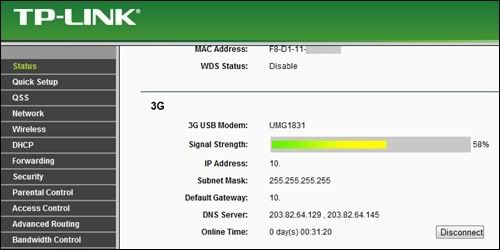
I am using Huawei UMG1831 with MR3420. From booting up the MR3420 to connecting to Celcom 3G Broadband mLite, it took 4-5 minutes. Firmware is 3.12.8 Build 110418 Rel.43954n. I am getting this message below: -

Get SIM PIN status failed, reset usb deviece.

user posted image

The QoS of Celcom 3G Broadband mLite is capped at 3.6Mbps download and 512kbps upload from MDMA.

user posted image

user posted image

user posted image

user posted image

user posted image

rootlinux
post May 11 2012, 01:14 AM

Enthusiast
*****
Senior Member
898 posts

Joined: Jan 2003
From: ph/sbj/slgr
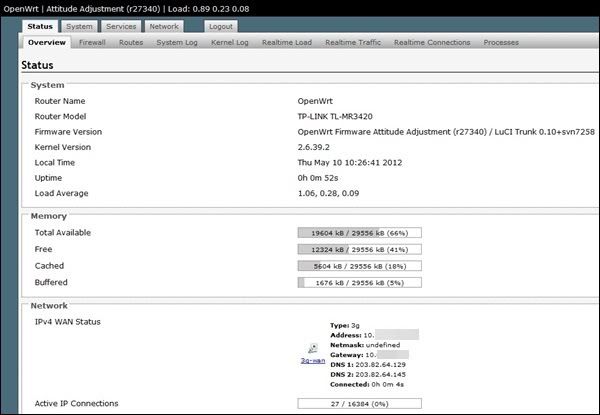
Today I flash MR3420 to OpenWRT and I am amazed with the 3G connection. 3G completed the connection within 52s.

user posted image

Speed is good too.

user posted image

user posted image

However, this release of OpenWRT was too old and the WiFi interface is buggy. Notebook and phone can see it but unable to connect.

This post has been edited by rootlinux: May 11 2012, 01:14 AM
rootlinux
post Jun 20 2012, 04:55 PM

Enthusiast
*****
Senior Member
898 posts

Joined: Jan 2003
From: ph/sbj/slgr
QUOTE(chancheehau @ Jun 20 2012, 02:36 PM)
any one use TPLink 3420 with Huawei UMG1831? it works fine?
*
yes, both TL-MR3420 & UMG1831 works great.

i also flash TL-MR3420 with OpenWrt and works great with UMG1831 too.

hope this answer help you. rclxm9.gif rclxm9.gif rclxm9.gif


Added on June 20, 2012, 4:57 pm
QUOTE(Karmaneraka @ Jun 18 2012, 07:22 PM)
Sorry for asking here...
I bought TP-Link router TL-MR3420  yesterday..
But untill now i still cant get access of internet using this router...
I use it with streamyx line.. Not 3G.. the main router was ok..
Just this TL-MR3420 router still not working..
Can anyone tell me how to setup it with proper way using steramyx line,,
*
do u connect TL-MR3420 to a ADSL modem only? TL-MR3420 WAN port to ADSL modem LAN port.

then u configure the TL-MR3420 WAN to use PPPoE. the default WAN is configured to use 3G for TL-MR3420 if I remember correctly.

This post has been edited by rootlinux: Jun 20 2012, 04:57 PM

rootlinux
post Jul 2 2012, 03:18 AM

Enthusiast
*****
Senior Member
898 posts

Joined: Jan 2003
From: ph/sbj/slgr
QUOTE(pcbase @ Jul 1 2012, 12:57 PM)
You can make it as a 3G router with OpenWrt.
rootlinux
post Jul 3 2012, 05:10 PM

Enthusiast
*****
Senior Member
898 posts

Joined: Jan 2003
From: ph/sbj/slgr
QUOTE(kenjixx @ Jul 2 2012, 02:58 PM)
please think carefully because it has the risk of bricking your device if you are not careful
the function it offer is great but only if you are willing to learn
if you are ready to take the risk
follow this guide to get openwrt for TL-WR1043ND
http://klseet.com/index.php?option=com_con...=147&Itemid=125
*
then u need to follow this guide below to use 3g/UMTS USB Dongle for WAN connection

i had both 3420 and 1043 working with OpenWrt using Huawei UMG1831

please note that the wireless-N speed is 130Mbps in OpenWrt
rootlinux
post Jul 16 2012, 12:54 PM

Enthusiast
*****
Senior Member
898 posts

Joined: Jan 2003
From: ph/sbj/slgr
QUOTE(nakTT @ Jul 16 2012, 12:48 PM)
Any idea how can we tell that it is because of the channel?
*
Download inSSIDer here - http://www.metageek.net/products/inssider-wifi-scanner/ - to inspect WiFi channel availability

Recommended channel are 1, 6 or 11 however if your house is heavily WiFi-ed, you have to test all channel to get a non-interference channel.

rootlinux
post Jul 23 2012, 01:25 AM

Enthusiast
*****
Senior Member
898 posts

Joined: Jan 2003
From: ph/sbj/slgr
QUOTE(yeop @ Jul 22 2012, 02:55 PM)
manage to install openwrt to my mr3020 smile.gif + openvpn + extroot

http://imgur.com/a/lusag
is e355 connect automatically to internet while plug into pc? i think need to disable wifi and 3g auto connect 1st, then can try use it on mr3420?
*
nice one...can u share "free" output? thank u.

rootlinux
post Jul 23 2012, 03:50 PM

Enthusiast
*****
Senior Member
898 posts

Joined: Jan 2003
From: ph/sbj/slgr
QUOTE(yeop @ Jul 23 2012, 03:23 PM)
» Click to show Spoiler - click again to hide... «


you pro rite biggrin.gif ? my question is swap will be use when only when all the 30mb ram used?
*
I m not pro...I have MR3420 with OpenWrt + OpenVPN (no extroot) and after connect ( manuall using openvpn --config /etc/openvpn/server1.ovpn ) to an OpenVPN server, the MR3420 reboot by itself


rootlinux
post Jul 30 2012, 03:52 PM

Enthusiast
*****
Senior Member
898 posts

Joined: Jan 2003
From: ph/sbj/slgr
QUOTE(nilocz @ Jul 30 2012, 03:47 PM)
hi all,

i'm using mr3420 + e372
can i used the mobile partner or MDMA software to connect  to network instead ?
*
u cant...u have to connect the e372 to your notebook/pc then run mobile partner/mdma.
rootlinux
post Aug 3 2012, 03:12 PM

Enthusiast
*****
Senior Member
898 posts

Joined: Jan 2003
From: ph/sbj/slgr
QUOTE(xernix @ Aug 2 2012, 10:14 PM)
Don't go for Backfire since the failsafe is not working. If something goes you'll brick your router. Better stick with Trunk build. But trunk does not come with Luci interface pre-installed and you need to install it manually.
*
that is very true, i bricked my 3420 with backfire and luckily with some soldering and a USB debugger I can debrick it.
rootlinux
post Aug 22 2012, 11:01 AM

Enthusiast
*****
Senior Member
898 posts

Joined: Jan 2003
From: ph/sbj/slgr
QUOTE(yoez362 @ Aug 17 2012, 06:28 PM)
Help Me..Im still newbies..
Tp-link 3420.openwrt,trunk(none).
How to solve openwrt that do not has webgui?
I have try many way.but nothing..
hope someone can help.
*
You need to install LuCI
rootlinux
post Sep 11 2012, 12:49 PM

Enthusiast
*****
Senior Member
898 posts

Joined: Jan 2003
From: ph/sbj/slgr
QUOTE(malaysianbest @ Sep 11 2012, 10:09 AM)
Hi there. I try to move huge amount of movies more than 10GB for each file via wireless from my pc to my laptop but the speed is less than 1MB/s and this router(tplink tl mr3420) claims 300Mbps of speed. Is there any tweak or setting to make faster speed ?
*
300Mbps drool.gif drool.gif drool.gif

u need to know a lot of factor


rootlinux
post Sep 18 2012, 11:36 PM

Enthusiast
*****
Senior Member
898 posts

Joined: Jan 2003
From: ph/sbj/slgr
QUOTE(kizwan @ Sep 14 2012, 12:26 PM)
MR3420 settings for 300Mbit/s speed (40MHz channel width). In case you guys unable to get 300Mbit/s connection, use this settings. Only for OpenWRT firmware & only with wireless card that support 40MHz channel. Also for 802.11n connection, security mode must WPA-AES or WPA2-AES (WEP & WPA-TKIP are not supported).

user posted image

Settings:-
(Set Channel = Auto)
user posted image

(Set "HT Mode" = "40MHz 2nd channel above")
user posted image
*
thank u, my win7 notebook wifi can connect at 300Mbps after follow this config.
rootlinux
post Nov 1 2012, 01:16 AM

Enthusiast
*****
Senior Member
898 posts

Joined: Jan 2003
From: ph/sbj/slgr
QUOTE(chuahcs79 @ Oct 31 2012, 11:29 PM)
well, sorry as i mention before many times, i am super noob in linux,

any detail on openwrt, u need to google search, or check with some pro here,.  notworthy.gif

for me personally i dont mind what signal it is, as long as stable speed at certain range


Added on October 31, 2012, 11:42 pm

found your answer -> here

10. To check signal strength run:

CODE
# gcom -d /dev/ttyUSBy   (where y is the appropriate tty port number)

*
Please note that u cant run 'gcom -d /dev/ttyUSBy' when u have 3-wan connected. You need to stop the 3g-wan from GUI then run 'gcom -d /dev/ttyUSBy'
rootlinux
post Nov 1 2012, 01:45 AM

Enthusiast
*****
Senior Member
898 posts

Joined: Jan 2003
From: ph/sbj/slgr
QUOTE(chuahcs79 @ Nov 1 2012, 01:23 AM)
yea u are right

but after disconnect signal confirm is low compare to connected time

[attachmentid=3131446]
*
just found out, u can use the below command when 3g-wan is connected: -

root@OpenWrt:~# comgt sig /dev/ttyUSB0
Trying list of devices
Signal Quality: 19,99

or this 'comgt info /dev/ttyUSB0'

*above is connected to Celcom


rootlinux
post Nov 1 2012, 02:05 AM

Enthusiast
*****
Senior Member
898 posts

Joined: Jan 2003
From: ph/sbj/slgr
QUOTE(chuahcs79 @ Nov 1 2012, 01:56 AM)
it works  thumbup.gif

CODE
comgt sig /dev/ttyUSB0  = red line

CODE
comgt info /dev/ttyUSB0  = blue line

[attachmentid=3131500]
*
quick question, can ur OpenWrt detect ZTE MF680? thank u and good nite
rootlinux
post Nov 1 2012, 10:57 AM

Enthusiast
*****
Senior Member
898 posts

Joined: Jan 2003
From: ph/sbj/slgr
QUOTE(ajoi57 @ Nov 1 2012, 02:09 AM)
I dont know what im doing wrong, i already success update list, done installing and follow next step base on video chuah upload. and now i cant even access my 192.168.1.1.. any idea why i cant open Luci Gui?
*
it could be ur router is bricked. u may try this step to unbrick ur router without serial: -

https://forum.openwrt.org/viewtopic.php?id=38953


This post has been edited by rootlinux: Nov 1 2012, 10:57 AM
rootlinux
post Nov 1 2012, 02:29 PM

Enthusiast
*****
Senior Member
898 posts

Joined: Jan 2003
From: ph/sbj/slgr
QUOTE(chuahcs79 @ Nov 1 2012, 01:55 PM)
yea i forget about this point  doh.gif
*
no worries. i had once bricked MR3420 with OpenWrt. a fren help me to solder the serial pin and i debrick successfully.

rootlinux
post Nov 1 2012, 03:17 PM

Enthusiast
*****
Senior Member
898 posts

Joined: Jan 2003
From: ph/sbj/slgr
QUOTE(chuahcs79 @ Nov 1 2012, 02:31 PM)
well i guess need to be real careful when flashing openwrt,..  nod.gif
*
my advise is never flash openwrt via wireless
flash openwrt using LAN and configure static IP instead of DHCP

rootlinux
post Nov 1 2012, 09:37 PM

Enthusiast
*****
Senior Member
898 posts

Joined: Jan 2003
From: ph/sbj/slgr
QUOTE(noobandroid @ Nov 1 2012, 09:09 PM)
yeah, put into putty but no respond, type help to see usable list, no # gcom insde
*
make sure u have the following installed: -

comgt
kmod-usb-serial
usb-modeswitch
usb-modeswitch-data


2 Pages  1 2 >Top
Topic ClosedOptions
 

Change to:
| Lo-Fi Version
0.0240sec    0.43    7 queries    GZIP Disabled
Time is now: 8th December 2025 - 04:08 AM