

QUOTE(chuahcs79 @ Aug 5 2012, 03:33 PM)
so far , i have try E372, E353, E1762, E1550, E1552,ZTE MF190, ZTE MF100, ZTE MF627, Option Icon 505...
alll working

can i know which firmware u use ? TL-MR3420_V1_120523 ?alll working
Thank you.

Tp Link TL-MR3420 3G/3.75G router owner club V1
|
|
 Aug 6 2012, 03:28 PM Aug 6 2012, 03:28 PM
Return to original view | Post
#1
|
 
Junior Member
257 posts Joined: Dec 2007 
|
QUOTE(chuahcs79 @ Aug 5 2012, 03:33 PM) so far , i have try E372, E353, E1762, E1550, E1552,ZTE MF190, ZTE MF100, ZTE MF627, Option Icon 505... can i know which firmware u use ? TL-MR3420_V1_120523 ?alll working Thank you. |
|
|
|
|
|
Aug 6 2012, 03:50 PM
Return to original view | Post
#2
|
|
Junior Member
257 posts Joined: Dec 2007
|
QUOTE(chuahcs79 @ Aug 6 2012, 03:36 PM) i use this firmnware oic.with E372 ( maxis set ),.. working well and wifi dont have any down time at all [attachmentid=2986147] Thank you. Added on August 6, 2012, 5:16 pm QUOTE(chuahcs79 @ Aug 6 2012, 03:36 PM) i use this firmnware I just buy it and try ...with E372 ( maxis set ),.. working well and wifi dont have any down time at all [attachmentid=2986147] the speed is same with mikrotik speed no big different.  Thank you.  This post has been edited by kaisam: Aug 6 2012, 05:16 PM |
|
|
Aug 6 2012, 05:47 PM
Return to original view | Post
#3
|
|
Junior Member
257 posts Joined: Dec 2007
|
QUOTE(chuahcs79 @ Aug 6 2012, 05:28 PM) which version of firmware u use ? im use firmware version TL-MR3420_V1_120523.did u try the soya box concept ? im just try with antenna & without antenna. The speed just no big different. not try soya box concept. coz no antenna signal 65% and with antenna signal 99% Thank you. |
|
|
Aug 6 2012, 06:05 PM
Return to original view | Post
#4
|
|
Junior Member
257 posts Joined: Dec 2007
|
QUOTE(chuahcs79 @ Aug 6 2012, 05:53 PM) yea try with soya bean box,.. might turn out better,. maybe try later.how u try your speed ? download speed = real speed,.. use speedtest.net to test. Thank you.  |
|
|
Aug 6 2012, 06:59 PM
Return to original view | Post
#5
|
|
Junior Member
257 posts Joined: Dec 2007
|
QUOTE(chuahcs79 @ Aug 6 2012, 06:34 PM) u should try to download using internet download manager to check your speed, oic.speedtest = not very accurate speed real speed = download speed I'm try download speed then let u know. Thank you. |
|
|
Aug 7 2012, 11:01 AM
Return to original view | Post
#6
|
|
Junior Member
257 posts Joined: Dec 2007
|
QUOTE(chuahcs79 @ Aug 6 2012, 06:34 PM) u should try to download using internet download manager to check your speed, today my download speed ...speedtest = not very accurate speed real speed = download speed 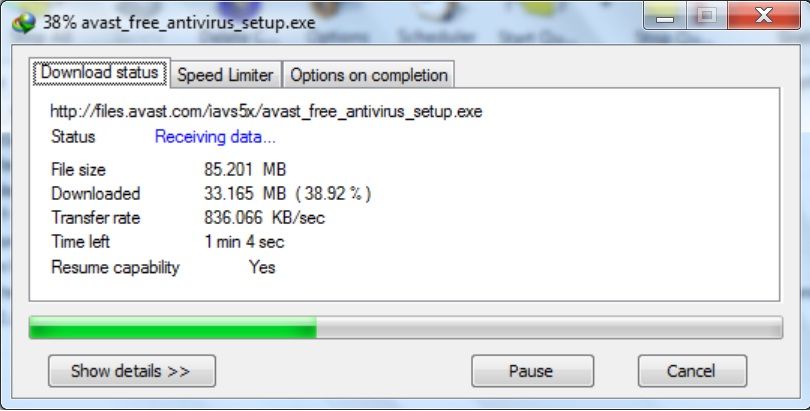 Thank you. |
|
|
|
|
|
Aug 7 2012, 03:49 PM
Return to original view | Post
#7
|
|
Junior Member
257 posts Joined: Dec 2007
|
QUOTE(chuahcs79 @ Aug 7 2012, 02:59 PM) is this better than before? yes. Thank you. |
|
|
Aug 7 2012, 08:29 PM
Return to original view | Post
#8
|
|
Junior Member
257 posts Joined: Dec 2007
|
QUOTE(chuahcs79 @ Aug 7 2012, 05:01 PM) continue tweaking a little bit more, speed might get up a bit more, u never know how to tweaking ?Thank you. |
|
|
Aug 7 2012, 08:51 PM
Return to original view | Post
#9
|
|
Junior Member
257 posts Joined: Dec 2007
|
QUOTE(chuahcs79 @ Aug 7 2012, 08:49 PM) try to download something when u adjust ti find the best direction, oic.Thank you. |
|
|
Aug 8 2012, 08:56 AM
Return to original view | Post
#10
|
|
Junior Member
257 posts Joined: Dec 2007
|
QUOTE(chuahcs79 @ Aug 7 2012, 08:54 PM) if u just adjust it for best signal, then it wont help much when u start using internet or DL something,.. oic.download speed is most accurate speed... when u found the best angle/direction, your download speed will increase and stable too Thank you. |
|
|
Aug 8 2012, 06:10 PM
Return to original view | Post
#11
|
|
Junior Member
257 posts Joined: Dec 2007
|
QUOTE(chuahcs79 @ Aug 8 2012, 11:03 AM) Hope it helps,. maxis can download BT ?mine 1 cant download.  u got any ideal to download ? Thank you. |
|
|
Aug 8 2012, 09:07 PM
Return to original view | Post
#12
|
|
Junior Member
257 posts Joined: Dec 2007
|
QUOTE(fruitie @ Aug 8 2012, 06:12 PM) Nope, the port only opens at 3.00 - 7.00 a.m. oic.Thank you. Added on August 8, 2012, 9:07 pm QUOTE(blacktubi @ Aug 8 2012, 06:28 PM) You can use a VPN Thank you. Ya, I mean a good VPN not those VPN for special usage BolehVPN is good You can use a seedbox service Both is cheap which start from RM15 per month This post has been edited by kaisam: Aug 8 2012, 09:07 PM |
|
|
Aug 17 2012, 10:48 AM
Return to original view | Post
#13
|
|
Junior Member
257 posts Joined: Dec 2007
|
QUOTE(chuahcs79 @ Aug 16 2012, 09:57 PM) the new version 2 wireless antenna = 5dBi x 2 100mW output power + 3dBi x 2 old v1 wireless antenna = 3dBi x 2 stronger wireless signal coverages and 100mW output power + 5dBi x 2 no big different .  Thank you. |
|
|
|
|
|
Aug 25 2012, 11:30 AM
Return to original view | Post
#14
|
|
Junior Member
257 posts Joined: Dec 2007
|
QUOTE(mynewuser @ Aug 25 2012, 07:05 AM) Hi, can I use P1 USB adapter with this device? P1 is 4G.TP Link TL-MR3420 is 3G/3.75G router so can't use it. Thank you. |
|
|
Aug 25 2012, 01:32 PM
Return to original view | Post
#15
|
|
Junior Member
257 posts Joined: Dec 2007
|
QUOTE(mynewuser @ Aug 25 2012, 11:43 AM) Any way to convert the P1 USB modem become WIFI hotspot? b4 i'm also use P1 USB modem, can't find router can support P1 USB modem.Only can use pc for sharing out and be a wifi hotspot. Thank you. This post has been edited by kaisam: Aug 25 2012, 01:32 PM |
|
|
Aug 28 2012, 05:17 PM
Return to original view | Post
#16
|
|
Junior Member
257 posts Joined: Dec 2007
|
QUOTE(HexPhoenix @ Aug 28 2012, 01:32 PM) hi guys, u can try Bandwidth Control Settings.I want to ask, how do I enable QoS (Quality of Service) in TL-MR3420; all people who connect to the router wirelessly get the same share of speed and bandwidth, regardless their position from the router. Since I don't want a person hogs all the bandwidth when he sitting right beside the router while another person who sitting at more distant proximity get slower speed since he can't get signal strength at full bar. is it enabling WMM at Wireless Advance setting? Thank you. |
|
|
Aug 28 2012, 08:49 PM
Return to original view | Post
#17
|
|
Junior Member
257 posts Joined: Dec 2007
|
QUOTE(yugo23 @ Aug 28 2012, 08:10 PM) I am having big problem with this router. what ISP provider u use ? upload can reach 3MB ?I can only get up to around 0,1 MBit/s upload speed. When I plug the modem directly in my PC I get more than 3 MBit/s. Any ideas would be highly appreciated. Thank you. |
|
|
Aug 30 2012, 09:32 AM
Return to original view | Post
#18
|
|
Junior Member
257 posts Joined: Dec 2007
|
QUOTE(HexPhoenix @ Aug 29 2012, 05:37 PM) Thanks. if set with MAC filtering, only MAC address is correct then can connect. Btw, I want to limit the connection of WiFi to 15 connections; means that only 15 people can have access to my WiFi, through MAC address filtering. Is it only to set up the MAC address filtering and all is set? What about people who trying to connect and try and try and try... since they will see the network is left without password, do their attempt of connecting to the network will make the network congested? Since I'm about to set up a connection using this router like the situation above, I'm worried about the heat generated by the router during the peak hours... plus it will be equipped with a signal booster and metteor yagi 3g antenna. Do they affect my network setup? p/s: sounds impossible for those devices to interrupt the connection, but I'm preparing for the worst. I think will not make the network congested. u can put notebook cooler fan below the router. u must try then know what happen. Thank you. |
|
|
Sep 8 2012, 07:17 PM
Return to original view | Post
#19
|
|
Junior Member
257 posts Joined: Dec 2007
|
QUOTE(ddr3 @ Sep 8 2012, 02:07 PM) hw much is the price? u want ? RM150 include post laju.I got it, can sell it to u. b4 i'm buy for testing, now just keep it. Thank you. |
|
|
Sep 8 2012, 09:16 PM
Return to original view | Post
#20
|
|
Junior Member
257 posts Joined: Dec 2007
|
QUOTE(ddr3 @ Sep 8 2012, 07:21 PM) Walau bro, u buy everything to test then keep ah? Hows the performance so far? Ok? i'm buy to test the repeater mode.Then while i'm got 3G then test it also. So far so good. Thank you. Added on September 8, 2012, 9:17 pm QUOTE(chuahcs79 @ Sep 8 2012, 07:22 PM) from your note, i think the device didnt performs any better since u planning to let go ? for me is ok lar.... not so bad.Thank you. This post has been edited by kaisam: Sep 8 2012, 09:17 PM |
|
Topic ClosedOptions
|
| Change to: |  0.0548sec 0.0548sec
 0.31 0.31
 7 queries 7 queries
 GZIP Disabled GZIP Disabled
Time is now: 8th December 2025 - 03:58 AM |
 Quote
Quote