

Speed is good too.


However, this release of OpenWRT was too old and the WiFi interface is buggy. Notebook and phone can see it but unable to connect.
This post has been edited by rootlinux: May 11 2012, 01:14 AM
Tp Link TL-MR3420 3G/3.75G router owner club V1
|
|
 May 11 2012, 01:14 AM May 11 2012, 01:14 AM
|
 
Senior Member
898 posts Joined: Jan 2003 From: ph/sbj/slgr 
|
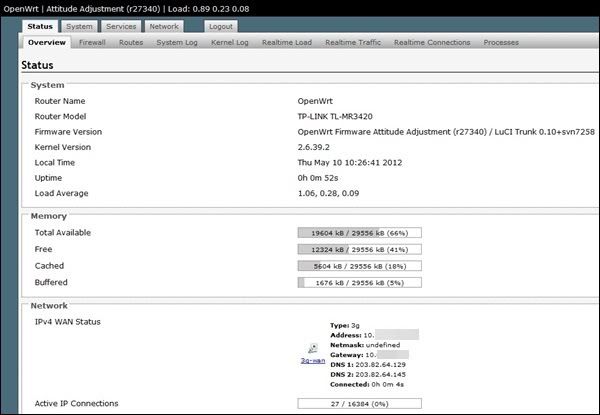
Today I flash MR3420 to OpenWRT and I am amazed with the 3G connection. 3G completed the connection within 52s.
Speed is good too. However, this release of OpenWRT was too old and the WiFi interface is buggy. Notebook and phone can see it but unable to connect. This post has been edited by rootlinux: May 11 2012, 01:14 AM |
|
|
|
|
|
May 11 2012, 06:16 AM
|

Senior Member
8,025 posts Joined: Feb 2005 From: Planet Boleland 
|
recently my MR3420 behave strangely, internet speed never exceed 3Mbps, mostly max out at 2Mbps
frustrated, done a FW upgrade and after the upgrade, speed increased tremendously but i only upgrade the FW and din do Factory Default and Reboot to use back my previous settings   This post has been edited by digilife: May 11 2012, 08:31 PM |
|
|
May 11 2012, 04:30 PM
|

Junior Member
65 posts Joined: Jul 2009
|
QUOTE(digilife @ May 11 2012, 06:16 AM) recently my MR3420 behave strangely, internet speed never exceed 3Mbps, mostly max out at 2Mbps ehm i think you have switched your "quote" between latest firmware and previous firmware am i right?frustrated, done a FW upgrade and after the upgrade, speed increased tremendously but i only upgrade the FW and din do Factory Default and Reboot to use back my previous settings [attachmentid=2835212]  the new one you can get from tp link singapore |
|
|
May 11 2012, 06:34 PM
|
|
Senior Member
8,025 posts Joined: Feb 2005 From: Planet Boleland
|
QUOTE(shinichi87 @ May 11 2012, 04:30 PM) ehm i think you have switched your "quote" between latest firmware and previous firmware am i right? which quote are u referring to? the new one you can get from tp link singapore  i got it from the TP Link site, use MR3420, not MR3220 as a forumer mentioned not to use a FW on different Hardware........ |
|
|
May 11 2012, 07:16 PM
|
 
Elite
6,931 posts Joined: Apr 2011 From: Bolehland for sure ^_^
|
QUOTE(digilife @ May 11 2012, 06:16 AM) recently my MR3420 behave strangely, internet speed never exceed 3Mbps, mostly max out at 2Mbps so it just refresh the firmware ? frustrated, done a FW upgrade and after the upgrade, speed increased tremendously but i only upgrade the FW and din do Factory Default and Reboot to use back my previous settings [attachmentid=2835212]  |
|
|
May 11 2012, 07:19 PM
|
|
Junior Member
65 posts Joined: Jul 2009
|
QUOTE(digilife @ May 11 2012, 06:34 PM) which quote are u referring to? i mean.. the one that you colored red in your picture. 110617 should be newer version of firmware. i got it from the TP Link site, use MR3420, not MR3220 as a forumer mentioned not to use a FW on different Hardware........ |
|
|
|
|
|
May 11 2012, 07:34 PM
|
|
Senior Member
8,025 posts Joined: Feb 2005 From: Planet Boleland
|
QUOTE(shinichi87 @ May 11 2012, 07:19 PM) i mean.. the one that you colored red in your picture. 110617 should be newer version of firmware. no, the Rel.43954n is the latest in the website, u go and see yourself  the top one marked with the latest FW  |
|
|
May 11 2012, 07:44 PM
|
|
Junior Member
65 posts Joined: Jul 2009
|
oh. i thought you download from singapore site. because the latest one there is 110617. btw, i have tried the latest 110418 from tp link .com.. it is not as good as 110617 that im using right now. this one rarely disconnected from internet. stays connected quite long
|
|
|
May 11 2012, 07:54 PM
|

Senior Member
826 posts Joined: Jan 2009
|
Latest firmware at TP-Link Malaysia also 110617.
http://www.tp-link.com.my/support/download...ersion=V1#tbl_j http://www.tp-link.sg/support/download/?mo...ersion=V1#tbl_j |
|
|
May 11 2012, 07:59 PM
|
|
Elite
6,931 posts Joined: Apr 2011 From: Bolehland for sure ^_^
|
QUOTE(kizwan @ May 11 2012, 07:54 PM) Latest firmware at TP-Link Malaysia also 110617. Thanks for your link,http://www.tp-link.com.my/support/download...ersion=V1#tbl_j http://www.tp-link.sg/support/download/?mo...ersion=V1#tbl_j just updated first post  |
|
|
May 11 2012, 08:05 PM
|
|
Senior Member
826 posts Joined: Jan 2009
|
QUOTE(digilife @ May 11 2012, 06:16 AM) recently my MR3420 behave strangely, internet speed never exceed 3Mbps, mostly max out at 2Mbps You should censored/cover the MAC address. It's like your IC number.frustrated, done a FW upgrade and after the upgrade, speed increased tremendously but i only upgrade the FW and din do Factory Default and Reboot to use back my previous settings [attachmentid=2835212] |
|
|
May 11 2012, 08:32 PM
|
|
Senior Member
8,025 posts Joined: Feb 2005 From: Planet Boleland
|
QUOTE(kizwan @ May 11 2012, 08:05 PM) You should censored/cover the MAC address. It's like your IC number. thanks for the kind advice |
|
|
May 12 2012, 01:33 AM
|

Senior Member
1,693 posts Joined: Sep 2009
|
i have intermittent connectivity on wireless...currently using ch6, what other channels are recommended?
|
|
|
|
|
|
May 12 2012, 01:42 AM
|
 
Staff
72,820 posts Joined: Sep 2005 From: KUL 
|
QUOTE(wanttobuylaptop @ May 12 2012, 01:33 AM) i have intermittent connectivity on wireless...currently using ch6, what other channels are recommended? I'm not sure but channel 6 and wireless b/g works well for months.  Also, MTU might help. How to determine your optimum MTU settings? Read here: http://www.dslreports.com/faq/5793 Change the max idle time to 0. Go to http://192.168.1.1 page then navigate to Network and collapse the branch out to 3G. From there, you can see it under Connection mode. I started with MTU, then set the max idle time but still having on and off connection loss on my iPad. Then Googled and found out Channel 6 is the best. Tried and works flawlessly. |
|
|
May 12 2012, 01:52 AM
|
|
Junior Member
96 posts Joined: Sep 2008
|
QUOTE(rootlinux @ May 11 2012, 01:14 AM) Today I flash MR3420 to OpenWRT and I am amazed with the 3G connection. 3G completed the connection within 52s. This is where I usually get latest compiled version of Openwrt Trunk build: http://dss-international.org/openwrt/firmw...runk/unleashed/Speed is good too. However, this release of OpenWRT was too old and the WiFi interface is buggy. Notebook and phone can see it but unable to connect. Currently at kernel 3.2.x |
|
|
May 12 2012, 03:25 AM
|
|
Elite
6,931 posts Joined: Apr 2011 From: Bolehland for sure ^_^
|
QUOTE(xernix @ May 12 2012, 01:52 AM) This is where I usually get latest compiled version of Openwrt Trunk build: http://dss-international.org/openwrt/firmw...runk/unleashed/ Latest TL-MR3420 firmware is doing a lot better job, dialing E353 modem faster than old firmware Currently at kernel 3.2.x  and wireless is much stable even though on auto channel  |
|
|
May 12 2012, 07:16 AM
|
|
Senior Member
8,025 posts Joined: Feb 2005 From: Planet Boleland
|
QUOTE(chuahcs79 @ May 12 2012, 03:25 AM) Latest TL-MR3420 firmware is doing a lot better job, dialing E353 modem faster than old firmware meaning, no Open WRT as for now? and wireless is much stable even though on auto channel btw, signal is low even on a Icon505M, but MF600 do the job well Icon505M tends to fall back to GPRS, green light but MF600 keep constant on HSDPA(mvpn-ing)........ 
|
|
|
May 12 2012, 07:46 AM
|

Senior Member
898 posts Joined: Aug 2006 From: Kajang, Selangor
|
QUOTE(kizwan @ May 11 2012, 07:54 PM) Latest firmware at TP-Link Malaysia also 110617. alaaaaa.... both tp-link malaysia n singapore is down?http://www.tp-link.com.my/support/download...ersion=V1#tbl_j http://www.tp-link.sg/support/download/?mo...ersion=V1#tbl_j i cant go the website just now  |
|
|
May 12 2012, 09:17 AM
|
|
Staff
72,820 posts Joined: Sep 2005 From: KUL
|
QUOTE(cruxidex @ May 12 2012, 07:46 AM) alaaaaa.... both tp-link malaysia n singapore is down? Looks like I'm not alone, I cannot access since the first day I bought this router. i cant go the website just now Others can.  I hide my proxy, then can access already. |
|
|
May 12 2012, 09:20 AM
|
|
Senior Member
8,025 posts Joined: Feb 2005 From: Planet Boleland
|
QUOTE(fruitie @ May 12 2012, 09:17 AM) Looks like I'm not alone, I cannot access since the first day I bought this router. all these while u are using proxy?Others can. I hide my proxy, then can access already. which proxy are u using? fast or not? thanks |
|
Topic ClosedOptions
|
| Change to: |  0.0202sec 0.0202sec
 0.61 0.61
 6 queries 6 queries
 GZIP Disabled GZIP Disabled
Time is now: 10th December 2025 - 04:21 AM |
 Quote
Quote