Outline ·
[ Standard ] ·
Linear+
Tp Link TL-MR3420 3G/3.75G router owner club V1
|
chulk
|
 Nov 15 2012, 11:53 AM Nov 15 2012, 11:53 AM
|

|
QUOTE(digilife @ Nov 15 2012, 11:46 AM) No4, use long LAN Cable to PC, or my better recommendation, use another Router , LAN out from Router 1 which is near Antenna ( use a long CAT6e cable to LAN out into the WAN of a pure Router ( MikroTik ) in the middle of the house where the Ipad/Iphone are located. Then you can LAN out from MikroTik into PC room via LAN if WiFi in PC room is not strong. But MikroTik should be very strong enough as it can be detected 6 floors without external antenna. lol not easy to find mikrotik router..... sifu can you tell be beside no.4 which is the 2nd best option and which is the worst? This post has been edited by chulk: Nov 15 2012, 11:54 AM |
|
|
|
|
|
chulk
|
Nov 15 2012, 02:43 PM
|
|
|
QUOTE(hairul @ Nov 15 2012, 02:28 PM) If no 4, better use homeplug. Eazy installation but need sone fund. Btw, homeplug work on single phase.
Added on November 15, 2012, 2:32 pmRouter still can use. Only dont know how to use command for router to download the proto3g package. If use ubuntu easy to download and install package... Flash back to stock firmware. homeplue bagus ke? whats the cons? single phase then? |
|
|
|
|
|
chulk
|
Nov 15 2012, 05:03 PM
|
|
|
QUOTE(blacktubi @ Nov 15 2012, 04:21 PM) I using homeplug, no ping and speed difference compared to LAN. thanks. sifu so which option you choose out of 4? in fact that building that block my signal is a abandon house, my option would be demolish it if possible...... |
|
|
|
|
|
chulk
|
Nov 15 2012, 05:36 PM
|
|
|
mean 2 router (1 for usb modem, another for wifi access point) and 3 home plugs?
This post has been edited by chulk: Nov 15 2012, 05:36 PM
|
|
|
|
|
|
chulk
|
Nov 15 2012, 06:24 PM
|
|
|
just wondering, how much diff bet wifi and cable connection? assuming wifi with 3 bar.
Added on November 15, 2012, 6:25 pmQUOTE(hairul @ Nov 15 2012, 06:20 PM) You can use any router for extender. No need bought router with modem. Should be cheaper... But for extender, better buy with many LAN port, not just one.
Added on November 15, 2012, 6:22 pmThis is similar to option No 4  lol mean i have to use 2 MR3420.......  This post has been edited by chulk: Nov 15 2012, 06:25 PM This post has been edited by chulk: Nov 15 2012, 06:25 PM |
|
|
|
|
|
chulk
|
Nov 15 2012, 06:41 PM
|
|
|
QUOTE(digilife @ Nov 15 2012, 06:40 PM) Second router use MikroTik is the best option.  the cost of 3G boardband ownership is higher than unifi oledi... 
Added on November 15, 2012, 6:43 pmQUOTE(blacktubi @ Nov 15 2012, 06:27 PM) No need to be 2 MR3420 1 MR3420 for the 3G router Another one just any Wireless Access Point or Any Wireless Router will do  Or you can buy a wireless extender homeplug but a router will do the job better for sure  QUOTE(hairul @ Nov 15 2012, 06:29 PM) Nope.. 1 MR3420 is enuff. Another Router is just Normal Router (without for 3G or ADSL) Unless Normal Router for your Network Extender more expensive than MR3420... 3420 only cost rm84, not much diff from those without usb (3G modem)....better stick to 3420 This post has been edited by chulk: Nov 15 2012, 06:46 PM |
|
|
|
|
|
chulk
|
Nov 16 2012, 08:23 AM
|
|
|
QUOTE(sakuragi @ Nov 16 2012, 12:48 AM) just get mine 3420v2 today.... searching high/low at plaza lowyat for the good deal...finally [attachmentid=3158043] their list price is rm78? or after bargain then rm78? and thats why i rather use 2 3420 lol. |
|
|
|
|
|
chulk
|
Nov 16 2012, 11:07 PM
|
|
|
QUOTE(blacktubi @ Nov 16 2012, 02:24 PM) Please refer to 3G modem WIKI thread Hardware modification section http://forum.lowyat.net/index.php?showtopic=2584921&hl=i found that most of us getting speed about 15mbps +- max. may i know anyone able to obtain 20-30 mbps, stable speed? |
|
|
|
|
|
chulk
|
Nov 16 2012, 11:20 PM
|
|
|
QUOTE(blacktubi @ Nov 16 2012, 11:11 PM) Only a few Previously KKW but not since he moved Fruitie but now his location more and more congested Chuahcs79 night time only opteron82 very very high speed Anyway what app you used to draw your house plan that day  well now i need to find a way to place the modem + fan + power cable on the wall, a wall shelf maybe...... the fan i using now are too powerful and freaking noisy.... can you imagine the fan at front door but i can hear the noise at kitchen. going to get a usb fan to replace it. by the way, need to do a nice cable management for antenna cable. you know.... there is nothing to mount the cable on the modem.... This post has been edited by chulk: Nov 16 2012, 11:21 PM |
|
|
|
|
|
chulk
|
Nov 16 2012, 11:32 PM
|
|
|
QUOTE(chuahcs79 @ Nov 16 2012, 11:26 PM) this is where your imagination and creation step in. I am using usb fan with 1.0A power plug adapter. And no more noisy sound i still wonder how you able to obtain 42 mbps.... |
|
|
|
|
|
chulk
|
Nov 17 2012, 08:01 AM
|
|
|
QUOTE(chuahcs79 @ Nov 17 2012, 02:49 AM) the 42Mbps is obtain @ penang road in georgetown at 4~5am with zte mf680 + tl-mr3420 one hit wonder?
Added on November 17, 2012, 8:07 amQUOTE(blacktubi @ Nov 16 2012, 11:11 PM) Only a few Previously KKW but not since he moved Fruitie but now his location more and more congested Chuahcs79 night time only opteron82 very very high speed Anyway what app you used to draw your house plan that day my another problem is how am i going to install the antenna on the roof, and drill a hole for the cable. see the tower? 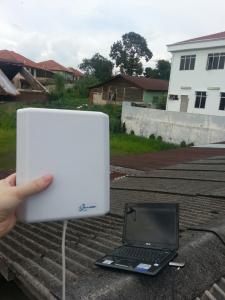
 This post has been edited by chulk: Nov 17 2012, 08:10 AM
 |
|
|
|
|
|
chulk
|
Nov 17 2012, 08:21 AM
|
|
|
QUOTE(digilife @ Nov 17 2012, 08:14 AM) indoor hardly see any diff, but out door i able to obtain about 12-15 dbm increment. i keep on testing found that roof top got the best signal, then i saw the tower far far away saying hello to me....... |
|
|
|
|
|
chulk
|
Nov 17 2012, 08:35 AM
|
|
|
QUOTE(digilife @ Nov 17 2012, 08:31 AM) Th antenna gave me very good Upload speed, but not Download speed  dont just look at speed test, 3G speed are very inconsistent, try actual download speed. go to download.com grab and download 10+ software see what your antenna capable for.
Added on November 17, 2012, 8:41 amQUOTE(hairul @ Nov 17 2012, 08:33 AM) 1st, you must have Hand Drill. U can use bracket that hold the "Analog" TV antena and shaft. Buy a cable ties also. Steel band need to make bracket is necessary. If the cable not long enough,need to put the router near the ceiling. Just make a new Hole to hook up to router. thats why i keep thinking how to place the router on the wall near to the ceiling..... add additional 1-2 meter antenna cable advisable ? This post has been edited by chulk: Nov 17 2012, 08:41 AM |
|
|
|
|
|
chulk
|
Nov 17 2012, 09:02 AM
|
|
|
QUOTE(hairul @ Nov 17 2012, 08:58 AM) You need to source "Low Resistant" cable. Its no cheap i think. Not sure where can get. Cheap cable have high resistant and can cause the speed drop. Or need to put your router near the antena or "Loteng" (Not sure English work Attic?), but another router to extend the network. For us that have very difficult to facing the antenna to the tower, sure need to "invest" some fund to get better result.. The important is stability, even the signal around 20-50%, and u can get download speed 800KB-1MB (By using IDM) should be puas hati kot... my speed range from 2mbps to 15 mbps...... but most of the time is 4mbps to 9 mbps.....IDM up to 1mbps + (night time lah, BT can only run after 1am. look into seedbox later) already enough is you ask me, just that .... you know... for fun. This post has been edited by chulk: Nov 17 2012, 09:04 AM |
|
|
|
|
|
chulk
|
Nov 17 2012, 09:48 AM
|
|
|
dear sifu, TS, please recommend me a good home plug..... never use it before.
it just work like a lan cable without any software setting ?
|
|
|
|
|
|
chulk
|
Nov 17 2012, 11:12 AM
|
|
|
QUOTE(blacktubi @ Nov 17 2012, 10:59 AM) I think Aztech is currently the best brand available I having both aztech and TP LINK The 115EP 500mbps model is nice Aztech ok ? long time din use Aztech product after screwed up by them years ago. tp link which model?
Added on November 17, 2012, 11:12 amQUOTE(stevenlee @ Nov 17 2012, 11:04 AM) blacktubi, aztech what model? i now dealing with ppl getting TL3420 after that i going to flash to openwrt  i thought V2 openwrt not ready? This post has been edited by chulk: Nov 17 2012, 11:12 AM |
|
|
|
|
|
chulk
|
Nov 17 2012, 11:30 AM
|
|
|
QUOTE(hairul @ Nov 17 2012, 11:16 AM) If you want Homeplug + Wifi + 2 Port Lan, Bought This (1 is Enough) http://www.lelong.com.my/aztech-single-wif...7-01-Sale-I.htmSo, use this connect with other homeplug that connect with your router. you mean 1 home plug + this wifi home plug? |
|
|
|
|
|
chulk
|
Nov 17 2012, 11:49 AM
|
|
|
ok so i go for Aztech HL115EP + HL110EW
sifu how you guys connect the cable to modem, nothing to hold them off......
This post has been edited by chulk: Nov 17 2012, 11:50 AM
|
|
|
|
|
|
chulk
|
Nov 17 2012, 11:53 AM
|
|
|
QUOTE(blacktubi @ Nov 17 2012, 11:51 AM) Huh what do you mean by connect cable to the modem?  i mean this  anything to hold it tight? |
|
|
|
|
|
chulk
|
Nov 17 2012, 12:28 PM
|
|
|
|
|
|
|
|



 Quote
Quote

 0.0224sec
 0.77
0.77
 7 queries
 GZIP Disabled