


need help. my amd radeon driver version is still at 11.5. Can someone be kind enough to show me to update to 11.7, step by step?
anyone playing Battlefield 3 here?

HP Pavillion DV6-6XXX series Owners Lounge V4, -162 owners. Y U NO INTEL + AMD CFX!!
|
|
 Nov 11 2011, 10:09 AM Nov 11 2011, 10:09 AM
Return to original view | Post
#1
|
 
Junior Member
329 posts Joined: Dec 2008  
|
hey guys. happy single's day.
need help. my amd radeon driver version is still at 11.5. Can someone be kind enough to show me to update to 11.7, step by step? anyone playing Battlefield 3 here? |
|
|
|
|
|
Nov 12 2011, 09:13 AM
Return to original view | Post
#2
|
|
Junior Member
329 posts Joined: Dec 2008
|
^ thumbs up! same here.
esp when u dealing with noosy gf. |
|
|
Nov 16 2011, 09:10 PM
Return to original view | Post
#3
|
|
Junior Member
329 posts Joined: Dec 2008
|
get a stronger bag. I got myself Belkin for my 6001tx
I had this for my CCC (refer pic below). is there any need for me to update CCC? I very long did not update anything from HP Support Assistant. Should I do so? This post has been edited by j-insigh: Nov 16 2011, 09:14 PM Attached thumbnail(s) 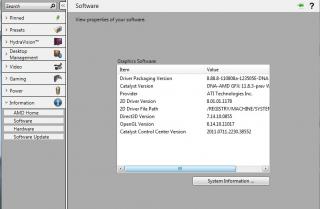
|
|
|
Nov 16 2011, 09:29 PM
Return to original view | Post
#4
|
|
Junior Member
329 posts Joined: Dec 2008
|
Sifus, I had this problem. I had run to optimize my bootup time, and I was stuck at the step 2, where after the long wait, it gives me this message. what went wrong and what i can do?
Attached thumbnail(s) 
|
|
|
Nov 16 2011, 11:09 PM
Return to original view | Post
#5
|
|
Junior Member
329 posts Joined: Dec 2008
|
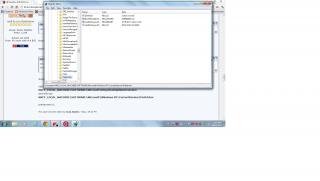
QUOTE(Acid_RuleZz @ Nov 16 2011, 09:40 PM) Superfetch and prefetch running? open regedit and check this key HKEY_LOCAL_MACHINE\SOFTWARE\Microsoft\Dfrg\BootOptimizeFunction and this key HKEY_LOCAL_MACHINE\SOFTWARE\Microsoft\Windows NT\CurrentVersion\Prefetcher printscreen it..   Attached thumbnail(s) 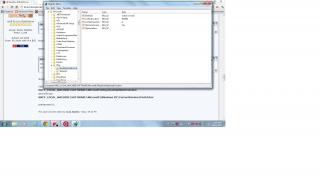
|
|
|
Nov 17 2011, 07:14 AM
Return to original view | Post
#6
|
|
Junior Member
329 posts Joined: Dec 2008
|
QUOTE(Acid_RuleZz @ Nov 16 2011, 11:36 PM) In HKEY_LOCAL_MACHINE\SOFTWARE\Microsoft\Dfrg\BootOptimizeFunction, I had done the BootOptimizeFunction, and just want to double confirm with you the SysMain start value. Is this value 2? I did not edit anything in SysMain yet. 1. Create a new String name "Enable" and set value as 'Y' 2. LcnStartLocation and LcnEndLocation set the value as "0" 3. Set OptimizeComplete value as "No" Then go to HKEY_LOCAL_MACHINE\SYSTEM\CurrentControlSet\services\SysMain, 1. Check if Start value is "2" Done all these, try to do the command again..  I had tried to run the cmd, but get the same error again. How now sifu? This post has been edited by j-insigh: Nov 17 2011, 07:42 AM Attached thumbnail(s) 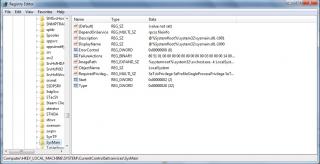

|
|
|
|
|
|
Nov 17 2011, 02:10 PM
Return to original view | Post
#7
|
|
Junior Member
329 posts Joined: Dec 2008
|
QUOTE(Acid_RuleZz @ Nov 17 2011, 12:29 PM) The reason why i'm not fond to Windows.  Try 1. Uninstall Windows Performance Toolkit and reinstall with this wpt_amd64.msi. 2. Delete everything in Windows\Prefetch. 3. Set Pagefile as "System Managed". |
|
|
Nov 28 2011, 01:23 PM
Return to original view | Post
#8
|
|
Junior Member
329 posts Joined: Dec 2008
|
Ok this is abit side topic but stil using dv6. MW3 nicer or BF3?? Lol
|
|
|
Nov 29 2011, 10:03 AM
Return to original view | Post
#9
|
|
Junior Member
329 posts Joined: Dec 2008
|
BF3 I finished in two days. Now challenging different difficulties
|
|
Topic ClosedOptions
|
| Change to: |  0.0407sec 0.0407sec
 0.13 0.13
 7 queries 7 queries
 GZIP Disabled GZIP Disabled
Time is now: 7th December 2025 - 09:27 AM |
 Quote
Quote