

QUOTE(88sales88 @ May 17 2012, 12:48 AM)
Anyone can advise how to configure the Mikrotik RB751G with a 3G USB Dongle ZTE-MF190 ?

is it detected by the rb ? and is it listed as supported device ?Enterprise Networking Mikrotik Routers (RouterBoard & RouterOS), User and owner discussion group
|
|
 May 17 2012, 11:25 AM May 17 2012, 11:25 AM
|
 
Senior Member
2,516 posts Joined: Feb 2007 From: Uarla Umpur   
|
QUOTE(88sales88 @ May 17 2012, 12:48 AM) Anyone can advise how to configure the Mikrotik RB751G with a 3G USB Dongle ZTE-MF190 ? is it detected by the rb ? and is it listed as supported device ? |
|
|
|
|
|
May 17 2012, 10:00 PM
|

Junior Member
189 posts Joined: Oct 2005 From: Cybertron
|
need help from fellow Mikrotik users here..
I cannot set wireless to 5Ghz. Country set to Malaysia and others also cannot. Using RB751u-2HnD running routeros v5.16. Any help? |
|
|
May 18 2012, 01:25 PM
|

Junior Member
257 posts Joined: Dec 2007
|
QUOTE(teohwk @ May 17 2012, 10:00 PM) need help from fellow Mikrotik users here.. This model don't have 5Ghz wireless. I cannot set wireless to 5Ghz. Country set to Malaysia and others also cannot. Using RB751u-2HnD running routeros v5.16. Any help?  Country can set to malaysia or others is no problem .... If still can't u can reset system to default. Thank you.  |
|
|
May 18 2012, 02:58 PM
|
 
VIP
8,788 posts Joined: Jan 2003 From: Kuala Lumpur  
|
kaisam, thanks for all the help earlier and I know you're an expert in this
 May I ask a question? If I want to limit bandwidth for all my wireless connections, what do I need to do? I suppose I first need to create a queue and assign it to my WLAN then limit the bandwidth from there? Anything else? May I ask a question? If I want to limit bandwidth for all my wireless connections, what do I need to do? I suppose I first need to create a queue and assign it to my WLAN then limit the bandwidth from there? Anything else? |
|
|
May 18 2012, 03:42 PM
Show posts by this member only | IPv6 | Post
#385
|
 
Elite
4,541 posts Joined: Jan 2003 From: BSRPPG51 Access Concentrator
|
QUOTE(clawhammer @ May 18 2012, 02:58 PM) kaisam, thanks for all the help earlier and I know you're an expert in this Doesn't that will limit the bandwidth on the wireless network, which is a strange thing to do? May I ask a question? If I want to limit bandwidth for all my wireless connections, what do I need to do? I suppose I first need to create a queue and assign it to my WLAN then limit the bandwidth from there? Anything else?If you want to limit Internet speed for wireless users, detach the wireless interface from the bridge, run a DHCP server on the wireless interface with its own IP range, and then throttle the said IP range Internet speed. |
|
|
May 18 2012, 04:10 PM
|
|
VIP
8,788 posts Joined: Jan 2003 From: Kuala Lumpur
|
QUOTE(asellus @ May 18 2012, 03:42 PM) Doesn't that will limit the bandwidth on the wireless network, which is a strange thing to do? Maybe I should explain further as to what I'm trying to achieve If you want to limit Internet speed for wireless users, detach the wireless interface from the bridge, run a DHCP server on the wireless interface with its own IP range, and then throttle the said IP range Internet speed.  I have a lot of wireless devices but my PC is running on LAN cable. Sometimes my family members which connects to wireless would YouTube, upload/download, etc which takes up a lot of bandwidth and eventually it affects my online gaming experience. What I want to do is to limit the bandwidth available to these devices so I thought it's easier to limit by interface rather than MAC or IP address? I have a lot of wireless devices but my PC is running on LAN cable. Sometimes my family members which connects to wireless would YouTube, upload/download, etc which takes up a lot of bandwidth and eventually it affects my online gaming experience. What I want to do is to limit the bandwidth available to these devices so I thought it's easier to limit by interface rather than MAC or IP address?If you have a better solution, please let me know. I'm sorry as I'm not a networking guy and the other day it took me so many hours just to configure port forwarding on the router, lol. |
|
|
|
|
|
May 18 2012, 04:45 PM
|
|
Junior Member
257 posts Joined: Dec 2007
|
QUOTE(clawhammer @ May 18 2012, 02:58 PM) kaisam, thanks for all the help earlier and I know you're an expert in this hahaha, i'm not expert .. May I ask a question? If I want to limit bandwidth for all my wireless connections, what do I need to do? I suppose I first need to create a queue and assign it to my WLAN then limit the bandwidth from there? Anything else? I'm just play around for this toy. u can limit bandwidth via each user each own bandwidth.  can use hostspot server & radius function to limit bandwidth for lan and wlan user. can limit by total bandwidth, rate limit, time base. Thank you.  This post has been edited by kaisam: May 18 2012, 04:56 PM |
|
|
May 18 2012, 07:53 PM
Show posts by this member only | IPv6 | Post
#388
|
|
Elite
4,541 posts Joined: Jan 2003 From: BSRPPG51 Access Concentrator
|
QUOTE(clawhammer @ May 18 2012, 04:10 PM) Maybe I should explain further as to what I'm trying to achieve Then what I have said before will do exactly what you want. All devices that connect to the wireless interface of the router can have its Internet connection throttled to whatever speed you wanted, while keeping the LAN users to enjoy full speed Internet access. Your earlier method will not only limit Internet speed but also wireless LAN badnwidth. I have a lot of wireless devices but my PC is running on LAN cable. Sometimes my family members which connects to wireless would YouTube, upload/download, etc which takes up a lot of bandwidth and eventually it affects my online gaming experience. What I want to do is to limit the bandwidth available to these devices so I thought it's easier to limit by interface rather than MAC or IP address?If you have a better solution, please let me know. I'm sorry as I'm not a networking guy and the other day it took me so many hours just to configure port forwarding on the router, lol. |
|
|
May 21 2012, 03:23 PM
|
|
VIP
8,788 posts Joined: Jan 2003 From: Kuala Lumpur
|
QUOTE(asellus @ May 18 2012, 07:53 PM) Then what I have said before will do exactly what you want. All devices that connect to the wireless interface of the router can have its Internet connection throttled to whatever speed you wanted, while keeping the LAN users to enjoy full speed Internet access. Your earlier method will not only limit Internet speed but also wireless LAN badnwidth. Thank you sir but I have no idea where to start, lol. I suppose the WLAN is already a separate interface for now (default configuration) so I basically need to create an IP address range and assign it to this interface then a queue to throttle it? |
|
|
May 21 2012, 03:53 PM
|
|
Senior Member
2,516 posts Joined: Feb 2007 From: Uarla Umpur
|
QUOTE(clawhammer @ May 21 2012, 03:23 PM) Thank you sir but I have no idea where to start, lol. I suppose the WLAN is already a separate interface for now (default configuration) so I basically need to create an IP address range and assign it to this interface then a queue to throttle it? i think he ment was create a virtual wlan interface.. then create a dhcp for this new virtual interfaceand configure the queue for that dhcp/virtual interface this is for two ssid la.. for single ssid just create a queue for the interface itself but then you yourself will kena throttled la.. unless you using wired |
|
|
May 22 2012, 12:17 AM
Show posts by this member only | IPv6 | Post
#391
|
|
Elite
4,541 posts Joined: Jan 2003 From: BSRPPG51 Access Concentrator
|
QUOTE(clawhammer @ May 21 2012, 03:23 PM) Thank you sir but I have no idea where to start, lol. I suppose the WLAN is already a separate interface for now (default configuration) so I basically need to create an IP address range and assign it to this interface then a queue to throttle it? With your router, I'm sure that the wireless interface is part of a bridge, therefore you cannot run a DHCP server on the wireless interface if you already have another running on the bridge. Detach the wireless interface from the bridge, assign a new IP address in a /24 range that is different than the one used by the bridge, run a DHCP server using the said range (no need to utilize the whole /24, use a /26 only for example) on the detached wireless interface. Then throttle the DHCP range they way you wanted it to happen.The VirtualAP method can be used too though. Make a new virtual AP, assign a /24 address range to it, run a DHCP server to distribute address from a /26 within the /24, then throttle away. |
|
|
May 22 2012, 09:54 AM
|

Senior Member
4,038 posts Joined: Aug 2005 From: Earth
|
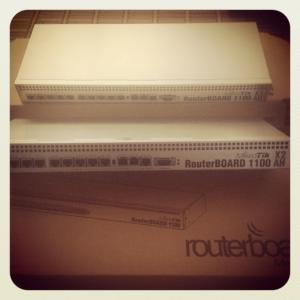
I got myself 3 RB1100AH X2 one my colleague dah amik Another 2 left with me and it's sold Wanna replace my RB1200 any takers? Still got warranty This post has been edited by MX510: May 22 2012, 09:57 AM |
|
|
May 22 2012, 12:51 PM
|

Senior Member
671 posts Joined: Jul 2005
|
Er... Can we downgrade the RouterOS version?
I found some problem using 5.16... Sobs... EDIT: Done already. This post has been edited by Shengz: May 22 2012, 04:19 PM |
|
|
|
|
|
Jun 4 2012, 06:37 PM
|

Senior Member
719 posts Joined: Dec 2006
|
QUOTE(jinaun @ Mar 26 2012, 12:58 AM) thanks but i've tried it and its not working too with the in-interface.. i've used hairpinNAT instead justnow and it seems to be working from both side Hi,I tried the hairpinNAT but cannot seems to get it to work. Mail server Virtualbox running XP with ip 192.168.0.237 RB750GL IP is 192.168.0.1 I already have Dynamic DNS working and I can access using dyndns url from the WAN side to access the POP but cannot seems to access from the LAN side. Can you have a look at the line below to see where I went wrong. /ip firewall nat add chain=srcnat src-address=192.168.0.0/24 \ dst-address=192.168.0.237 protocol=tcp dst-port=110 \ out-interface=ether2-master-local action=masquerade Thanks. Solved with example from this Mikrotik Forum This post has been edited by jackdon: Jun 5 2012, 11:46 PM |
|
|
Jun 9 2012, 06:53 AM
|
|
Senior Member
4,038 posts Joined: Aug 2005 From: Earth
|
CODE What's new in 5.17 (2012-May-28 12:34): *) files - fixed problem when directories disappeared after reboot on usb or sd flash; *) webfig - make QuickSet scan list work in Firefox v12; *) webfig - fixed problem in QuickSet when changing country or channel-width in AP mode would enable NV2 protocol; *) webfig - fixed skins when hiding first tab may make other tabs inaccessible; *) winbox - fixed packet raw data view in packet sniffer; *) winbox - fixed problem when router could be DoS attacked through winbox port; *) ports - add option "/port firmware ignore-directip-modem" which will ignore modems ip interface and modem's serial ports will be made accessible to users; *) ipv6 pool - allow pools with prefix equal to prefix length; *) ping times improved on Nv2 high data rate wireless links; *) tool email - added starttls option; *) snmp - allow multiple ip ranges for each community; *) serial console - added channel support; http://www.mikrotik.com/download I just flashed my RB1100 AHX2 see lah what happened 5.16 lot's of bug |
|
|
Jun 9 2012, 09:08 AM
|
|
All Stars
12,019 posts Joined: Jan 2003
|
My 751u been running for 10.5 days, so far no transmission error.. Look like the old firmware is better.
Anyone use the latest firmware on 751u yet? Added on June 9, 2012, 9:17 amAnyone know about how much a RB450 with casing? This post has been edited by weikee: Jun 9 2012, 09:17 AM |
|
|
Jun 9 2012, 12:13 PM
|
|
Junior Member
257 posts Joined: Dec 2007
|
QUOTE(Shengz @ May 22 2012, 12:51 PM) Er... Can we downgrade the RouterOS version? Now got version5.17, more stable.I found some problem using 5.16... Sobs... EDIT: Done already. Thank you. |
|
|
Jun 10 2012, 12:47 AM
|
|
Senior Member
2,516 posts Joined: Feb 2007 From: Uarla Umpur
|
QUOTE(weikee @ Jun 9 2012, 09:08 AM) My 751u been running for 10.5 days, so far no transmission error.. Look like the old firmware is better. which firmware u running ?Anyone use the latest firmware on 751u yet? Added on June 9, 2012, 9:17 amAnyone know about how much a RB450 with casing? |
|
|
Jun 10 2012, 09:56 AM
|
|
All Stars
12,019 posts Joined: Jan 2003
|
QUOTE(JinXXX @ Jun 10 2012, 12:47 AM) which firmware u running ? The original that come from it, think was 5.10 or lower. Can't recall. Did mention here before.Added on June 10, 2012, 9:59 amRemember, is 5.6 This post has been edited by weikee: Jun 10 2012, 09:59 AM |
|
|
Jun 11 2012, 10:43 AM
|
|
Senior Member
1,007 posts Joined: Oct 2006 From: island up north
|
Hi. I've just bought RB751G-2HnD and configured it according to klseet.com for Unifi. Need some tweaking to make it work as I'm totally noob on MikroTik and it is of different model from RB750 example. Problem is I did not know what I did to make the WiFi working, spent half a day toying with just the WiFi setup. I change protocol from default nv2 nstreme 802.11 to just 802.11 to finally get my laptop able to see the SSID but still not able to get an address from DHCP. I click a few thing and voila, my laptop got the IP. Hope someone can help me or point me to right direction to understand actual setup or configuration to make the WiFi work in case it stop working in future, I'll know what to check. I googled a lot on this but did not find anything helpful. Thanks.
|
| Change to: |  0.0762sec 0.0762sec
 0.20 0.20
 6 queries 6 queries
 GZIP Disabled GZIP Disabled
Time is now: 3rd December 2025 - 05:49 AM |
 Quote
Quote