Welcome Guest ( Log In | Register )

Bump Topic Topic Closed RSS Feed
4 Pages  1 2 3 > » Bottom

Outline · [ Standard ] · Linear+

 SAMSUNG GALAXY S II Official thread V14, Be a SMART user - Pls read Page 1 first

views
     
mydragoon
post Sep 19 2011, 08:36 AM

Look at all my stars!!
*******
Senior Member
7,044 posts

Joined: Nov 2007


over the weekend, checked out what's new on Samsung Apps.

i got prompted for some updates... installed them... then downloaded a few stuffs...

next day, i noticed i get some korean notification... *sigh*
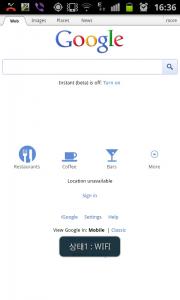
Attached Image

it does not break android... but it does go to show android is still a long way to go when it comes to being an OS that had got high 'quality standards'...

lots of little issues everywhere... like what i highlighted previously...
* 15% min battery level for the camera apps to work
* wifi sharing service (+1 more wifi related service) running in background even though wifi sharing is not enabled
* unstable wifi connection to the point i need to off and on wifi for it to work again
* deleting a saved DRAFT message is not easy... no one click option. you have to empty the message by deleting word by word
* contacts in message will show ALL contacts (if you have multiple accounts -- regardless of what is done)
* nerfed gmail apps -- can't attach files other than images files FROM GALLERY (and MUSIC, i think). it seems it is possible to attach doc, etc... but it depends on manufacturer.
* BT pairing with another android device can be painful -- dun have 'always trust and accept files from this android device' option.
* Samsung kies -- nothing more needs to be said.
* Samsung dive -- very similar to kies. super half-baked service/ product. thank goodness is free, though another way to look at it... we did indirectly pay for it.
* gallery seems to be 'picky' about the photos it wants to list. i have some photos taken on the phone before i installed the microSD card. after putting in the card, i moved the photos from the camera to the card. gallery has decided NOT to show them. to access the files, i need to use File Manager.
* outside of SGS2, you have things like core apps that dun work properly -- the new Market is a good example. It could not really update apps properly. Instead of 1 click to view your apps, the new apps requires 2-3 clicks.

its really minor things... and most ppl probably won't even notice it. but still... smile.gif
mydragoon
post Sep 19 2011, 08:39 AM

Look at all my stars!!
*******
Senior Member
7,044 posts

Joined: Nov 2007


anyway, found this apps from Samsung Apps. quite sure its also available from the market. androsensor... i think its quite nice, for those who like a dashboard kinda thing...

Attached Image

sensors not supported on sgs2: atmospheric pressure & temperature.
i think xoom has atmospheric pressure sensor. i wonder which device has got temperature sensors? smile.gif

mydragoon
post Sep 19 2011, 09:12 AM

Look at all my stars!!
*******
Senior Member
7,044 posts

Joined: Nov 2007


for the sms draft... well, i would like if they allowed me to hold and then delete message. but ya... all the stuff i mentioned are small issues... nothing majorly painful.

as for the contacts in message, as i have a few accounts, when i type the first few letters, the names will all still appear from all accounts even though i have specified in my Sync settings that contacts only from from one Gmail account. this was discussed in earlier thread...

i think for those with 1 account, it would also be affected -- if your Gmail settings is such that it saves contacts of ppl you email to.

the thing is... this contact list in message has more contacts that what i get when i click contacts.

so now, the workaround for me is... when i want to send to multiple ppl, from message, i click the contacts icon... then groups... select the main account -- then select my contacts. this way, it will list only contacts that i want (my main account).
mydragoon
post Sep 19 2011, 11:44 AM

Look at all my stars!!
*******
Senior Member
7,044 posts

Joined: Nov 2007


QUOTE(annoymous1234 @ Sep 19 2011, 10:49 AM)
what are the differences between the notifications ringtone in message setting and an the normal setting -> sounds -> notification ringtone? are there any differences?
*
this ringtone Q reminds me of anything thing i find puzzling with the sgs2 audio settings... it seems to have so many options...
i think there are like 4 diff settings:
* incoming
* media
* system
* notification

it gets confusing when we go into silent mode. i have noticed that silent mode does not mute media. when you launch games and movies, the audio will be at the volume you had set. and when you launch the media, your silent mode is turned off (meaning no longer in silent mode). it can get pretty confusing... heh heh...
mydragoon
post Sep 19 2011, 03:12 PM

Look at all my stars!!
*******
Senior Member
7,044 posts

Joined: Nov 2007


QUOTE(brotan @ Sep 19 2011, 02:42 PM)
wow. just now when i was playing Real Football 11, my measured temperature shot up from 36C to 48C within 10min
*
not surprising, actually... i noticed playing what i call graphic intensive games like RF11 or even the recently free for sgs2 racing game (from samsung apps) can cause the phone to get warm quite fast. heh heh... warm coz face it... it is what we can warm la... 50C also not considered hot yet. smile.gif
mydragoon
post Sep 19 2011, 03:19 PM

Look at all my stars!!
*******
Senior Member
7,044 posts

Joined: Nov 2007


QUOTE(mydragoon @ Sep 19 2011, 08:36 AM)
» Click to show Spoiler - click again to hide... «
*
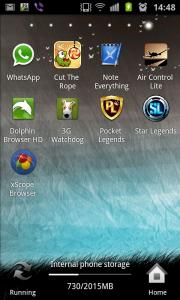
one of the things that caught my eye while downloading stuffs from samsung apps (that caused my phone to now have notification in korean) was some launchers... heh heh...

installed and tried them... including some themes... cool!

the applications screen
Attached Image

more application screen
Attached Image

home page menu
Attached Image

adding home page and setting main home page
Attached Image
this is what i like... can have more than 5 home pages and you can set which one as the main one. by default, the middle one (3rd page) is the default page.

the launcher...
Attached Image

oh ya... did i mention? no rooting required! smile.gif

This post has been edited by mydragoon: Sep 19 2011, 03:32 PM
mydragoon
post Sep 19 2011, 03:28 PM

Look at all my stars!!
*******
Senior Member
7,044 posts

Joined: Nov 2007


QUOTE(Joey Christensen @ Sep 19 2011, 11:50 AM)
I got to agree wholeheartedly with you. I mean why can't they bloody arrange it in a simple manner that all media/sound for each and everything in a single tab or something.

It wouldn't take a rocket scientist to do so. I mean heck it, they designed and came out with a great phone but when it comes to user friendliness...it's a bit of a dismay.

Anyway, I'll give it a try nonetheless. Every day is a learning day.
*
yup, that's why a few posts earlier, i mentioned of some little annoyance with how samsung implemented certain things... some are not android-related like kies. see my earlier post:
QUOTE(mydragoon @ Sep 19 2011, 08:36 AM)
its really minor things... and most ppl probably won't even notice it. but still... smile.gif
*
to those who replied to my earlier posts... just to update and clarify...
* BT pairing. i believe its more to do with android to android. i had this problem BT files from sgs2 to my Asus Transformer tablet. no such issue with sgs2 to notebook.
* delete the draft message... well... technology supposed to make it easier for us la... so we can all be lazy... hahaha...

but i mean... if we are to use car as analogy... everyone says sgs2 is like ferrari. yes, no doubt about that... but the little things i mentioned earlier makes this ferrari look like it's got manual windows control (the one you roll the handle to wind down the window) instead of power windows. and instead of a Blur-Ray ICE, this ferrari somehow came bundled with cassette player. no doubt can just take out the player and replace with bluray player, just like how we can flash the roms... but the point is... out of the box/ showroom, it would be nice if all were already there in the first place. smile.gif


mydragoon
post Sep 19 2011, 03:29 PM

Look at all my stars!!
*******
Senior Member
7,044 posts

Joined: Nov 2007


QUOTE(brotan @ Sep 19 2011, 03:20 PM)
when touching the screen a little bit long time during play, feel like "ouch", my finger's burning. need to remove my finger off for a while
*
i know what you mean... i had sth similar not to long back. playing a game while charging. ended up phone was quite hot and it got uncomfortable sliding my fingers on the screen. anyway, i stopped playing after a while when i noticed i was using more juice than the phone could charge. smile.gif
mydragoon
post Sep 19 2011, 03:54 PM

Look at all my stars!!
*******
Senior Member
7,044 posts

Joined: Nov 2007


QUOTE(edwinlcw @ Sep 19 2011, 03:38 PM)
what app is that?
*
QUOTE(blurjoey @ Sep 19 2011, 03:51 PM)
Is this the Samsung Pure Breeze launcher?
*
QUOTE(antt00 @ Sep 19 2011, 03:47 PM)

Added on September 19, 2011, 3:51 pm
From his picture i think its SSkin. You can find it in samsung apps.
*
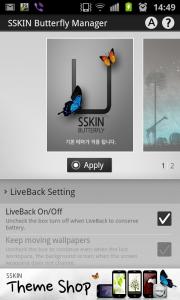
yup... sskin butterfly launcher.
Attached Image

lots of themes that can be downloaded and used on this launcher.


Added on September 19, 2011, 3:55 pm
QUOTE(Mollai @ Sep 19 2011, 02:49 PM)
I'm not familiar with all those terms sad.gif

How do i off the camera shutter sound without rooting?
*
hmmm... i normally have my phone on vibrate/ silent mode. no shutter sound at that time... or not that i noticed anyway...

This post has been edited by mydragoon: Sep 19 2011, 03:55 PM
mydragoon
post Sep 19 2011, 05:01 PM

Look at all my stars!!
*******
Senior Member
7,044 posts

Joined: Nov 2007


QUOTE(+Newbie+ @ Sep 19 2011, 04:28 PM)
lol, yeah, voyeurs detected!! laugh.gif

But yeah, from what I understand, the camera shutter sound either needs rooting to be removed, or you need to use 3rd party apps to either replace the camera app or control the volume separately.
Regarding the delete message, I believe if you tap on the text once, you will get a blue arrow on the text. Tap one more time and there will be an "options" pop up window. You can click the option, "select all" and then delete the text from there.

It's really rather quick once you're used to it.
*
ya... thanks. i'm aware of this. was hoping for a:
touch, hold, select delete rather than
open message, touch, select all, select delete.

but ya, i've been using this at times... sometimes... just hit del and hold the key... to lazy to press too many times. lol...
mydragoon
post Sep 19 2011, 05:26 PM

Look at all my stars!!
*******
Senior Member
7,044 posts

Joined: Nov 2007


QUOTE(devil94 @ Sep 19 2011, 05:24 PM)
anyway to tweak it beside then setcpu ? after applying the SSKIN feel abit not smooth as before sad.gif
*
ya, i noticed this as well... scrolling between home screens not as smooth with SSKIN. but i kinda like SSKIN.

wondering why Samsung never implement this instead for Touchwiz.
mydragoon
post Sep 19 2011, 05:29 PM

Look at all my stars!!
*******
Senior Member
7,044 posts

Joined: Nov 2007


QUOTE(Fallenangelz @ Sep 19 2011, 05:27 PM)
if u look more clearly, SSKIN is clearly another imitation of launcherpro doh.gif
*
oh... never realised that. looks like i accidentally stepped into launcher thingy... heh heh... will check out the other launchers now. all need root access? or no need? sorry la... i guess i could just google a bit...
mydragoon
post Sep 19 2011, 05:40 PM

Look at all my stars!!
*******
Senior Member
7,044 posts

Joined: Nov 2007


QUOTE(antt00 @ Sep 19 2011, 05:38 PM)
Touchwiz is smoother because it uses the hardware as well. To get smoother UI you can put tweaks into your build.prop but of cos need root la. The link have been posted here a few times. Now my ADW is as smooth as TW.
*
aiyah... looks like i got another reason/ excuse to root...

must resist temptation... must try... heh heh...
mydragoon
post Sep 19 2011, 10:05 PM

Look at all my stars!!
*******
Senior Member
7,044 posts

Joined: Nov 2007


quite like this butterfly launcher + sskin. the buttons at the bottom (dunno what we call them) is almost the same, except that contacts have been replaced with internet.I think that is smart since contacts and phone are actually the same thingy, just different tab.

this launcher thingy/ discovery has made me want to check out other launchers... ;-)
mydragoon
post Sep 20 2011, 08:00 AM

Look at all my stars!!
*******
Senior Member
7,044 posts

Joined: Nov 2007


hmmm... was exploring this butterfly launcher + sskin.

last night, i mentioned contacts was replaced with internet icon at the dock (the bottom part of the screen). this morning, accidentally discovered i could actually add another 3 more icons on the dock... cool. smile.gif
mydragoon
post Sep 20 2011, 08:09 AM

Look at all my stars!!
*******
Senior Member
7,044 posts

Joined: Nov 2007


QUOTE(antt00 @ Sep 20 2011, 08:06 AM)
Most launcher allow you to do that. And also arrange app drawer, use different way to browse app drawer, hide status bar, change icon, use theme, swiping to start stuff on home screen, etc...

That's why most people use different launcher than stock launcher provided with the phone. There are so many ways to customize and use your phone.
*
wow... i'm just learning... lol... coz i dun recall touchwiz letting me do that.

so kinda happy with it. just that with this launcher... can see 'lag' when moving between home screen. its not really lag, just not as smooth as touchwiz.

for me... since i got this from samsung apps, i guess samsung had done some vetting of the apps... wink.gif

p/s: what the heck is apps drawer?

This post has been edited by mydragoon: Sep 20 2011, 08:09 AM
mydragoon
post Sep 20 2011, 11:13 AM

Look at all my stars!!
*******
Senior Member
7,044 posts

Joined: Nov 2007


QUOTE(antt00 @ Sep 20 2011, 08:13 AM)

Added on September 20, 2011, 8:20 am
Apps drawer is the page where you can scroll through all your apps. On TW it is when you press the home icon.

TW lack function and theme but its bloody smooth because it uses the phone hardware also. Other launcher only uses their software because unable to utilize the phone hardware and will seem like lagging compared to TW.
*
u mean from home screen, press the application icon?

so... the pages that comes up after pressing application icon on home screen is called the apps drawer...? i see... understand. thanks. smile.gif
mydragoon
post Sep 20 2011, 01:58 PM

Look at all my stars!!
*******
Senior Member
7,044 posts

Joined: Nov 2007


QUOTE(Mollai @ Sep 20 2011, 01:26 PM)
Unticked but still got sound. sad.gif How to remove the shutter sound without rooting????
I'm having is question too..but don't care la, when it turns yellowish I'll buy a casing.
*
best way... mute the phone aka silent mode.

otherwise, try this...
go to apps drawer (heh heh) --> settings --> sound --> volume
then reduce SYSTEM to 0.

but honestly, i'm not sure what else is affected when system goes to 0. i have this setting and my alarm, notification, call volume, etc is still ok.

this complicated audio setting is one irritation i mentioned earlier...
mydragoon
post Sep 20 2011, 02:58 PM

Look at all my stars!!
*******
Senior Member
7,044 posts

Joined: Nov 2007


QUOTE(Mollai @ Sep 20 2011, 02:24 PM)
ok..i'll when my manager not in the office..kekeke

btw...settings can be reached from menu > settings..no need to go apps drawer
*
hahaha... still the same number of keystrokes.

menu --> settings --> audio
applications --> settings --> audio

but your method will be faster if the settings is not on the first page of the apps drawer. anyway, i didn't know about the menu --> settings... now i know... wink.gif


Added on September 20, 2011, 2:59 pm
QUOTE(antt00 @ Sep 20 2011, 02:33 PM)
You can use apps such as volume ace to control all these volumes and setup sound profiles. Somemore can put widget on home screen so changing sound profiles can be done in 2 taps eg. going from everything fullblast to total silence in 2 taps.
*
ya... would be good if we could setup some profiles. with my old dumbphone, i could set profiles to enable certain settings, etc... not sure if got such thing or not on sgs2 --> without having to root, etc.

This post has been edited by mydragoon: Sep 20 2011, 02:59 PM
mydragoon
post Sep 20 2011, 03:44 PM

Look at all my stars!!
*******
Senior Member
7,044 posts

Joined: Nov 2007


QUOTE(brotan @ Sep 20 2011, 03:16 PM)
anyone knows if there is something we can wear on our fingers to make the swiping smoother?

my fingers some time can get a bit sticky and so when playing fast games, the swiping seems a bit "stuck"

maybe a special finger glove?
*
saliva? smile.gif

4 Pages  1 2 3 > » Top
Topic ClosedOptions
 

Change to:
| Lo-Fi Version
0.7284sec    0.21    7 queries    GZIP Disabled
Time is now: 8th December 2025 - 06:04 AM