QUOTE(antt00 @ Sep 20 2011, 10:36 AM)
Then i thought maybe the size of mp3 could be a problem so i try a full mp3 song 7mb and it still play without problem. Bloody loud until i terkejut.
I seriously laughed when I read that. LOLZ! Thanks, bro!SAMSUNG GALAXY S II Official thread V14, Be a SMART user - Pls read Page 1 first
|
|
 Sep 20 2011, 10:45 AM Sep 20 2011, 10:45 AM
Return to original view | Post
#21
|
 
Senior Member
3,651 posts Joined: Jan 2009 From: Fort Canning Garden Status: Dog Fighting   
|
QUOTE(antt00 @ Sep 20 2011, 10:36 AM) Then i thought maybe the size of mp3 could be a problem so i try a full mp3 song 7mb and it still play without problem. Bloody loud until i terkejut. I seriously laughed when I read that. LOLZ! Thanks, bro! |
|
|
|
|
|
Sep 20 2011, 10:52 AM
Return to original view | Post
#22
|
|
Senior Member
3,651 posts Joined: Jan 2009 From: Fort Canning Garden Status: Dog Fighting
|
Came across something I randomly read and would like to share with everyone...
A) The battery/phone has a chip that prevents the batter from dropping below a certain voltage per lion/lipo cell. Say in this case 3.9v to be safe. The power is cut off at that voltage to protect the battery, B) These batteries NEED to be cycled from full charge to full discharge to work at full potential. After a couple cycles the battery will settle out. Running your phone to 0% is not the same as running the battery to 0%. The circuitry will protect the cell by maintaining the correct minimum voltage. Provided that voltage threshold is not exceeded (and it won’t as the phone won’t let you) the battery will remain in fantastic health for a very very long time. The batteries job is to protect itself. You are crazy to think manufacturers would leave this job to the consumer when it’s so easily and economically handled onboard the chip. Credit goes to: Tbone For those who appreciate reading... » Click to show Spoiler - click again to hide... « Feel free to visit batteryuniversity.com to learn more. This post has been edited by Joey Christensen: Sep 20 2011, 10:56 AM |
|
|
Sep 22 2011, 06:05 PM
Return to original view | Post
#23
|
|
Senior Member
3,651 posts Joined: Jan 2009 From: Fort Canning Garden Status: Dog Fighting
|
QUOTE(lil twist @ Sep 22 2011, 01:49 PM) question: Please make your purchase. It has the functionality waiting for you to peruse it.can samsung galaxy s 2 make 3G video calls to other phone like nokia, sony ericsson, etc? i understand that some people said that only samsung android phone can do that, besides the old version (symbian based OS)... can anyone enlighten me?  making a crucial decision whether want to buy this phone or not... making a crucial decision whether want to buy this phone or not...  |
|
|
Sep 24 2011, 11:52 AM
Return to original view | Post
#24
|
|
Senior Member
3,651 posts Joined: Jan 2009 From: Fort Canning Garden Status: Dog Fighting
|
QUOTE(eddie2020 @ Sep 24 2011, 12:40 AM) which shop in lowyat is preferable to shop? i mao get sgs 2 >< dono which best price.. got white for sme set? There's one in Ampang Point and another in Leisure Mall, Cheras. Please keep in mind that the white coloured set are all AP sets. Period. If it is not of a concern, you can drop by there and have a look. It looks very nice in white. I really have to admit that. |
|
|
Sep 24 2011, 11:59 AM
Return to original view | Post
#25
|
|
Senior Member
3,651 posts Joined: Jan 2009 From: Fort Canning Garden Status: Dog Fighting
|
QUOTE(waveweaver @ Sep 23 2011, 10:12 PM) Where did you buy your phone.? Most Samsung shop have stock with them so they will cut the seal in front of you. Other shop that had no stock had to take their stock from Samsung. They will open the seal there to check everything/accessories is complete. So when they bring it to you of course the seal open already. Nothing to be worried as long you get the complete set. Just make sure your phone and battery got SME sticker meaning it's an original set and not AP :-P I agree. I'm not saying anything but it's a norm to do so because the other shops bought those smartphones from the "original" Samsung shops. They'll open the box up and they'll inspect everything is in the box. When I bought mine from an authorised Samsung dealer, the fella did take a box and he cut the two blue coloured tapes in front of me. Everything is done right in front of me. He didn't go elsewhere or go to the back of the shop as I know some will do hanky panky at our backs. Bloody bastards! My advice, try to get a set from Samsung authorised outlet or the equivalents. If that makes peace to your mind. Cheerio and good luck! Oh, don't forget to cross reference with the serialised number on the box and your Galaxy S II set. Check your S II IMEI with the serialised number on the box. This post has been edited by Joey Christensen: Sep 24 2011, 12:02 PM |
|
|
Sep 24 2011, 02:49 PM
Return to original view | Post
#26
|
|
Senior Member
3,651 posts Joined: Jan 2009 From: Fort Canning Garden Status: Dog Fighting
|
QUOTE(desmondk @ Sep 24 2011, 02:37 PM) how about the serial number? The serialised number can be found on the box.QUOTE(desmondk @ Sep 24 2011, 02:30 PM) whr to find imei number? Click APPLICATION icon---Click SETTINGS---Scroll down a bit and look for the last listed item, which is ABOUT PHONE---Click STATUS---Scroll a little bit down and you can see IMEI (the numbers should tally with the serialised number on the box that comes together with your smartphone.  There you have it. Press the HOME button to get to the main menu screen. This post has been edited by Joey Christensen: Sep 24 2011, 02:54 PM |
|
|
|
|
|
Sep 24 2011, 03:10 PM
Return to original view | Post
#27
|
|
Senior Member
3,651 posts Joined: Jan 2009 From: Fort Canning Garden Status: Dog Fighting
|
QUOTE(desmondk @ Sep 24 2011, 03:04 PM) thanks... i try to register my warranty online... Hmmm. When I bought mine, I thought of registering my self but the salesperson said they'll consolidate the warranty forms and will process the warranty registration on behalf. Well, at least the service rendered to me was nice and definitely the rare kind of salesperson that I've met before. Damn digi, i bought it last two weeks from digi online store. and they told me that they will help me to register. but now they asked me to go to samsung center to settle myself... == Did they stamp their shop's name and address or that sort on the warranty card/sheet? |
|
|
Sep 24 2011, 03:15 PM
Return to original view | Post
#28
|
|
Senior Member
3,651 posts Joined: Jan 2009 From: Fort Canning Garden Status: Dog Fighting
|
QUOTE(desmondk @ Sep 24 2011, 03:12 PM) nope. the box was nicely sealed with the blue SME sticker. so, they cant stamp anything. Oh...they didn't give you any freebies like screen protector or maybe casing? Anyway, mine was sealed and the salesperson kindly apply the screen protector for me and he let me slip the SGP casing to test it out also. i just registered online. Dunno it really works when the time has come.. Could it be that you bought from DiGi Specilised Shop or something? |
|
|
Sep 24 2011, 03:22 PM
Return to original view | Post
#29
|
|
Senior Member
3,651 posts Joined: Jan 2009 From: Fort Canning Garden Status: Dog Fighting
|
QUOTE(desmondk @ Sep 24 2011, 03:15 PM) i did mention in my previous post. i bought it via digi online store. bundle with 68 smart plan.. I read your postings. It's my personality. I'm a detailed person and if I'm not sure about something, I would be putting my wordings as questionable wordings. |
|
|
Sep 24 2011, 03:28 PM
Return to original view | Post
#30
|
|
Senior Member
3,651 posts Joined: Jan 2009 From: Fort Canning Garden Status: Dog Fighting
|
QUOTE(Shizuru @ Sep 24 2011, 03:22 PM) I have nothing against the fruit but just choose a phone according to your needs lor.. asking people for opinions and making new thread about it just wasting resource. Do some reading can point you to the right directions already, no one better knows your needs then yourself Sometimes we, as humans, are uncertain beings. But then again, the World Wide Web offers sources aplenty when it comes to information "grabbing". Unless it's really silly willy in nature then you can have a giggle or two reading people's postings.  "The quest for certainty blocks the search for meaning. Uncertainty is the very condition to impel man to unfold his powers" by Erich Fromm |
|
|
Sep 27 2011, 04:24 PM
Return to original view | Post
#31
|
|
Senior Member
3,651 posts Joined: Jan 2009 From: Fort Canning Garden Status: Dog Fighting
|
Here's something to read on...
The new device was spotted on the hallways at FCC with the model number GT-I9100G attached to it, which does not hint at a specific carrier that might add it to its offering. Source: http://news.softpedia.com/news/Samsung-Gal...ls-200830.shtml |
|
|
Sep 27 2011, 04:30 PM
Return to original view | Post
#32
|
|
Senior Member
3,651 posts Joined: Jan 2009 From: Fort Canning Garden Status: Dog Fighting
|
QUOTE(soulseeker6187 @ Sep 27 2011, 03:42 PM) I think the sudden price drop for the phone is because the change of the SoC in the new stock The existing ones Galaxy S II are selling at RM1,750ish. Samsung is pulling some jabs here and there. With the two new ones being introduced for a release in Korean's shore, and Note is tip-toeing around the corner. Samsung's getting aggressive with its releases.  The "G" and without "G"...Is it based on telecommunication carrier specifications? |
|
|
Sep 27 2011, 05:24 PM
Return to original view | Post
#33
|
|
Senior Member
3,651 posts Joined: Jan 2009 From: Fort Canning Garden Status: Dog Fighting
|
QUOTE(profdra @ Sep 27 2011, 05:00 PM) Can anyone owning I9000 & I9100 confirm that I9000's white has a blue tint & I9100's white has a yellow tint? I just sent I9100 for screen replacement due to the yellow tint but it came back with the same yellow tint on a new screen. Can I perform a check on the yellow tint? I didn't see any problem on my Galaxy S II. Could you tell me a little?It's not the left side yellow tint problem. The white is just off white with yellow tint. |
|
|
|
|
|
Sep 27 2011, 05:44 PM
Return to original view | Post
#34
|
|
Senior Member
3,651 posts Joined: Jan 2009 From: Fort Canning Garden Status: Dog Fighting
|
Hey! Dare you to do so!
This post has been edited by Joey Christensen: Sep 27 2011, 05:45 PM |
|
|
Sep 27 2011, 06:02 PM
Return to original view | Post
#35
|
|
Senior Member
3,651 posts Joined: Jan 2009 From: Fort Canning Garden Status: Dog Fighting
|
QUOTE(lolz1120 @ Sep 27 2011, 05:52 PM) i can't seem to spot any warranty card no, imei and serial number inside the package, where can i find these? It's in your smartphone. There's a tally on the box itself too. Do the cross checking and you'll be fine. |
|
|
Sep 28 2011, 05:44 PM
Return to original view | Post
#36
|
|
Senior Member
3,651 posts Joined: Jan 2009 From: Fort Canning Garden Status: Dog Fighting
|
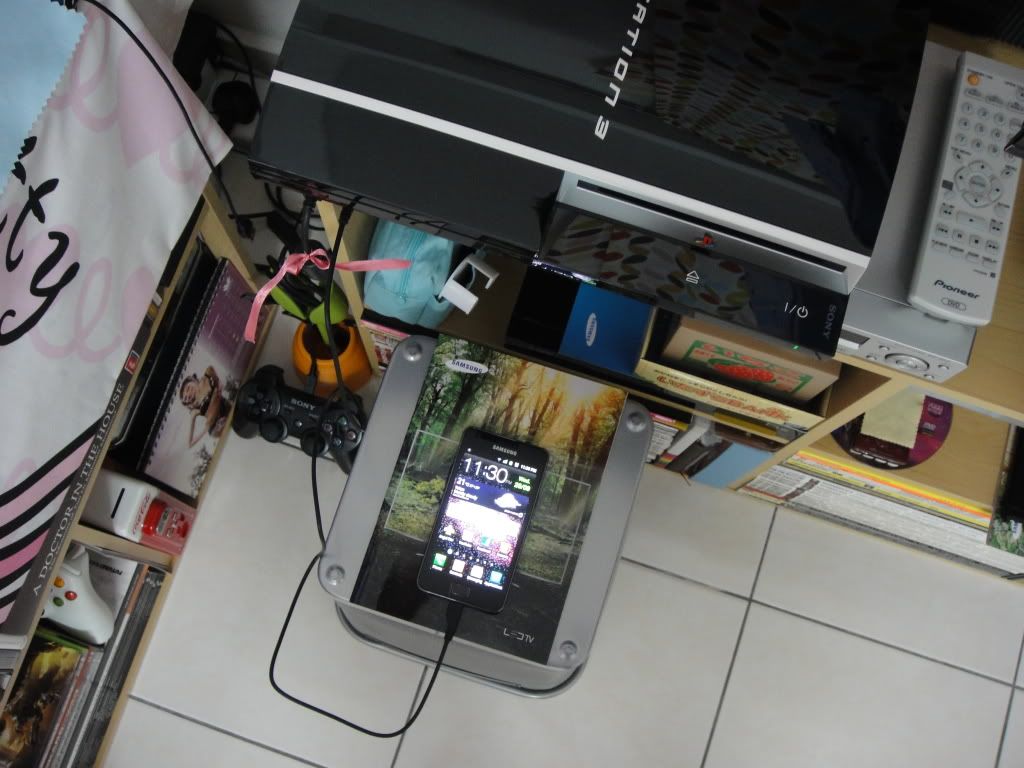
Anyone tried plugging his/her Galaxy II via USB port on PlayStation®3? I tried the plug and play methodology and it couldn't detect my Galaxy S II as something like a USB flashdrive.
It required the CD for installation? |
|
|
Sep 28 2011, 05:48 PM
Return to original view | Post
#37
|
|
Senior Member
3,651 posts Joined: Jan 2009 From: Fort Canning Garden Status: Dog Fighting
|
QUOTE(o.P ace @ Sep 28 2011, 05:46 PM) where cai i buy 2000mAh battery for sgs2.?can help me? I think Benny did post something about battery. Maybe you can send him a message.Added on September 28, 2011, 5:51 pm QUOTE(+Newbie+ @ Sep 28 2011, 05:48 PM) You can try to go in the phone and enable USB debugging mode. GREAT! It worth to try. Erm...May I know where can I access to the USB debugging mode? I'm not that technical and I didn't come across this item also. LOLZ! Appreciate your help.It works for me whenever I want to access the files on my phone without the phone being in Kies mode. (Meaning I press home button after plugging it in to exit the Kies mode. This normally causes the phone to become invisible to the pc, so I use the USB debugging mode to make it visible again.) Not sure if it'll work on PS3 though. This post has been edited by Joey Christensen: Sep 28 2011, 05:51 PM |
|
|
Sep 28 2011, 05:58 PM
Return to original view | Post
#38
|
|
Senior Member
3,651 posts Joined: Jan 2009 From: Fort Canning Garden Status: Dog Fighting
|
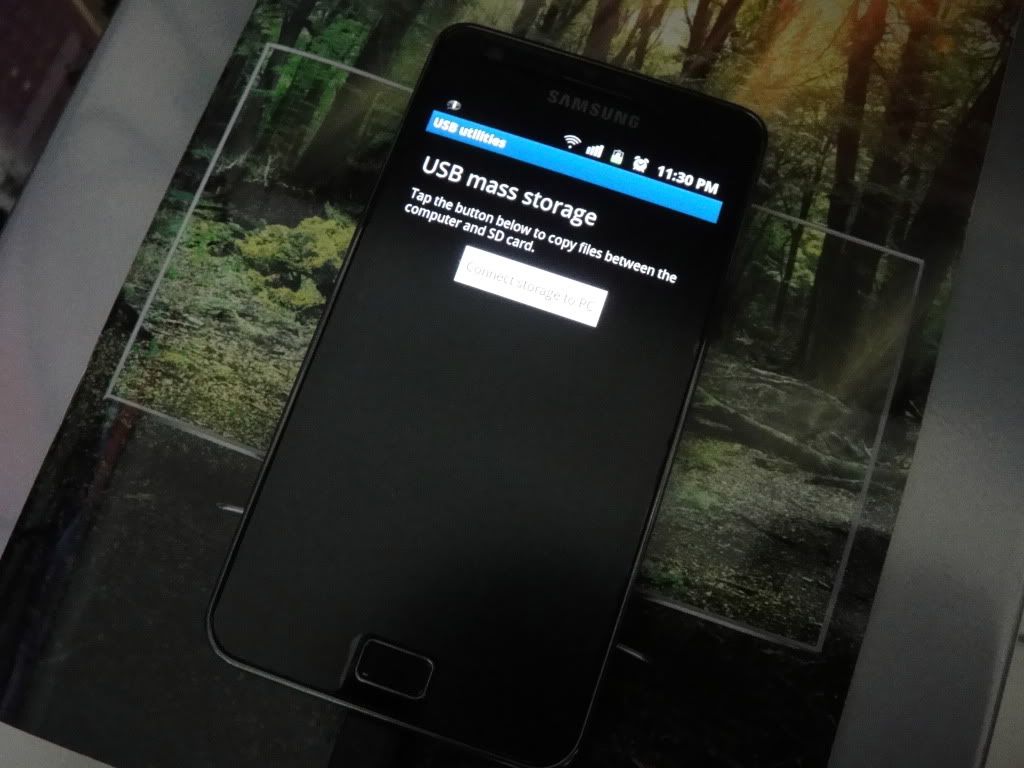
Is it SETTING---WIRELESS and NETWORK---USB Utilities---USB Mass Storage---Click on "Connect storage to PC"?
It has a short discription that goes like this: Tap the button below to copy files between the computer and SD card. I might use this on my PlayStation®3 later tonight. Hope I got the time... |
|
|
Sep 29 2011, 09:52 AM
Return to original view | Post
#39
|
|
Senior Member
3,651 posts Joined: Jan 2009 From: Fort Canning Garden Status: Dog Fighting
|
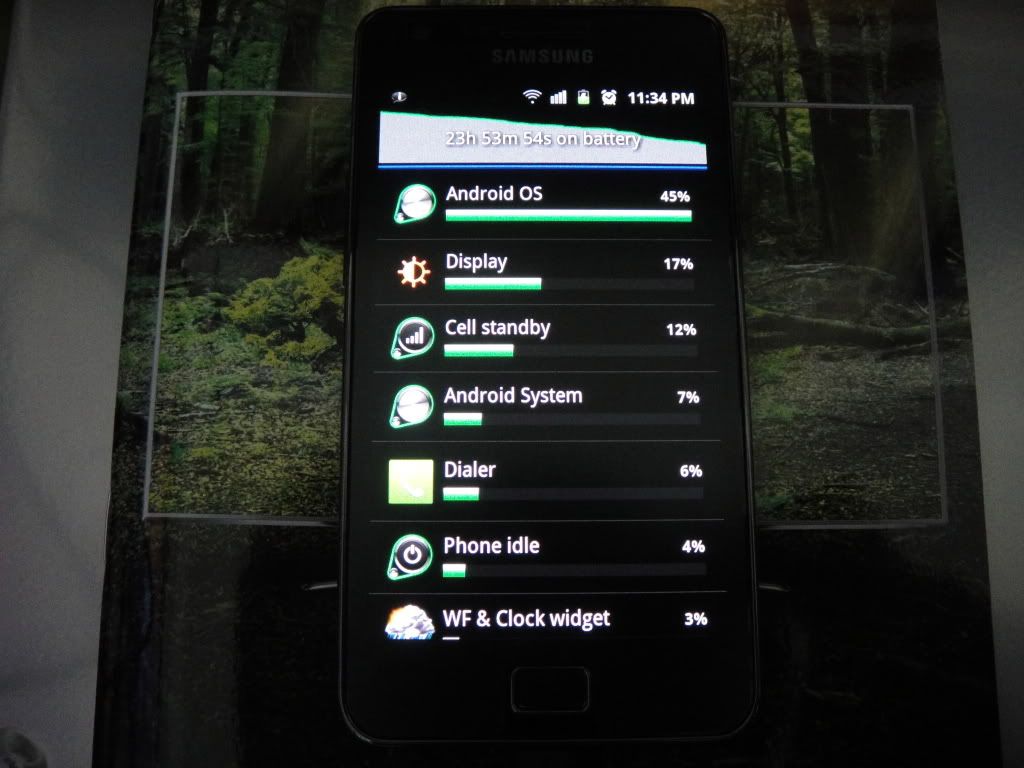
QUOTE(Dark_Angel85 @ Sep 28 2011, 06:18 PM) USB debugging mode is under If only you were here earlier before I've gone back home after home. SETTINGS>APPLICATIONS>DEVELOPMENT QUOTE(Joey Christensen @ Sep 28 2011, 05:58 PM) Is it SETTING---WIRELESS and NETWORK---USB Utilities---USB Mass Storage---Click on "Connect storage to PC"? I've failed. Anyway, I should try it tonight under DEVELOPMENT. It has a short discription that goes like this: Tap the button below to copy files between the computer and SD card. I might use this on my PlayStation®3 later tonight. Hope I got the time... » Click to show Spoiler - click again to hide... « » Click to show Spoiler - click again to hide... « Additional picture taken. Not bad since it's (battery juice) gradually declining. » Click to show Spoiler - click again to hide... « |
|
|
Sep 29 2011, 11:03 AM
Return to original view | Post
#40
|
|
Senior Member
3,651 posts Joined: Jan 2009 From: Fort Canning Garden Status: Dog Fighting
|
QUOTE(edwinlcw @ Sep 29 2011, 10:22 AM) let me go back and try on my ps3 and see if it can detect my sgs2.... I think you should go through SETTINGS>APPLICATION>DEVELOPMENTMine was going through USB SETTING and it didn't work out well for me. |
|
Topic ClosedOptions
|
| Change to: |  0.0386sec 0.0386sec
 0.49 0.49
 7 queries 7 queries
 GZIP Disabled GZIP Disabled
Time is now: 13th December 2025 - 12:45 AM |
 Quote
Quote