

This post has been edited by TheLaptopDudeGuy: Sep 30 2011, 10:01 PM
Attached thumbnail(s)
SAMSUNG GALAXY S II Official thread V14, Be a SMART user - Pls read Page 1 first
|
|
 Sep 30 2011, 09:55 PM Sep 30 2011, 09:55 PM
Return to original view | Post
#141
|
 
Senior Member
2,583 posts Joined: Oct 2010  
|
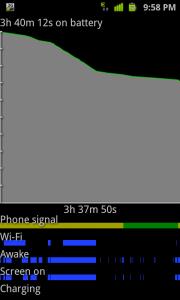
Why do i have so many wakelocks on smaberg roms? activity manager-launc,facebook service and rilj are the top three cause these wakelocks. I dont enable sync on facebook app,why is it still running in the background?
This post has been edited by TheLaptopDudeGuy: Sep 30 2011, 10:01 PM Attached thumbnail(s)
|
|
|
|
|
|
Oct 1 2011, 07:11 AM
Return to original view | Post
#142
|
|
Senior Member
2,583 posts Joined: Oct 2010
|
First of all sorry if i bother u guys agn, but i wanna ask why do i have so many wakelocks? I know im sorta like a battery freak,but with so many wakelocks and bat drop 10%,i believe that i can get better standby times. I really need u guys help, thanks
 data,wifi and. gps was off last night. i dont enable any apps to sync in the backvround too. so why is activitymanager-launch and alarmmanager causing wakelocks? data,wifi and. gps was off last night. i dont enable any apps to sync in the backvround too. so why is activitymanager-launch and alarmmanager causing wakelocks?  and facebook service too, i set notifications to inactive and refresh interval to never,why woud it still be running in the background? and facebook service too, i set notifications to inactive and refresh interval to never,why woud it still be running in the background?This post has been edited by TheLaptopDudeGuy: Oct 1 2011, 07:53 AM Attached thumbnail(s) 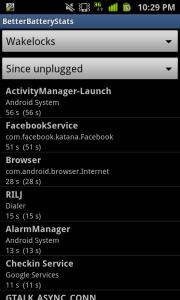

|
|
|
Oct 1 2011, 09:19 AM
Return to original view | Post
#143
|
|
Senior Member
2,583 posts Joined: Oct 2010
|
QUOTE(Lineage @ Oct 1 2011, 09:02 AM) From what I see your app lock you less than 1 min..which is not an issue..if you dont use the stock facebook app..it can save more then why is there so many wakelocks at night? its really killing my battery    |
|
|
Oct 1 2011, 09:30 AM
Return to original view | Post
#144
|
|
Senior Member
2,583 posts Joined: Oct 2010
|
QUOTE(Lineage @ Oct 1 2011, 09:29 AM) Some are system apps..how many % drop overnight? How long for the night? standard 8 hours if drop 3-5% consider normal.. one night abt 9 hours drain 10% arh  thats whats bothering me thats whats bothering meThis post has been edited by TheLaptopDudeGuy: Oct 1 2011, 09:32 AM |
|
|
Oct 1 2011, 09:34 AM
Return to original view | Post
#145
|
|
Senior Member
2,583 posts Joined: Oct 2010
|
QUOTE(Fallenangelz @ Oct 1 2011, 09:33 AM) mine is never normal then. the least also 8% drop. but y so concern bout the percentage? anyhow after u wake up u oso will charge it what im not a big fan of charging all the time |
|
|
Oct 1 2011, 09:37 AM
Return to original view | Post
#146
|
|
Senior Member
2,583 posts Joined: Oct 2010
|
QUOTE(Lineage @ Oct 1 2011, 09:32 AM) Every night constantly drain 10%? everyday you check your wakelock also the same? this is the first night on touch xpower, so not sure. last time on touch xtreme, also many wakelocks. i'll check see if still have this drain or not. i dont use any battery saving apps Any battery saving app using? try Juice Defender |
|
|
|
|
|
Oct 1 2011, 09:44 AM
Return to original view | Post
#147
|
|
Senior Member
2,583 posts Joined: Oct 2010
|
QUOTE(Fallenangelz @ Oct 1 2011, 09:36 AM) then please tell me the difference in 1% can last u how many minutes. browsing? within seconds 1% gone. but 1 night drop 10%, that 10% can last an extra one hour with my sort of usage |
|
|
Oct 1 2011, 09:46 AM
Return to original view | Post
#148
|
|
Senior Member
2,583 posts Joined: Oct 2010
|
QUOTE(Lineage @ Oct 1 2011, 09:38 AM) Try to monitor 1 or 2 more nights..reboot before go sleep and never launch any apps again ok will monitor my batt. i installed juice defender before, i dont really get the settings  After that, if still not satisfy, try to use Juice Defender   |
|
|
Oct 1 2011, 09:57 AM
Return to original view | Post
#149
|
|
Senior Member
2,583 posts Joined: Oct 2010
|
i think benny should put the i9100g thing at the front page, warn people abt the 'other' sgs2. if it is already there,
|
|
|
Oct 1 2011, 09:59 AM
Return to original view | Post
#150
|
|
Senior Member
2,583 posts Joined: Oct 2010
|
QUOTE(Lineage @ Oct 1 2011, 09:32 AM) Every night constantly drain 10%? everyday you check your wakelock also the same? charging my phone now, when i check battery usage, got a TON of wakelocks, activitymanager-launch is the culprit, how do i stop that process Any battery saving app using? try Juice Defender  |
|
|
Oct 1 2011, 11:21 AM
Return to original view | Post
#151
|
|
Senior Member
2,583 posts Joined: Oct 2010
|
QUOTE(888kb24 @ Oct 1 2011, 11:18 AM) Sorry for asking, what is the main diff between i9100 and i9100g? only the processor? is it the reason why S2 price dropped significantly? look at the few posts above you, its using a different processor compared to the i9100 |
|
|
Oct 1 2011, 11:40 AM
Return to original view | Post
#152
|
|
Senior Member
2,583 posts Joined: Oct 2010
|
QUOTE(soulseeker6187 @ Oct 1 2011, 11:16 AM) from what rumour says, prime will come with OMAP 4460, the newer version instead of OMAP4430 in i9100G. also have rumours it will be Exynos 4212 what? seriously? since its made by samsung, why dont they put their new exynos proc in it?  exynos proc no stock? exynos proc no stock? |
|
|
Oct 1 2011, 11:44 AM
Return to original view | Post
#153
|
|
Senior Member
2,583 posts Joined: Oct 2010
|
QUOTE(soulseeker6187 @ Oct 1 2011, 11:42 AM) The Nexus Phone will be built according to Google requirements. aw... i hope they would use exynos proc instead, some people are saying ti omap not as powerful as exynos |
|
|
Oct 1 2011, 11:48 AM
Return to original view | Post
#154
|
|
Senior Member
2,583 posts Joined: Oct 2010
|
QUOTE(soulseeker6187 @ Oct 1 2011, 11:46 AM) we dont know yet coz its a new verison of OMAP. no benchmarks yet. ok |
|
|
Oct 1 2011, 11:53 AM
Return to original view | Post
#155
|
|
Senior Member
2,583 posts Joined: Oct 2010
|
QUOTE(Joey Christensen @ Oct 1 2011, 11:49 AM) Oh yeah! I'd must say it's not that shabby for our SGS2. Review from anandtech which can't be wrong. i remember reading somewhere that the new exynos proc is up to 30% more power efficient The Fastest Smartphone SoC Today: Samsung Exynos 4210 Samsung has been Apple's sole application processor supplier since the release of the original iPhone. It's unclear how much Samsung contributes to the design process, especially with later SoCs like the A4 and A5 carrying the Apple brand. It's possible that Samsung is now no more than a manufacturing house for Apple. Needless to say, the past few years of supplying SoCs for the iPhone and iPad have given Samsung a good idea of what the market wants from an application processor. We first got the hint that Samsung knew what it was up to with its Hummingbird SoC, used in the Galaxy S line of smartphones. Hummingbird featured a 1GHz ARM Cortex A8 core and an Imagination Technologies PowerVR SGX 540 GPU. Although those specs don't seem very impressive today, Hummingbird helped Samsung ship more Android smartphones than any of its competitors in 2010. At a high level, Hummingbird looked a lot like Apple's A4 used in the iPad and iPhone 4. Its predecessor looked a lot like Apple's 3rd generation SoC used in the iPhone 3GS. Source: http://www.anandtech.com/show/4686/samsung...st-redefined/14 Additional read-up... Architecturally, the Exynos 4210 isn't too far from Apple's A5, NVIDIA's Tegra 2 or TI's OMAP 4. This is the same CPU configuration as all of the aforementioned SoCs, with a twist. While the A5, Tegra 2 and OMAP 4 all have a pair of ARM Cortex A9 cores running at 1GHz, Exynos pushes the default clock speed up to 1.2GHz. Samsung is able to hit higher clock speeds either through higher than normal voltages or as a result of its close foundry/design relationship. but i think shud be abt mayb 10% power efficient |
|
Topic ClosedOptions
|
| Change to: |  0.0455sec 0.0455sec
 0.87 0.87
 7 queries 7 queries
 GZIP Disabled GZIP Disabled
Time is now: 10th December 2025 - 07:24 PM |
 Quote
Quote