Welcome Guest ( Log In | Register )

Bump Topic Topic Closed RSS Feed

Outline · [ Standard ] · Linear+

 The SteelSeries Thread V7, UPDATED NOTIFICATION BOARD

views
     
DemonTweakZ
post Feb 15 2012, 04:07 PM

Pretengineer Detector
******
Senior Member
1,042 posts

Joined: Dec 2009
From: Mars


QUOTE(H3LLKEEPER @ Feb 15 2012, 03:56 PM)
try unintall engine
if still persist then it might be mousepad
how long have you been using your mousepad?
*
i've been using the mousepad since i bought it last october. and there was no problem till i RMA it because my sensor died. this mouse i'm using is the RMA-ed one.

QUOTE(Everdying @ Feb 15 2012, 04:03 PM)
somewhat related, but a certain logitech gaming mouse used to jitter with drivers installed.
and u said urs doesnt jitter without mousepad and engine...so there's obviously only one more thing left to try...which of cos is with mousepad and without engine...
*
i'm gonna try that and also with engine without mousepad. all on the same pc. this steelseries mouse problem is terrible. its not even half a year old and it's shyt.
DemonTweakZ
post Feb 17 2012, 08:03 AM

Pretengineer Detector
******
Senior Member
1,042 posts

Joined: Dec 2009
From: Mars


QUOTE(FukaDa @ Feb 16 2012, 10:53 AM)
Jitters problem, hmm , i remember i have that before ,but after i update my firmware was fine tho ~.~ really weird
*
still got jitter after two days of testing. i will send back to the shop.
DemonTweakZ
post Feb 17 2012, 07:34 PM

Pretengineer Detector
******
Senior Member
1,042 posts

Joined: Dec 2009
From: Mars


QUOTE(b3nji23 @ Feb 17 2012, 05:01 PM)
New SS firmware updates released  rclxms.gif  notworthy.gif

http://steelseries.com/support/downloads

Firmware updates: Sensei and Kana

Hi everyone, we have released new firmware updates for SteelSeries Sensei and SteelSeries Kana - this can be downloaded from our download section (click Sensei or Kana, choose Windows Firmware Update tool).

Windows Firmware Update Tool v1.17.8.6 contains important fixes and improvements for the firmware on the Sensei and Kana mice. In particular, the improvements are defined below:

Sensei (firmware version 244):

- The Sensei no longer stays powered on while the computer is in sleep mode.

- Performance Enhancements: Read and Write operations have been dramatically improved. The Sensei cursor no longer “skips” for 1-2 seconds when switching between profiles or saving profiles.

- In unique certain situations, DCPI mode would get disabled. This issue has been resolved.

- ExactAim and ExactAccel no longer cancel each other out.

Kana (firmware version 260):

- Fixed an intermittent issue that caused the cursor to be stuck in movement when the mouse is quickly moved off the surface.
*
QUOTE(H3LLKEEPER @ Feb 17 2012, 07:31 PM)
Anyone care to try the update?
*
I just updated.
1) i cant seem to be able to key in my desired DPI in the settings
2) white looks like it has a slight tinge of blue.
3) cannot upload custom bitmap image
4) laggy
5) after dragging profiles to mouse, it doesn't change in engine (still shows PROFILE 1, PROFILE 2, PROFILE 3....)

» Click to show Spoiler - click again to hide... «


i dunno if its the engine but there was some problems when i was updating the firmware. first was "cannot open bootloader device" and the second was "cannot load fw" or something. right after that my pc BSOD. now the LCD looks like this:

» Click to show Spoiler - click again to hide... «

» Click to show Spoiler - click again to hide... «


i dunno if you guys can see it but there are lines all over the lcd screen. it never used to be like that. I guess I got to RMA it AGAIN?

This post has been edited by DemonTweakZ: Feb 17 2012, 07:53 PM
DemonTweakZ
post Feb 18 2012, 12:18 PM

Pretengineer Detector
******
Senior Member
1,042 posts

Joined: Dec 2009
From: Mars


QUOTE(FukaDa @ Feb 18 2012, 11:51 AM)
I really have no clue why you still cant fix your sensei  hmm.gif  hmm.gif
*
most probably when I RMA it for the first time, they gave me a faulty one. I even had to chase them. They took so long to replace it. I won't be buying a steelseries anymore.
DemonTweakZ
post Feb 18 2012, 08:35 PM

Pretengineer Detector
******
Senior Member
1,042 posts

Joined: Dec 2009
From: Mars


QUOTE(FukaDa @ Feb 18 2012, 12:19 PM)
Where did you purchase your SteelSeries? And im pretty sure they replace it with new Units for RMA.
*
I bought mine from ModernoPC. i just dropped it back for RMA.
some forummer mentioned that they might give me the ones that have been RMA-ed. dunno how true that is.
DemonTweakZ
post Feb 18 2012, 11:07 PM

Pretengineer Detector
******
Senior Member
1,042 posts

Joined: Dec 2009
From: Mars


QUOTE(rurushu @ Feb 18 2012, 09:21 PM)
you mean when you RMA, they gave you refurbished unit??? hmm.gif
*
QUOTE(xandman @ Feb 18 2012, 09:37 PM)
given their reputation...
i dun think they'll risk doing that...
*
I dun know if its a refurbished unit. The mouse came back with my profiles in it. Shouldn't it be default? Also i saw some wear marks on the bottom of the mouse. That can't be new rite? And lastly, I've had nothing but more problems ever since.
DemonTweakZ
post Feb 19 2012, 01:06 PM

Pretengineer Detector
******
Senior Member
1,042 posts

Joined: Dec 2009
From: Mars


QUOTE(heavyarm @ Feb 19 2012, 12:02 AM)
Erm...when u take ur RMA sensei is it sealed with plastic round sticker both end?

So far, All faulty products i send to RMA all come back new unit within 2 weeks smile.gif and new box with new "play original" sticker
*
That round sticker doesn't guarantee it's brand new, you could buy some and put them on it as well. Even the "play original" sticker also doesn't mean anything to me besides the fact that it's from them. Why? Because they could give me a unit that's newer (not necessarily new) than mine, just as long as the serial number is larger than mine. I wouldn't know what serial number will be considered new rite? There is no way of finding out the corresponding serial number for each manufacturer batch, isn't there? I don't think Play Interactive knows as well. They will be under the impression that it's new as well. However, I am giving them the benefit of the doubt on this one.
I'm not sure if they gave me a refurbished unit. I don't think the distributor would open up any of the mice to replace a fried chip.

QUOTE(moderno @ Feb 19 2012, 01:36 AM)
surprisingly here.... wink.gif  as far as we know all RMA units are new units as given back by distributor..on our side we never simply replaced any RMA items with a refurbished unit.. as i remember the replacement unit is a new one with sealed up sticker with both ends and new Play-on Sticker with Serial No. smile.gif

but rest assured as you've contacted Gavin (PlayInteractive) and he also has contacted us on this matter, we will resolving it ASAP and settling it next week smile.gif

for the wear marks, we've faced this issue previously with SteelSeries Kinzu which customer complains the newly purchased Kinzu got some wear marks on the mousefeets. As we're also not sure at that time, we asked customer to come bak to our store and we opened another new Kinzu taken from shelves (new stocks) and it also bears the same wear marks.

We believe the wear marks was caused by the pre-released QC control / test done by SteelSeries before it goes into packaging.

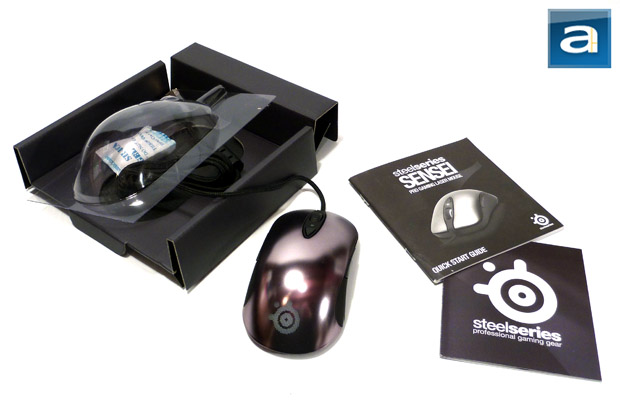
Good example we can show is by refering this review pics by APH Network. http://aphnetworks.com/reviews/steelseries_sensei

The reviewer snap the Sensei pics as it was freshly come out from the packaging box smile.gif

"The SteelSeries Sensei came to our offices in Calgary all the way from Japan Chicago, Illinois in a standard brown cardboard box. For a computer mouse, this is a pretty typical way for the products to be shipped to us. The master's journey went smoothly, and there was virtually no damage to the shipping box, thanks to UPS Standard. Well, as always, it's time to pull the mentor out of the box, and take a look at what we got for ourselves today. ...."

user posted image

user posted image

user posted image

user posted image

user posted image

it bears the same wear marks smile.gif just wanna share the info that most new steelseries mouse kinda have all this kinds of wear marks on the bottom. To ask why maybe we need to ask them SteelSeries HQ smile.gif

to bro DemonTweakZ, rest assured everything will be done to settle this matter ASAP..no worry..will contact u soon smile.gif
*
Eh bro, you are here. Haha.
Yeah Gavin told me could be software problem. Hope he settles it quickly la. Last time i had to wait more than 3 weeks and i had to pm him here before he sent the unit to you.
This cannot be your fault or to a degree Play Interactive's as well. I'm just lamenting on the QC of the mouse. You know, being RM400 and all..

QUOTE(warlove3 @ Feb 19 2012, 08:30 AM)
shouldn't be a flaw, but they had gone through intensive QC to make sure every settings worked before shipping?? My Fnatic Sensei also have the mousefeet worn a BIT not as much as on the Moderno post...
*
Who does that? Open every mouse and test it before sending it out. And how much testing is required before these marks appear? I doubt if they have so much time to test every single mouse till there are wear marks.

QUOTE(Everdying @ Feb 19 2012, 11:50 AM)
more PC-like statements...
imo, doesnt make sense to take thousands of mouse off the production line, then do rigorous testing on the sensor again, then stick it back on the line again for packaging.

i would guess the wear marks on the feet most likely occur while the finally assembled mouse is rolling down the production line on the way to the box.
*
yeah, could be production fault. I'm sure during production, they just simply throw the skates all over the place before some dude assembles them. Hence the wear marks on the skates and nothing on the bottom of the mouse itself.

This post has been edited by DemonTweakZ: Feb 19 2012, 01:13 PM

DemonTweakZ
post Feb 25 2012, 07:36 PM

Pretengineer Detector
******
Senior Member
1,042 posts

Joined: Dec 2009
From: Mars


i'm not the only one with a buggy sensei
DemonTweakZ
post Feb 28 2012, 07:36 PM

Pretengineer Detector
******
Senior Member
1,042 posts

Joined: Dec 2009
From: Mars


QUOTE(KahLooN @ Feb 26 2012, 09:36 AM)
When I'm about giving to troubleshoot the mouse, I give it a try to repeat the above steps as I tried earlier.

Somehow, Lady Luck was here perhaps. The mouse is now alive. Really a shocking moment when I reinstall back the software and it pass till 100%.
Thanks to those guide me earlier.
notworthy.gif
*
i know your mouse is working but i just wanna share that i had the same problem.

i got back my RMA-ed sensei. brand new, when installing it doesnt blink and when updating it hangs. even crashes my pc. so what i did was i updated first then disconnect and install the SS Engine. do it separately and it shouldn't be a problem. i downloaded the ss update tool from the website.

Topic ClosedOptions
 

Change to:
| Lo-Fi Version
0.0419sec    0.69    7 queries    GZIP Disabled
Time is now: 2nd December 2025 - 05:58 PM