


The Razer Thread v15
The Razer Thread v15
|
|
  Nov 9 2011, 12:58 PM Nov 9 2011, 12:58 PM
Return to original view | Post
#1
|
 
Senior Member
1,924 posts Joined: Jan 2005 From: Subang Jaya  
|
Razer Electra & Battlefield 3 stuffs arriving this week
|
|
|
|
|
|
Nov 17 2011, 05:06 PM
Return to original view | Post
#2
|
|
Senior Member
1,924 posts Joined: Jan 2005 From: Subang Jaya
|
RAZER BATTLEFIELD 3 GOODIES & ELECTRA ARRIVED!
  |
|
|
Nov 19 2011, 01:06 PM
Return to original view | Post
#3
|
|
Senior Member
1,924 posts Joined: Jan 2005 From: Subang Jaya
|
QUOTE(kira-kun @ Nov 19 2011, 12:53 PM) are you guys bringing over? no update yet on the availability of the case...locally rite now only got the iphone 4 case battlefield edition @ SRP : RM 89PM me the price if you are lol!   |
|
|
Nov 22 2011, 03:25 PM
Return to original view | Post
#4
|
|
Senior Member
1,924 posts Joined: Jan 2005 From: Subang Jaya
|
QUOTE(TechnoG @ Nov 22 2011, 10:44 AM) Yes, it is quieter due to different switches being used The Razer BlackWidow Stealth edition keyboards use the tactile Cherry MX Brown mechanical key switches, while the Razer BlackWidow keyboards use tactile and clicky Cherry MX Blue mechanical key switches.ah i see.. thanks for the info man.. do u currently own one? having problem finding the stealth edition here in johor Cherry MX Brown Switches 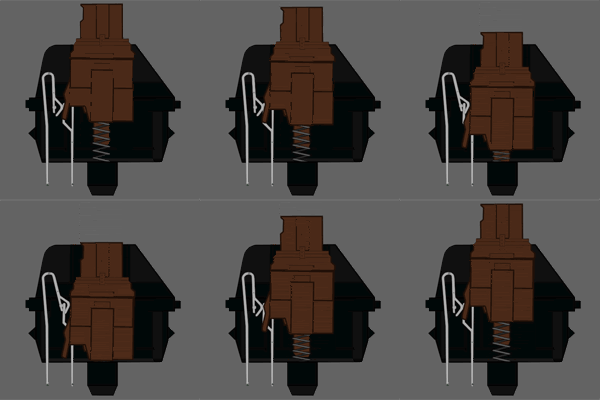 Type: Tactile Switch Link: Datasheet Tactile: Yes Clicky: No Actuation Force: 45g (55g Peak Force) (Force Diagram) Key Travel: 2mm to actuation, 4mm to bottom QUOTE Cherry MX Brown switches are considered a middle ground between typing and "gaming" switches. They have a light, tactile feel half way through the key press that lets you know the switch has activated. This gives you an indication of what you can release the switch. The switch is considered a middle ground because the reset point & actuation point are close enough together than you can "float" at that point, enabling you to double tap faster. As a note: this switch actually has a peak force of 55G, it is 45G at the point of actuation. This is due to the design of the Cherry switch itself. Cherry MX Blue Switches 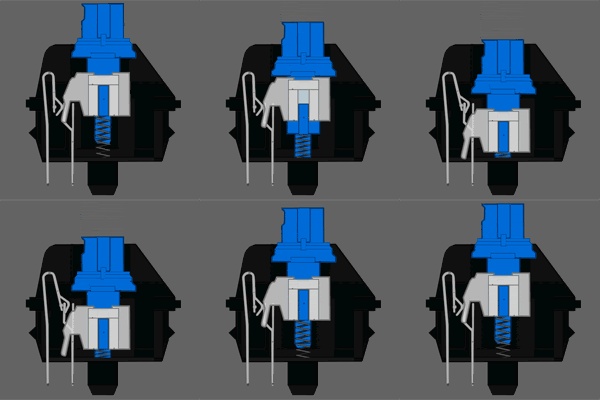 Type: Tactile & Clicky Switch Link: Datasheet Tactile: Yes, precise Clicky: Yes Actuation Force: 50g (60g Peak Force) (Force Diagram) Key Travel: 2mm to actuation, 4mm to bottom [quote]Cherry MX Blue switches are the best cherry switch for typing. The tactile bump can easily be felt, and the resistance is similar to your average keyboard. BW Stealth not yet coming in Razer Malaysia product list as till this date  This post has been edited by moderno: Nov 22 2011, 03:26 PM |
|
|
Nov 22 2011, 05:16 PM
Return to original view | Post
#5
|
|
Senior Member
1,924 posts Joined: Jan 2005 From: Subang Jaya
|
QUOTE(TechnoG @ Nov 22 2011, 04:24 PM) Nahh, I don't own one. Sponsor me one lah BLUE SWITCH : clicky-clicky feeling you cannot find BW Stealth in shops because it is only sold exclusively in razerzone.com, joins other products like Armadillo2 etc that is being sold only in their webby. comparison between the switches is posted by moderno. BROWN SWITCH : medium-clicky feeling BLACK SWITCH : no-clicky feeling it depends on ur own preference |
|
|
Nov 25 2011, 12:55 PM
Return to original view | Post
#6
|
|
Senior Member
1,924 posts Joined: Jan 2005 From: Subang Jaya
|
QUOTE(Exandru @ Nov 25 2011, 12:27 PM) Hi, can try updating the firmware via razerzone : I have an issue with Razer Lachesis (old 1 I believe) - My friend owned a Razer Lachesis, used for 1 year, then the pointer no longer working. So he bought 2nd unit and using till now. Receipt lost by the way. - I'm looking for a Razer mouse, and I liked Lachesis then he said, "I give you my rosak Lachesis, if you can fix it, its yours" - I have it now. I plugged in to my laptop:- 1) Blue light is up, no blinking. 2) Right click, left click, scrolling, middle click = Working 3) I can't test the side buttons. 4) POINTER ain't working (not moving at all) What I did :- 1) Used on different PC - Failed. 2) Cleaned the laser pointer with cotton bud - Failed. 3) Install driver & update firmware - Failed. If I were to send it to distributor, Section 19, without receipt, not possible? If serial number is usable to prove being under warranty, can use? Even if it's not, is this mouse repairable? I wouldn't mind paying if it's not too expensive. My friend said he bought it one shop in Lowyat Plaza, but can't remember where (to point out the receipt). Any helps from you masters? Thank you in advance. http://www.razersupport.com/index.php?_m=d...nav=0,76,169,18 |
|
|
Nov 25 2011, 01:22 PM
Return to original view | Post
#7
|
|
Senior Member
1,924 posts Joined: Jan 2005 From: Subang Jaya
|
if updating everything else failed...then maybe u have a dead sensor lachesis then
u can try sent it for RMA directly to Ban Leong SS19 PJ there...acceptability wise..u have to go and ask them 1st |
|
Topic ClosedOptions
|
| Change to: |  0.0484sec 0.0484sec
 0.66 0.66
 7 queries 7 queries
 GZIP Disabled GZIP Disabled
Time is now: 2nd December 2025 - 11:10 AM |
 Quote
Quote