

QUOTE(andrewtho @ Nov 20 2011, 07:50 PM)
mantis still got meh? I thought extinct already 

still got, saw 1 in tsb The Razer Thread v15
|
|
 Nov 20 2011, 07:54 PM Nov 20 2011, 07:54 PM
|
 
Senior Member
9,337 posts Joined: Mar 2010   
|
QUOTE(andrewtho @ Nov 20 2011, 07:50 PM) mantis still got meh? I thought extinct already still got, saw 1 in tsb |
|
|
|
|
|
Nov 20 2011, 11:41 PM
|

Junior Member
73 posts Joined: Jun 2011
|
hi all,
i'm newbie here in this forum.. anyone here can guide me for keyboard : Razer Blackwidow Ultimate mice: naga mmog? i have been using this 2 gadget nearly 10mth..but i still not pro to use the macro function yets.. i know to set n save the macros.. but i once i on the fly the fly start the macro's wrongly...i dont know to stop it...how should i turn the macros off without restart my pc(this what i always do if i wanted to turn of my macros) having hard times with this... i brought this 2 item also i saw it have macro function ability...that's y i buy it without asking...even i ask back to the shop i buy(ALL IT hyperstore) there the sales person also dont know to teach me...just give me a simple answer..(WE NEVER USE IT BEFORE)  so sad... hard time's here... please any one help me or pm me..whoever is pro in macro on RAZER product.. so sad... hard time's here... please any one help me or pm me..whoever is pro in macro on RAZER product.. |
|
|
Nov 21 2011, 08:31 AM
|

Junior Member
137 posts Joined: May 2009
|
what is the best pad combo for DA?? will it be alot diff if i use pad or using on normal table surface?? shud i go for normal DA or DA BE??
|
|
|
Nov 21 2011, 09:26 AM
|
|
Senior Member
9,337 posts Joined: Mar 2010
|
QUOTE(chahupping @ Nov 21 2011, 08:31 AM) what is the best pad combo for DA?? will it be alot diff if i use pad or using on normal table surface?? shud i go for normal DA or DA BE?? Goliathus?  use it on your bare table surface, it'll burn your feet and leave teflon marks on your table, it'll look very messy and ugly. Depends on you, but I'll recommend you to go for DA BE use it on your bare table surface, it'll burn your feet and leave teflon marks on your table, it'll look very messy and ugly. Depends on you, but I'll recommend you to go for DA BE Added on November 21, 2011, 9:29 am QUOTE(sinclai79 @ Nov 20 2011, 11:41 PM) hi all, did you download the firmware? i'm newbie here in this forum.. anyone here can guide me for keyboard : Razer Blackwidow Ultimate mice: naga mmog? i have been using this 2 gadget nearly 10mth..but i still not pro to use the macro function yets.. i know to set n save the macros.. but i once i on the fly the fly start the macro's wrongly...i dont know to stop it...how should i turn the macros off without restart my pc(this what i always do if i wanted to turn of my macros) having hard times with this... i brought this 2 item also i saw it have macro function ability...that's y i buy it without asking...even i ask back to the shop i buy(ALL IT hyperstore) there the sales person also dont know to teach me...just give me a simple answer..(WE NEVER USE IT BEFORE) so sad... hard time's here... please any one help me or pm me..whoever is pro in macro on RAZER product.. what's so hard? but if you plan to assign those button in game, do it at your can controls section. This post has been edited by TechnoG: Nov 21 2011, 09:29 AM |
|
|
Nov 21 2011, 03:01 PM
|
|
Junior Member
73 posts Joined: Jun 2011
|
QUOTE(TechnoG @ Nov 21 2011, 10:26 AM) Goliathus? bro technoG i have all all the both firmware...i mean after i asign/apply macro profile with setting 99times.. use it on your bare table surface, it'll burn your feet and leave teflon marks on your table, it'll look very messy and ugly. Depends on you, but I'll recommend you to go for DA BE Added on November 21, 2011, 9:29 am did you download the firmware? what's so hard? but if you plan to assign those button in game, do it at your can controls section. just example...when i set my macro at my keyboard software...all it's works well.. i just when my keyboard macro was set 99times..one the macro start i cannot stop?need to wait till all the macro repeating 99times only i could stop?(is there any ways to stop the macro program when i accidentally pressed the M1-M5)?ussually i cant stop the macro...i just restart my pc...(this make me suck's) anyone could understand my problem? This post has been edited by sinclai79: Nov 21 2011, 03:03 PM |
|
|
Nov 21 2011, 05:28 PM
|
 
Staff
30,730 posts Joined: Jan 2003
|
why would u even want to set something 99 times?
and the bw can do macro on any other key apart from M1-M5. so simple logic would state that, if u keep accidentally pressing those keys, move the macro somewhere else. |
|
|
|
|
|
Nov 21 2011, 09:10 PM
|
|
Junior Member
5 posts Joined: Nov 2011 From: JB
|
hey guys.. newbie here.. would just like to ask if anyone here has the razer blackwidow stealth edition.. is it significantly quieter than the blackwidow ultimate?
|
|
|
Nov 21 2011, 10:31 PM
|
|
Junior Member
73 posts Joined: Jun 2011
|
QUOTE(Everdying @ Nov 21 2011, 06:28 PM) why would u even want to set something 99 times? i'm using macro program to afk my online game's...in window mode..while when i afk is when i'm sleeping...but when 99times macro..havent finish i woke up..i wanted to pause or stop the macro for me to check my mail or fb or lynn..i can't type at all..coz..it's keep on (1 2 3 4 12 3 4 5 )so how am i goin to pause it or stop it without restart my computer?and the bw can do macro on any other key apart from M1-M5. so simple logic would state that, if u keep accidentally pressing those keys, move the macro somewhere else. |
|
|
Nov 22 2011, 01:59 AM
|

Junior Member
403 posts Joined: Mar 2010
|
Hey guys,having problem here with my Razer Onza TE, the LT button doesn't work 100%, it's not dead yet but if I press the button to the max, it won't work, it only work when I press untill 50-70% of the button. Anyone here faces the same problem?
This post has been edited by aishulicious: Nov 22 2011, 02:04 AM |
|
|
Nov 22 2011, 10:44 AM
|
|
Senior Member
9,337 posts Joined: Mar 2010
|
QUOTE(eyth @ Nov 21 2011, 09:10 PM) hey guys.. newbie here.. would just like to ask if anyone here has the razer blackwidow stealth edition.. is it significantly quieter than the blackwidow ultimate? Yes, it is quieter due to different switches being used Added on November 22, 2011, 11:00 am QUOTE(aishulicious @ Nov 22 2011, 01:59 AM) Hey guys,having problem here with my Razer Onza TE, the LT button doesn't work 100%, it's not dead yet but if I press the button to the max, it won't work, it only work when I press untill 50-70% of the button. Anyone here faces the same problem? time for RMA but dunno whether this kind of case is acceptable..so just live with it.This post has been edited by TechnoG: Nov 22 2011, 11:00 AM |
|
|
Nov 22 2011, 02:26 PM
|
|
Junior Member
5 posts Joined: Nov 2011 From: JB
|
[quote=TechnoG,Nov 22 2011, 10:44 AM]
Yes, it is quieter due to different switches being used ah i see.. thanks for the info man.. do u currently own one? having problem finding the stealth edition here in johor |
|
|
 Nov 22 2011, 03:25 PM Nov 22 2011, 03:25 PM
|

Senior Member
1,924 posts Joined: Jan 2005 From: Subang Jaya 
|
QUOTE(TechnoG @ Nov 22 2011, 10:44 AM) Yes, it is quieter due to different switches being used The Razer BlackWidow Stealth edition keyboards use the tactile Cherry MX Brown mechanical key switches, while the Razer BlackWidow keyboards use tactile and clicky Cherry MX Blue mechanical key switches.ah i see.. thanks for the info man.. do u currently own one? having problem finding the stealth edition here in johor Cherry MX Brown Switches 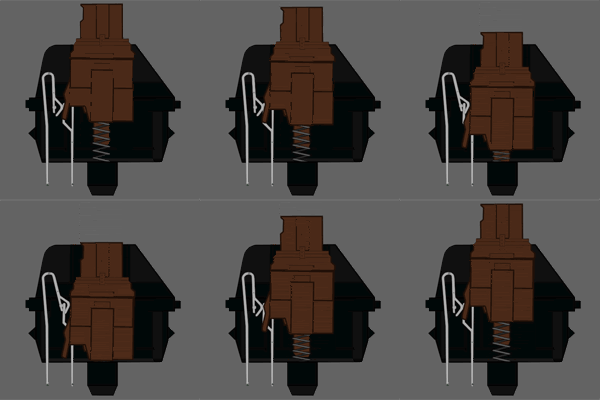 Type: Tactile Switch Link: Datasheet Tactile: Yes Clicky: No Actuation Force: 45g (55g Peak Force) (Force Diagram) Key Travel: 2mm to actuation, 4mm to bottom QUOTE Cherry MX Brown switches are considered a middle ground between typing and "gaming" switches. They have a light, tactile feel half way through the key press that lets you know the switch has activated. This gives you an indication of what you can release the switch. The switch is considered a middle ground because the reset point & actuation point are close enough together than you can "float" at that point, enabling you to double tap faster. As a note: this switch actually has a peak force of 55G, it is 45G at the point of actuation. This is due to the design of the Cherry switch itself. Cherry MX Blue Switches 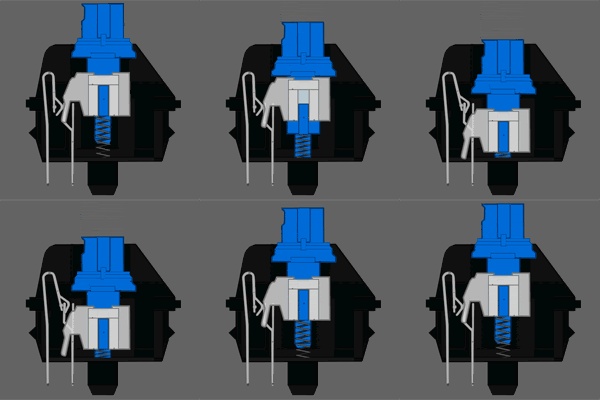 Type: Tactile & Clicky Switch Link: Datasheet Tactile: Yes, precise Clicky: Yes Actuation Force: 50g (60g Peak Force) (Force Diagram) Key Travel: 2mm to actuation, 4mm to bottom [quote]Cherry MX Blue switches are the best cherry switch for typing. The tactile bump can easily be felt, and the resistance is similar to your average keyboard. BW Stealth not yet coming in Razer Malaysia product list as till this date  This post has been edited by moderno: Nov 22 2011, 03:26 PM |
|
|
Nov 22 2011, 04:24 PM
|
|
Senior Member
9,337 posts Joined: Mar 2010
|
QUOTE(eyth @ Nov 22 2011, 02:26 PM) ah i see.. thanks for the info man.. do u currently own one? having problem finding the stealth edition here in johor Nahh, I don't own one. Sponsor me one lah you cannot find BW Stealth in shops because it is only sold exclusively in razerzone.com, joins other products like Armadillo2 etc that is being sold only in their webby. comparison between the switches is posted by moderno. This post has been edited by TechnoG: Nov 22 2011, 04:25 PM |
|
|
|
|
|
Nov 22 2011, 05:16 PM
|
|
Senior Member
1,924 posts Joined: Jan 2005 From: Subang Jaya
|
QUOTE(TechnoG @ Nov 22 2011, 04:24 PM) Nahh, I don't own one. Sponsor me one lah BLUE SWITCH : clicky-clicky feeling you cannot find BW Stealth in shops because it is only sold exclusively in razerzone.com, joins other products like Armadillo2 etc that is being sold only in their webby. comparison between the switches is posted by moderno. BROWN SWITCH : medium-clicky feeling BLACK SWITCH : no-clicky feeling it depends on ur own preference |
|
|
Nov 22 2011, 06:22 PM
|
|
Junior Member
5 posts Joined: Nov 2011 From: JB
|
@moderno & technoG - thanks so much for ur replies and info.. learnt alot
 |
|
|
Nov 22 2011, 09:48 PM
|

Senior Member
1,058 posts Joined: Mar 2009
|
To all blackwidow Ultimate users, have you guys experienced that your keyboard cannot on the 'gaming mode'? Meaning to say that, when you press the 'FN' key + "'G'/F11'" to activate/on gaming mode. I tried pressing both, but the green light won't come out. I tried pressing 'FN' with the media control, it works. Driver and Firmware are up to date.
|
|
|
Nov 22 2011, 10:13 PM
|
|
Senior Member
2,239 posts Joined: Aug 2008
|
Any ideas on how to open up my Carcharias volume controller? It is giving me sometimes single left/right audio when adjusting the volume. Have to adjust it just to be right to get both left right audio to work.
Thinking of doing something with it , not even a year some more. |
|
|
Nov 23 2011, 02:53 AM
|
|
Junior Member
73 posts Joined: Jun 2011
|
QUOTE(j.sun @ Nov 22 2011, 10:48 PM) To all blackwidow Ultimate users, have you guys experienced that your keyboard cannot on the 'gaming mode'? Meaning to say that, when you press the 'FN' key + "'G'/F11'" to activate/on gaming mode. I tried pressing both, but the green light won't come out. I tried pressing 'FN' with the media control, it works. Driver and Firmware are up to date. i been tried before this problem..just send to warranty claim...if u still under warranty n receipt..they will change new set for u.. my blackwidow being claim for 4time already... 4times all change new set |
|
|
Nov 23 2011, 06:25 AM
|

Junior Member
233 posts Joined: Aug 2010
|
What do you guys think about Razer Imperator REFRESH? The 4g version.
Planning to get a gaming mouse and budget is about Rm250 plus minus. Please recommend! |
|
|
Nov 23 2011, 08:09 AM
|
|
Senior Member
9,337 posts Joined: Mar 2010
|
QUOTE(justordinary @ Nov 23 2011, 06:25 AM) What do you guys think about Razer Imperator REFRESH? The 4g version. Meh. Xai or G700 is the better bet Planning to get a gaming mouse and budget is about Rm250 plus minus. Please recommend! Added on November 23, 2011, 8:10 am QUOTE(freakenstein @ Nov 22 2011, 10:13 PM) Any ideas on how to open up my Carcharias volume controller? It is giving me sometimes single left/right audio when adjusting the volume. Have to adjust it just to be right to get both left right audio to work. take it for warranty? common problem with headsets I think..encountered with some of them that are like that, but not Carcharias tho.Thinking of doing something with it , not even a year some more. This post has been edited by TechnoG: Nov 23 2011, 08:10 AM |
|
Topic ClosedOptions
|
| Change to: |  0.0272sec 0.0272sec
 0.29 0.29
 6 queries 6 queries
 GZIP Disabled GZIP Disabled
Time is now: 2nd December 2025 - 11:34 AM |
 Quote
Quote