Outline ·
[ Standard ] ·
Linear+
SAMSUNG GALAXY S II Official thread V13, NEW Users - be SMART user :read page 1
|
del_Piero10
|
 Sep 4 2011, 08:29 PM Sep 4 2011, 08:29 PM
|

|
hi guys, i'm still new with my SGS II. just bought it yesterday; SME unit. the problem is, i noticed that my SGS II will reboot itself randomly. it happens 3 to 4 times already today. i read some of the problems in xda-developers forum: http://forum.xda-developers.com/showthread.php?t=1062065some of the solution was to load a custom ROM; kdf rom, update to xdd. since i'm still new with this device, can some one give some tips to solve my random reboot issue? i only install some games such as Angry bird seasons, jenga (already uninstalled), blasts monkeys. please help.. |
|
|
|
|
|
del_Piero10
|
Sep 5 2011, 12:07 PM
|
|
|
QUOTE(waveweaver @ Sep 4 2011, 09:51 PM) A few steps that you can try - 1) Uninstall all your game apps and see if the reboot stop 2) If still reboot, do a factory rest. See if the problem stop 3) If still reboot, go to service centre for check up p/s - no need to flash any custom rom or update anything as the phone should be in good working condition BEFORE you do any flashing. Thanks mate. I've uninstalled some of the games and the phone doesn't reboot itself since last night. if it happens again, i will try the factory reset. thanks!! Flashing the ROM is the last thing on my mind right now. just want to play around with its original setting until i get bored.hehehe!!  |
|
|
|
|
|
del_Piero10
|
Sep 11 2011, 12:27 AM
|
|
|
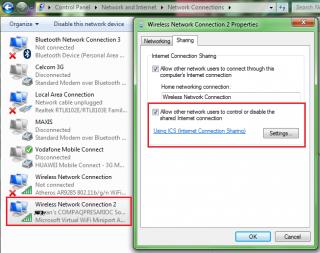
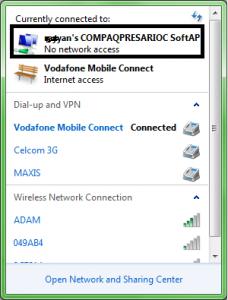
hi, i'm trying to create a Wifi share through my laptop. i'm using the Celcom broadband as internet source for my laptop. i've followed all instructions shown on the first page (see attached pictures) but i still got problem. the error i got was there was no access to my newly created wifi adapter. how can i configure the internet connection sharing (ICS) to connect my SGS II? Attached thumbnail(s)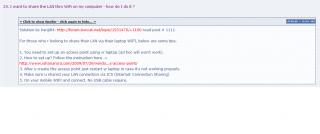
|
|
|
|
|
|
del_Piero10
|
Sep 11 2011, 05:08 PM
|
|
|
QUOTE(del_Piero10 @ Sep 11 2011, 12:27 AM) hi, i'm trying to create a Wifi share through my laptop. i'm using the Celcom broadband as internet source for my laptop. i've followed all instructions shown on the first page (see attached pictures) but i still got problem. the error i got was there was no access to my newly created wifi adapter. how can i configure the internet connection sharing (ICS) to connect my SGS II? since no one have this problem, i found my own solution. just download this software: http://virtualrouter.codeplex.com/ and install it. connect your broadband and enable your wifi. turn on the software and it will detect the internet access source automatically... |
|
|
|
|
|
del_Piero10
|
Sep 11 2011, 05:32 PM
|
|
|
QUOTE(Slekerz @ Sep 11 2011, 05:16 PM) Im also on celcom broadband have no problem wifi sharing with my laptop,maybe your aon setting is not right. i think so la. may be i didn't configure the ICS or network sharing properly. so this software will save a lot of time for newbies to connect their SGS II to wifi share through laptop!  |
|
|
|
|
|
del_Piero10
|
 Sep 15 2011, 12:05 PM Sep 15 2011, 12:05 PM
|
|
|
hi, my SGS II keep switch off on itself..its been twice already. last time it happened, i uninstall all games and it work for a while. and now it happens again. now i just uninstall the advance task killer from my phone. one more funny thing is, after i switch my phone on again, the screen suddenly becomes blue for at least 5 seconds and then back to normal again. this only happen randomly. it really piss me off because this is the new unit that i bought less than 2 weeks ago; original SME unit..  |
|
|
|
|
|
del_Piero10
|
Sep 15 2011, 12:32 PM
|
|
|
QUOTE(alieamin @ Sep 15 2011, 12:22 PM) I have a few customer having this kind of problem, after upgrade to 2.3.4 the phone working fine. auto restart is usually caused by unstable operating system. If auto off,then there is connection issue between battery and board. sorry for my previous mistake. the phone was rebooting itself actually. does the official gingerbread 2.3.4 for SGS II released already? for your info, i haven't do any rooting yet to my phone. |
|
|
|
|
|
del_Piero10
|
Sep 15 2011, 03:44 PM
|
|
|
i just rooted my SGS 2 using CF-Root-SGS2_XW_ODD_KE8-v4.0-CWM4 file with Odin. i refer to post below: http://forum.xda-developers.com/showthread.php?t=1103399now i want to get rid off the yellow triangle. which stock kernel i need to use? i've downloaded the files below: KDA KDB KDD KDF KE1 KE2 Right now my Kernel version is I19100XXKH3-CL479037 according to FAQ on page file, i need to use CWM to reload the stock kernel. Please advice aa!!  |
|
|
|
|
|
del_Piero10
|
Sep 15 2011, 04:07 PM
|
|
|
QUOTE(Bugeca @ Sep 15 2011, 03:50 PM) What is your current build number / firmware version? before i Root, i updated the kernel version through Kies to KH2. right now my build # is Gingerbread.DXKH2. i didn't flash any rom yet, just root only via Odin using the file i've mentioned in my previous post. |
|
|
|
|
|
del_Piero10
|
Sep 15 2011, 04:10 PM
|
|
|
QUOTE(antt00 @ Sep 15 2011, 03:57 PM) Login to your gmail. On left hand side got "contact" below Gmail logo. Just click that lo and you will see all your contact.
Added on September 15, 2011, 4:01 pmWhy you root using KE8 kernel but kernel version KH3  As what was ask before what is your rom version? I'm sorry, i root it with CF-Root-SGS2_XX_OXA_KH3-v4.1-CWM4, not KE8. may be i copy the wrong one. |
|
|
|
|



 Quote
Quote

 0.0415sec
 0.62
0.62
 7 queries
 GZIP Disabled