Welcome Guest ( Log In | Register )

Outline · [ Standard ] · Linear+

 A simple guide to Ad Hoc Party

views
     
TSblah2blah
post Sep 2 2011, 01:43 PM, updated 15y ago

Enthusiast
*****
Senior Member
748 posts

Joined: Aug 2009
Attached Image

Ok this is just my simple guide (with simple 2MP pics as well) to guide you to some of the basic on this wonderful program for your PS3 which is Ad Hoc Party. It was out for period of time already but not many people know (including me) until this massive Monster Hunter 3rd Portable HD (MH3rdP HD) for our beloved PS3 is out. Ok so here it goes.

Q : What is Ad Hoc Party?
A : Ad Hoc Party is just a simple program from Sony to allow our PSP games that can play Ad Hoc mode game to play with other players around the world with your PS3 as your host (we know we are all busy to meet up to play ad hoc). Some of the example games that works is MH3rdP, MGS Peace Walker, Ace Combat, God Eater, blah blah blah)

Q : How does Ad Hoc Party works?
A : Technically I not sure how it works in details, but all you need to have is PS3 (of course duh), a PSP (again duh), a LAN network connected to your ISP (router or modem is alright as long has Internet connection) and Ad Hoc Party (triple duh). Once you're connected to PSN, when you open your program it will show like this.

Attached Image

Q : When can we use Ad Hoc Party to play games?
A : When you're free?

Q : Why Ad Hoc Party?
A : We as a PS3 owner do not want to be left out from some of the addictive multi-player game on PSP to play with other people. So this is the solution of your thirsty gamers out there. I'm too dumb to install X-Link Kai to work on my PC, so this is a more simple and user-friendly program for all of us. Do note that there are few region of Ad Hoc Party that I know (U.S. and Japan AFAIK, not sure bout U.K. and Asia region). So basically Ad Hoc Party serves as a so-called 'server' for our particular region.
tanariz
post Sep 2 2011, 02:10 PM

New Member
*
Junior Member
21 posts

Joined: Apr 2009
-

This post has been edited by tanariz: Sep 2 2011, 07:19 PM
TSblah2blah
post Sep 2 2011, 02:10 PM

Enthusiast
*****
Senior Member
748 posts

Joined: Aug 2009
Ok so here's the tutorial. Eventually when you brought your

Attached Image

you know you got 3 things to do :

1) Update your PS3 (disc provide 3.66 which is not enough for the current 3.70 if you want to access to PSN)
2) Install the game (for the PS3 version)
3) Install Ad Hoc Party (which is a 1.00 version, which is not enough to play also. You need 2.00 version)

After you'd install everything so here it goes. When you select the game it will come out 2 section for you, play offline or online (forgot to take this pic but is a very easy task) so choose the right one if you want to play online.

PS - Before I continue I assume that you'd updated your PS3 and your Ad Hoc Party is ready to use.

Next you will see this.

Attached Image

First few choices are Start, Jump, Game Search and Page Update. So if you press the first one (Start) you will be here.

Attached Image

There are total of 20 world (alphabet A to T) and each world has 64 lobby. 20X64=1280 place for you to meet up. Here I use an example of the room.

Attached Image

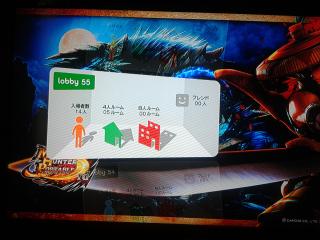
As you can see here there are 14 person inside, 4 person room consist of 5 and 8 person room consist of 0. Do note there are some Ad Hoc games (I dunno what game) that can take 8 person together unlike MH3rdP can take 4 person only. After this you will be brought inside the lobby.

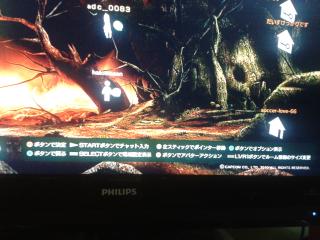
Attached Image

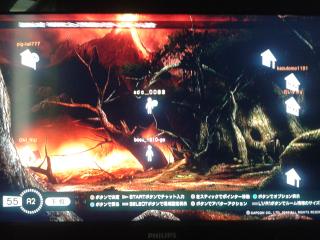
As you can see here there are some room with open, close and some other thing that common sense will know. Ok I wun elaborate much here so to the next step.

Attached Image

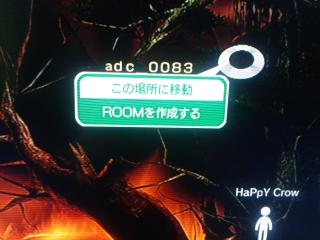
Let say you want to create a room, just use your left analog and point any free space, press Circle and you will given this two menu which is move your icon here and create a room. So common sense you know la what to do.

Attached Image

Or if you want to join in an open room (with the door open la duh), click on one of the room, there will be two selection for you which is comment/member inside the room and enter the room.

After you'd go inside the room you will see a chat log and some of the member inside the room with each particular colour including yourself. So if you're ready to join the hunt just press R2 and the game will start (applicable for PS3 version) and sorry forgot to take pics again.

This post has been edited by andrewcha: Sep 4 2011, 08:02 PM
TSblah2blah
post Sep 2 2011, 02:48 PM

Enthusiast
*****
Senior Member
748 posts

Joined: Aug 2009
Attached Image

If you'd choose the second option which is 'Jump', you will get to this screen which is your bookmark/history for the current lobby that you'd join for your previous hunt. Simple for you if your group of friend has always come to this lobby to hunt as you don't have to find each other anywhere 'cos is a 1280 lobby available out there.

Attached Image

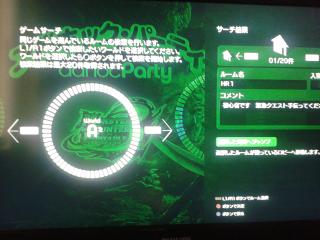
The third option from your title menu which is 'Game Search'. This is a simplified version of the 'Start' menu where you can easily find all the world with 20 recommended/open room for you to enter.

Now for some of the advance button available in Ad Hoc Party. Check this out when you're inside the lobby.

Attached Image

When you press Start button, a chat log will pop up and you can write there for your status (just like FB or MSN) on your icon.
When you hold on Square button, there are 4 emoticon for you to make your icon 'feels'. Just found out before I post this.
When you press L1/R1 button, you can change your text bigger/smaller.
When you press Select button, this will come out.

Attached Image

These are the option that is quite similar to your PSP when you want to change the setting for your Ad Hoc mode. The first one I'm not sure since is written there No 1, No 2 and No 3. I just leave it as it is. Do input to me so I can update it too.

The second option is the channel. There are a few options also for your Ad Hoc channel which is Channel 1, 11 blah blah so just leave it to the first one which is automatic wireless channel.

The third one is voice chat option. When you're in game, if you have a Bluetooth microphone, you can voice chat (or VC) together. So this option is to let you turn off or on for VC.

Last one is the option for you when you're in the game (forgot to take pic again). When you're inside the game you'll see on your right and bottom screen there is some small option on Ad Hoc party (or shortcut I should say). This option is to turn it off or on only. Thats it.

From this post for the third pic, when you press Triangle button. an Option menu pops up like this.

Attached Image

First option is Friendlist. This is to show you that your friend on your PSN is inside or not in Ad Hoc Party.

Second option is Bookmark. This show some of your Bookmark lobby and modify it.

Third is the Chat Log where to show some of your text chat you have. For text chat you can input with your PS3 controller or just plug in a USB keyboard.

Last option is Exit from the lobby. Here you can go out to the title screen or world screen to look for another world. That's it for now. Before I go I want to show you another pic if you're playing Ad Hoc Party using PSP.

Attached Image

Let say you don't have PS3 version of MH3rdP HD but you want to join in your friend lobby. You can do so. With the almost same method like previous steps, you can join the fight. See the pics above? You need to turn on the WiFi on your PSP and go into your Online Gathering Hall for your PS3 to detect your PSP. After your PS3 recognize it, you join in using your PS3 with the same method and you can see all the other players name on your PSP. Check out this video for better understanding.


Hope this simple tuts will guide you for better understanding on Ad Hoc Party. You can check out Wikipedia on
Ad Hoc Party too. Signing out to hunt some monster now. Peace. icon_rolleyes.gif

This post has been edited by andrewcha: Sep 4 2011, 08:06 PM
paige.pc
post Sep 3 2011, 10:19 PM

Getting Started
**
Junior Member
120 posts

Joined: Jun 2009


Ooo thanks that helps quite alot
s_leonhart
post Sep 4 2011, 01:38 AM

MOA Club member
*****
Senior Member
999 posts

Joined: Dec 2009

great guide. keep it up smile.gif
happysam
post Sep 6 2011, 02:04 PM

New Member
*
Junior Member
6 posts

Joined: Jan 2010


i have ps3, but can i join/connect to ps3 using my psp into the adhoc ?

prefer using psp bc i can use eng/chinese for now....
don understand japanese... tongue.gif hahah...
TSblah2blah
post Sep 6 2011, 03:03 PM

Enthusiast
*****
Senior Member
748 posts

Joined: Aug 2009
QUOTE(happysam @ Sep 6 2011, 03:04 PM)
i have ps3, but can i join/connect to ps3 using my psp into the adhoc ?

prefer using psp bc i can use eng/chinese for now....
don understand japanese... tongue.gif hahah...
*
Can. In fact it is more stable and reliable. Did you watch the video? Ad Hoc Party suppose is meant for PSP. I think Sony and Capcom are trying something using this title so that they're coming a new MH title for MH series on PS3. MH3rdP HD is like emulating the PSP version on PS3 and use Ad Hoc party to connect with others via PS3. IMHO. sweat.gif
happysam
post Sep 6 2011, 03:25 PM

New Member
*
Junior Member
6 posts

Joined: Jan 2010


at office now... cant watch youtube here XD

i see... will try later... xlink kai not tat stable for me too... once a while will get dc bc most of the players in there is european... and my ping high -.- bc of shitmyx... -.-

will try it tonight and hopefully everyth works well smile.gif thanks a lot for the info
dante1989
post Sep 11 2011, 08:25 AM

Getting Started
**
Junior Member
288 posts

Joined: Sep 2010


Hi i have a question:

My friend has a ps3 and i have a psp. Now we are wondering whether we can join the ad-hoc party lobby as different players for example player A and B + 2 japanese players.
TSblah2blah
post Sep 11 2011, 10:15 AM

Enthusiast
*****
Senior Member
748 posts

Joined: Aug 2009
ps3 can join the lobby but your fren psp cant since psp need a host. ps3 as a host has join other lobby thus he cant join you. unless both of you use psp and let the ps3 hold as host and join other lobby.
dante1989
post Sep 11 2011, 10:17 AM

Getting Started
**
Junior Member
288 posts

Joined: Sep 2010


Ohh okay thanks.. means we can only play locally :/
pakcikDriver
post Sep 12 2011, 10:20 AM

New Member
*
Junior Member
23 posts

Joined: Oct 2006


can they just make a damn room for the hunters to gather, ala the tavern in MH PS2.. sighs
TSblah2blah
post Sep 12 2011, 04:16 PM

Enthusiast
*****
Senior Member
748 posts

Joined: Aug 2009
QUOTE(pakcikDriver @ Sep 12 2011, 11:20 AM)
can they just make a damn room for the hunters to gather, ala the tavern in MH PS2.. sighs
*
tak pakai server macam mana nak support so many people in 1 place? I know what you mean like MHTri online
pakcikDriver
post Sep 12 2011, 10:05 PM

New Member
*
Junior Member
23 posts

Joined: Oct 2006


QUOTE(andrewcha @ Sep 11 2011, 11:16 PM)
tak pakai server macam mana nak support so many people in 1 place? I know what you mean like MHTri online
*
thats right bro.

I really miss the old community that we had in PS2 Monster Hunter online.

a lot of friendly people, that are willing to help the newbies get around the game. good times..


Change to:
| Lo-Fi Version
0.0183sec    0.77    6 queries    GZIP Disabled
Time is now: 1st December 2025 - 12:27 PM