


Quite interested in those Photoshop paintings~
Where do a noobie start? Any advices sifu-sifu?
I know a little bit about drawing with hand, but virtually zero knowledge on drawing or painting with a computer

Thanks in advance

::: ART ATTACK V3 :::, all about handmade ART :D
|
|
 Feb 13 2012, 05:03 PM Feb 13 2012, 05:03 PM
Return to original view | Post
#1
|
 
Elite
24,193 posts Joined: Feb 2010 From: Perak 
|
Wah, nice thread
Quite interested in those Photoshop paintings~ Where do a noobie start? Any advices sifu-sifu? I know a little bit about drawing with hand, but virtually zero knowledge on drawing or painting with a computer Thanks in advance |
|
|
|
|
|
Feb 14 2012, 11:14 AM
Return to original view | Post
#2
|
|
Elite
24,193 posts Joined: Feb 2010 From: Perak
|
QUOTE(DragonReine @ Feb 13 2012, 11:01 PM) @ TJ Not sure what you're asking about, exactly. Do you want to know the software/hardware needed, how to use digital programs etc?  QUOTE(Adamiquesce @ Feb 14 2012, 02:57 AM) yeah not sure what are asking about... Thanks for the reply guys, appreciate it if u dont really have the skills on both medium,u gotta learn from the very basic...pencil and paper. I do know a little bit on how to draw on paper with pencil I was just wondering how to draw/ paint using a computer? Sorry for the noob question but I don't really know how else to put it  Usually you guys just start off drawing with the computer? Or do you draw on paper and then scan the picture? Sorry if my questions sound stupid Thanks in advance for your replies |
|
|
Feb 14 2012, 02:50 PM
Return to original view | Post
#3
|
|
Elite
24,193 posts Joined: Feb 2010 From: Perak
|
QUOTE(soundsyst64 @ Feb 14 2012, 01:34 PM) there's a few methods. Wah bro! Din't expect to see you here - draw on paper, scan, doing outlines and colors in photoshop/other graphic program - input directly using tablet (eg. wacom bamboo, cintiq) and do the rest in graphics program I start with first method before switch to second method after getting myself a tablet.  I see, so I better start of with the 1st method I guess~ Thanks for the reply! You guys draw and paint using mouse for the 1st method?  |
|
|
Feb 14 2012, 02:58 PM
Return to original view | Post
#4
|
|
Elite
24,193 posts Joined: Feb 2010 From: Perak
|
QUOTE(soundsyst64 @ Feb 14 2012, 02:55 PM) hehe Using mouse to draw sounds scary T____T yup, using mouse. But of course you need time to get hang on it. Anyway, any idea how a noob should start? I've read through some of the links shared here... I think that most of them are too advanced for my "level"  |
|
|
Feb 15 2012, 12:07 AM
Return to original view | Post
#5
|
|
Elite
24,193 posts Joined: Feb 2010 From: Perak
|
QUOTE(DragonReine @ Feb 14 2012, 08:11 PM) Well firstly you need to acquire the software (there are many varieties out there, ranging from expensive stuff like Photoshop to free-of-charge software like GIMP), and then learn how your particular choice of drawing software works, and after that you decide if you want to paint using the mouse or using the tablet. (continued below, related to Adam's post) Many thanks for the reply » Click to show Spoiler - click again to hide... « Appreciate it!!! OMG, those pros are really pro And seems like using a mouse to draw and paint can be quite time consuming and hard... but I guess I'll give it a try anyway haha~ (How do you guys know how to "paint" after digitalizing the hand-drawn picture? Sounds pretty hard to me lol) As for a tablet, any tablet will do? (wait, the tablet's you guys are referring to here are those drawing tablets right?)  Thanks in advance for the reply!! |
|
|
Feb 15 2012, 10:47 AM
Return to original view | Post
#6
|
|
Elite
24,193 posts Joined: Feb 2010 From: Perak
|
QUOTE(vypur85 @ Feb 15 2012, 12:49 AM) Using mouse to draw is not so advisable. Using mouse to colour is achievable but takes very long time as mentioned. I guess you get better when you practice painting often (then again, what doesn't?). That's why a lot of artists go for speedpaint. It's a form of practice for them. Yeah, drawing tablets. Any tablet should do I guess. I would suggest you to get yourself a Wacom tablet. The smallest model will do good. It's around RM350-400 I think. QUOTE(DragonReine @ Feb 15 2012, 12:56 AM) The painting is the same as traditional painting, TJ. It's just that digital painting is both always dry and never dry (i.e. you can change as you go, being flexible, and you don't have to wait hours/days/weeks for the "paint" to dry before you put down a new "layer"), and you can change your brush size/shape/texture on the fly. Many thanks guys!! You guys are poisoning me haha This video here (http://youtu.be/Imd_tTl5WSg) is pretty similar to how I personally work, although my personal sketches tend to be more precise as seen here: http://dragonreine.deviantart.com/art/WIP-...sited-217469414 And here's a VERY informative blog that talks about the sort of peripherals/tablets that are out there on the market, their costs, and which is best for your personal skill level and/or budget: http://enliighten.com/blog/tools-of-the-tr...-peripherals-3/ (enliighten.com is a good site, btw, created by a very experienced digital artist, and he covers a lot of basics in that site, with useful video tutorials) Also, I found the ImagineFX channel again (whee!) and there's a series of videos that shows how Mario Wibisono (the guy who paints with mouse) works on one of the covers (Part one here: http://www.youtube.com/watch?v=0_wOjcg1Te0), and this is the video that inspired my "Wolf's Rain" painting, by Melanie Delon: http://www.youtube.com/watch?v=-26j9iNeRL0 Note that my style (pencil sketch, semi-transparent layers of paint on top) is closer to the "traditional" way of working with paint than the other artists I'd featured here. EDIT: Also, what vypur just said  Here's a Wacom price list: http://www.wacom.asia/my/products-price Here's a Wacom price list: http://www.wacom.asia/my/products-priceThe cheapest model you can use for digital painting would be the Bamboo Pen, which costs RM299. If you can go to Lowyat Plaza in KL, you can check out the smaller shops and haggle for a lower price on that model That said, if you're going to invest in a tablet, buy the best that you can afford.  @DragonReine, I'll look through all your tutorials links 1st, and maybe try abit of mouse painting 1st before actually deciding whether to get a tablet Thanks again ya~ Really appreciate it!! |
|
|
|
|
|
Feb 21 2012, 05:37 PM
Return to original view | Post
#7
|
|
Elite
24,193 posts Joined: Feb 2010 From: Perak
|
Dear sifu-sifu!
I'm back I managed to draw and colored a drawing (of my gf) with pencil, pen and color pencil. The base drawing is below, I would like to learn how to paint it or do anything to it with Photoshop: » Click to show Spoiler - click again to hide... « This is what I have in mind for the drawing: 
So the biggest problem now is..... Where do I even start (Photoshop)? Hope sifu-sifu can help give some guidance P/S: I need to start by outlining the drawing is it? This post has been edited by [PF] T.J.: Mar 2 2012, 11:21 AM |
|
|
Feb 21 2012, 08:25 PM
Return to original view | Post
#8
|
|
Elite
24,193 posts Joined: Feb 2010 From: Perak
|
QUOTE(inachi @ Feb 21 2012, 07:57 PM) actually when you have the outline you can already applying color on the outline. Thanks for the reply bro, but what do you mean? |
|
|
Feb 21 2012, 10:34 PM
Return to original view | Post
#9
|
|
Elite
24,193 posts Joined: Feb 2010 From: Perak
|
QUOTE(inachi @ Feb 21 2012, 10:22 PM) now u want to paint right? its like how kids do coloring..since you have ur outline then just paint..which part u don understand? Well, I was hoping sifus here could show me the way "just paint" is quite general haha Sorry la, I am noob  |
|
|
Feb 22 2012, 09:59 PM
Return to original view | Post
#10
|
|
Elite
24,193 posts Joined: Feb 2010 From: Perak
|
QUOTE(Bonchi @ Feb 22 2012, 07:53 AM) just get a wacom and start painting with the basic paintbrush only.. eventually you'll learn to use more of the software features when you wanna improve it. thats how i did last time. if we suggest anything at this moment, you'd probably wont get it. so just a hint, use layers Thanks for the feedback bro, appreciate it! Well, I'm not too sure about whether I should get a drawing pad or not... that's why need to learn a little bit by using mouse 1st Layers? Will do!! TQ TQ Added on February 22, 2012, 10:01 pm QUOTE(DragonReine @ Feb 22 2012, 07:43 PM) @ T.J. Thank you thank you sifu!!! Check these tutorials: Anime soft-shading tutorial by *Mikeinel and Tutorial for soft cell shading by ~getty Shows you practically every step in how to colour Both use slightly different methods, see which one suits your taste. The first one is better if you use a mouse, though; second one needs a pressure-sensitive tablet to get the best effect. Will look into them now hehe~~ I'll go and play around 1st, then come back for C & C Thanks and have a nice day~ This post has been edited by [PF] T.J.: Feb 22 2012, 10:01 PM |
|
|
Jul 27 2012, 09:53 AM
Return to original view | Post
#11
|
|
Elite
24,193 posts Joined: Feb 2010 From: Perak
|
Hi guys, long time no visit this thread liao XD
Just sharing one of my drawings I managed to finished yesterday, haven't been drawing for ages Done by pencil, Pilot G-tech pen and color pencils (Steadler 36 colors). Its weird how the drawing looked so different (uglier ) when scanned with scanner, is it normal? O___o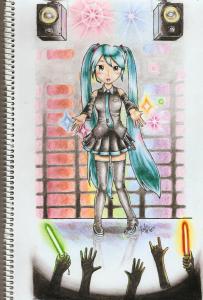
I've no luck trying to learn to draw and paint digitally, I just suck LOL This post has been edited by [PF] T.J.: Jul 27 2012, 07:49 PM |
|
Topic ClosedOptions
|
| Change to: |  0.0530sec 0.0530sec
 0.36 0.36
 7 queries 7 queries
 GZIP Disabled GZIP Disabled
Time is now: 8th December 2025 - 06:12 PM |
 Quote
Quote


