

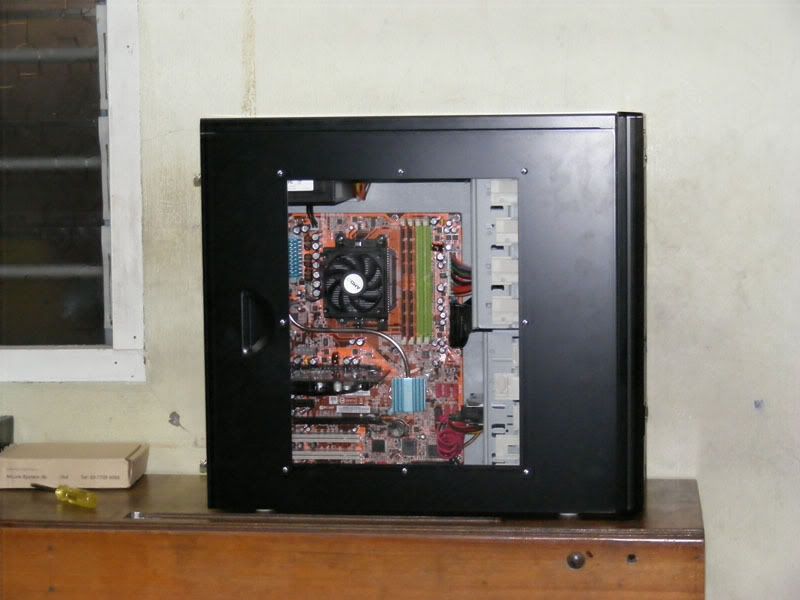
Just set up my cousin's PC yesterday. Decided to hide the cables a little and this is what i managed to do.
Pls comment.
Picture of nice cable management.., - Post ur pics. No cacings pls
|
|
 Jun 1 2007, 08:02 PM Jun 1 2007, 08:02 PM
Return to original view | Post
#1
|
 
Senior Member
2,386 posts Joined: Jan 2003 From: Many calls it "Hell"  
|
Just set up my cousin's PC yesterday. Decided to hide the cables a little and this is what i managed to do. Pls comment. |
|
|
|
|
|
Jun 3 2007, 08:59 PM
Return to original view | Post
#2
|
|
Senior Member
2,386 posts Joined: Jan 2003 From: Many calls it "Hell"
|
QUOTE(Kataro @ Jun 1 2007, 08:31 PM) wow...very nice cable management...very clean... Thanx...     QUOTE(fo33il @ Jun 1 2007, 08:52 PM) wow It's the C5 fully black. .....is it cooler master C5? black colour one? .....is it cooler master C5? black colour one?its very neat n tidy!!!! did u drill the mobo tray to hide the cable? Nope, no physical mods to the casing. QUOTE(Are_keem @ Jun 1 2007, 08:54 PM) where did you route all the cables? is it through the holes beside the PSU? nice job you've done there Very sharp eyes you have there. Bingo, see the little gap beside the PSU, all the PSU cables were pushed through there and hidden or re-routed from behind. Even the 4 pin ATX cable was routed from behind. -adios- QUOTE(Doom @ Jun 1 2007, 09:33 PM) wow that's one hell neat rig there... With some planning and when you have too much time to kill, everyone can do that.hmm .. I wonder how u managed to get it so clean .... QUOTE(mADmAN @ Jun 1 2007, 10:01 PM) indeed it looks very neat. should post pix WITHOUT the side panel and also where u hid all the cables...at least that can give some ideas to other people as well... be generous with the knowledge  QUOTE(DaRkSyThE @ Jun 1 2007, 11:01 PM) not to mention a shot of the psu area too  QUOTE(toughnut @ Jun 2 2007, 11:30 AM) better if got screenshot for both with and without side panel on. i'm now working on my case's cable too. not messy but still want to make it "disappear" behind the side panel QUOTE(llllNarutollll @ Jun 2 2007, 06:25 PM) without casing PLZ I'll post more on it, the other shots will show some of the cables. Like the IDE cable, floppy cables, the front audio and the front 1394.But i forgotten to snap the area where i left the cables. It's actually beside the right side panel, beside the HDD area. QUOTE(Are_keem @ Jun 2 2007, 08:18 PM) without casing? lolz Yup, sort of like that... it will be like worms heaven IMO -adios-  QUOTE(HaHaNoCluE @ Jun 2 2007, 08:42 PM) fren u forgot to pasang cables kah??? Haha... .... real nice job... ...Shhh...dun tell others, i'm using wireless...QUOTE(sanfa @ Jun 2 2007, 10:55 PM) nice!!!!!! The truth shall be revealed. Wait for my next posts on the remaining pics. Btw, is the pic in ur avatar u...I can help you out if you pimp your rig if you want to... can u help make my rig become like that??? juz joking... actually wanna ask u something... where u cucuk all the casing fan socket and cpu fan soc??? can't seen it... u make hole on ur mobo ka???  QUOTE(Are_keem @ Jun 2 2007, 11:41 PM) I didnt see any 6-pin PCIE connector there.. It's an 8600GT, so no need 6-pin PCIE. or the gc didnt need any power? -adios- QUOTE(vincent09 @ Jun 2 2007, 11:45 PM) Maybe need to know what hardware got inside that casing, less hardware less cacing XD. If not wrong just got 1 HDD right? AMD X2 4400+Abit KN9 SLI 2x1GB DDR2 667 Galaxy 8600GT OC Edition 250GB Seagate Sata II NCQ 16mb Samsung DVD-RW 1.44 Floppy CM 120mm Silent Fan CM Centurion 5 Casing CM Extreme Power 430w QUOTE(Doom @ Jun 3 2007, 01:53 AM) yah ... usually the less hardwares and additional ports needed results lesser cables.. Yup, so try to put only what you need. QUOTE(V1V3C @ Jun 3 2007, 04:37 PM) wah so sexy No physical mods to the case... u drilled the casing ka? |
|
|
Jun 3 2007, 09:55 PM
Return to original view | Post
#3
|
|
Senior Member
2,386 posts Joined: Jan 2003 From: Many calls it "Hell"
|
By request, the pic without the side panel.
Now all the cacings are exposed...  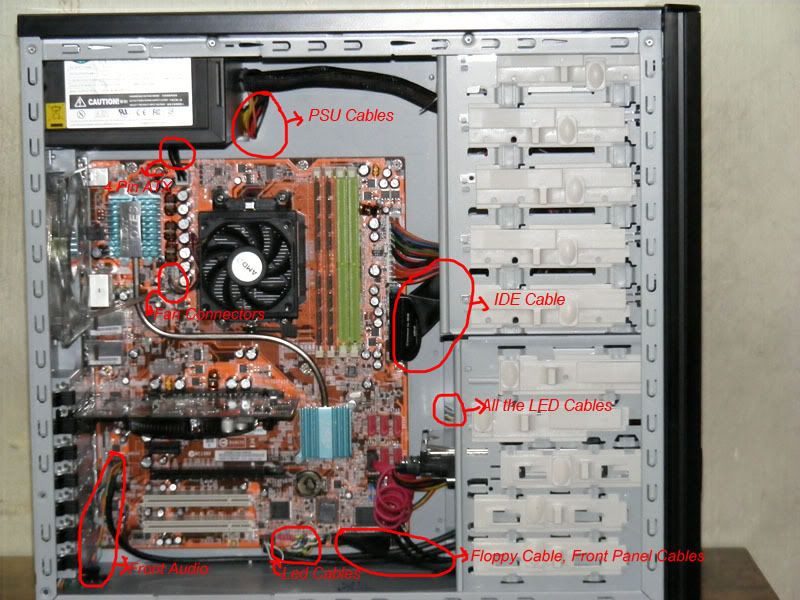 QUOTE(Are_keem @ Jun 3 2007, 09:34 PM) I didnt brave enough to enroute all the cables through that small hole.. scary the cable might spoilt.. that hole is damn small liao.. the gap behind the mobo tray also very2 small I've checked. That hole would not cause any cuts to the cables. So basically there should not be any problem with it. The gap behind the mobo tray depends on how you arrange them. I masked the cables to the mobo tray itself. Too bad i dun have sleeves and heatshrinks with me or i'll be able to do a better job.  ** lol, the owner still need floppy drives arr? edited : typo  -adios- As you could see there, the front panel cables requires some sleeving, same as the other PSU ATX cables. Bout the floppy, ya, it's still needed. My couz still has a baby bro in standard one. My baby couz, and the school computer class distributes floppy disk. So basically the floppy was exclusively prepared for him... This post has been edited by @meno: Jun 3 2007, 10:21 PM |
|
|
Jun 4 2007, 01:21 AM
Return to original view | Post
#4
|
|
Senior Member
2,386 posts Joined: Jan 2003 From: Many calls it "Hell"
|
QUOTE(Doom @ Jun 4 2007, 12:52 AM) NIce job even with the side panel off it still a good cable management result... Thanx for the compliment bro... Really appreciate it... |
|
|
Jun 4 2007, 07:18 PM
Return to original view | Post
#5
|
|
Senior Member
2,386 posts Joined: Jan 2003 From: Many calls it "Hell"
|
Hi RokXIII,
Here are my suggestions. Firstly, those power cables from the PSU could be hidden inside the 5.25" bays as you have ample space there. For the Main ATX 4 and 24 pin cable, i think it's quite good d, nothing much can be done there. Those LED cables could use some sleeving. Since you already sleeved the PSU, it shouldn't be much extra work. The IDE cable could be folded more properly. For the other cables, i'm not quite sure how to hide them as i've never owned any Lian-lis before. Btw dude, where's you Michael Scofield avatar? |
|
|
Jun 7 2007, 01:09 AM
Return to original view | Post
#6
|
|
Senior Member
2,386 posts Joined: Jan 2003 From: Many calls it "Hell"
|
QUOTE(RokXIII @ Jun 5 2007, 09:02 AM) Thanks for both of ur comments, i will try to do according to what u guys said! Rounded ide cables...Hmm, sometimes i hate them as they are harder to hide compared to normal IDE cables. Like my own rig, the DFI rounded cables really makes up a cacing nest in my rig especially when i still need both the IDE cables and also the floppy cable. I will get a rounded IDE cable soon, so nothing to worry bout it. And for the 120mm rear fan, i dun have a 3 pin connector currently, so i think i will keep it 1st. Btw, is that possible to sleeve up the LED cable (jumper)? If yes, then how? @meno Michael Scofield will not coming out until this August, so same with me la, i will put again his avatar when is S3... Btw, it is possible to sleeve up all the cables. Try using the smallest size sleeves, put all your cables LED (jumper) cables together, try to arrange them to have almost the same length and it will be much more tidier. OT: Hmmm, S3 in August. I'm also eagerly waiting. Can't wait for it to be up. |
|
|
Jun 7 2007, 06:46 PM
Return to original view | Post
#7
|
|
Senior Member
2,386 posts Joined: Jan 2003 From: Many calls it "Hell"
|
QUOTE(mADmAN @ Jun 7 2007, 01:13 AM) thats ur biggest problem right there...the DFI rounded cables...they suck...they really just suck. not as flexible and when u bend them they look like shit... Totally agreed with what you said there bro, the DFI cables suck. If not because i do not have spare rounded cables, i would not be using them. Those old cheapo rounded cables which i have eventually gave way after some wear and tear. Should give those CM you recommend a try when i have the budget.the best rounded cables ive ever experienced would be the black ones from CM (the one with the extra ground wire). flexible, and they still look good when u bend them. i used them in my HTPC and i can still tuck them away nicely, out of sight. Btw, just revived my 2nd rig. Would post up the pics after everything is done. |
|
Topic ClosedOptions
|
| Change to: |  0.0387sec 0.0387sec
 0.52 0.52
 7 queries 7 queries
 GZIP Disabled GZIP Disabled
Time is now: 17th December 2025 - 03:19 PM |
 Quote
Quote