Welcome Guest ( Log In | Register )

Bump Topic Topic Closed RSS Feed

Outline · [ Standard ] · Linear+

Unifi Official TM UniFi High Speed Broadband Thread V12, FREE Installation & 1-month subscription

views
     
klseet
post Sep 16 2011, 10:57 PM

Getting Started
**
Junior Member
130 posts

Joined: Mar 2008
ASUS RT-N16

Finally, the long awaited stock Broadcom-base router with 3 digits vlan-tagging support, YES !! rclxms.gif
http://klseet.com/index.php?option=com_con...d=106&Itemid=98
Initial UniFi custom firmware testing:
http://klseet.com/index.php?option=com_con...d=107&Itemid=99

Both internet & IPTV no problem ! nod.gif
Testing still in progress, need further fine-tune with ASUS team, beta will be release soon, stay tuned.

My respect & thanks to ASUS team for their continuous strong support effort in making the very first Broadcom gigabit router to support UniFi, you guys really rock ! notworthy.gif


This post has been edited by klseet: Sep 16 2011, 11:31 PM
klseet
post Sep 16 2011, 11:32 PM

Getting Started
**
Junior Member
130 posts

Joined: Mar 2008
QUOTE(rewlie @ Sep 15 2011, 07:25 AM)
Oh my.. since like my ASUS RT-N13U going to happen the same with Dlink DIR-615..
QUOTE(digipaq @ Sep 15 2011, 09:29 AM)
I am using the same router, and facing the same problem.....
Strange, I remembered I've tested the N13U for at least 2 days and I don't have such issues.
Few things you need to re-check/re-confirm:

1. Use the latest custom firmware 8.22.23 & utility 7.28.2.3 HERE
2. Always perform "Factory Restore" BEFORE & AFTER flashing
3. Then setup as per HERE
4. Don't use auto channel, assign either 1,6 or 11 whenever possible; use 20MHz channel width
(Note: you may google for Xirrus application to check what channel your closest neighbourhood is using, assign at least 5 channels away from the closest. If 1,6,11 congested, for Ralink you may go 13 or 14)
5. For LAN setup, remember to enter the router's IP (eg, 192.168.1.1) as the gateway (default is blank) under DHCP
6. Try to assign smaller DHCP range (eg, from 101 to 150)
7. Try not to use the stock QoS function

It should work well. nod.gif

QUOTE(drunkonpiss @ Sep 16 2011, 06:24 PM)
hello everyone,
Unifi user here. trying to setup my TP Link WR841N. I followed this guide
http://klseet.com/index.php?option=com_con...e&id=7&Itemid=6
but it seems that data is not going through the router. Already verified my PPPOE username and password but still not working.. any ideas on this? thanks!
*
Assuming you've flashed, setup, connect cables correctly, please go to the System Log to see more detail, it's quite straight forward you may see some detail there.

klseet
post Sep 24 2011, 12:30 PM

Getting Started
**
Junior Member
130 posts

Joined: Mar 2008
QUOTE(na21m @ Sep 24 2011, 10:36 AM)
Just got a TP W8961ND ... I dont see any guides on this model ...
You may refer to:
http://klseet.com/index.php?option=com_con...id=86&Itemid=81
klseet
post Oct 13 2011, 02:46 AM

Getting Started
**
Junior Member
130 posts

Joined: Mar 2008
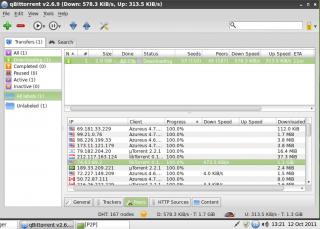
I just setup LinuxMint 11 LXDE on 1 of my old laptop with qBittorrent , play around with it and I got this:
Attached Image

The torrent is from HK site and this is the first time I get almost full torrent download speed from US ..... blink.gif
but my VPN and xbox360 is still suffering from the submarine cable issue ... really don't know what's going on .... rclxub.gif
klseet
post Oct 13 2011, 03:23 PM

Getting Started
**
Junior Member
130 posts

Joined: Mar 2008
QUOTE(Godlike war @ Oct 13 2011, 04:43 AM)
im using utorrent
can tell me how to setting in order to get full speed like urs
*
Generally I use this setup for most of the torrent client on my VIP5:
http://forum.lowyat.net/index.php?showtopi...&#entry43194191

No guarantee full speed, lately my torrent up & down, not stable at all, could be the submarine cable issue.....

I'll test further on the Linux-base, I could be wrong, it seem to have better speed than my current uTorrent on Windows unsure.gif

This post has been edited by klseet: Oct 13 2011, 03:25 PM
klseet
post Oct 14 2011, 02:18 AM

Getting Started
**
Junior Member
130 posts

Joined: Mar 2008
QUOTE(IwanAGP @ Oct 13 2011, 04:52 PM)
Can teach teach how to setup port forward on 841ND? Have been playing around but don't get it working. Particularly... Unifi Athena Hub!...
I long time never join the Hub, my VIP5 just too little bandwidth ... sweat.gif

For TPL port foward, I think it's under the Forwarding -->Virtual Servers, click Add New:
Attached Image

Enter relevant information, click Save when done:
Attached Image

For torrenting, assign a fix IP to your PC/laptop and use higher port like 5xxxx.
Can consider uTorrent or qBittorrent software, both are good ! nod.gif

I just tested again the latest qBittorrent v2.9 on LinuxMint, seem able to get good speed !

Initially it download from local peers (notice the 110x IP, as I always believe it's good IP!), then suddenly the Korean peers arrive, notice the high download speed on that Korean IP .....
Attached Image
and it continue to download mostly from that Korean peer, not sure why .....
Attached Image
Attached Image
Attached Image

Overall i can get full download speed with low upload speed.
And the qBittorrent comes with daemon installed and can access remotely via web:
Attached Image

Really not bad, looks like I'll stick with the 512RAM old laptop on LinuxMint[LXDE]+qBittorrent from now laugh.gif


klseet
post Oct 16 2011, 01:16 AM

Getting Started
**
Junior Member
130 posts

Joined: Mar 2008
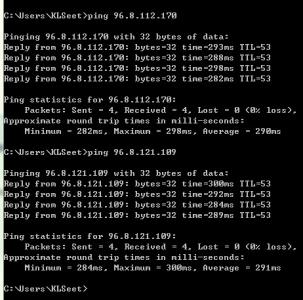
Just test ping from my VIP5
Attached Image
Seem to be ok
klseet
post Oct 26 2011, 02:18 AM

Getting Started
**
Junior Member
130 posts

Joined: Mar 2008
TP-Link TL-WR1043ND

Attached Image
Attached Image

http://klseet.com/index.php?option=com_con...=115&Itemid=106

Yes, after waited for soooo long sweat.gif , finally it's here! biggrin.gif

Both internet & IPTV no problem, still testing, stay tuned ..... icon_rolleyes.gif
klseet
post Oct 29 2011, 10:50 AM

Getting Started
**
Junior Member
130 posts

Joined: Mar 2008
QUOTE(klseet @ Oct 26 2011, 02:18 AM)
TP-Link TL-WR1043ND

Attached Image
Attached Image

http://klseet.com/index.php?option=com_con...=115&Itemid=106

Yes, after waited for soooo long  sweat.gif , finally it's here!  biggrin.gif

Both internet & IPTV no problem, still testing, stay tuned .....  icon_rolleyes.gif
*
Tested for more than 3 days, so far no problem seem to be stable!

Already getting quite a bit of requests, after discussing with the relevant person, I've decided to upload, you may refer to:
http://klseet.com/index.php?option=com_con...=article&id=117
smile.gif

Since TM has not endorsed on other brands/models for UniFi usage (probably will never do so), please note the manufacturer has no intention to release it nor create confusion and misunderstanding here. The beta firmware is made on an As-Is basis solely for testing & training purposes only.

I only tested on my Huawei HG850a, appreciate other BTU/VDSL2 users can either email me (klseet@gmail.com) or PM me to confirm whether it's working.

Enjoy your testing this weekend, cheers! cool.gif

klseet
post Oct 29 2011, 05:51 PM

Getting Started
**
Junior Member
130 posts

Joined: Mar 2008
Thanks for confirming the beta firmware works on TL-WR1043ND Ver:1.6
May I know what BTU/VDSL2 are you using?
klseet
post Oct 29 2011, 11:47 PM

Getting Started
**
Junior Member
130 posts

Joined: Mar 2008
QUOTE(hengguowei @ Oct 29 2011, 10:38 PM)
... it means after the BTU, we can use any any brand or any model....
Not really, as long as the device can support vlan.500 (PPPoE for internet) and 600 (bridge for IPTV) smile.gif
Or, you may check out some option HERE base on your requirement+setup+budget.
klseet
post Oct 30 2011, 12:55 AM

Getting Started
**
Junior Member
130 posts

Joined: Mar 2008
QUOTE(hengguowei @ Oct 30 2011, 12:16 AM)
..after the MikroTik thingy, I can pretty much use any router or switch or whatever network device right?
If you are referring to RB250GS, then yes, you may use any WAN-base router gateway, just setup PPPoE will do.

If you are referring to RB750/G/GL, itself it's already a router gateway, without wifi, so you can use unmanaged switch to extend connection for other devices.

QUOTE(hengguowei @ Oct 30 2011, 12:16 AM)
.... The router connected to the BTU should be close to the STB? If TM comes and it's very far, they will charge on extra cabling? ...
Not necessary, it depends on where it's your router gateway location & the STB for IPTV area.
If exceeded the standard, installer will charge you.
So it's better you plan your internal home network wiring prior to installation.

QUOTE(hengguowei @ Oct 30 2011, 12:16 AM)
... Is the cable connecting the MikroTik to STB the normal RJ-45 port? If yes, means I should set it up beforehand so TM won't charge some super expensive charges? ..
Yes, connection from the router gateway to STB is Cat cable.
Yes, I think it's better you plan your home network location & wiring prior to the installation.
smile.gif
klseet
post Oct 30 2011, 04:28 PM

Getting Started
**
Junior Member
130 posts

Joined: Mar 2008
QUOTE(hengguowei @ Oct 30 2011, 11:34 AM)
The STB is directly connected to the first router gateway after the BTU? Or can it be connected to the 16-port ethernet switch based on your setup?
*
The STB is connected directly to the RG's port with vlan-tagged 600, I don't see there is a need for a switch in between.
Please take a look at one of the replacement option HERE ,depends on which model, I normally attach the connection diagram at the bottom for better understanding.

Btw, what do you mean by "the first router gateway", is there a second RG? blink.gif

If you are using the RB750 and wish to extend both internet+IPTV to another section, you may refer HERE for some idea on how to trunk both vlan.500 & 600 over a single Cat cable (credit to JinXXX), either using RB250GS or TD-W8960N on the other section.

Topic ClosedOptions
 

Change to:
| Lo-Fi Version
0.0479sec    0.81    8 queries    GZIP Disabled
Time is now: 2nd December 2025 - 08:22 PM