

just a bit of sharing. not sure if anyone read this
http://www.engadget.com/2011/08/09/samsung...odenamed-celox/
SAMSUNG GALAXY S II Official thread V11, NEW Users be SMARTuser - PLS read Page 1
SAMSUNG GALAXY S II Official thread V11, NEW Users be SMARTuser - PLS read Page 1
|
|
 Aug 10 2011, 06:05 AM Aug 10 2011, 06:05 AM
Return to original view | Post
#1
|
 
Senior Member
1,149 posts Joined: Feb 2009  
|
just a bit of sharing. not sure if anyone read this
http://www.engadget.com/2011/08/09/samsung...odenamed-celox/ |
|
|
|
|
|
Aug 10 2011, 11:20 PM
Return to original view | Post
#2
|
|
Senior Member
1,149 posts Joined: Feb 2009
|
will I shorten the battery life if I didn't unplug the charger after changing full? and continue to use the phone(mostly is when I play game..~)
|
|
|
Aug 12 2011, 09:45 AM
Return to original view | Post
#3
|
|
Senior Member
1,149 posts Joined: Feb 2009
|
hi guys~ I have this battery drain problem from wifi sharing... everytime I use wifi(the normal wifi, connect to wifi) the wifi sharing and wifi sharing manager automatic run by itself even after I disconnect from wifi and draining the battery...
I did a bit of searching seem to be a bug on 2.3.3 and can't find any solution, anyone have any solution beside killing it manually every time =.=|| |
|
|
Aug 12 2011, 09:57 AM
Return to original view | Post
#4
|
|
Senior Member
1,149 posts Joined: Feb 2009
|
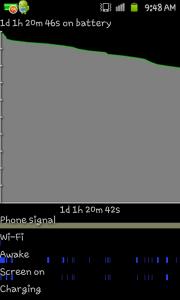
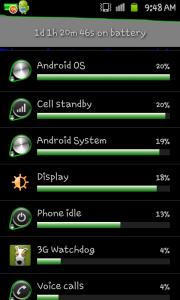
a day of minimum usage with few calls, message, fb with 3G and alarm clock |
|
|
Aug 12 2011, 10:03 AM
Return to original view | Post
#5
|
|
Senior Member
1,149 posts Joined: Feb 2009
|
QUOTE(Fallenangelz @ Aug 12 2011, 09:56 AM) root n flash babe yea, maybe i should do that  QUOTE(mydragoon @ Aug 12 2011, 09:56 AM) hmmm... i thought this service starts by itself when the phone starts up? its not normal ? i have this as well in the running service and thought its normal. i restarted my phone a few times yesterday and did not use wifi sharing at all. but did see it as running service... thought it was normal. seem to be a bug which eating the battery, now i manually kill it so my battery last longer |
|
|
Aug 12 2011, 10:19 AM
Return to original view | Post
#6
|
|
Senior Member
1,149 posts Joined: Feb 2009
|
QUOTE(mydragoon @ Aug 12 2011, 10:06 AM) yikes... stopped it... and it restarted... hmmm... kill it again... it restarts... aiyoh... yea~ if you on the wifi, it will be there all the time even u kill it... try uncle Benny solution >>Use Titanium Backup and FREEZE these 2 apps if you have no use of it all<< also, asking again since i din get feedback last time... anyone faced problem where wifi dun seem to be stable. in office... my phone connected to wifi all the time... what i mean by not stable is... after a while, it does not seem to be able to actually connect to internet. it shows connected to the network but i can't surf anything... games connecting to server also dun work. i end up having to off and on wifi on the phone. |
|
|
|
|
|
Aug 12 2011, 10:21 AM
Return to original view | Post
#7
|
|
Senior Member
1,149 posts Joined: Feb 2009
|
QUOTE(waveweaver @ Aug 12 2011, 10:20 AM) Anybody knows what stability test app suppose to do? I try it yesterday but dont know what i should expect from the test except it did rise my phone temperature ~~ sigh ~~ izit like a stress test? |
|
|
Aug 12 2011, 10:41 AM
Return to original view | Post
#8
|
|
Senior Member
1,149 posts Joined: Feb 2009
|
QUOTE(waveweaver @ Aug 12 2011, 10:31 AM) Yeah., it's for stress test. But i dont know what exactly what the end result should be. no log or report? maybe this show sgs2 can't be crash System crash? Force closed? I ran it for 4 hrs non-stop yesterday including 1 full hour running with 58°C but still nothing happen. At the end of the 4th hours i stop the test. Scared the phone might fried :-)  |
|
|
Aug 12 2011, 04:07 PM
Return to original view | Post
#9
|
|
Senior Member
1,149 posts Joined: Feb 2009
|
QUOTE(Noobi3 @ Aug 12 2011, 03:54 PM) Maxis is being sucky these few week .... Last few days , i got a full bar but nobody can call in , keep getting sms for missed call . Then for the pass week , everytime i pass mid valley , heading towards subang , i will lose connection if i am on the phone  quite ok today quite ok today |
|
|
Aug 14 2011, 10:28 PM
Return to original view | Post
#10
|
|
Senior Member
1,149 posts Joined: Feb 2009
|
QUOTE(waveweaver @ Aug 14 2011, 10:24 PM) Sorry dude., can't comment about any SP or casing coz my bad girl is totally naked since i bought her ~~Whoottt.!!~~ gorilla glass actually no need sp to protect right? I put one on to hide the fingerprint coz I just cannot stand the fingerprint If you have patience and can wait till the end of this year then you might as well get Nexus Prime or maybe SGS3 ~~ lol ~~ Otherwise grab your SGSII ~~ NOW while it still sizzling hot :-P  |
|
|
Aug 15 2011, 08:42 AM
Return to original view | Post
#11
|
|
Senior Member
1,149 posts Joined: Feb 2009
|
QUOTE(Fallenangelz @ Aug 15 2011, 08:12 AM) i'm doubting because i oni can send max 10 contacts, not 20 as per stated any way to send using pc? |
|
|
Aug 15 2011, 10:17 AM
Return to original view | Post
#12
|
|
Senior Member
1,149 posts Joined: Feb 2009
|
QUOTE(Bugeca @ Aug 15 2011, 09:23 AM) SMS2PC - Paid Thanks EasySMS - Free & Donate MightyText - Free |
|
|
Aug 15 2011, 01:37 PM
Return to original view | Post
#13
|
|
Senior Member
1,149 posts Joined: Feb 2009
|
QUOTE(benny888 @ Aug 15 2011, 12:24 PM) Download the official 2.3.4 build ( XXKG6) from http://www.samfirmware.com/WEBPROTECT-i9100.htm. Just use Odin to flash. Flashing takes only 5 minutes kautim ! You will lose all your data, so backup important stuffs first. If your phone is rooted, use Titanium Backup. It just tales 5-10 minutes to load back all your installed apps/data etc. Only widgets on screen you have to manually set it back flash to official 2.3.4 build ( XXKG6) will wipe all the data?Added on August 15, 2011, 12:25 pm I sent in 3 times a KL bought AP set ( root/flash cook rom ) even to Singapore Plaza Spore service Center to flash back official rom - also free The official service center ONLY flash for you the official rom version as it is available with them. At present don't think they have 2.3.4 with them yet ; probably still 2.3.3 - KF2 or KF3. My friend send in his Maxis set and request to flash HK Chinese rom but turned down as is considered unofficial rom |
|
|
|
|
|
Aug 15 2011, 01:53 PM
Return to original view | Post
#14
|
|
Senior Member
1,149 posts Joined: Feb 2009
|
QUOTE(AstonCheah @ Aug 15 2011, 01:39 PM) yes: "You will lose all your data, so backup important stuffs first. If your phone is rooted, use Titanium Backup. It just tales 5-10 minutes to load back all your installed apps/data etc. Only widgets on screen you have to manually set it back" o thanks... I plan flash to 2.3.4 but my phone not root, can I use kies to backup?or should I just root it? This post has been edited by AhBoy~~: Aug 15 2011, 01:54 PM |
|
|
Aug 15 2011, 02:23 PM
Return to original view | Post
#15
|
|
Senior Member
1,149 posts Joined: Feb 2009
|
QUOTE(erymanthus @ Aug 15 2011, 02:19 PM) I'm running on Stock XWKF1.....why my 3G occasionally disconnect itself??? maxis? i think is a maxis problem... I tweet maxis about this problem~ they ask me to reset my phoneAnyone else faces this issue? |
|
|
Aug 15 2011, 03:40 PM
Return to original view | Post
#16
|
|
Senior Member
1,149 posts Joined: Feb 2009
|
hi which rom fixed the battery life problem, will not wipe d phone and close to stock s2 rom(work like touch wiz) bcoz i kind of likes the way it works. thanks~
|
|
|
Aug 15 2011, 09:44 PM
Return to original view | Post
#17
|
|
Senior Member
1,149 posts Joined: Feb 2009
|
<ID:0/014> Added!!
<ID:0/014> Odin v.3 engine (ID:14).. <ID:0/014> File analysis.. <ID:0/014> SetupConnection.. <<what happen when I got stuck in here |
|
|
Aug 15 2011, 10:00 PM
Return to original view | Post
#18
|
|
Senior Member
1,149 posts Joined: Feb 2009
|
QUOTE(destEX @ Aug 15 2011, 09:54 PM) you din restart ur phone after u failed once alright after I remove battery and download mode again then can already |
|
|
Aug 15 2011, 10:16 PM
Return to original view | Post
#19
|
|
Senior Member
1,149 posts Joined: Feb 2009
|
when I flash to XXKG6 rom, my titanium backup won't be wipe?
|
|
|
Aug 16 2011, 12:13 AM
Return to original view | Post
#20
|
|
Senior Member
1,149 posts Joined: Feb 2009
|
I got this message after flash to XXKG6
reconnect the device in samsung kies mode current connection mode not supported by kies how do I fix it? Added on August 16, 2011, 12:15 amalright fix with uncheck the usb debug This post has been edited by AhBoy~~: Aug 16 2011, 12:15 AM |
|
Topic ClosedOptions
|
| Change to: |  0.0244sec 0.0244sec
 0.28 0.28
 7 queries 7 queries
 GZIP Disabled GZIP Disabled
Time is now: 3rd December 2025 - 04:55 AM |
 Quote
Quote