

QUOTE(Acid_RuleZz @ Sep 17 2011, 03:29 PM)
no idea.. windows love to troll. 

u sure is windows?? i tried plug in my ipad, it says no enuf power supply to the port, need to connect to usb 2.0:sweat:HP Pavillion DV6-6XXX series Owners Lounge V3, -130 owners. Refreshed! Aww Yeah!!
|
|
 Sep 17 2011, 02:42 PM Sep 17 2011, 02:42 PM
Return to original view | Post
#141
|
 
Junior Member
137 posts Joined: May 2009 
|
QUOTE(Acid_RuleZz @ Sep 17 2011, 03:29 PM) no idea.. windows love to troll. u sure is windows?? i tried plug in my ipad, it says no enuf power supply to the port, need to connect to usb 2.0:sweat: |
|
|
|
|
|
Sep 17 2011, 02:55 PM
Return to original view | Post
#142
|
|
Junior Member
137 posts Joined: May 2009
|
btw, why sometimes i cant safely remove my hdd even i closed all my programs?? what shud i do then??
|
|
|
Sep 20 2011, 09:09 PM
Return to original view | Post
#143
|
|
Junior Member
137 posts Joined: May 2009
|
got my lycosa mirror!!! happy now!!
:D screw the fingerprint.  Attached thumbnail(s) 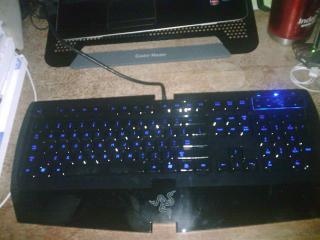
|
|
|
Sep 20 2011, 09:19 PM
Return to original view | Post
#144
|
|
Junior Member
137 posts Joined: May 2009
|
QUOTE(Acid_RuleZz @ Sep 20 2011, 10:12 PM) No.. rm270. i actually aiming for blackwidow ultimate witch is rm100 more, but the complex doesnt sell, oh well just get this since backlit is my 1st priority and i save rm100. I don't know how to describe.Yes, you can create a live Ubuntu USB/CD and use it whenever you want. Whenever you want to use it you just need to insert the USB/CD and set your first boot to USB/DVD. Just one drawback.. i don't think the Wifi will work out of the box. U might need to use LAN cable to access the internet in Live mode. Sauce: LiveCD - Community Ubuntu You can use it to remove Windows virus too.. » Click to show Spoiler - click again to hide... « No i don't use Ubuntu anymore.  I have a separate partition with ArchLinux installed. Added on September 20, 2011, 9:14 pm D: How much is that? EDITED: any idea why cant i use my beats on the headset port on my lycosa?? isit nt enuf power supply?? This post has been edited by chahupping: Sep 20 2011, 09:58 PM |
|
|
Sep 20 2011, 11:03 PM
Return to original view | Post
#145
|
|
Junior Member
137 posts Joined: May 2009
|
QUOTE(Acid_RuleZz @ Sep 20 2011, 11:30 PM) Probably... LOL! silly me, i din plug in the connector to my laptop. lol. BUT! HOLY !@#$%, my laptop just get bsod??!!!! wtf just happen?? out of sudden?? isit cause i plug my keyboard to the usb 3.0 instead of the usb 2.0 which is nearer to the power source, the laptop nt enuf power supply?? cause i connect many things, my broadband, mouse, external, coller plus keyboard. i rmb i saw this term. BAD_POOL_HEADERAdded on September 20, 2011, 10:42 pmDo you have any other headset/earphone to test? This post has been edited by chahupping: Sep 20 2011, 11:06 PM |
|
|
Sep 20 2011, 11:09 PM
Return to original view | Post
#146
|
|
Junior Member
137 posts Joined: May 2009
|
QUOTE(lee_what2004 @ Sep 21 2011, 12:07 AM) ^run BlueScreenView.. i run it, how to use it?? lol/. |
|
|
|
|
|
Sep 20 2011, 11:16 PM
Return to original view | Post
#147
|
|
Junior Member
137 posts Joined: May 2009
|
QUOTE(lee_what2004 @ Sep 21 2011, 12:12 AM) Got any entry about the BSOD or empty ? empty?? |
|
|
Sep 20 2011, 11:19 PM
Return to original view | Post
#148
|
|
Junior Member
137 posts Joined: May 2009
|
QUOTE(lee_what2004 @ Sep 21 2011, 12:18 AM) You got disable pagefile ? yea, i disabled. |
|
|
Sep 20 2011, 11:22 PM
Return to original view | Post
#149
|
|
Junior Member
137 posts Joined: May 2009
|
QUOTE(lee_what2004 @ Sep 21 2011, 12:22 AM) No wonder its empty.. oh, but acidzz ask me to disable for better performance, so how now??If you disable the pagefile, then no dump file.. |
|
|
Sep 20 2011, 11:31 PM
Return to original view | Post
#150
|
|
Junior Member
137 posts Joined: May 2009
|
QUOTE(lee_what2004 @ Sep 21 2011, 12:24 AM) Well, if this BSOD only happens once, then just forget it LOL! im worried. |
|
|
Sep 21 2011, 12:03 AM
Return to original view | Post
#151
|
|
Junior Member
137 posts Joined: May 2009
|
so shud i enable page file just incase??
|
|
|
Sep 21 2011, 12:15 AM
Return to original view | Post
#152
|
|
Junior Member
137 posts Joined: May 2009
|
QUOTE(lee_what2004 @ Sep 21 2011, 01:06 AM) Yup, leave it at 512MB should be enough.. max size put 512?? ?or let system managed file size?? |
|
|
Sep 21 2011, 12:52 AM
Return to original view | Post
#153
|
|
Junior Member
137 posts Joined: May 2009
|
QUOTE(lee_what2004 @ Sep 21 2011, 01:27 AM) Min and Max put 512MB. i need to restart to set the changes izit?If you put let system managed file size, its usually 1.5x your total RAM.. |
|
|
|
|
|
Sep 21 2011, 07:41 PM
Return to original view | Post
#154
|
|
Junior Member
137 posts Joined: May 2009
|
any idea why my lycosa panel key, the volume key doesnt work with hp on screen display?? it works with the laptop media keys.
 |
|
|
Sep 22 2011, 06:21 PM
Return to original view | Post
#155
|
|
Junior Member
137 posts Joined: May 2009
|
how to make my volume control panel on lycosa compatible with the on screen display??
|
|
|
Sep 23 2011, 12:35 AM
Return to original view | Post
#156
|
|
Junior Member
137 posts Joined: May 2009
|
QUOTE(Acid_RuleZz @ Sep 22 2011, 11:32 PM) sorry boss.. no idea. try reinstall HP OSD? my osd have no problem, can work with the media keys on laptop, but i wan make it compatible with the lycosa media key?Welcome aboard.  I will update 1st page in a jiffy. Maybe u need to send to HP Service Centre and ask them to check the webcam connector. edited: why isit like this?? i dun hear any sound coming from the headphones, only from the speaker, i already plug in my headphone. This post has been edited by chahupping: Sep 23 2011, 01:33 AM Attached thumbnail(s) 
|
|
|
Sep 23 2011, 04:11 PM
Return to original view | Post
#157
|
|
Junior Member
137 posts Joined: May 2009
|
QUOTE(Acid_RuleZz @ Sep 23 2011, 03:02 PM) I use this guide before.. but it's pretty old and i don't use gtalk anymore. problem fix, i wonder why?? it only happen when i turn on my starcraft 2. last time dun have this problem?? btw? once i disable the thing it gone?? Link: Show Current Music Track playing in Foobar 1.0+ as Gtalk status Maybe the key register is not the same as media keys on the laptop.  Try disable this.. » Click to show Spoiler - click again to hide... « Probably a typo.. did u check the spec? edit: when i playing sc2 with skype on, how come my sc2 in game sound off?? i mean i calling ppl with headphones, no in game sound?? how to fix?? This post has been edited by chahupping: Sep 23 2011, 04:43 PM Attached thumbnail(s) 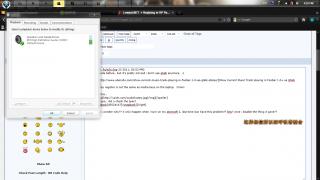
|
|
|
Sep 24 2011, 03:07 PM
Return to original view | Post
#158
|
|
Junior Member
137 posts Joined: May 2009
|
QUOTE(bluebeary @ Sep 24 2011, 02:20 PM) I'm uploading this from my S.E.X Arc, not sure it works or not. holy !#$%, this is way better man. Anyway, I was at All It Supermart ( or something like that) and saw the new brochure. I'm so excited & delighted !! If the photo doesn't show up, here r the specs. HP dv6-6168TX i7-2670QM 8gb ram, 1 TB HD (5400rpm) FULL HD ANTI GLARE LED DISPLAY (1920 X 1080) Bluray Tom Radeon HD 6770M (2gb ddr5) Beats Audio internal speakers (I think no more headset) DREAM MACHINE |
|
|
Sep 24 2011, 05:35 PM
Return to original view | Post
#159
|
|
Junior Member
137 posts Joined: May 2009
|
damn, i really regret what i gt earlier.
|
|
|
Sep 24 2011, 07:39 PM
Return to original view | Post
#160
|
|
Junior Member
137 posts Joined: May 2009
|
ahh well~ screw it, just enjoy what i got then.
 sometimes i feel the left side really hot, somewhere around 60 - 70 but check the temp only 50+ temp. sometimes i feel the left side really hot, somewhere around 60 - 70 but check the temp only 50+ temp.This post has been edited by chahupping: Sep 24 2011, 07:40 PM |
|
Topic ClosedOptions
|
| Change to: |  0.0260sec 0.0260sec
 0.55 0.55
 7 queries 7 queries
 GZIP Disabled GZIP Disabled
Time is now: 7th December 2025 - 10:59 PM |
 Quote
Quote
