Outline ·
[ Standard ] ·
Linear+
HP Pavillion DV6-6XXX series Owners Lounge V3, -130 owners. Refreshed! Aww Yeah!!
|
dilumcc
|
 Aug 28 2011, 10:21 AM Aug 28 2011, 10:21 AM
|
New Member


|
its in the 1st page http://forum.lowyat.net/topic/1847795/+1719Microsoft Windows SDK for Windows 7 and .NET Framework 4. when installing MS Windows SDK for Win7. At installation option screen, untick everything except Windows Performance Toolkit under Common Utilities. open start menu and run Command Prompt as Administrator. Type or copy paste this cmd into Command Prompt. CODE xbootmgr -trace boot -prepSystem -verboseReadyBoot |
|
|
|
|
|
TSAcid_RuleZz
|
Aug 28 2011, 12:13 PM
|
|
|
QUOTE(louisfjh @ Aug 28 2011, 07:00 AM) wat theme u use?? nice taskbar u have
Added on August 28, 2011, 7:10 am& if i paste autohide in.. next time wan set it not autohide so ned delete the autohide.bat & paste the autohide off in or just can untick the autohide in taskbar properties??
Added on August 28, 2011, 7:14 amerm... y my taskbar cant bcome thin @@
Added on August 28, 2011, 7:20 am» Click to show Spoiler - click again to hide... « Maybe u need to disable UAC.  I'm using Elune theme + Token icon. Need to manually change the icons. Links: Elune by *minhtrimatrix | Token by ~brsev |
|
|
|
|
|
lee_what2004
|
Aug 28 2011, 01:24 PM
|
*stare* ji--------

|
QUOTE(louisfjh @ Aug 28 2011, 07:00 AM) & if i paste autohide in.. next time wan set it not autohide so ned delete the autohide.bat & paste the autohide off in or just can untick the autohide in taskbar properties??
Added on August 28, 2011, 7:14 amerm... y my taskbar cant bcome thin @@
Added on August 28, 2011, 7:20 amhttp://i499.photobucket.com/albums/rr356/louisfjh/Untitled-6.jpg That one after you run the "ThinTask - Autohide OFF.bat" or you restart and startup come out like that ? |
|
|
|
|
|
louisfjh
|
Aug 28 2011, 07:48 PM
|
Getting Started
|
QUOTE(Acid_RuleZz @ Aug 28 2011, 12:13 PM) Maybe u need to disable UAC. I'm using Elune theme + Token icon. Need to manually change the icons. Links: Elune by *minhtrimatrix | Token by ~brsevwat is UAC??
Added on August 28, 2011, 7:49 pmQUOTE(lee_what2004 @ Aug 28 2011, 01:24 PM) That one after you run the "ThinTask - Autohide OFF.bat" or you restart and startup come out like that ? restart or double click the .bat it come out like this... then my task bar no bcome thin This post has been edited by louisfjh: Aug 28 2011, 07:49 PM |
|
|
|
|
|
Batusai
|
Aug 28 2011, 08:01 PM
|
|
|
QUOTE(louisfjh @ Aug 28 2011, 07:48 PM) User Account Control. Press start>Press your windows acc picture> see the last option "Change (UAC) Settings"> totally disable it.. |
|
|
|
|
|
lee_what2004
|
Aug 28 2011, 08:37 PM
|
*stare* ji--------
|
QUOTE(louisfjh @ Aug 28 2011, 07:48 PM) wat is UAC??
Added on August 28, 2011, 7:49 pmrestart or double click the .bat it come out like this... then my task bar no bcome thin Right click the .bat, run as admin |
|
|
|
|
|
joonwei23
|
Aug 28 2011, 10:22 PM
|
|
|
Anyone knows how to change back my icons to the default ones ? I tried changing my skin using 7conifier but I forgot to back up my default icons. Now its screwed  Anyone knows where/how to fix it ? |
|
|
|
|
|
TSAcid_RuleZz
|
Aug 28 2011, 10:34 PM
|
|
|
Tools>Restore Default Icons.. cannot work?
|
|
|
|
|
|
louisfjh
|
Aug 28 2011, 10:41 PM
|
Getting Started
|
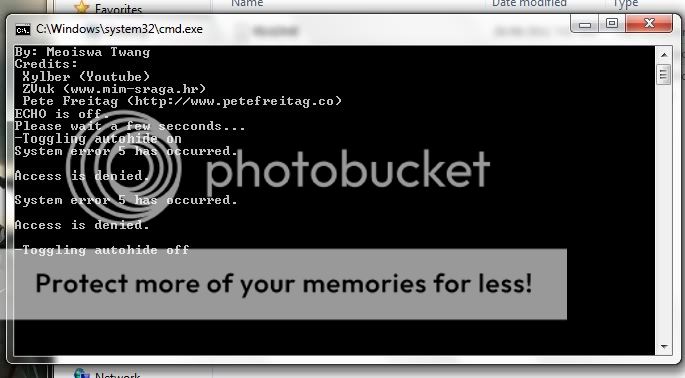
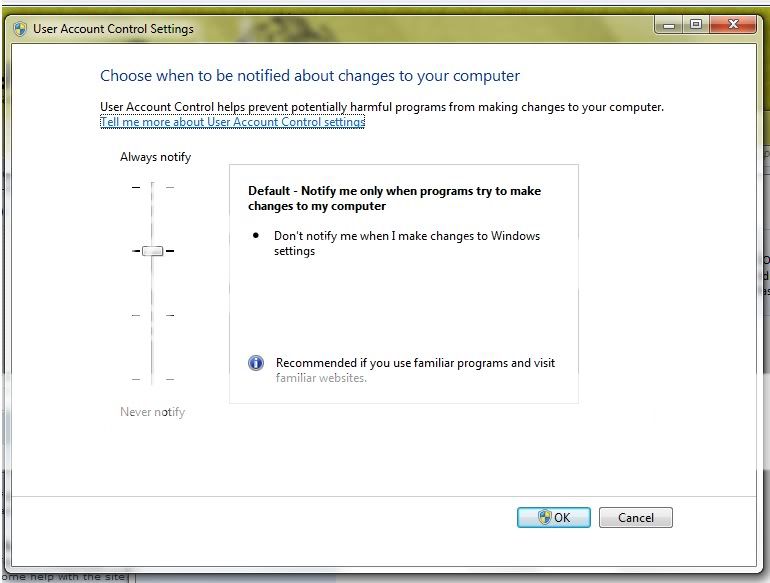 this set to never notify??? sifu lee.. i tried run ad admin... it work.. but the next time i restart it same show the error msg @@ |
|
|
|
|
|
lee_what2004
|
Aug 28 2011, 10:42 PM
|
*stare* ji--------
|
Well, you need to set the startup to work as admin as well..
or just set that to never notify.
|
|
|
|
|
|
lee_what2004
|
Aug 28 2011, 10:46 PM
|
*stare* ji--------
|
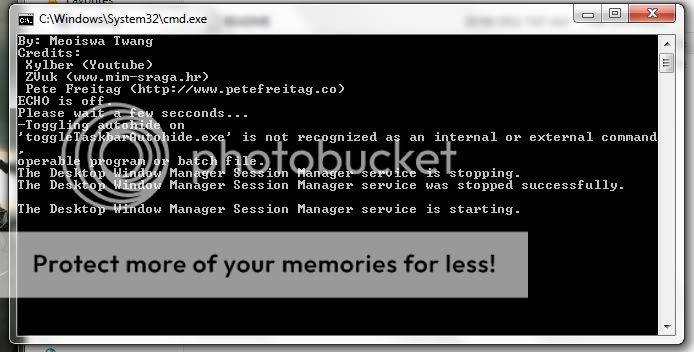
Copy that toggleTaskbarAutohide.exe to C:\Windows\System32
|
|
|
|
|
|
louisfjh
|
Aug 28 2011, 11:01 PM
|
Getting Started
|
QUOTE(lee_what2004 @ Aug 28 2011, 10:46 PM) Copy that toggleTaskbarAutohide.exe to C:\Windows\System32 work after do this.. but that cant set to run as admin 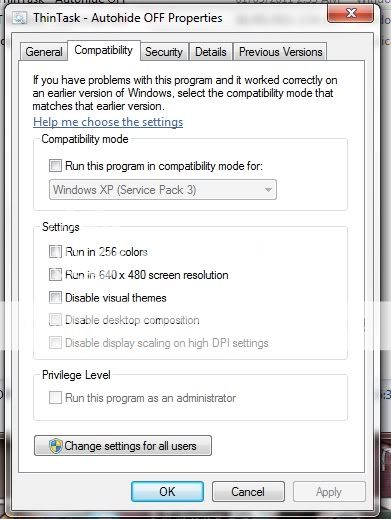 cant let me tick for run as admin@@
Added on August 28, 2011, 11:03 pmso just set the UAC to never notify?? wat is that actually? set that to never notify nth de ho...? This post has been edited by louisfjh: Aug 28 2011, 11:03 PM |
|
|
|
|
|
TSAcid_RuleZz
|
Aug 28 2011, 11:05 PM
|
|
|
I created a shortcut for "ThinTask - Autohide OFF.bat" and then copy pasta it to Startup folder.
|
|
|
|
|
|
louisfjh
|
Aug 28 2011, 11:06 PM
|
Getting Started
|
QUOTE(Acid_RuleZz @ Aug 28 2011, 11:05 PM) I created a shortcut for "ThinTask - Autohide OFF.bat" and then copy pasta it to Startup folder. u have disable UAC? |
|
|
|
|
|
TSAcid_RuleZz
|
Aug 28 2011, 11:07 PM
|
|
|
@louisfjh since day 1.  |
|
|
|
|
|
louisfjh
|
Aug 28 2011, 11:08 PM
|
Getting Started
|
QUOTE(Acid_RuleZz @ Aug 28 2011, 11:07 PM) @louisfjh since day 1. lol.. ok ok.. i think disable that work edy... later wan learn try to make the theme & icon.. ur theme nice  |
|
|
|
|
|
lee_what2004
|
Aug 28 2011, 11:09 PM
|
*stare* ji--------
|
QUOTE(louisfjh @ Aug 28 2011, 11:01 PM)
Added on August 28, 2011, 11:03 pmso just set the UAC to never notify?? wat is that actually? set that to never notify nth de ho...? Well, that is the one that darken the screen and ask for permission each time you want to run applications.. |
|
|
|
|
|
TSAcid_RuleZz
|
Aug 28 2011, 11:50 PM
|
|
|
lol.. not my theme. i'm just using it.  |
|
|
|
|
|
lee_what2004
|
Aug 28 2011, 11:54 PM
|
*stare* ji--------
|
Mine is elune with black icons |
|
|
|
|



 Quote
Quote




 0.0625sec
 0.33
0.33
 6 queries
 GZIP Disabled