

QUOTE(chahupping @ Aug 28 2011, 12:45 AM)
why is there another disk pop out after i update everything through hp assistant??

You mean the HP Tools ?HP Assistant created that..
HP Pavillion DV6-6XXX series Owners Lounge V3, -130 owners. Refreshed! Aww Yeah!!
|
|
 Aug 28 2011, 12:55 AM Aug 28 2011, 12:55 AM
|
 
Elite
14,813 posts Joined: Nov 2006  
|
QUOTE(chahupping @ Aug 28 2011, 12:45 AM) why is there another disk pop out after i update everything through hp assistant?? You mean the HP Tools ?HP Assistant created that.. |
|
|
|
|
|
Aug 28 2011, 12:58 AM
|
 
Senior Member
6,612 posts Joined: Jan 2003 From: Tomorrow
|
Yeah.. i'm using 11.8.3.
Added on August 28, 2011, 1:10 amLooks like i got a new maximum clock.  » Click to show Spoiler - click again to hide... « This post has been edited by Acid_RuleZz: Aug 28 2011, 01:10 AM |
|
|
Aug 28 2011, 01:20 AM
|

Senior Member
537 posts Joined: Nov 2006
|
hmm did anyone solve the issue of HDMI that is using Intel Graphics only??
|
|
|
Aug 28 2011, 01:24 AM
|
|
Senior Member
6,612 posts Joined: Jan 2003 From: Tomorrow
|
Radeon will go thru Intel HD then output to HDMI i think... coz thats how it goes when i use the VGA output. I'm using Radeon but i need to use Intel Graphic Properties to change resolutions and multi-monitor mode.
|
|
|
Aug 28 2011, 01:27 AM
|
|
Elite
14,813 posts Joined: Nov 2006
|
QUOTE(Acid_RuleZz @ Aug 28 2011, 12:58 AM) Yeah.. i'm using 11.8.3. The graph steadily go down, you turn on cooler ?Added on August 28, 2011, 1:10 amLooks like i got a new maximum clock. » Click to show Spoiler - click again to hide... « |
|
|
Aug 28 2011, 01:33 AM
|
|
Senior Member
537 posts Joined: Nov 2006
|
QUOTE(Acid_RuleZz @ Aug 28 2011, 01:24 AM) Radeon will go thru Intel HD then output to HDMI i think... coz thats how it goes when i use the VGA output. I'm using Radeon but i need to use Intel Graphic Properties to change resolutions and multi-monitor mode. okay thks, will go through more testing to check whether it accelerates graphics from Radeon during HDMI mode |
|
|
|
|
|
Aug 28 2011, 01:34 AM
|
|
Senior Member
6,612 posts Joined: Jan 2003 From: Tomorrow
|
QUOTE(lee_what2004 @ Aug 28 2011, 01:27 AM) The graph steadily go down, you turn on cooler ? I'm on cooler all the time. The graph go down because one of the CPU core hit 86c and the laptop fan went rampage mode.  » Click to show Spoiler - click again to hide... « This post has been edited by Acid_RuleZz: Aug 28 2011, 01:41 AM |
|
|
Aug 28 2011, 02:13 AM
|

Senior Member
2,066 posts Joined: Oct 2007
|
man.. Im seriously jealous of AMD's temperature now.. haha
|
|
|
Aug 28 2011, 03:44 AM
|

Senior Member
1,019 posts Joined: Sep 2009
|
QUOTE(Acid_RuleZz @ Aug 28 2011, 12:58 AM) Yeah.. i'm using 11.8.3. Hmm okay Added on August 28, 2011, 1:10 amLooks like i got a new maximum clock. » Click to show Spoiler - click again to hide... «  and its fine for you yeah ? btw nice windows bar. is it done using rain meter ? i want something like that actually  |
|
|
Aug 28 2011, 03:54 AM
|
|
Senior Member
6,612 posts Joined: Jan 2003 From: Tomorrow
|
QUOTE(Batusai @ Aug 28 2011, 02:13 AM) man.. Im seriously jealous of AMD's temperature now.. haha It's 1am and i'm using U3 cooler. QUOTE(joonwei23 @ Aug 28 2011, 03:44 AM) Hmm okay No problem for me so far...and its fine for you yeah ? btw nice windows bar. is it done using rain meter ? i want something like that actually Window bar? It normal bar with a little dirty hack to make it thin. |
|
|
Aug 28 2011, 04:03 AM
|
|
Senior Member
1,019 posts Joined: Sep 2009
|
^ teach teach !
the normal looks dull to me already.  |
|
|
Aug 28 2011, 04:22 AM
|
|
Senior Member
6,612 posts Joined: Jan 2003 From: Tomorrow
|
QUOTE(Vernon @ Aug 27 2011, 11:34 PM) hi guys, can anyone tell me where is the pause button??  after purchase then only i notice there seem to be missing a pause button.. QUOTE(Acid_RuleZz @ Aug 28 2011, 12:10 AM) Don't have. fuuuuu... i just notice the Pause key is at right shift. For media playback pause is Fn+F7  QUOTE(joonwei23 @ Aug 28 2011, 04:03 AM) ^ teach teach ! Download and extract to folder.. make shortcut of either 'ThinTask - Autohide OFF.bat' or 'ThinTask - Autohide On.bat' and paste it into your startup folder.the normal looks dull to me already. Link: ThinTask V2.zip |
|
|
Aug 28 2011, 04:30 AM
|
|
Senior Member
1,019 posts Joined: Sep 2009
|
^
that only works if the windows bar is on the side yes ? haha |
|
|
|
|
|
Aug 28 2011, 05:04 AM
|
|
Senior Member
6,612 posts Joined: Jan 2003 From: Tomorrow
|
yea.. and small icons. lol
|
|
|
Aug 28 2011, 06:22 AM
|

Junior Member
257 posts Joined: May 2008
|
QUOTE(Acid_RuleZz @ Aug 28 2011, 04:22 AM) fuuuuu... i just notice the Pause key is at right shift. me too @@ have pause Download and extract to folder.. make shortcut of either 'ThinTask - Autohide OFF.bat' or 'ThinTask - Autohide On.bat' and paste it into your startup folder. Link: ThinTask V2.zip  i try just put left side then small icon & autohide it edy bcome thin, noned use the thintask wo... Added on August 28, 2011, 6:27 amor it is for fix thin for start up window next time??? & where is the startup folder?? LOL This post has been edited by louisfjh: Aug 28 2011, 06:27 AM |
|
|
Aug 28 2011, 06:39 AM
|
|
Senior Member
6,612 posts Joined: Jan 2003 From: Tomorrow
|
yeah.. auto-thin for every startup/login
CODE C:\Users\<user>\AppData\Roaming\Microsoft\Windows\Start Menu\Programs\Startup This post has been edited by Acid_RuleZz: Aug 28 2011, 06:39 AM |
|
|
Aug 28 2011, 07:00 AM
|
|
Junior Member
257 posts Joined: May 2008
|
QUOTE(Acid_RuleZz @ Aug 28 2011, 06:39 AM) yeah.. auto-thin for every startup/login wat theme u use?? nice taskbar u haveCODE C:\Users\<user>\AppData\Roaming\Microsoft\Windows\Start Menu\Programs\Startup Added on August 28, 2011, 7:10 am QUOTE(louisfjh @ Aug 28 2011, 07:00 AM) wat theme u use?? nice taskbar u have & if i paste autohide in.. next time wan set it not autohide so ned delete the autohide.bat & paste the autohide off in or just can untick the autohide in taskbar properties??Added on August 28, 2011, 7:14 amerm... y my taskbar cant bcome thin @@ Added on August 28, 2011, 7:20 am 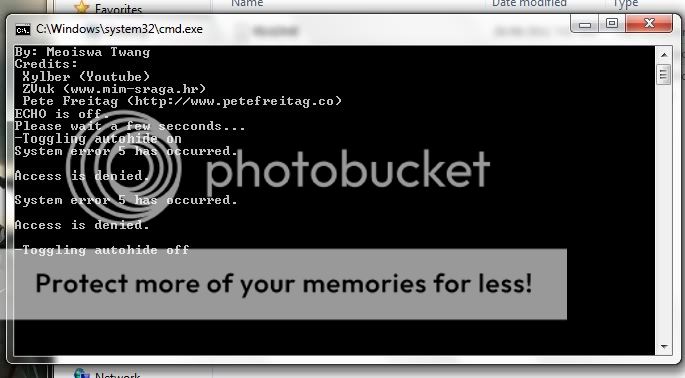 This post has been edited by louisfjh: Aug 28 2011, 07:20 AM |
|
|
Aug 28 2011, 09:11 AM
|

Junior Member
323 posts Joined: Jan 2003 From: Forgotten Capital 遗忘之城
|
I have tried the hdmi cable with my desktop to tv, same thing happened, the tv shows 'No Signal'. The cable is Prostar 1.3b from Carrefour, I guess it is either cable fault or my LG LCD hdmi port fault. Hai~
|
|
|
Aug 28 2011, 09:15 AM
|

Newbie
2 posts Joined: Jun 2011
|
just used asus logic defrag and optimze then the code for windows perfomance tool.
boot time is 20 secs!! Attached thumbnail(s) 
|
|
|
Aug 28 2011, 10:05 AM
|
|
Junior Member
257 posts Joined: May 2008
|
wat is code for windows perfomance tool?
|
|
Topic ClosedOptions
|
| Change to: |  0.0340sec 0.0340sec
 0.32 0.32
 6 queries 6 queries
 GZIP Disabled GZIP Disabled
Time is now: 3rd December 2025 - 06:12 AM |
 Quote
Quote

