


 Sep 14 2005, 08:16 PM, updated 21y ago



What is Solidburn?
Philips introduces SolidBurn, a new self-learning feature that will ensure optimal writing conditions for any recordable DVD+R or DVD-R media.
This advanced writer feature executes a series of tests on an 'unknown' DVD media to determine the optimal writing strategy. Without SolidBurn, new DVD media and media that are not in the media list of the drive, are written using a less optimal standard write strategy. This could result in lower recording speeds than specified or lower quality recordings jeopardizing disc playability or lifetime.
How does it work?
Before the disc is burned, the drive writes two very short tracks, one in the LeadIn and one in the LeadOut area of the disc. Then the drive measures the jitter on both areas and decides if this jitter value is OK or not. If not, the drive will choose another writing strategy and redo the test until the Jitter is acceptable.
After this, the drive writes your data on the disc, with the best possible writing strategy, which was found by SolidBurn.
Why SolidBurn?
Every disc sold has unique parameters. Mostly, these parameters are almost identical, but sometimes, there are better and less good or even bad discs.
Normal drives will always use the same writing strategy, no matter if the disc inserted is a good or a less good one. SolidBurn will adapt its writing strategy for each disc.
Normal drives who encounter a disc they do not know, will use a default writing strategy, which is mostly not the best one. To guarantee better performance on unknown discs, regular firmware upgrades are required. SolidBurn makes no difference between known and unknown discs and will always choose the best writing strategy for each disc.
Some graphs
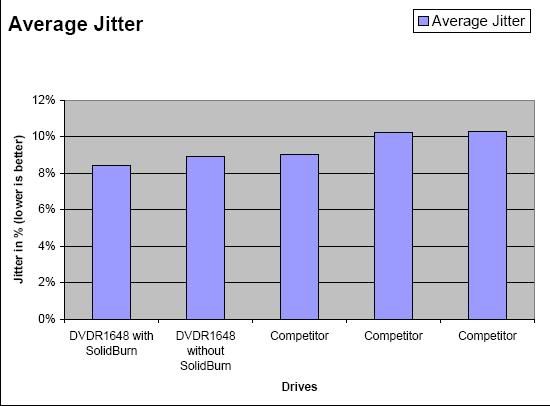
Solidburn shows the lowest jitter measured (lower is better):
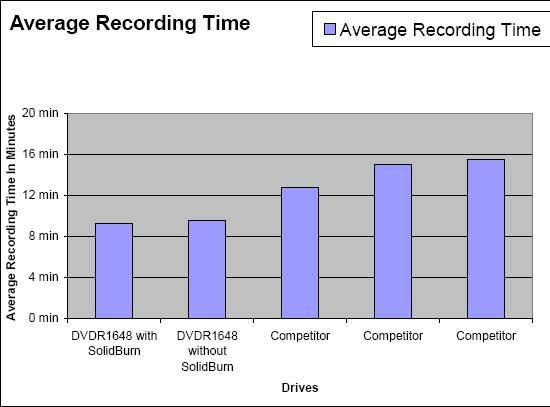
Using SolidBurn also gives the highest possible writing speeds, resulting in the lowest average recording times:
PHILIPS DVD1648
Download:
http://download.cdfreaks.com/download/107
Version History
Initial release P1.1
. Released 1 June 2005
Changes from P1.1 to P1.2
. Released 10 August 2005
. Corrected LED behaviour for DVD (the LED was switched off during DVD writing and reading in firmware P1.1).
. This firmware does not contain Solidburn yet. This will enabled from firmware P2.x onwards.
Changes from P1.2 to P2.2
. Released 13 September 2005
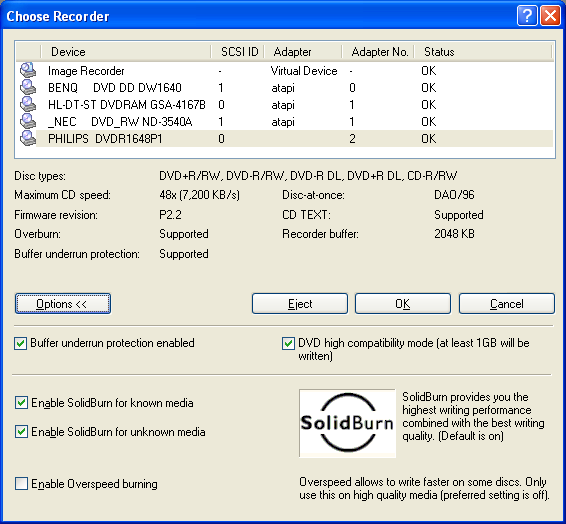
. Added SolidBurn (tm) technology when writing on DVD+R and DVD-R. SolidBurn (tm) determines the best writing strategy for DVD+R and DVD-R media automatically and maximizes the recording speed on these media. More info can be found in a separate document (Philips introduces Solidburn.pdf).
. When SolidBurn (tm) is used during writing, the LED will flash faster then normal.
NERO 6.6.0.17
This post has been edited by yangxi: Sep 15 2005, 12:35 PM
 Quote
Quote
 0.0147sec
 0.42
0.42
 5 queries
 GZIP Disabled