

PRIME spec almost same as S2. Diff only screen size. But battery mhz not much improve.
Samsung Galaxy S Plus (I-9001) Official Thread V1, Galaxy S Plus 1.4ghz speed !! Join in !!
Samsung Galaxy S Plus (I-9001) Official Thread V1, Galaxy S Plus 1.4ghz speed !! Join in !!
|
|
 Oct 20 2011, 06:46 PM Oct 20 2011, 06:46 PM
Return to original view | Post
#41
|
 
Senior Member
2,549 posts Joined: Dec 2004 From: Sungai Petani, Kedah  
|
PRIME spec almost same as S2. Diff only screen size. But battery mhz not much improve.
|
|
|
|
|
|
Oct 21 2011, 05:26 PM
Return to original view | Post
#42
|
|
Senior Member
2,549 posts Joined: Dec 2004 From: Sungai Petani, Kedah
|
I no install antivirus. don't like to consume the memory. I will ensure those not required app remove as to have good memory control. Some app eat the memory a lot.
|
|
|
Oct 23 2011, 04:23 PM
Return to original view | Post
#43
|
|
Senior Member
2,549 posts Joined: Dec 2004 From: Sungai Petani, Kedah
|
QUOTE(annoymous1234 @ Oct 23 2011, 09:51 AM) Yeah!! Many ppl tot u missing d lol.. u can see other thread as reference.. no rush take ya time First rename the main subject. |
|
|
Oct 25 2011, 08:39 AM
Return to original view | Post
#44
|
|
Senior Member
2,549 posts Joined: Dec 2004 From: Sungai Petani, Kedah
|
QUOTE(greenmiks @ Oct 24 2011, 03:22 PM) Guys need help.. Yes,What is the type of battery for this SGS Plus?...can i use Galaxy S battery for SGS Plus?...  TQ... Added on October 25, 2011, 8:41 am QUOTE(azrko @ Oct 24 2011, 09:20 AM) not everyone have whatsapp.. mostly she always use both sms and whatsapp everyday so if always to turn off and turn it on back will keep annoying to her.. Better turn off the data as to save power. Turn on when required. This post has been edited by mynewuser: Oct 25 2011, 08:41 AM |
|
|
Oct 26 2011, 05:45 AM
Return to original view | Post
#45
|
|
Senior Member
2,549 posts Joined: Dec 2004 From: Sungai Petani, Kedah
|
QUOTE(greenmiks @ Oct 26 2011, 12:17 AM) means here it'll clearing up all my data and apps installed in phone memory... All apps will be clean and your sms and phone book and etc. Sometime some application will drain your battery very fast. When in standby mode also.external SD not affected rite?.. So for confirmation before bring to samsung. 1. Hard reset your phone. 2. Remove your external sdcard. 3. Do not install any app. Do not confirm any gmail and any sync setup. 4. Full charge your handphone. 5. Unplug your charger and leave it overnight. 6. Check how is the battery status next morning by refer to Status-About Phone-Battery Use |
|
|
Oct 29 2011, 08:29 PM
Return to original view | Post
#46
|
|
Senior Member
2,549 posts Joined: Dec 2004 From: Sungai Petani, Kedah
|
QUOTE(siongkoon @ Oct 29 2011, 05:23 PM) would rooting the phone make the phone perform faster and better? Some people perform root as to make it slower. Save battery power. |
|
|
|
|
|
Nov 4 2011, 08:16 PM
Return to original view | Post
#47
|
|
Senior Member
2,549 posts Joined: Dec 2004 From: Sungai Petani, Kedah
|
Theme install from the market la.
Video format you can try to play. Those cannot be play, you can install moboplayer. You need to root in order to uninstall the default apps. better leave the default apps and just perform freeze by using titanum backup. Check this to fresh -> http://androidadvices.com/samsung-galaxy-i...xxkpg-firmware/ |
|
|
Nov 4 2011, 10:31 PM
Return to original view | Post
#48
|
|
Senior Member
2,549 posts Joined: Dec 2004 From: Sungai Petani, Kedah
|
QUOTE(yamatto89 @ Nov 4 2011, 10:27 PM) i had just update my firmware (officially using kies) to I9001 DXKJ1 s2 and s+ where got diff.android 2.3.5... but seem like the 2.3.5 is diff with my friend samsung galaxy S2 1? |
|
|
Nov 5 2011, 08:59 AM
Return to original view | Post
#49
|
|
Senior Member
2,549 posts Joined: Dec 2004 From: Sungai Petani, Kedah
|
QUOTE(marinejr @ Nov 5 2011, 08:05 AM) Just updated to 2.3.5 using kies..So far so good nothing is missing. kies available to upgrade now?Found some minor changes. Can view page 1 without scroll back all pages on home screen & application screen. |
|
|
Nov 5 2011, 11:56 AM
Return to original view | Post
#50
|
|
Senior Member
2,549 posts Joined: Dec 2004 From: Sungai Petani, Kedah
|
Can anyone that success update through kies inform the version of 2.3.5 rom.
After update, All app / existing data will be missing? |
|
|
Nov 5 2011, 12:49 PM
Return to original view | Post
#51
|
|
Senior Member
2,549 posts Joined: Dec 2004 From: Sungai Petani, Kedah
|
Anyone can confirm what ROM version after upgrade. Is it I9001DXKJ2?
|
|
|
Nov 5 2011, 05:40 PM
Return to original view | Post
#52
|
|
Senior Member
2,549 posts Joined: Dec 2004 From: Sungai Petani, Kedah
|
QUOTE(michaelgbcmel @ Nov 5 2011, 05:32 PM) haha... i send it to service centre alr.. don know how many day it will stay there as now is holiday time What happen to your phone? |
|
|
Nov 5 2011, 06:21 PM
Return to original view | Post
#53
|
|
Senior Member
2,549 posts Joined: Dec 2004 From: Sungai Petani, Kedah
|
Perhaps samsung server jam.
Added on November 5, 2011, 6:21 pmBetter use ODIN to flash instate of using kies. This post has been edited by mynewuser: Nov 5 2011, 06:21 PM |
|
|
|
|
|
Nov 6 2011, 10:18 AM
Return to original view | Post
#54
|
|
Senior Member
2,549 posts Joined: Dec 2004 From: Sungai Petani, Kedah
|
completed upgrade the rom. battery life look better. other don't feel the diff. will update once notice any change.
|
|
|
Nov 6 2011, 02:40 PM
Return to original view | Post
#55
|
|
Senior Member
2,549 posts Joined: Dec 2004 From: Sungai Petani, Kedah
|
QUOTE(annoymous1234 @ Nov 6 2011, 11:04 AM) i9001 user lets try this what to try? need to pay wo. https://market.android.com/details?id=com.b...tproof.voicerec edit: meh.. not working  |
|
|
Nov 8 2011, 04:32 PM
Return to original view | Post
#56
|
|
Senior Member
2,549 posts Joined: Dec 2004 From: Sungai Petani, Kedah
|
this who use phone for browsing. can consider uc browser 8.04. it much faster than any browser.
|
|
|
Nov 8 2011, 06:00 PM
Return to original view | Post
#57
|
|
Senior Member
2,549 posts Joined: Dec 2004 From: Sungai Petani, Kedah
|
QUOTE(tomctz @ Nov 7 2011, 11:03 PM) just upgrade the firmware to 2.3.5 hmm nothing much diff but can see news and weather apps appear, blue light when swipe to limit, when swipe to the last page then one more swipe will straight direct to the first page, then lastly maybe smoother (psychology) hahaha ^ ^ New and weather @ 2.3.3 also available. |
|
|
Nov 8 2011, 06:48 PM
Return to original view | Post
#58
|
|
Senior Member
2,549 posts Joined: Dec 2004 From: Sungai Petani, Kedah
|
QUOTE(GalaxySPlus @ Nov 8 2011, 06:41 PM) Hi im a new user of galaxy s plus. Im facing a problem here and need a solution. When im scrolling through or searching my contacts, my phone would hang and it hangs so long and i had to restart it. FYI i hv abt 10000 contacts. Anyone could help me out ? Appreciate it thanks 10000 contacts. That too much, please reduce the contacts la. |
|
|
Nov 9 2011, 09:12 AM
Return to original view | Post
#59
|
|
Senior Member
2,549 posts Joined: Dec 2004 From: Sungai Petani, Kedah
|
QUOTE(taq_gt @ Nov 9 2011, 03:47 AM) where to download the ori firmware?already root so kies ddnt recognize phone Please try this -> http://www.mediafire.com/?t35dodf2b2fb0As it publish at this website -> http://muabanraovat.org/huong-dan-up-rom-a...01-4926813.html Added on November 9, 2011, 9:29 am QUOTE(shredder90 @ Nov 9 2011, 02:58 AM) still can't update firmware.. You need this file ODIN & AriesVE.ops file. Refer attachment.can someone teach how to update using odin.. i already donlod the file that are needed.. then i dont know what to do.. some one help me.. You also need the ROM -> http://hotfile.com/dl/133852231/1083d2e/GT...1DXKJ1.rar.html Pass: sampro.pl Fully charge your phone. Backup all your file and contact. Hard reset your phone. Now turn Off and ON your phone again to enter into the downloading mode. To enter into the downloading mode just press volume DOWN key and Home button along with the power button, altogether simultaneously. Refer to the below video to find how to enter your Android mobile into the downloading mode. http://www.youtube.com/watch?feature=playe...d&v=JwFCKDC7OQ4 After the phone is in downloading mode, connect it with the PC (or Laptop) using the USB Cable. As soon as you connect the USB cable the COM Port Mapping block in the Odin tool will be turn into yellow color indicating that all the necessary drivers have been installed successfully. Now, in the Odin tool click on the OPS and Select One package and choose the ROM files as shown in the ODIN.jpg below. Once all the files are selected as given above click on ‘Start’ option to initiate the process of firmware updation. This firmware updation process may take few minutes so don’t interrupt the process in the middle or else you need to start the process again from the beginning. As soon as the process completes your phone will restarts automatically. If the process is taking more time than the usual then disconnect the cable and follow the whole procedure again from the beginning. Now turn OFF your mobile and enter into the recovery mode. To enter into the recovery mode Switch phone off - Press Vol+ and Power Button - as soon as the "SAMSUNG" appears release both buttons - as soon as the "Android out of the Box" appears, press the Menu button. Now your phone is in recovery mode, so choose the options like wipe data/ factory reset and wipe cache partition. The touch interface will not work in the recovery mode so use volume UP & DOWN keys in order to scroll UP & Down. In the process of firmware update, some of the cache files will generates in your phone in order to damage some applications of your phone. So, to avoid any such damage on your phone we need to clean up all the cache files from the phone. Refer to the above video tutorial to get a better idea on cleaning of cache files. After clearing all the cache files form the phone, just reboot it using the option ‘reboot system now’, and enter the language preferences and the Google account preferences again so that you can bring back your phone into the normal mode. This post has been edited by mynewuser: Nov 9 2011, 12:57 PM Attached thumbnail(s) 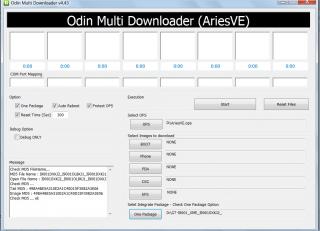
Attached File(s)  ODIN.zip ( 202.9k )
Number of downloads: 16
ODIN.zip ( 202.9k )
Number of downloads: 16 |
|
|
Nov 9 2011, 10:51 PM
Return to original view | Post
#60
|
|
Senior Member
2,549 posts Joined: Dec 2004 From: Sungai Petani, Kedah
|
4 hour +
|
|
Topic ClosedOptions
|
| Change to: |  0.0322sec 0.0322sec
 0.22 0.22
 7 queries 7 queries
 GZIP Disabled GZIP Disabled
Time is now: 6th December 2025 - 05:34 PM |
 Quote
Quote