Outline ·
[ Standard ] ·
Linear+
iPhone Club v14 - iPhone related news & Questions, FAQ/Q&A Thread
|
maderfader
|
 Jul 28 2011, 05:46 PM Jul 28 2011, 05:46 PM
|
Getting Started


|
QUOTE(julieteh @ Jul 28 2011, 05:42 PM) I have tried restarting but the problem was not solved  My phone has been jailbroken, can I still do the reset without losing my apps and data? Is the settings>Messages>MMS Messaging turned on?? |
|
|
|
|
|
maderfader
|
Aug 3 2011, 01:09 PM
|
Getting Started
|
» Click to show Spoiler - click again to hide... « QUOTE(doggy1989 @ Aug 3 2011, 12:16 PM) well...my iphone4 is seriously getting low on space and getting laggy and delay like hell especially when starting up a new apps/games/or sometimes even changing themes it take nearly 1-2 minute to set up..sometimes pressing and choosing apps also got delay.. 32 giga..now left around 1giga... 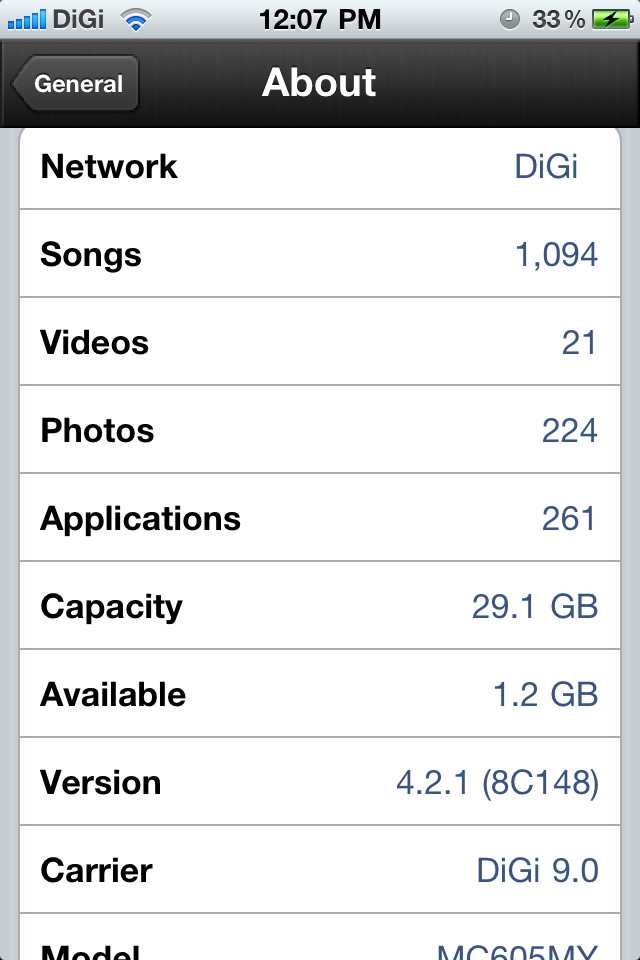 i not to sure what to delete...lol... btw.....how much available memory is recommended for a Smooth moving phone  .. 1) back up your videos to computer n delete any long duration@not important videos..videos taken from iphone 4 is HD 2) there's tremendously big amount of songs u have there..may be a good thing to delete the songs that u never really like. 3) your active apps should be the one that u use frequently n important to you..u should backup your apps in itunes,n delete the non-important apps,especially high capacity ones..this is not pc,no??if u want the apps u deleted again,just sync to your iphone..itunes will not charge u again(in case of paid apps) p.s. forgot to tell u..u should always have the habit to remove all apps in multitasking bar..that should help A BIT on the laggyness coz each apps will use some memory in order to run in the background(n some use data usage as well) This post has been edited by maderfader: Aug 3 2011, 01:13 PM |
|
|
|
|
|
maderfader
|
Aug 3 2011, 01:51 PM
|
Getting Started
|
QUOTE(doggy1989 @ Aug 3 2011, 01:36 PM) emm..but whats the recommended memory to have available to avoid any lagness? As far as i know,there's no study made by researcher on how much ACTUAL available memory required to have a smooth running iphone 4..it's more like "u just know when u had too much" type of thing |
|
|
|
|
|
maderfader
|
 Aug 10 2011, 03:43 PM Aug 10 2011, 03:43 PM
|
Getting Started
|
Need some help here as i don't have the experience yet..So sifus,please advice..i'll go straight to the point. My sis-in-law bought an iphone 3gs last year,it's already jailbroken(don't know which method,n i didn't even ask). So,yesterday she restored the iphone(don't know which ios)..n now,when i looked at it,the 3gs has these problems; a) 3gs can't detect sim card..using celcom previously..so i try swap the sim with my wife's maxis sim into the 3gs n still can't detect it b) connect to itunes view at startup n emergency calls only c) When connect the 3gs to itunes, itunes said the simcard is not supported. Can somebody explain to me what is actually happening??thru my readings,i'd say that the 3gs is a locked set (but don't know which country)..is it true?? if so,how do i fix this?? your input is very much appreciated,thanks guys  |
|
|
|
|
|
maderfader
|
Aug 10 2011, 03:50 PM
|
Getting Started
|
» Click to show Spoiler - click again to hide... « QUOTE(greenlp_87 @ Aug 10 2011, 03:45 PM) please provide more info on the ios current version and the baseband(modem firmware)..look it in the setting>general>about.  That's the problem..i can't even view the usual 'home' view..simply said,dont know what ios,dont know what baseband its currently in,n don't know which locked set its coming from..
Added on August 10, 2011, 3:53 pmQUOTE(sakurazz @ Aug 10 2011, 03:49 PM) since celcom and maxis u had tried.. probably will be a digi set 3gs.. u will need to unlocked the phone again if u wish to use with ur celcom sim card mate Any suggestion on which unlocked method to use??so many,i got confused..some use snowbreeze,some use gevey sim(n its for ip 4 only if im not mistaken) BTW,isn't the iphones in malaysia is already an official unlocked set?? FYI all,the 3gs was bought from a seller in low yatt plaza This post has been edited by maderfader: Aug 10 2011, 03:55 PM |
|
|
|
|
|
maderfader
|
Aug 10 2011, 04:03 PM
|
Getting Started
|
QUOTE(greenlp_87 @ Aug 10 2011, 03:58 PM) if its local set sure it can read any sim mate..ur set surely a locked set...if u restore to the latest ios version surely the only way to unlock it is by using gevey sim... 
Added on August 10, 2011, 3:59 pmif the phone model is mc***my its local, if other than that its not a local set mate... That's what i thought too..but as i mentioned before,are u sure there's a gevey sim that works to unlock a 3gs locked set??could u guide me where,coz already googled but to no avail. is there any other way to know the ios,baseband,serial no. etc given that i can't access them?? |
|
|
|
|
|
maderfader
|
Aug 10 2011, 04:35 PM
|
Getting Started
|
QUOTE(azraeil @ Aug 10 2011, 04:31 PM) It must have been a locked set and previously was jailbroken and the seller must have installed ultrsn0w. The only way you can unlock you 3Gs is by restoring it to a custom firmware and most likely you will need to install the iPad baseband (which will kill the GPS). Am i able to restore it using ultrasn0w even though i'm not able to view the homescreen n itunes?? |
|
|
|
|
|
maderfader
|
Aug 11 2011, 08:01 AM
|
Getting Started
|
QUOTE(maderfader @ Aug 10 2011, 03:43 PM) Need some help here as i don't have the experience yet..So sifus,please advice..i'll go straight to the point. My sis-in-law bought an iphone 3gs last year,it's already jailbroken(don't know which method,n i didn't even ask). So,yesterday she restored the iphone(don't know which ios)..n now,when i looked at it,the 3gs has these problems; a) 3gs can't detect sim card..using celcom previously..so i try swap the sim with my wife's maxis sim into the 3gs n still can't detect it b) connect to itunes view at startup n emergency calls only c) When connect the 3gs to itunes, itunes said the simcard is not supported. Can somebody explain to me what is actually happening??thru my readings,i'd say that the 3gs is a locked set (but don't know which country)..is it true?? if so,how do i fix this?? your input is very much appreciated,thanks guys thanks for all your responses for my current problem,sorry for the late reply..the one last thing that i need to ask of u sifus..what are the methods i can use so that AT LEAST i can kick it out of the "connect to itunes" screen?coz at current state,i can do anything..cant restore,cant update..unless there is a method to restore that i didn't know of..so please please advice This post has been edited by maderfader: Aug 11 2011, 08:45 AM |
|
|
|
|
|
maderfader
|
Aug 11 2011, 11:32 AM
|
Getting Started
|
 To give a better insight Oh man..did the pic came out??coz i uploaded thru iphone 4,n this is the first time i upload something directly from iphone This post has been edited by maderfader: Aug 11 2011, 11:34 AM |
|
|
|
|
|
maderfader
|
Aug 11 2011, 02:11 PM
|
Getting Started
|
QUOTE(epsonstylux @ Aug 11 2011, 11:56 AM) remove your SIM, try pressing home button and sleep button for about 30secs until the phone restarts. btw guys, in contacts, if we put the picture of the contacts using photo from camera roll, after we delete the photo will the photo in contacts gone too? Yah,already tried the DFU reset..still not working |
|
|
|
|
|
maderfader
|
Aug 12 2011, 06:28 PM
|
Getting Started
|
» Click to show Spoiler - click again to hide... « QUOTE(maderfader @ Aug 10 2011, 03:43 PM) Need some help here as i don't have the experience yet..So sifus,please advice..i'll go straight to the point. My sis-in-law bought an iphone 3gs last year,it's already jailbroken(don't know which method,n i didn't even ask). So,yesterday she restored the iphone(don't know which ios)..n now,when i looked at it,the 3gs has these problems; a) 3gs can't detect sim card..using celcom previously..so i try swap the sim with my wife's maxis sim into the 3gs n still can't detect it b) connect to itunes view at startup n emergency calls only c) When connect the 3gs to itunes, itunes said the simcard is not supported. Can somebody explain to me what is actually happening??thru my readings,i'd say that the 3gs is a locked set (but don't know which country)..is it true?? if so,how do i fix this?? your input is very much appreciated,thanks guys Ok,long story short,i've managed to kick it out of recovery mode n now have the 3gs on 4.3.3 jailbroken untethered with redsn0w..now,new(or rather existing) issue occurs. Currently the 3gs' baseband is 05.16.02..when i inserted celcom simcard,it seems that it cant detect the malaysian sim card, i.e. no My Celcom appear on the top left,i assumed its still locked..i already have the ultrasn0w in the 3gs,but with no effect..is there any specific baseband no.(for malaysia) that i should upgrade to the 3gs?? Current 3gs celcom users,please provide the modem firmware under setting>general>about..or is there any other way?? Sifus in LYN,plz advice |
|
|
|
|
|
maderfader
|
Aug 12 2011, 06:49 PM
|
Getting Started
|
» Click to show Spoiler - click again to hide... « QUOTE(kyox88 @ Aug 12 2011, 06:44 PM) My iphone 4 JB 4.3.3 suddenly dont have text tone....i mean, i have all unlock tone, keyboard tone, dialpad tone, and incoming call ringtone, but i dont have text tone...when i receive new msg my phone just silent, and didnt even vibrate...anyone can help me? I have try reset (home + lock button), not working I have try reset all setting=nothing I have uninstall all JB tweaks= no change when i click at setting/sounds/text tone/, i can see the list of tone..but when i click on them, my tone become laggy and no sound come out.... i iz sad... Double check that all the appropriate settings in Sounds is in order i.e. the vibrate is on etc. Then,if still not fix,try change the message tone to other regular tones..also try toggle your silent button on n off This post has been edited by maderfader: Aug 12 2011, 06:51 PM |
|
|
|
|
|
maderfader
|
Aug 13 2011, 05:46 AM
|
Getting Started
|
QUOTE(tashfinsheikh @ Aug 12 2011, 08:52 PM) Can you change your baseband ? Didn't knew about that Care to share how to change baseband ? From what i read,u can actually change your baseband ONLY if u use pwnagetool or sn0wbreeze to create a custom firmware..there is also a method using redsn0w that can change the current 05.14 baseband to ipad baseband (06.15.00) but i dont know how to do the latter Editted: another thing,there's no way (for now) to downgrade your baseband but the devs are currently working hard on it..they said that its 99% doable
Added on August 13, 2011, 5:58 amQUOTE(young_97 @ Aug 13 2011, 12:05 AM) Can downgrade to 4.3.3 by using DFU mode. and u need edit your HOSTS file in system32/drivers/etc (correct me if wrong) Yes u can,i've personally done it..but only if u have shsh blob 4.3.3 saved..for me,i'm lucky enough that the 4.3.3 is saved coz i didnt knew as i cant check it  This post has been edited by maderfader: Aug 13 2011, 05:58 AM This post has been edited by maderfader: Aug 13 2011, 05:58 AM |
|
|
|
|
|
maderfader
|
Mar 14 2012, 09:17 AM
|
Getting Started
|
QUOTE(hackerzx @ Mar 14 2012, 12:37 AM) Hi, did i miss out something..i trying to help my sis upgrade her iOS4 to iOS5 (using ipsw 5.0 not latest 5.1) but encounter 3194 error. what i've done 1)already upgrade latest iTunes + Windows update 2)already restart pc + itunes 3)already edit host file (add or remove the apple server)..delete host file also do but not work 4)using button restore or update still same before this no issue for me using manually upgrade (ipsw file) dont give solution to update from itunes since my internet connection so slow  Apple no longer sign ipsw 5.0,apple is currently signing the latest 5.1..there's no way for you to update in between..edit the host file will work only if u have saved the shsh blob for 5.0 for that phone This post has been edited by maderfader: Mar 14 2012, 09:51 AM |
|
|
|
|
|
maderfader
|
Mar 14 2012, 10:32 AM
|
Getting Started
|
QUOTE(hackerzx @ Mar 14 2012, 10:01 AM) but if i'm using restore should be no prob right? Based on my experience,it doesn't matter if u're using restore or update(shift+restore@update) coz the point is u want to upgrade it to a later ios(version after ios 4)..obviously,your sis phone does not have the blob for the new ios,its not possible to upgrade in between..from my understanding,restore is to revert the phone's ios to its stock setting..for now,the only way for that phone to be at least working is to upgrade to the latest ios 5.1 and wait(& pray) for the new jailbreak for 5.1..btw,what idevice is u're trying to upgrade? p.s. if u're using this guide,u're out of luck..i'm saying it again,u need to have a saved blob for the ios u want to restore it to..in other words, the guide i posted to you only works for downgrading(after saved the blob),not update in between. This post has been edited by maderfader: Mar 14 2012, 10:56 AM |
|
|
|
|
|
maderfader
|
Mar 14 2012, 12:53 PM
|
Getting Started
|
QUOTE(hackerzx @ Mar 14 2012, 12:27 PM) my sister and i using iphone 4.. before this i'm success with that ipsw file & using the restore way since i google and said from iOS 4 move to iOS 5 cant use the 'update' way..(im using PC) ..so now for my sis i try also do the same way ..(using her laptop) .. both are us still NO JB. p/s i'm using the ipsw file since update from iOS2 ..using update way ..until upgrade to iOS5 using restore way.. ..now helping my sister success before this but stuck to iOS5 pula  In my opinion,i think u misread the instructions in the guide..better u give us the link of the guide u referred to..AFAIK,my answer still stands..no way to update in between where apple don't sign the ios anymore unless u create a custom ipsw ios for the iphone version(apple-signed ipsw) |
|
|
|
|
|
maderfader
|
Mar 14 2012, 05:21 PM
|
Getting Started
|
QUOTE(hackerzx @ Mar 14 2012, 02:29 PM) what u mean update in between? langkau ? eg like 4.1 direct to 4.3? still cant accept the fact because its not happened to me ..tq for your guide will try later. update in between tu maksudnye,ko dari 4.3.3 MESTI update TEROS ke ios 5.1..tak boleh update ke 4.3.4,4.3.5 ,5.0 & 5.0.1(tengah2). Kalau dah update ke 5.1,boleh patah balik di tengah DENGAN SYARAT ade save blob @ custom firmware..pandai2 la nak memahaminye |
|
|
|
|



 Quote
Quote
 0.0224sec
 0.53
0.53
 7 queries
 GZIP Disabled