Welcome Guest ( Log In | Register )

Outline · [ Standard ] · Linear+

Virus/Malware eset nod32 stop working (ENHANCED PROTECTION MODE), virus!! help me urgently plzzzz....

views
     
TSPruneFace
post Jul 18 2011, 08:35 PM, updated 15y ago

Getting Started
**
Junior Member
279 posts

Joined: Jun 2009


I was on9 facebook and click on the video link.. then, i required to install adobe to view the video and i've installed it... Suddenly my antivirus popup a message then restart my computer.

Message:

Attention!
ESET Smart Security operates under enhanced protection mode.
This is a temporary measure necessary for immediate response to the threat from virus.
No action is required from you.
I tried to delete the antivirus through the Control Panel, and after that deleted the anti virus still appears on + the same message and I can not do anything and deleting files on a console has nothing do with anti-virus ...
As you have seen anti-virus is ESET NOD32 SMART SECURITY.


Somebody help me plzzzz.....


icon_question.gif icon_question.gif icon_question.gif icon_question.gif icon_question.gif


Added on July 18, 2011, 8:50 pmSummore i cant login facebook anymore and it said Sorry, we are experiencing temporary technical problem, please check back later.

This post has been edited by PruneFace: Jul 18 2011, 08:50 PM
WebWalker
post Jul 18 2011, 09:07 PM

Computer Geek
********
All Stars
12,851 posts

Joined: May 2005
From: Puchong, Selangor


I guess you pc is infected by virus.

Basically if you viewing video in Facebook or Youtube, you dont need to install anything if the flash already installed.

Try to install AVIRA and see whether it clean your pc virus.
TSPruneFace
post Jul 18 2011, 10:48 PM

Getting Started
**
Junior Member
279 posts

Joined: Jun 2009


owh really?? i'll try install it..
hcleong
post Jul 18 2011, 10:57 PM

Getting Started
**
Junior Member
122 posts

Joined: Jan 2003
TS hamsap, want watch xxx, lol. Or try Malwarebyte, which I found not bad for cleaning up.
TSPruneFace
post Jul 18 2011, 11:20 PM

Getting Started
**
Junior Member
279 posts

Joined: Jun 2009


zzz.. watch ur mouth plzz... i just arrived home from office & suddenly my little brother told me about the virus.. haizzz

anyway thanks for ur advice.. thanks!! tongue.gif


Added on July 19, 2011, 4:31 pm
QUOTE(hcleong @ Jul 18 2011, 11:57 PM)
TS hamsap, want watch xxx, lol. Or try Malwarebyte, which I found not bad for cleaning up.
*
it works !! thanks so much..

This post has been edited by PruneFace: Jul 19 2011, 04:31 PM
lisieng
post Jul 19 2011, 07:48 PM

New Member
*
Junior Member
40 posts

Joined: Jul 2011


ive tried malwarebyte, but my laptop still v=cannot open facebook. what should i do? i even do system restore oredi.. help me!


Added on July 19, 2011, 8:28 pmu can access facebook page using ur laptop already?

This post has been edited by lisieng: Jul 19 2011, 08:28 PM
kingkingyyk
post Jul 19 2011, 08:35 PM

10k Club
Group Icon
Elite
15,694 posts

Joined: Mar 2008
That's the problem when someone used a scanner to remove the virus instead of following trained malware fighter.

Malwarebyte's is used to remove traces after the infection. Malicious entries must be removed before removing the traces.

Download HijackThis.
  • Save HijackThis.exe to your desktop.
  • Doubleclick on the HijackThis.exe icon on your desktop.
  • By default it will install to C:\Program Files\Trend Micro\HijackThis .
  • Click on Install.
  • It will create a HijackThis icon on the desktop.
  • Once installed, it will launch Hijackthis.
  • Click on the Do a system scan and save a logfile button. It will scan and the log should open in notepad.
  • Click on "Edit > Select All" then click on "Edit > Copy" to copy the entire contents of the log.
  • Paste into next reply.


This post has been edited by kingkingyyk: Jul 19 2011, 08:35 PM
lisieng
post Jul 19 2011, 08:50 PM

New Member
*
Junior Member
40 posts

Joined: Jul 2011


next reply??


Added on July 19, 2011, 8:56 pmwhat is dat? help me!!!

This post has been edited by lisieng: Jul 19 2011, 08:56 PM
hcleong
post Jul 19 2011, 10:30 PM

Getting Started
**
Junior Member
122 posts

Joined: Jan 2003
QUOTE(lisieng @ Jul 19 2011, 08:50 PM)
next reply??


Added on July 19, 2011, 8:56 pmwhat is dat? help me!!!
*
He ask you to download hijackthis, a tools that scan you active running service, program etc + program that will be fire up when machine start up in windows, and then return you a log file in notepad, you just need to copy and paste the log result, so that we can inspect what is possible still running there.
lisieng
post Jul 19 2011, 10:34 PM

New Member
*
Junior Member
40 posts

Joined: Jul 2011


u mean paste it here?


Added on July 19, 2011, 10:36 pmLogfile of Trend Micro HijackThis v2.0.4
Scan saved at 9:16:19 PM, on 19-Jul-11
Platform: Windows 7 (WinNT 6.00.3504)
MSIE: Internet Explorer v9.00 (9.00.8112.16421)
Boot mode: Normal

Running processes:
C:\Program Files (x86)\Intel\Intel Matrix Storage Manager\IAAnotif.exe
C:\Windows\PLFSetI.exe
C:\Program Files (x86)\Common Files\Ahead\Lib\NMBgMonitor.exe
C:\Program Files (x86)\Thunder Network\Thunder\Program\Thunder.exe
C:\Program Files (x86)\Google\GoogleToolbarNotifier\GoogleToolbarNotifier.exe
C:\Program Files (x86)\Common Files\Ahead\Lib\NMIndexStoreSvr.exe
C:\Users\user\AppData\Local\Google\Update\1.3.21.57\GoogleCrashHandler.exe
C:\Program Files (x86)\Launch Manager\LManager.exe
C:\Program Files (x86)\Common Files\Real\Update_OB\realsched.exe
C:\Program Files (x86)\Yahoo!\Search Protection\SearchProtection.exe
C:\Program Files (x86)\Join Air\UIExec.exe
C:\Program Files (x86)\Common Files\Java\Java Update\jusched.exe
C:\Program Files (x86)\Avira\AntiVir Desktop\avgnt.exe
C:\Program Files (x86)\NewTech Infosystems\Backup Now EZ\BackupNowEZtray.exe
C:\Program Files (x86)\Malwarebytes' Anti-Malware\mbamgui.exe
c:\program files (x86)\common files\thunder network\tp\ver1\1.1.2.46_1111\thunderplatform.exe
C:\Program Files (x86)\Yahoo!\Messenger\ymsgr_tray.exe
C:\ProgramData\Thunder Network\Thunder\Addins\InMediaAddin\ThunderMinisite.exe
C:\Program Files (x86)\Avira\AntiVir Desktop\avcenter.exe
C:\Program Files (x86)\Avira\AntiVir Desktop\avscan.exe
C:\Program Files (x86)\Malwarebytes' Anti-Malware\mbam.exe
C:\Program Files (x86)\Trend Micro\HiJackThis\HiJackThis.exe

F2 - REG:system.ini: UserInit=userinit.exe,
O2 - BHO: Thunder AtOnce - {01443AEC-0FD1-40fd-9C87-E93D1494C233} - C:\Program Files (x86)\Thunder Network\Thunder\ComDlls\TDAtOnce_Now.dll
O2 - BHO: &Yahoo! Toolbar Helper - {02478D38-C3F9-4efb-9B51-7695ECA05670} - C:\PROGRA~2\Yahoo!\Companion\Installs\cpn\yt.dll
O2 - BHO: AcroIEHelperStub - {18DF081C-E8AD-4283-A596-FA578C2EBDC3} - C:\Program Files (x86)\Common Files\Adobe\Acrobat\ActiveX\AcroIEHelperShim.dll
O2 - BHO: RealPlayer Download and Record Plugin for Internet Explorer - {3049C3E9-B461-4BC5-8870-4C09146192CA} - C:\Program Files (x86)\Real\RealPlayer\rpbrowserrecordplugin.dll
O2 - BHO: Groove GFS Browser Helper - {72853161-30C5-4D22-B7F9-0BBC1D38A37E} - C:\Program Files (x86)\Microsoft Office\Office12\GrooveShellExtensions.dll
O2 - BHO: XunleiBHO - {889D2FEB-5411-4565-8998-1DD2C5261283} - C:\Program Files (x86)\Thunder Network\Thunder\BHO\XunleiBHO7.1.4.2104.dll
O2 - BHO: Windows Live ID Sign-in Helper - {9030D464-4C02-4ABF-8ECC-5164760863C6} - C:\Program Files (x86)\Common Files\Microsoft Shared\Windows Live\WindowsLiveLogin.dll
O2 - BHO: Windows Live Messenger Companion Helper - {9FDDE16B-836F-4806-AB1F-1455CBEFF289} - C:\Program Files (x86)\Windows Live\Companion\companioncore.dll
O2 - BHO: Google Toolbar Helper - {AA58ED58-01DD-4d91-8333-CF10577473F7} - C:\Program Files (x86)\Google\Google Toolbar\GoogleToolbar_32.dll
O2 - BHO: Google Toolbar Notifier BHO - {AF69DE43-7D58-4638-B6FA-CE66B5AD205D} - C:\Program Files (x86)\Google\GoogleToolbarNotifier\5.6.5612.1312\swg.dll
O2 - BHO: QUICKfind BHO Object - {C08DF07A-3E49-4E25-9AB0-D3882835F153} - C:\PROGRA~2\IDM\QUICKF~1\PlugIns\IEHelp.dll
O2 - BHO: Bing Bar Helper - {d2ce3e00-f94a-4740-988e-03dc2f38c34f} - "C:\Program Files (x86)\Microsoft\BingBar\BingExt.dll" (file missing)
O2 - BHO: Java™ Plug-In 2 SSV Helper - {DBC80044-A445-435b-BC74-9C25C1C588A9} - C:\Program Files (x86)\Java\jre6\bin\jp2ssv.dll
O2 - BHO: SingleInstance Class - {FDAD4DA1-61A2-4FD8-9C17-86F7AC245081} - C:\PROGRA~2\Yahoo!\Companion\Installs\cpn\YTSingleInstance.dll
O3 - Toolbar: Yahoo! Toolbar - {EF99BD32-C1FB-11D2-892F-0090271D4F88} - C:\PROGRA~2\Yahoo!\Companion\Installs\cpn\yt.dll
O3 - Toolbar: Google Toolbar - {2318C2B1-4965-11d4-9B18-009027A5CD4F} - C:\Program Files (x86)\Google\Google Toolbar\GoogleToolbar_32.dll
O3 - Toolbar: Bing Bar - {8dcb7100-df86-4384-8842-8fa844297b3f} - "C:\Program Files (x86)\Microsoft\BingBar\BingExt.dll" (file missing)
O4 - HKLM\..\Run: [LManager] C:\Program Files (x86)\Launch Manager\LManager.exe
O4 - HKLM\..\Run: [GrooveMonitor] "C:\Program Files (x86)\Microsoft Office\Office12\GrooveMonitor.exe"
O4 - HKLM\..\Run: [TkBellExe] "C:\Program Files (x86)\Common Files\Real\Update_OB\realsched.exe" -osboot
O4 - HKLM\..\Run: [YSearchProtection] "C:\Program Files (x86)\Yahoo!\Search Protection\SearchProtection.exe"
O4 - HKLM\..\Run: [UIExec] "C:\Program Files (x86)\Join Air\UIExec.exe"
O4 - HKLM\..\Run: [MobileConnect] %programfiles%\Vodafone\Vodafone Mobile Connect\Bin\MobileConnect.exe /silent
O4 - HKLM\..\Run: [Adobe ARM] "C:\Program Files (x86)\Common Files\Adobe\ARM\1.0\AdobeARM.exe"
O4 - HKLM\..\Run: [Adobe Reader Speed Launcher] "C:\Program Files (x86)\Adobe\Reader 9.0\Reader\Reader_sl.exe"
O4 - HKLM\..\Run: [SunJavaUpdateSched] "C:\Program Files (x86)\Common Files\Java\Java Update\jusched.exe"
O4 - HKLM\..\Run: [avgnt] "C:\Program Files (x86)\Avira\AntiVir Desktop\avgnt.exe" /min
O4 - HKLM\..\Run: [BackupNowEZtray] "C:\Program Files (x86)\NewTech Infosystems\Backup Now EZ\BackupNowEZtray.exe" -k
O4 - HKLM\..\Run: [3915700.exe] "C:\Windows\TEMP\3915700.exe"
O4 - HKLM\..\Run: [Malwarebytes' Anti-Malware] "C:\Program Files (x86)\Malwarebytes' Anti-Malware\mbamgui.exe" /starttray
O4 - HKCU\..\Run: [BgMonitor_{79662E04-7C6C-4d9f-84C7-88D8A56B10AA}] "C:\Program Files (x86)\Common Files\Ahead\Lib\NMBgMonitor.exe"
O4 - HKCU\..\Run: [Thunder] C:\Program Files (x86)\Thunder Network\Thunder\Program\Thunder.exe -silent -StartType:AutoRun
O4 - HKCU\..\Run: [swg] "C:\Program Files (x86)\Google\GoogleToolbarNotifier\GoogleToolbarNotifier.exe"
O4 - HKCU\..\Run: [Messenger (Yahoo!)] "C:\PROGRA~2\Yahoo!\Messenger\YahooMessenger.exe" -quiet
O4 - HKCU\..\Run: [Search Protection] C:\Program Files (x86)\Yahoo!\Search Protection\SearchProtection.exe
O4 - HKCU\..\Run: [NortonOnlineBackupReminder] "C:\Program Files (x86)\Symantec\Norton Online Backup\Activation\NobuActivation.exe" UNATTENDED
O4 - HKCU\..\Run: [Sidebar] C:\Program Files\Windows Sidebar\sidebar.exe /autoRun
O4 - HKCU\..\Run: [Google Update] "C:\Users\user\AppData\Local\Google\Update\GoogleUpdate.exe" /c
O4 - HKUS\S-1-5-19\..\Run: [Sidebar] %ProgramFiles%\Windows Sidebar\Sidebar.exe /autoRun (User 'LOCAL SERVICE')
O4 - HKUS\S-1-5-19\..\RunOnce: [mctadmin] C:\Windows\System32\mctadmin.exe (User 'LOCAL SERVICE')
O4 - HKUS\S-1-5-20\..\Run: [Sidebar] %ProgramFiles%\Windows Sidebar\Sidebar.exe /autoRun (User 'NETWORK SERVICE')
O4 - HKUS\S-1-5-20\..\RunOnce: [mctadmin] C:\Windows\System32\mctadmin.exe (User 'NETWORK SERVICE')
O4 - Global Startup: Bluetooth.lnk = ?
O8 - Extra context menu item: Add to Google Photos Screensa&ver - res://C:\Windows\system32\GPhotos.scr/200
O8 - Extra context menu item: Download with GetRight - C:\Program Files (x86)\GetRight\GRdownload.htm
O8 - Extra context menu item: E&xport to Microsoft Excel - res://C:\PROGRA~2\MICROS~1\Office12\EXCEL.EXE/3000
O8 - Extra context menu item: Google Sidewiki... - res://C:\Program Files (x86)\Google\Google Toolbar\Component\GoogleToolbarDynamic_mui_en_2EC7709873947E87.dll/cmsidewiki.html
O8 - Extra context menu item: Open with GetRight Browser - C:\Program Files (x86)\GetRight\GRbrowse.htm
O8 - Extra context menu item: Send image to &Bluetooth Device... - C:\Program Files\WIDCOMM\Bluetooth Software\btsendto_ie_ctx.htm
O8 - Extra context menu item: Send page to &Bluetooth Device... - C:\Program Files\WIDCOMM\Bluetooth Software\btsendto_ie.htm
O8 - Extra context menu item: 使用迅雷下载 - C:\Program Files (x86)\Thunder Network\Thunder\BHO\geturl.htm
O8 - Extra context menu item: 使用迅雷下载全部链接 - C:\Program Files (x86)\Thunder Network\Thunder\BHO\GetAllUrl.htm
O9 - Extra button: @C:\Program Files (x86)\Windows Live\Companion\companionlang.dll,-600 - {0000036B-C524-4050-81A0-243669A86B9F} - C:\Program Files (x86)\Windows Live\Companion\companioncore.dll
O9 - Extra button: @C:\Program Files (x86)\Windows Live\Writer\WindowsLiveWriterShortcuts.dll,-1004 - {219C3416-8CB2-491a-A3C7-D9FCDDC9D600} - C:\Program Files (x86)\Windows Live\Writer\WriterBrowserExtension.dll
O9 - Extra 'Tools' menuitem: @C:\Program Files (x86)\Windows Live\Writer\WindowsLiveWriterShortcuts.dll,-1003 - {219C3416-8CB2-491a-A3C7-D9FCDDC9D600} - C:\Program Files (x86)\Windows Live\Writer\WriterBrowserExtension.dll
O9 - Extra button: Send to OneNote - {2670000A-7350-4f3c-8081-5663EE0C6C49} - C:\PROGRA~2\MICROS~1\Office12\ONBttnIE.dll
O9 - Extra 'Tools' menuitem: S&end to OneNote - {2670000A-7350-4f3c-8081-5663EE0C6C49} - C:\PROGRA~2\MICROS~1\Office12\ONBttnIE.dll
O9 - Extra button: Research - {92780B25-18CC-41C8-B9BE-3C9C571A8263} - C:\PROGRA~2\MICROS~1\Office12\REFIEBAR.DLL
O9 - Extra button: Send To Bluetooth - {CCA281CA-C863-46ef-9331-5C8D4460577F} - C:\Program Files\WIDCOMM\Bluetooth Software\btsendto_ie.htm
O9 - Extra 'Tools' menuitem: Send to &Bluetooth Device... - {CCA281CA-C863-46ef-9331-5C8D4460577F} - C:\Program Files\WIDCOMM\Bluetooth Software\btsendto_ie.htm
O10 - Unknown file in Winsock LSP: c:\program files (x86)\common files\microsoft shared\windows live\wlidnsp.dll
O11 - Options group: [ACCELERATED_GRAPHICS] Accelerated graphics
O15 - ESC Trusted Zone: http://*.update.microsoft.com
O16 - DPF: {8100D56A-5661-482C-BEE8-AFECE305D968} (Facebook Photo Uploader 5 Control) - http://upload.facebook.com/controls/2009.0...oUploader55.cab
O18 - Protocol: grooveLocalGWS - {88FED34C-F0CA-4636-A375-3CB6248B04CD} - C:\Program Files (x86)\Microsoft Office\Office12\GrooveSystemServices.dll
O18 - Protocol: wlpg - {E43EF6CD-A37A-4A9B-9E6F-83F89B8E6324} - C:\Program Files (x86)\Windows Live\Photo Gallery\AlbumDownloadProtocolHandler.dll
O23 - Service: Agere Modem Call Progress Audio (AgereModemAudio) - LSI Corporation - C:\Program Files\LSI SoftModem\agr64svc.exe
O23 - Service: @%SystemRoot%\system32\Alg.exe,-112 (ALG) - Unknown owner - C:\Windows\System32\alg.exe (file missing)
O23 - Service: Avira AntiVir Scheduler (AntiVirSchedulerService) - Avira GmbH - C:\Program Files (x86)\Avira\AntiVir Desktop\sched.exe
O23 - Service: Avira AntiVir Guard (AntiVirService) - Avira GmbH - C:\Program Files (x86)\Avira\AntiVir Desktop\avguard.exe
O23 - Service: Bluetooth Service (btwdins) - Broadcom Corporation. - C:\Program Files\WIDCOMM\Bluetooth Software\btwdins.exe
O23 - Service: @%SystemRoot%\system32\efssvc.dll,-100 (EFS) - Unknown owner - C:\Windows\System32\lsass.exe (file missing)
O23 - Service: Acer ePower Service (ePowerSvc) - Acer Incorporated - C:\Program Files\Acer\Acer ePower Management\ePowerSvc.exe
O23 - Service: @%systemroot%\system32\fxsresm.dll,-118 (Fax) - Unknown owner - C:\Windows\system32\fxssvc.exe (file missing)
O23 - Service: GRegService (Greg_Service) - Acer Incorporated - C:\Program Files (x86)\Acer\Registration\GregHSRW.exe
O23 - Service: Google Update Service (gupdate) (gupdate) - Google Inc. - C:\Program Files (x86)\Google\Update\GoogleUpdate.exe
O23 - Service: Google Update Service (gupdatem) (gupdatem) - Google Inc. - C:\Program Files (x86)\Google\Update\GoogleUpdate.exe
O23 - Service: Google Software Updater (gusvc) - Google - C:\Program Files (x86)\Google\Common\Google Updater\GoogleUpdaterService.exe
O23 - Service: Intel® Matrix Storage Event Monitor (IAANTMON) - Intel Corporation - C:\Program Files (x86)\Intel\Intel Matrix Storage Manager\IAANTMon.exe
O23 - Service: @keyiso.dll,-100 (KeyIso) - Unknown owner - C:\Windows\system32\lsass.exe (file missing)
O23 - Service: MBAMService - Malwarebytes Corporation - C:\Program Files (x86)\Malwarebytes' Anti-Malware\mbamservice.exe
O23 - Service: @comres.dll,-2797 (MSDTC) - Unknown owner - C:\Windows\System32\msdtc.exe (file missing)
O23 - Service: MyWinLocker Service (MWLService) - Egis Technology Inc. - C:\Program Files (x86)\EgisTec\MyWinLocker 3\x86\\MWLService.exe
O23 - Service: NBService - Nero AG - C:\Program Files (x86)\Nero\Nero 7\Nero BackItUp\NBService.exe
O23 - Service: @%SystemRoot%\System32\netlogon.dll,-102 (Netlogon) - Unknown owner - C:\Windows\system32\lsass.exe (file missing)
O23 - Service: NMIndexingService - Nero AG - C:\Program Files (x86)\Common Files\Ahead\Lib\NMIndexingService.exe
O23 - Service: nProtect GameGuard Service (npggsvc) - Unknown owner - C:\Windows\system32\GameMon.des.exe (file missing)
O23 - Service: NTI BackupNowEZSvr - NewTech Infosystems, Inc. - C:\Program Files (x86)\NewTech Infosystems\Backup Now EZ\BackupNowEZSvr.exe
O23 - Service: NTI IScheduleSvc - NewTech Infosystems, Inc. - C:\Program Files (x86)\NewTech Infosystems\Acer Backup Manager\IScheduleSvc.exe
O23 - Service: NTI Backup Now 5 Backup Service (NTIBackupSvc) - NewTech InfoSystems, Inc. - C:\Program Files (x86)\NewTech Infosystems\NTI Backup Now 5\BackupSvc.exe
O23 - Service: NTI Backup Now 5 Scheduler Service (NTISchedulerSvc) - NewTech Infosystems, Inc. - C:\Program Files (x86)\NewTech Infosystems\NTI Backup Now 5\SchedulerSvc.exe
O23 - Service: NVIDIA Display Driver Service (nvsvc) - Unknown owner - C:\Windows\system32\nvvsvc.exe (file missing)
O23 - Service: @%systemroot%\system32\psbase.dll,-300 (ProtectedStorage) - Unknown owner - C:\Windows\system32\lsass.exe (file missing)
O23 - Service: Cyberlink RichVideo Service(CRVS) (RichVideo) - Unknown owner - C:\Program Files (x86)\Cyberlink\Shared files\RichVideo.exe
O23 - Service: @%systemroot%\system32\Locator.exe,-2 (RpcLocator) - Unknown owner - C:\Windows\system32\locator.exe (file missing)
O23 - Service: @%SystemRoot%\system32\samsrv.dll,-1 (SamSs) - Unknown owner - C:\Windows\system32\lsass.exe (file missing)
O23 - Service: @%SystemRoot%\system32\snmptrap.exe,-3 (SNMPTRAP) - Unknown owner - C:\Windows\System32\snmptrap.exe (file missing)
O23 - Service: @%systemroot%\system32\spoolsv.exe,-1 (Spooler) - Unknown owner - C:\Windows\System32\spoolsv.exe (file missing)
O23 - Service: @%SystemRoot%\system32\sppsvc.exe,-101 (sppsvc) - Unknown owner - C:\Windows\system32\sppsvc.exe (file missing)
O23 - Service: UI Assistant Service - Unknown owner - C:\Program Files (x86)\Join Air\AssistantServices.exe
O23 - Service: @%SystemRoot%\system32\ui0detect.exe,-101 (UI0Detect) - Unknown owner - C:\Windows\system32\UI0Detect.exe (file missing)
O23 - Service: Updater Service - Acer - C:\Program Files\Acer\Acer Updater\UpdaterService.exe
O23 - Service: @%SystemRoot%\system32\vaultsvc.dll,-1003 (VaultSvc) - Unknown owner - C:\Windows\system32\lsass.exe (file missing)
O23 - Service: @%SystemRoot%\system32\vds.exe,-100 (vds) - Unknown owner - C:\Windows\System32\vds.exe (file missing)
O23 - Service: Vodafone Mobile Connect Service (VMCService) - Vodafone - C:\Program Files (x86)\Vodafone\Vodafone Mobile Connect\Bin\VMCService.exe
O23 - Service: @%systemroot%\system32\vssvc.exe,-102 (VSS) - Unknown owner - C:\Windows\system32\vssvc.exe (file missing)
O23 - Service: @%SystemRoot%\system32\Wat\WatUX.exe,-601 (WatAdminSvc) - Unknown owner - C:\Windows\system32\Wat\WatAdminSvc.exe (file missing)
O23 - Service: @%systemroot%\system32\wbengine.exe,-104 (wbengine) - Unknown owner - C:\Windows\system32\wbengine.exe (file missing)
O23 - Service: @%Systemroot%\system32\wbem\wmiapsrv.exe,-110 (wmiApSrv) - Unknown owner - C:\Windows\system32\wbem\WmiApSrv.exe (file missing)
O23 - Service: @%PROGRAMFILES%\Windows Media Player\wmpnetwk.exe,-101 (WMPNetworkSvc) - Unknown owner - C:\Program Files (x86)\Windows Media Player\wmpnetwk.exe (file missing)
O23 - Service: XLDoctor Services - ShenZhen Xunlei Networking Technologies,LTD - C:\Program Files (x86)\Thunder Network\Thunder\Program\DctSer.exe
O23 - Service: Yahoo! Updater (YahooAUService) - Yahoo! Inc. - C:\Program Files (x86)\Yahoo!\SoftwareUpdate\YahooAUService.exe

--
End of file - 16042 bytes


This post has been edited by lisieng: Jul 19 2011, 10:36 PM
awie958
post Jul 19 2011, 10:37 PM

New Member
*
Newbie
1 posts

Joined: Mar 2010
QUOTE(hcleong @ Jul 19 2011, 10:30 PM)
He ask you to download hijackthis, a tools that scan you active running service, program etc + program that will be fire up when machine start up in windows, and then return you a log file in notepad, you just need to copy and paste the log result, so that we can inspect what is possible still running there.
*
today come to me 1 laptop and 1 cpu unit same problem.is there anybody here got solution?
lisieng
post Jul 19 2011, 10:44 PM

New Member
*
Junior Member
40 posts

Joined: Jul 2011


u work at computer shop de??
hcleong
post Jul 19 2011, 10:48 PM

Getting Started
**
Junior Member
122 posts

Joined: Jan 2003
O4 - HKLM\..\Run: [3915700.exe] "C:\Windows\TEMP\3915700.exe"
The virus still running there.... Did you update your antivirus pattern and MalwareByte pattern data to the latest?


Added on July 19, 2011, 10:51 pm
QUOTE(awie958 @ Jul 19 2011, 10:37 PM)
today come to me 1 laptop and 1 cpu unit same problem.is there anybody here got solution?
*
I'm not really expect in it even I have some knowledge, and I didn't hit by that also, so I can only give some advice base on the common case, until I have a chance actually handling it myself.

This post has been edited by hcleong: Jul 19 2011, 10:51 PM
lisieng
post Jul 19 2011, 10:55 PM

New Member
*
Junior Member
40 posts

Joined: Jul 2011


before this i have eset and avira (at the same time in my laptop..lols...) then, after being infected, both antivirus cannot be used oredi. so i uninstalled them. then, i download malwarebyte as suggested. 1st scan, 43 object infected. 2nd time, 1 infected... idk why

then, i go download avira back... detect two infected=quarantined.

then i scann my lptp again... using both malwarebyte n avira... both clear... now how??

my google chrome still say "could not connect to www.facebook.com'


==... what is going on????
hcleong
post Jul 19 2011, 11:01 PM

Getting Started
**
Junior Member
122 posts

Joined: Jan 2003
try to ping www.facebook.com and see what IP it return. Check the host file under:- C:\Windows\System32\drivers\etc, see if got any entry for www.facebook.com in it.

Btw, if your previous HijackThis log entry is after all the scans you mention, it mean you need to find some other avtivirus that can do the job, it seem the virus still there. Try to scan you machine in safe mode again.
lisieng
post Jul 19 2011, 11:10 PM

New Member
*
Junior Member
40 posts

Joined: Jul 2011


ok, i will try... thanks for all the helps... im not a person experienced in pc software etc... huhu... will tell u the result... im trying now... huhu...
hcleong
post Jul 19 2011, 11:16 PM

Getting Started
**
Junior Member
122 posts

Joined: Jan 2003
QUOTE(lisieng @ Jul 19 2011, 11:10 PM)
ok, i will try... thanks for all the helps... im not a person experienced in pc software etc... huhu... will tell u the result... im trying now... huhu...
*
Btw, the "hosts" file is with out any extension, you can open notepad then drag it in to view.
lisieng
post Jul 19 2011, 11:23 PM

New Member
*
Junior Member
40 posts

Joined: Jul 2011


ok, this is my log after all the scans


Logfile of Trend Micro HijackThis v2.0.4
Scan saved at 11:15:34 PM, on 19-Jul-11
Platform: Windows 7 (WinNT 6.00.3504)
MSIE: Internet Explorer v9.00 (9.00.8112.16421)
Boot mode: Normal

Running processes:
C:\Program Files (x86)\Intel\Intel Matrix Storage Manager\IAAnotif.exe
C:\Windows\PLFSetI.exe
C:\Program Files (x86)\Common Files\Ahead\Lib\NMBgMonitor.exe
C:\Program Files (x86)\Thunder Network\Thunder\Program\Thunder.exe
C:\Program Files (x86)\Google\GoogleToolbarNotifier\GoogleToolbarNotifier.exe
C:\Program Files (x86)\Common Files\Ahead\Lib\NMIndexStoreSvr.exe
C:\Users\user\AppData\Local\Google\Update\1.3.21.57\GoogleCrashHandler.exe
C:\Program Files (x86)\Launch Manager\LManager.exe
C:\Program Files (x86)\Common Files\Real\Update_OB\realsched.exe
C:\Program Files (x86)\Yahoo!\Search Protection\SearchProtection.exe
C:\Program Files (x86)\Join Air\UIExec.exe
C:\Program Files (x86)\Common Files\Java\Java Update\jusched.exe
C:\Program Files (x86)\Avira\AntiVir Desktop\avgnt.exe
C:\Program Files (x86)\NewTech Infosystems\Backup Now EZ\BackupNowEZtray.exe
C:\Program Files (x86)\Malwarebytes' Anti-Malware\mbamgui.exe
c:\program files (x86)\common files\thunder network\tp\ver1\1.1.2.46_1111\thunderplatform.exe
C:\Program Files (x86)\Yahoo!\Messenger\ymsgr_tray.exe
C:\ProgramData\Thunder Network\Thunder\Addins\InMediaAddin\ThunderMinisite.exe
C:\Program Files (x86)\Oxford\OALD7\oald7.exe
C:\Program Files (x86)\Mobile Partner\Mobile Partner.exe
C:\Users\user\AppData\Local\Google\Chrome\Application\chrome.exe
C:\Program Files (x86)\Trend Micro\HiJackThis\HiJackThis.exe
C:\Program Files (x86)\Internet Explorer\iexplore.exe
C:\Program Files (x86)\Microsoft\BingBar\BingBar.exe
C:\Program Files (x86)\Microsoft\BingBar\BingApp.exe
C:\Users\user\AppData\Local\Google\Chrome\Application\chrome.exe

F2 - REG:system.ini: UserInit=userinit.exe,
O2 - BHO: Thunder AtOnce - {01443AEC-0FD1-40fd-9C87-E93D1494C233} - C:\Program Files (x86)\Thunder Network\Thunder\ComDlls\TDAtOnce_Now.dll
O2 - BHO: &Yahoo! Toolbar Helper - {02478D38-C3F9-4efb-9B51-7695ECA05670} - C:\PROGRA~2\Yahoo!\Companion\Installs\cpn\yt.dll
O2 - BHO: AcroIEHelperStub - {18DF081C-E8AD-4283-A596-FA578C2EBDC3} - C:\Program Files (x86)\Common Files\Adobe\Acrobat\ActiveX\AcroIEHelperShim.dll
O2 - BHO: RealPlayer Download and Record Plugin for Internet Explorer - {3049C3E9-B461-4BC5-8870-4C09146192CA} - C:\Program Files (x86)\Real\RealPlayer\rpbrowserrecordplugin.dll
O2 - BHO: Groove GFS Browser Helper - {72853161-30C5-4D22-B7F9-0BBC1D38A37E} - C:\Program Files (x86)\Microsoft Office\Office12\GrooveShellExtensions.dll
O2 - BHO: XunleiBHO - {889D2FEB-5411-4565-8998-1DD2C5261283} - C:\Program Files (x86)\Thunder Network\Thunder\BHO\XunleiBHO7.1.4.2104.dll
O2 - BHO: Windows Live ID Sign-in Helper - {9030D464-4C02-4ABF-8ECC-5164760863C6} - C:\Program Files (x86)\Common Files\Microsoft Shared\Windows Live\WindowsLiveLogin.dll
O2 - BHO: Windows Live Messenger Companion Helper - {9FDDE16B-836F-4806-AB1F-1455CBEFF289} - C:\Program Files (x86)\Windows Live\Companion\companioncore.dll
O2 - BHO: Google Toolbar Helper - {AA58ED58-01DD-4d91-8333-CF10577473F7} - C:\Program Files (x86)\Google\Google Toolbar\GoogleToolbar_32.dll
O2 - BHO: Google Toolbar Notifier BHO - {AF69DE43-7D58-4638-B6FA-CE66B5AD205D} - C:\Program Files (x86)\Google\GoogleToolbarNotifier\5.6.5612.1312\swg.dll
O2 - BHO: QUICKfind BHO Object - {C08DF07A-3E49-4E25-9AB0-D3882835F153} - C:\PROGRA~2\IDM\QUICKF~1\PlugIns\IEHelp.dll
O2 - BHO: Bing Bar Helper - {d2ce3e00-f94a-4740-988e-03dc2f38c34f} - "C:\Program Files (x86)\Microsoft\BingBar\BingExt.dll" (file missing)
O2 - BHO: Java™ Plug-In 2 SSV Helper - {DBC80044-A445-435b-BC74-9C25C1C588A9} - C:\Program Files (x86)\Java\jre6\bin\jp2ssv.dll
O2 - BHO: SingleInstance Class - {FDAD4DA1-61A2-4FD8-9C17-86F7AC245081} - C:\PROGRA~2\Yahoo!\Companion\Installs\cpn\YTSingleInstance.dll
O3 - Toolbar: Yahoo! Toolbar - {EF99BD32-C1FB-11D2-892F-0090271D4F88} - C:\PROGRA~2\Yahoo!\Companion\Installs\cpn\yt.dll
O3 - Toolbar: Google Toolbar - {2318C2B1-4965-11d4-9B18-009027A5CD4F} - C:\Program Files (x86)\Google\Google Toolbar\GoogleToolbar_32.dll
O3 - Toolbar: Bing Bar - {8dcb7100-df86-4384-8842-8fa844297b3f} - "C:\Program Files (x86)\Microsoft\BingBar\BingExt.dll" (file missing)
O4 - HKLM\..\Run: [LManager] C:\Program Files (x86)\Launch Manager\LManager.exe
O4 - HKLM\..\Run: [GrooveMonitor] "C:\Program Files (x86)\Microsoft Office\Office12\GrooveMonitor.exe"
O4 - HKLM\..\Run: [TkBellExe] "C:\Program Files (x86)\Common Files\Real\Update_OB\realsched.exe" -osboot
O4 - HKLM\..\Run: [YSearchProtection] "C:\Program Files (x86)\Yahoo!\Search Protection\SearchProtection.exe"
O4 - HKLM\..\Run: [UIExec] "C:\Program Files (x86)\Join Air\UIExec.exe"
O4 - HKLM\..\Run: [MobileConnect] %programfiles%\Vodafone\Vodafone Mobile Connect\Bin\MobileConnect.exe /silent
O4 - HKLM\..\Run: [Adobe ARM] "C:\Program Files (x86)\Common Files\Adobe\ARM\1.0\AdobeARM.exe"
O4 - HKLM\..\Run: [Adobe Reader Speed Launcher] "C:\Program Files (x86)\Adobe\Reader 9.0\Reader\Reader_sl.exe"
O4 - HKLM\..\Run: [SunJavaUpdateSched] "C:\Program Files (x86)\Common Files\Java\Java Update\jusched.exe"
O4 - HKLM\..\Run: [avgnt] "C:\Program Files (x86)\Avira\AntiVir Desktop\avgnt.exe" /min
O4 - HKLM\..\Run: [BackupNowEZtray] "C:\Program Files (x86)\NewTech Infosystems\Backup Now EZ\BackupNowEZtray.exe" -k
O4 - HKLM\..\Run: [3915700.exe] "C:\Windows\TEMP\3915700.exe"
O4 - HKLM\..\Run: [Malwarebytes' Anti-Malware] "C:\Program Files (x86)\Malwarebytes' Anti-Malware\mbamgui.exe" /starttray
O4 - HKCU\..\Run: [BgMonitor_{79662E04-7C6C-4d9f-84C7-88D8A56B10AA}] "C:\Program Files (x86)\Common Files\Ahead\Lib\NMBgMonitor.exe"
O4 - HKCU\..\Run: [Thunder] C:\Program Files (x86)\Thunder Network\Thunder\Program\Thunder.exe -silent -StartType:AutoRun
O4 - HKCU\..\Run: [swg] "C:\Program Files (x86)\Google\GoogleToolbarNotifier\GoogleToolbarNotifier.exe"
O4 - HKCU\..\Run: [Messenger (Yahoo!)] "C:\PROGRA~2\Yahoo!\Messenger\YahooMessenger.exe" -quiet
O4 - HKCU\..\Run: [Search Protection] C:\Program Files (x86)\Yahoo!\Search Protection\SearchProtection.exe
O4 - HKCU\..\Run: [NortonOnlineBackupReminder] "C:\Program Files (x86)\Symantec\Norton Online Backup\Activation\NobuActivation.exe" UNATTENDED
O4 - HKCU\..\Run: [Sidebar] C:\Program Files\Windows Sidebar\sidebar.exe /autoRun
O4 - HKCU\..\Run: [Google Update] "C:\Users\user\AppData\Local\Google\Update\GoogleUpdate.exe" /c
O4 - HKUS\S-1-5-19\..\Run: [Sidebar] %ProgramFiles%\Windows Sidebar\Sidebar.exe /autoRun (User 'LOCAL SERVICE')
O4 - HKUS\S-1-5-19\..\RunOnce: [mctadmin] C:\Windows\System32\mctadmin.exe (User 'LOCAL SERVICE')
O4 - HKUS\S-1-5-20\..\Run: [Sidebar] %ProgramFiles%\Windows Sidebar\Sidebar.exe /autoRun (User 'NETWORK SERVICE')
O4 - HKUS\S-1-5-20\..\RunOnce: [mctadmin] C:\Windows\System32\mctadmin.exe (User 'NETWORK SERVICE')
O4 - Global Startup: Bluetooth.lnk = ?
O8 - Extra context menu item: Add to Google Photos Screensa&ver - res://C:\Windows\system32\GPhotos.scr/200
O8 - Extra context menu item: Download with GetRight - C:\Program Files (x86)\GetRight\GRdownload.htm
O8 - Extra context menu item: E&xport to Microsoft Excel - res://C:\PROGRA~2\MICROS~1\Office12\EXCEL.EXE/3000
O8 - Extra context menu item: Google Sidewiki... - res://C:\Program Files (x86)\Google\Google Toolbar\Component\GoogleToolbarDynamic_mui_en_2EC7709873947E87.dll/cmsidewiki.html
O8 - Extra context menu item: Open with GetRight Browser - C:\Program Files (x86)\GetRight\GRbrowse.htm
O8 - Extra context menu item: Send image to &Bluetooth Device... - C:\Program Files\WIDCOMM\Bluetooth Software\btsendto_ie_ctx.htm
O8 - Extra context menu item: Send page to &Bluetooth Device... - C:\Program Files\WIDCOMM\Bluetooth Software\btsendto_ie.htm
O8 - Extra context menu item: 使用迅雷下载 - C:\Program Files (x86)\Thunder Network\Thunder\BHO\geturl.htm
O8 - Extra context menu item: 使用迅雷下载全部链接 - C:\Program Files (x86)\Thunder Network\Thunder\BHO\GetAllUrl.htm
O9 - Extra button: @C:\Program Files (x86)\Windows Live\Companion\companionlang.dll,-600 - {0000036B-C524-4050-81A0-243669A86B9F} - C:\Program Files (x86)\Windows Live\Companion\companioncore.dll
O9 - Extra button: @C:\Program Files (x86)\Windows Live\Writer\WindowsLiveWriterShortcuts.dll,-1004 - {219C3416-8CB2-491a-A3C7-D9FCDDC9D600} - C:\Program Files (x86)\Windows Live\Writer\WriterBrowserExtension.dll
O9 - Extra 'Tools' menuitem: @C:\Program Files (x86)\Windows Live\Writer\WindowsLiveWriterShortcuts.dll,-1003 - {219C3416-8CB2-491a-A3C7-D9FCDDC9D600} - C:\Program Files (x86)\Windows Live\Writer\WriterBrowserExtension.dll
O9 - Extra button: Send to OneNote - {2670000A-7350-4f3c-8081-5663EE0C6C49} - C:\PROGRA~2\MICROS~1\Office12\ONBttnIE.dll
O9 - Extra 'Tools' menuitem: S&end to OneNote - {2670000A-7350-4f3c-8081-5663EE0C6C49} - C:\PROGRA~2\MICROS~1\Office12\ONBttnIE.dll
O9 - Extra button: Research - {92780B25-18CC-41C8-B9BE-3C9C571A8263} - C:\PROGRA~2\MICROS~1\Office12\REFIEBAR.DLL
O9 - Extra button: Send To Bluetooth - {CCA281CA-C863-46ef-9331-5C8D4460577F} - C:\Program Files\WIDCOMM\Bluetooth Software\btsendto_ie.htm
O9 - Extra 'Tools' menuitem: Send to &Bluetooth Device... - {CCA281CA-C863-46ef-9331-5C8D4460577F} - C:\Program Files\WIDCOMM\Bluetooth Software\btsendto_ie.htm
O10 - Unknown file in Winsock LSP: c:\program files (x86)\common files\microsoft shared\windows live\wlidnsp.dll
O11 - Options group: [ACCELERATED_GRAPHICS] Accelerated graphics
O15 - ESC Trusted Zone: http://*.update.microsoft.com
O16 - DPF: {8100D56A-5661-482C-BEE8-AFECE305D968} (Facebook Photo Uploader 5 Control) - http://upload.facebook.com/controls/2009.0...oUploader55.cab
O17 - HKLM\System\CCS\Services\Tcpip\..\{3053D49B-7909-4203-BB73-4DF3CEE1DBDA}: NameServer = 203.82.64.161 203.82.64.129
O18 - Protocol: about - {3050F406-98B5-11CF-BB82-00AA00BDCE0B} - C:\Windows\SysWOW64\mshtml.dll
O18 - Protocol: cdl - {3DD53D40-7B8B-11D0-B013-00AA0059CE02} - C:\Windows\SysWOW64\urlmon.dll
O18 - Protocol: dvd - {12D51199-0DB5-46FE-A120-47A3D7D937CC} - C:\Windows\SysWOW64\msvidctl.dll
O18 - Protocol: file - {79EAC9E7-BAF9-11CE-8C82-00AA004BA90B} - C:\Windows\SysWOW64\urlmon.dll
O18 - Protocol: ftp - {79EAC9E3-BAF9-11CE-8C82-00AA004BA90B} - C:\Windows\SysWOW64\urlmon.dll
O18 - Protocol: grooveLocalGWS - {88FED34C-F0CA-4636-A375-3CB6248B04CD} - C:\Program Files (x86)\Microsoft Office\Office12\GrooveSystemServices.dll
O18 - Protocol: http - {79EAC9E2-BAF9-11CE-8C82-00AA004BA90B} - C:\Windows\SysWOW64\urlmon.dll
O18 - Protocol: https - {79EAC9E5-BAF9-11CE-8C82-00AA004BA90B} - C:\Windows\SysWOW64\urlmon.dll
O18 - Protocol: its - {9D148291-B9C8-11D0-A4CC-0000F80149F6} - C:\Windows\System32\itss.dll
O18 - Protocol: javascript - {3050F3B2-98B5-11CF-BB82-00AA00BDCE0B} - C:\Windows\SysWOW64\mshtml.dll
O18 - Protocol: livecall - {828030A1-22C1-4009-854F-8E305202313F} - C:\Program Files (x86)\Windows Live\Messenger\msgrapp.dll
O18 - Protocol: local - {79EAC9E7-BAF9-11CE-8C82-00AA004BA90B} - C:\Windows\SysWOW64\urlmon.dll
O18 - Protocol: mailto - {3050F3DA-98B5-11CF-BB82-00AA00BDCE0B} - C:\Windows\SysWOW64\mshtml.dll
O18 - Protocol: mhtml - {05300401-BCBC-11D0-85E3-00C04FD85AB4} - C:\Windows\system32\inetcomm.dll
O18 - Protocol: mk - {79EAC9E6-BAF9-11CE-8C82-00AA004BA90B} - C:\Windows\SysWOW64\urlmon.dll
O18 - Protocol: ms-help - {314111C7-A502-11D2-BBCA-00C04F8EC294} - C:\Program Files (x86)\Common Files\Microsoft Shared\Help\hxds.dll
O18 - Protocol: ms-its - {9D148291-B9C8-11D0-A4CC-0000F80149F6} - C:\Windows\System32\itss.dll
O18 - Protocol: ms-itss - {0A9007C0-4076-11D3-8789-0000F8105754} - c:\Program Files (x86)\Common Files\Microsoft Shared\Information Retrieval\msitss.dll
O18 - Protocol: msnim - {828030A1-22C1-4009-854F-8E305202313F} - C:\Program Files (x86)\Windows Live\Messenger\msgrapp.dll
O18 - Protocol: res - {3050F3BC-98B5-11CF-BB82-00AA00BDCE0B} - C:\Windows\SysWOW64\mshtml.dll
O18 - Protocol: tv - {CBD30858-AF45-11D2-B6D6-00C04FBBDE6E} - C:\Windows\SysWOW64\msvidctl.dll
O18 - Protocol: vbscript - {3050F3B2-98B5-11CF-BB82-00AA00BDCE0B} - C:\Windows\SysWOW64\mshtml.dll
O18 - Protocol: wlmailhtml - {03C514A3-1EFB-4856-9F99-10D7BE1653C0} - C:\Program Files (x86)\Windows Live\Mail\mailcomm.dll
O18 - Protocol: wlpg - {E43EF6CD-A37A-4A9B-9E6F-83F89B8E6324} - C:\Program Files (x86)\Windows Live\Photo Gallery\AlbumDownloadProtocolHandler.dll
O23 - Service: Agere Modem Call Progress Audio (AgereModemAudio) - LSI Corporation - C:\Program Files\LSI SoftModem\agr64svc.exe
O23 - Service: @%SystemRoot%\system32\Alg.exe,-112 (ALG) - Unknown owner - C:\Windows\System32\alg.exe (file missing)
O23 - Service: Avira AntiVir Scheduler (AntiVirSchedulerService) - Avira GmbH - C:\Program Files (x86)\Avira\AntiVir Desktop\sched.exe
O23 - Service: Avira AntiVir Guard (AntiVirService) - Avira GmbH - C:\Program Files (x86)\Avira\AntiVir Desktop\avguard.exe
O23 - Service: Bluetooth Service (btwdins) - Broadcom Corporation. - C:\Program Files\WIDCOMM\Bluetooth Software\btwdins.exe
O23 - Service: @%SystemRoot%\system32\efssvc.dll,-100 (EFS) - Unknown owner - C:\Windows\System32\lsass.exe (file missing)
O23 - Service: Acer ePower Service (ePowerSvc) - Acer Incorporated - C:\Program Files\Acer\Acer ePower Management\ePowerSvc.exe
O23 - Service: @%systemroot%\system32\fxsresm.dll,-118 (Fax) - Unknown owner - C:\Windows\system32\fxssvc.exe (file missing)
O23 - Service: GRegService (Greg_Service) - Acer Incorporated - C:\Program Files (x86)\Acer\Registration\GregHSRW.exe
O23 - Service: Google Update Service (gupdate) (gupdate) - Google Inc. - C:\Program Files (x86)\Google\Update\GoogleUpdate.exe
O23 - Service: Google Update Service (gupdatem) (gupdatem) - Google Inc. - C:\Program Files (x86)\Google\Update\GoogleUpdate.exe
O23 - Service: Google Software Updater (gusvc) - Google - C:\Program Files (x86)\Google\Common\Google Updater\GoogleUpdaterService.exe
O23 - Service: Intel® Matrix Storage Event Monitor (IAANTMON) - Intel Corporation - C:\Program Files (x86)\Intel\Intel Matrix Storage Manager\IAANTMon.exe
O23 - Service: @keyiso.dll,-100 (KeyIso) - Unknown owner - C:\Windows\system32\lsass.exe (file missing)
O23 - Service: MBAMService - Malwarebytes Corporation - C:\Program Files (x86)\Malwarebytes' Anti-Malware\mbamservice.exe
O23 - Service: @comres.dll,-2797 (MSDTC) - Unknown owner - C:\Windows\System32\msdtc.exe (file missing)
O23 - Service: MyWinLocker Service (MWLService) - Egis Technology Inc. - C:\Program Files (x86)\EgisTec\MyWinLocker 3\x86\\MWLService.exe
O23 - Service: NBService - Nero AG - C:\Program Files (x86)\Nero\Nero 7\Nero BackItUp\NBService.exe
O23 - Service: @%SystemRoot%\System32\netlogon.dll,-102 (Netlogon) - Unknown owner - C:\Windows\system32\lsass.exe (file missing)
O23 - Service: NMIndexingService - Nero AG - C:\Program Files (x86)\Common Files\Ahead\Lib\NMIndexingService.exe
O23 - Service: nProtect GameGuard Service (npggsvc) - Unknown owner - C:\Windows\system32\GameMon.des.exe (file missing)
O23 - Service: NTI BackupNowEZSvr - NewTech Infosystems, Inc. - C:\Program Files (x86)\NewTech Infosystems\Backup Now EZ\BackupNowEZSvr.exe
O23 - Service: NTI IScheduleSvc - NewTech Infosystems, Inc. - C:\Program Files (x86)\NewTech Infosystems\Acer Backup Manager\IScheduleSvc.exe
O23 - Service: NTI Backup Now 5 Backup Service (NTIBackupSvc) - NewTech InfoSystems, Inc. - C:\Program Files (x86)\NewTech Infosystems\NTI Backup Now 5\BackupSvc.exe
O23 - Service: NTI Backup Now 5 Scheduler Service (NTISchedulerSvc) - NewTech Infosystems, Inc. - C:\Program Files (x86)\NewTech Infosystems\NTI Backup Now 5\SchedulerSvc.exe
O23 - Service: NVIDIA Display Driver Service (nvsvc) - Unknown owner - C:\Windows\system32\nvvsvc.exe (file missing)
O23 - Service: @%systemroot%\system32\psbase.dll,-300 (ProtectedStorage) - Unknown owner - C:\Windows\system32\lsass.exe (file missing)
O23 - Service: Cyberlink RichVideo Service(CRVS) (RichVideo) - Unknown owner - C:\Program Files (x86)\Cyberlink\Shared files\RichVideo.exe
O23 - Service: @%systemroot%\system32\Locator.exe,-2 (RpcLocator) - Unknown owner - C:\Windows\system32\locator.exe (file missing)
O23 - Service: @%SystemRoot%\system32\samsrv.dll,-1 (SamSs) - Unknown owner - C:\Windows\system32\lsass.exe (file missing)
O23 - Service: @%SystemRoot%\system32\snmptrap.exe,-3 (SNMPTRAP) - Unknown owner - C:\Windows\System32\snmptrap.exe (file missing)
O23 - Service: @%systemroot%\system32\spoolsv.exe,-1 (Spooler) - Unknown owner - C:\Windows\System32\spoolsv.exe (file missing)
O23 - Service: @%SystemRoot%\system32\sppsvc.exe,-101 (sppsvc) - Unknown owner - C:\Windows\system32\sppsvc.exe (file missing)
O23 - Service: UI Assistant Service - Unknown owner - C:\Program Files (x86)\Join Air\AssistantServices.exe
O23 - Service: @%SystemRoot%\system32\ui0detect.exe,-101 (UI0Detect) - Unknown owner - C:\Windows\system32\UI0Detect.exe (file missing)
O23 - Service: Updater Service - Acer - C:\Program Files\Acer\Acer Updater\UpdaterService.exe
O23 - Service: @%SystemRoot%\system32\vaultsvc.dll,-1003 (VaultSvc) - Unknown owner - C:\Windows\system32\lsass.exe (file missing)
O23 - Service: @%SystemRoot%\system32\vds.exe,-100 (vds) - Unknown owner - C:\Windows\System32\vds.exe (file missing)
O23 - Service: Vodafone Mobile Connect Service (VMCService) - Vodafone - C:\Program Files (x86)\Vodafone\Vodafone Mobile Connect\Bin\VMCService.exe
O23 - Service: @%systemroot%\system32\vssvc.exe,-102 (VSS) - Unknown owner - C:\Windows\system32\vssvc.exe (file missing)
O23 - Service: @%SystemRoot%\system32\Wat\WatUX.exe,-601 (WatAdminSvc) - Unknown owner - C:\Windows\system32\Wat\WatAdminSvc.exe (file missing)
O23 - Service: @%systemroot%\system32\wbengine.exe,-104 (wbengine) - Unknown owner - C:\Windows\system32\wbengine.exe (file missing)
O23 - Service: @%Systemroot%\system32\wbem\wmiapsrv.exe,-110 (wmiApSrv) - Unknown owner - C:\Windows\system32\wbem\WmiApSrv.exe (file missing)
O23 - Service: @%PROGRAMFILES%\Windows Media Player\wmpnetwk.exe,-101 (WMPNetworkSvc) - Unknown owner - C:\Program Files (x86)\Windows Media Player\wmpnetwk.exe (file missing)
O23 - Service: XLDoctor Services - ShenZhen Xunlei Networking Technologies,LTD - C:\Program Files (x86)\Thunder Network\Thunder\Program\DctSer.exe
O23 - Service: Yahoo! Updater (YahooAUService) - Yahoo! Inc. - C:\Program Files (x86)\Yahoo!\SoftwareUpdate\YahooAUService.exe

--
End of file - 18884 bytes


what IP needed? isit the summary?
what shud i look for?

btw, i checked the hosts file... theres this network protocol services etc... i viewed using notepad, i dint found any facebook word in it...


then??


Added on July 19, 2011, 11:24 pmim thinking or uninstall malwarebyte and avira, and try spybot instead. wad u think?

This post has been edited by lisieng: Jul 19 2011, 11:24 PM

hcleong
post Jul 19 2011, 11:32 PM

Getting Started
**
Junior Member
122 posts

Joined: Jan 2003
O4 - HKLM\..\Run: [3915700.exe] "C:\Windows\TEMP\3915700.exe"

you need to restart you machine in save mode and try your luck to clean it with the current antivirus you got. In some case the virus hit you is just in market... so the antivirus will not able to detect it until 1-2 days later.

To get you pc into safe mode, hit F8 after the bios screen and before it load up with the windows logo, it will give you a list of selection in dos mode, select the safe mode. Do the scanning again after boot into safe mode. And HijackThis is not an antivirus, it will only scan the running service and program and return the log. So try to use avira and malwarebyte to do a full system scan.

And yeah, You can try sypbot search and destroy also, I think they can concurrent exist in the system anyway...

This post has been edited by hcleong: Jul 19 2011, 11:33 PM
lisieng
post Jul 19 2011, 11:42 PM

New Member
*
Junior Member
40 posts

Joined: Jul 2011


ok, done wif the safe mode, and now all the icons turn bigger.. haha isit normal? shud i try install other antivirus like spybot n try full scan using it?
hcleong
post Jul 19 2011, 11:48 PM

Getting Started
**
Junior Member
122 posts

Joined: Jan 2003
It is normal for all the icon and display change bad in safe mode. because the windows only load minimum driver and program, as long as you din try to change anything thing, it should not affect you display setting when boot back in normal mode. Spybot also need to update in data pattern, make sure you have it updated, and do a full scan, scanning in safe mode is preferable due do minimum items was loaded, hence less chances that the virus will sit in the memory.
lisieng
post Jul 19 2011, 11:55 PM

New Member
*
Junior Member
40 posts

Joined: Jul 2011


ok, now doing full scan.... btw, i found out this site... what do u think? shud i follow? microsoft security essentials?

thanx for all ur helps again smile.gif
hcleong
post Jul 20 2011, 12:01 AM

Getting Started
**
Junior Member
122 posts

Joined: Jan 2003
hmm, it is also a antivirus, but by microsoft, some say it goods while some say it is not, I din really try that. Did you fail to connect to www.facebook.com via 1 type of browser only, or you try other browser also return the same result?

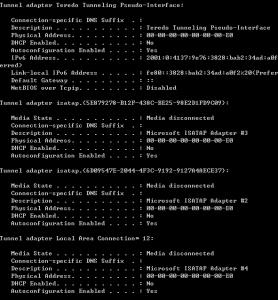
If all browsers fail, can you try this, open command prompt, type:-
ping www.facebook.com

And see what reply you get. And also ipconfig/all and paste the result result here.

lisieng
post Jul 20 2011, 12:09 AM

New Member
*
Junior Member
40 posts

Joined: Jul 2011


is dis correct way to ping??

command prompt, then type ping www.facebook.com

??


Added on July 20, 2011, 12:11 amall my browser fail to connect to fb just now... ping nid internet connection?


Added on July 20, 2011, 12:15 ami didnt connect to internet n this is my result, computer in safe mode

ipconfiguration:

primary dns suffix:...
node type...hybrid
ip routing enabled: no
wins proxy enabled: no

as for ping www.facebook.com


ping request couldnot find host www.facebook.com. pls check the name and try again


Added on July 20, 2011, 12:17 ambtw, r u an someone in computer and software professionals? smile.gif

This post has been edited by lisieng: Jul 20 2011, 12:17 AM
hcleong
post Jul 20 2011, 12:25 AM

Getting Started
**
Junior Member
122 posts

Joined: Jan 2003
>.<, need to back to normal mode 1st lar, in safe mode unless you specific select it else it will disable most of the hardware. After you do all teh scanning, reboot back to normal mode then try to ping and the ipconfig/all command again.

I'm 打杂..... what also need to know a bit, from software to hardware, pc to server..... but most of it I din go deep enough to be a specialist, >.<
lisieng
post Jul 20 2011, 12:33 AM

New Member
*
Junior Member
40 posts

Joined: Jul 2011


normal mode? haha.. okok... will do it later lo after finish scanning..tongue.gif

uh, for me, all this things that i have been done now is already very DEEP ler... haiz.. never done all these before..


Added on July 20, 2011, 12:47 amnormal mode

ping www.facebook.com
still cannot find host

for ipconfig
so many ler... cnt copy n paste de... ==

This post has been edited by lisieng: Jul 20 2011, 12:47 AM
lisieng
post Jul 20 2011, 12:53 AM

New Member
*
Junior Member
40 posts

Joined: Jul 2011


so i take the picture.. haha

Attached Image Attached Image Attached Image


Added on July 20, 2011, 12:55 amso??

This post has been edited by lisieng: Jul 20 2011, 12:55 AM
hcleong
post Jul 20 2011, 01:03 AM

Getting Started
**
Junior Member
122 posts

Joined: Jan 2003
hmm, seem like you are using celcom broadband, you can try the command below with command prompt:

ipconfig /flushdns

After that try to ping www.facebook.com again.
lisieng
post Jul 20 2011, 01:16 AM

New Member
*
Junior Member
40 posts

Joined: Jul 2011


same thing...could not find host...

huhu, y like dat? cannot save dy ar my laptop?? T.T
hcleong
post Jul 20 2011, 01:29 AM

Getting Started
**
Junior Member
122 posts

Joined: Jan 2003
I think may be need to manual change the DNS server and try.... What OS you using?

you can try the below command, to see if you able to get the www.facebook.com ip, from command promt:

nslookup

enter then type,

server 8.8.8.8


after that type:
www.facebook.com

and hit enter again. If it run well, you should see something like below in the reply:

Server: google-public-dns-a.google.com
Address: 8.8.8.8

Non-authoritative answer:
Name: www.facebook.com
Address: 69.171.229.14
server 8.8.8.8

lisieng
post Jul 20 2011, 01:38 AM

New Member
*
Junior Member
40 posts

Joined: Jul 2011


OS? window 7

command prompt:cant find www.facebook.com: No response from server

==

y dis virus so strong de?


hcleong
post Jul 20 2011, 01:42 AM

Getting Started
**
Junior Member
122 posts

Joined: Jan 2003
ok... can you win 7 machine still can online browser other website? or only the facebook problem?
lisieng
post Jul 20 2011, 01:46 AM

New Member
*
Junior Member
40 posts

Joined: Jul 2011


i think so far only the facebook problem.. sad.gif
hcleong
post Jul 20 2011, 01:48 AM

Getting Started
**
Junior Member
122 posts

Joined: Jan 2003
what browser are you using?
lisieng
post Jul 20 2011, 01:52 AM

New Member
*
Junior Member
40 posts

Joined: Jul 2011


internt explorer n google chrome
hcleong
post Jul 20 2011, 01:56 AM

Getting Started
**
Junior Member
122 posts

Joined: Jan 2003
QUOTE(lisieng @ Jul 20 2011, 01:52 AM)
internt explorer n google chrome
*
Can go into your IE, Alt+T, then select Internet Options -> Select Connection Tab, then click on LAN Setting, in the setting pop up, it should have a few check box there, is any of it check and with value?
lisieng
post Jul 20 2011, 01:59 AM

New Member
*
Junior Member
40 posts

Joined: Jul 2011


no. nothing checked


Added on July 20, 2011, 2:06 ambtw, tis virus keep comeout after i full scan my lptp... after i remove it, n run full scan again, this same thing come out. fullscan using malwarebyte

Trojan.Agent-registry key-HKEY_CLASSES_ROOT\thunder

This post has been edited by lisieng: Jul 20 2011, 02:06 AM
hcleong
post Jul 20 2011, 02:19 AM

Getting Started
**
Junior Member
122 posts

Joined: Jan 2003
QUOTE(lisieng @ Jul 20 2011, 01:59 AM)
no. nothing checked


Added on July 20, 2011, 2:06 ambtw, tis virus keep comeout after i full scan my lptp... after i remove it, n run full scan again, this same thing come out. fullscan using malwarebyte

Trojan.Agent-registry key-HKEY_CLASSES_ROOT\thunder
*
I think that is from your 迅雷. This is interesting, I have never see something like this.... Will try to think something for it... btw, did you change your fb password? Just in case, since this virus are try to block you from fb...
lisieng
post Jul 20 2011, 02:22 AM

New Member
*
Junior Member
40 posts

Joined: Jul 2011


yes,changed my password already via other lptp. okie, thanx for your help, guess that we shud try tomorrow. its too late dy.

again, thanx for ur help.learned alot today. looking forward for other way to solve dis. smile.gif
TSPruneFace
post Jul 20 2011, 09:22 PM

Getting Started
**
Junior Member
279 posts

Joined: Jun 2009


QUOTE(lisieng @ Jul 19 2011, 11:55 PM)
before this i have eset and avira (at the same time in my laptop..lols...) then, after being infected, both antivirus cannot be used oredi. so i uninstalled them. then, i download malwarebyte as suggested. 1st scan, 43 object infected. 2nd time, 1 infected... idk why

then, i go download avira back... detect two infected=quarantined.

then i scann my lptp again... using both malwarebyte n avira... both clear... now how??

my google chrome still say "could not connect to www.facebook.com'
==... what is going on????
*
lol... my problem solved already ...

the last thing u shud do is run CCleaner... that's all.. TQ

rclxms.gif rclxms.gif rclxms.gif rclxms.gif rclxms.gif

This post has been edited by PruneFace: Jul 20 2011, 09:23 PM
lisieng
post Jul 20 2011, 09:56 PM

New Member
*
Junior Member
40 posts

Joined: Jul 2011


what is CCleaner??

how u solve your problem?
TSPruneFace
post Jul 20 2011, 10:03 PM

Getting Started
**
Junior Member
279 posts

Joined: Jun 2009


QUOTE(lisieng @ Jul 20 2011, 10:56 PM)
what is CCleaner??

how u solve your problem?
*
1 - install malware & run it
2 - Run ur antivirus (any)
3 - Run CCleaner (usually included with windows 7)
- Otherwise just download it here


lisieng
post Jul 20 2011, 10:04 PM

New Member
*
Junior Member
40 posts

Joined: Jul 2011


what will CCleaner do??
TSPruneFace
post Jul 20 2011, 10:10 PM

Getting Started
**
Junior Member
279 posts

Joined: Jun 2009


sweat.gif sweat.gif

You can find it yourself... icon_rolleyes.gif
lisieng
post Jul 20 2011, 10:14 PM

New Member
*
Junior Member
40 posts

Joined: Jul 2011


will it delete my documents??
TSPruneFace
post Jul 20 2011, 10:19 PM

Getting Started
**
Junior Member
279 posts

Joined: Jun 2009


actually you can setting it.. Just clear your browser's data such history, cookies, temporary data etc... The issue here is the worm infected all your browser.. You just need to clear up your browsers.. Summore, you can fix your registry. tongue.gif


Added on July 20, 2011, 10:21 pm
QUOTE(lisieng @ Jul 20 2011, 11:14 PM)
will it delete my documents??
*
it will not delete your document.. dont worry...

This post has been edited by PruneFace: Jul 20 2011, 10:21 PM
lisieng
post Jul 20 2011, 10:52 PM

New Member
*
Junior Member
40 posts

Joined: Jul 2011


done everything... still cannot ==
TSPruneFace
post Jul 20 2011, 11:20 PM

Getting Started
**
Junior Member
279 posts

Joined: Jun 2009


really?
lisieng
post Jul 20 2011, 11:27 PM

New Member
*
Junior Member
40 posts

Joined: Jul 2011


yeap!
shamz78
post Jul 21 2011, 07:34 PM

New Member
*
Newbie
1 posts

Joined: Jul 2011


QUOTE(lisieng @ Jul 20 2011, 10:52 PM)
done everything... still cannot ==
*
This virus is new. Many of antivirus program still don't have the solution. This virus blocks you from accessing the facebook website. When you ping to facebook.com, you will get this reply 127.0.0.1 which is localhost. To solve this, firstly you must install the latest malwarebytes anti malware. The latest malwarebytes have the realtime scan feature which is able to disable the virus program. I also recommend you to replace your antivirus with another one. Probably u still cannot access the facebook website even after u have successfully removed this virus. To solve this, i suggest u to rename or change the hosts file which is located in C: > Windows > System32> Drivers> Etc. Rename or change the file type to text file. This will re enable you to access the facebook website. Hopefully this will solve your problem.. icon_idea.gif

This post has been edited by shamz78: Jul 21 2011, 08:49 PM
kingkingyyk
post Jul 21 2011, 09:48 PM

10k Club
Group Icon
Elite
15,694 posts

Joined: Mar 2008
http://forum.lowyat.net/index.php?showuser=91567
You can proceed to PM him to ask for help instead.
He is a trained people to deal with malware.

It is not a good idea on believing untrained person.

This post has been edited by kingkingyyk: Jul 21 2011, 09:57 PM
lisieng
post Jul 22 2011, 02:06 AM

New Member
*
Junior Member
40 posts

Joined: Jul 2011


i ping fb b4, then it say cannot find host le
BlueWind
post Jul 22 2011, 11:15 AM

Sianzation
*******
Senior Member
2,901 posts

Joined: Jan 2007


Hi,

Are you installing two AV in your computer? Avira and ESET?

Also, can you provide the message from ESET?

I need you to run OTL for an in-depth scan. If you cannot paste the log here because it's too long(thanks to the cacated LYN) then upload those files as attachment.

Download OTL to your Desktop
  • Double click on the icon to run it. Make sure all other windows are closed and to let it run uninterrupted.
  • Click on Minimal Output at the top
  • Download the following file scan.txt to your Desktop. Click here to download it. You may need to right click on it and select "Save"
  • Double click inside the Custom Scan box at the bottom
  • A window will appear saying "Click OK to load a custom scan from a file or Cancel to cancel"
  • Click the OK button and navigate to the file scan.txt which we just saved to your desktop
  • Select scan.txt and click Open. Writing will now appear under the Custom Scan box
  • Click the Run Scan button. Do not change any settings unless otherwise told to do so. The scan won't take long.
    • When the scan completes, it will open two notepad windows. OTL.Txt and Extras.Txt. These are saved in the same location as OTL.
    • Please copy (Edit->Select All, Edit->Copy) the contents of these files, one at a time and post them in your topic
===================================================

On your next reply please post :
OTL log
Extras log


Let me know if you have any problems in performing with the steps above or any questions you may have.

lisieng
post Jul 22 2011, 12:50 PM

New Member
*
Junior Member
40 posts

Joined: Jul 2011


i clicked the custom scan at the bottom of ht OTL, but nothing happened.(why le)?? but i just run scan under standard output, and there is extra and otl log..

so, what shud i do? the log, can use or not?

i already uninstall eset and avira. the eset message is like this de before

Attention!
ESET Smart Security operates under enhanced protection mode.
This is a temporary measure necessary for immediate response to the threat from virus.
No action is required from you.
BlueWind
post Jul 22 2011, 01:17 PM

Sianzation
*******
Senior Member
2,901 posts

Joined: Jan 2007


Ok, go ahead and post the OTL log and the Extra log back here for review.

To me what I think the problem is just the ESET is blocking facebook. But I will look through the log to see anything else I can help you to clean up.
lisieng
post Jul 22 2011, 01:41 PM

New Member
*
Junior Member
40 posts

Joined: Jul 2011


Attached File  OTL.Txt ( 360.03k ) Number of downloads: 40
Attached File  Extras.Txt ( 74.07k ) Number of downloads: 18


Added on July 22, 2011, 1:41 pmthanx ya! smile.gif

This post has been edited by lisieng: Jul 22 2011, 01:41 PM
BlueWind
post Jul 22 2011, 01:54 PM

Sianzation
*******
Senior Member
2,901 posts

Joined: Jan 2007


Ok, forget about what I said. Wait for further instructions.

This post has been edited by BlueWind: Jul 22 2011, 01:55 PM
BlueWind
post Jul 22 2011, 02:20 PM

Sianzation
*******
Senior Member
2,901 posts

Joined: Jan 2007


Here it is. Please follow the instructions CAREFULLY.

QUOTE
PLEASE TAKE NOTE THAT THIS FIX IS ONLY INTENDED FOR THIS COMPUTER. DOING SO WILL ONLY DO MORE DAMAGE THAN GOOD. I SHALL TAKE NO RESPONSIBILITY FOR ANY DATA LOST WHATSOEVER THAT MAY OCCUR. THANKS


Follow these steps to display hidden files and folders.
  • Open Folder Options by clicking the Start button user posted image, clicking Control Panel, clicking Appearance and Personalization, and then clicking Folder Options.
  • Click the View tab.
  • Under Advanced settings, click Show hidden files and folders
  • Click OK. (Remember to Hide files and folders once done)
Please go to one of the below sites to scan the following files:
Virus Total (Recommended)
jotti.org
VirScan


click on Browse, and upload the following file for analysis:
C:\Windows\geoiplist.rar
C:\Windows\unrar.exe
C:\Windows\loader2.exe_ok


Then click Submit. Allow the file to be scanned, and then please copy and paste the results link(for Virus Total) here for me to see.
If it says already scanned -- click "reanalyze now"
Please post the results in your next reply.

===================================================

Run OTL.exe
  • Copy/paste the following text written inside of the code box into the Custom Scans/Fixes box located at the bottom of OTL

    CODE
    :OTL
    DRV:64bit: - [2009-05-14 15:49:56 | 000,121,152 | ---- | M] (ESET) [Kernel | Auto | Running] -- C:\Windows\SysNative\drivers\epfwwfpr.sys -- (epfwwfpr)
    DRV:64bit: - [2009-05-14 15:47:16 | 000,134,024 | ---- | M] (ESET) [Kernel | System | Running] -- C:\Windows\SysNative\drivers\ehdrv.sys -- (ehdrv)
    DRV:64bit: - [2009-05-14 15:41:14 | 000,142,776 | ---- | M] (ESET) [File_System | Auto | Running] -- C:\Windows\SysNative\drivers\eamon.sys -- (eamon)
    O3:64bit: - HKLM\..\Toolbar: (no name) - Locked - No CLSID value found.
    O3 - HKLM\..\Toolbar: (no name) - Locked - No CLSID value found.
    O4 - HKLM..\Run: [tray_ico] File not found
    O4 - HKLM..\Run: [tray_ico2] File not found
    O4 - HKLM..\Run: [tray_ico3] File not found
    O4 - HKLM..\Run: [tray_ico4] File not found
    O16 - DPF: {8AD9C840-044E-11D1-B3E9-00805F499D93} http://java.sun.com/update/1.6.0/jinstall-...indows-i586.cab (Java Plug-in 1.6.0_20)
    O16 - DPF: {CAFEEFAC-0016-0000-0020-ABCDEFFEDCBA} http://java.sun.com/update/1.6.0/jinstall-...indows-i586.cab (Java Plug-in 1.6.0_20)
    O16 - DPF: {CAFEEFAC-FFFF-FFFF-FFFF-ABCDEFFEDCBA} http://java.sun.com/update/1.6.0/jinstall-...indows-i586.cab (Java Plug-in 1.6.0_20)
    O33 - MountPoints2\{2ac6b661-90be-11df-854c-002622788aa7}\Shell - "" = AutoRun
    O33 - MountPoints2\{2ac6b661-90be-11df-854c-002622788aa7}\Shell\AutoRun\command - "" = F:\AutoRun.exe -- [2009-08-24 02:42:34 | 000,143,360 | R--- | M] (Huawei Technologies Co., Ltd.)
    O33 - MountPoints2\{2ac6b670-90be-11df-854c-002622788aa7}\Shell - "" = AutoRun
    O33 - MountPoints2\{2ac6b670-90be-11df-854c-002622788aa7}\Shell\AutoRun\command - "" = F:\AutoRun.exe -- [2009-08-24 02:42:34 | 000,143,360 | R--- | M] (Huawei Technologies Co., Ltd.)
    O33 - MountPoints2\{2ac6b68a-90be-11df-854c-002622788aa7}\Shell - "" = AutoRun
    O33 - MountPoints2\{2ac6b68a-90be-11df-854c-002622788aa7}\Shell\AutoRun\command - "" = F:\AutoRun.exe -- [2009-08-24 02:42:34 | 000,143,360 | R--- | M] (Huawei Technologies Co., Ltd.)
    O33 - MountPoints2\{44cbd2a8-b1ff-11e0-bd46-002622788aa7}\Shell - "" = AutoRun
    O33 - MountPoints2\{44cbd2a8-b1ff-11e0-bd46-002622788aa7}\Shell\AutoRun\command - "" = F:\AutoRun.exe -- [2009-08-24 02:42:34 | 000,143,360 | R--- | M] (Huawei Technologies Co., Ltd.)
    O33 - MountPoints2\{44cbd2c5-b1ff-11e0-bd46-002622788aa7}\Shell - "" = AutoRun
    O33 - MountPoints2\{44cbd2c5-b1ff-11e0-bd46-002622788aa7}\Shell\AutoRun\command - "" = F:\AutoRun.exe -- [2009-08-24 02:42:34 | 000,143,360 | R--- | M] (Huawei Technologies Co., Ltd.)
    O33 - MountPoints2\{5b11be41-f4ef-11de-9468-002622788aa7}\Shell - "" = AutoRun
    O33 - MountPoints2\{5b11be41-f4ef-11de-9468-002622788aa7}\Shell\AutoRun\command - "" = F:\setup_vmc_lite.exe /checkApplicationPresence
    O33 - MountPoints2\{5b11be4d-f4ef-11de-9468-002622788aa7}\Shell - "" = AutoRun
    O33 - MountPoints2\{5b11be4d-f4ef-11de-9468-002622788aa7}\Shell\AutoRun\command - "" = F:\setup_vmc_lite.exe /checkApplicationPresence
    O33 - MountPoints2\{5b11be4f-f4ef-11de-9468-002622788aa7}\Shell - "" = AutoRun
    O33 - MountPoints2\{5b11be4f-f4ef-11de-9468-002622788aa7}\Shell\AutoRun\command - "" = F:\setup_vmc_lite.exe /checkApplicationPresence
    O33 - MountPoints2\{6ed98391-7b9f-11e0-b47b-002622788aa7}\Shell - "" = AutoRun
    O33 - MountPoints2\{6ed98391-7b9f-11e0-b47b-002622788aa7}\Shell\AutoRun\command - "" = F:\AutoRun.exe -- [2009-08-24 02:42:34 | 000,143,360 | R--- | M] (Huawei Technologies Co., Ltd.)
    O33 - MountPoints2\{6ed98394-7b9f-11e0-b47b-002622788aa7}\Shell - "" = AutoRun
    O33 - MountPoints2\{6ed98394-7b9f-11e0-b47b-002622788aa7}\Shell\AutoRun\command - "" = F:\AutoRun.exe -- [2009-08-24 02:42:34 | 000,143,360 | R--- | M] (Huawei Technologies Co., Ltd.)
    O33 - MountPoints2\{8024f3f7-099c-11e0-9c3d-002622788aa7}\Shell - "" = AutoRun
    O33 - MountPoints2\{8024f3f7-099c-11e0-9c3d-002622788aa7}\Shell\AutoRun\command - "" = G:\LaunchU3.exe -a
    O33 - MountPoints2\{93e00a3e-d231-11df-be5b-002622788aa7}\Shell - "" = AutoRun
    O33 - MountPoints2\{93e00a3e-d231-11df-be5b-002622788aa7}\Shell\AutoRun\command - "" = F:\AutoRun.exe -- [2009-08-24 02:42:34 | 000,143,360 | R--- | M] (Huawei Technologies Co., Ltd.)
    O33 - MountPoints2\{98f3b5db-4a37-11e0-b3ba-001e101f7f74}\Shell - "" = AutoRun
    O33 - MountPoints2\{98f3b5db-4a37-11e0-b3ba-001e101f7f74}\Shell\AutoRun\command - "" = H:\LaunchU3.exe -a
    O33 - MountPoints2\{a6c79fc6-a477-11df-bed5-002622788aa7}\Shell - "" = AutoRun
    O33 - MountPoints2\{a6c79fc6-a477-11df-bed5-002622788aa7}\Shell\AutoRun\command - "" = F:\AutoRun.exe -- [2009-08-24 02:42:34 | 000,143,360 | R--- | M] (Huawei Technologies Co., Ltd.)
    O33 - MountPoints2\{c667bd71-6001-11e0-b312-002622788aa7}\Shell - "" = AutoRun
    O33 - MountPoints2\{c667bd71-6001-11e0-b312-002622788aa7}\Shell\AutoRun\command - "" = F:\AutoRun.exe -- [2009-08-24 02:42:34 | 000,143,360 | R--- | M] (Huawei Technologies Co., Ltd.)
    O33 - MountPoints2\{d0c02023-bffc-11df-9b86-002622788aa7}\Shell - "" = AutoRun
    O33 - MountPoints2\{d0c02023-bffc-11df-9b86-002622788aa7}\Shell\AutoRun\command - "" = F:\AutoRun.exe -- [2009-08-24 02:42:34 | 000,143,360 | R--- | M] (Huawei Technologies Co., Ltd.)
    O33 - MountPoints2\{fe5ab63d-b5b2-11df-9aa5-002622788aa7}\Shell - "" = AutoRun
    O33 - MountPoints2\{fe5ab63d-b5b2-11df-9aa5-002622788aa7}\Shell\AutoRun\command - "" = G:\AutoRun.exe
    O33 - MountPoints2\{fe5ab654-b5b2-11df-9aa5-001e101f1838}\Shell - "" = AutoRun
    O33 - MountPoints2\{fe5ab654-b5b2-11df-9aa5-001e101f1838}\Shell\AutoRun\command - "" = F:\AutoRun.exe -- [2009-08-24 02:42:34 | 000,143,360 | R--- | M] (Huawei Technologies Co., Ltd.)
    O33 - MountPoints2\{fe5ab693-b5b2-11df-9aa5-001e101f1838}\Shell - "" = AutoRun
    O33 - MountPoints2\{fe5ab693-b5b2-11df-9aa5-001e101f1838}\Shell\AutoRun\command - "" = F:\AutoRun.exe -- [2009-08-24 02:42:34 | 000,143,360 | R--- | M] (Huawei Technologies Co., Ltd.)
    O33 - MountPoints2\F\Shell - "" = AutoRun
    O33 - MountPoints2\F\Shell\AutoRun\command - "" = F:\AutoRun.exe -- [2009-08-24 02:42:34 | 000,143,360 | R--- | M] (Huawei Technologies Co., Ltd.)
    O33 - MountPoints2\G\Shell - "" = AutoRun
    O33 - MountPoints2\G\Shell\AutoRun\command - "" = G:\AutoRun.exe
    [2011-07-11 09:40:19 | 000,000,000 | ---D | C] -- C:\Users\user\AppData\Local\{60619A2F-D25F-4E17-99CC-21291F48D4E6}
    [2011-07-09 22:41:50 | 000,000,000 | ---D | C] -- C:\Users\user\AppData\Local\{E61D9E84-8E6E-4FDC-9CB4-2EA3490B86A5}
    [2011-07-08 22:07:42 | 000,000,000 | ---D | C] -- C:\Users\user\AppData\Local\{84CC0FAD-C599-4AF1-B0AA-945FF8471D0E}
    [2011-07-08 09:40:29 | 000,000,000 | ---D | C] -- C:\Users\user\AppData\Local\{7899900F-67C7-481B-9BB8-FCEAB6F0DCCA}
    [2011-07-07 07:30:35 | 000,000,000 | ---D | C] -- C:\Users\user\AppData\Local\{970E717B-29E0-430E-9CF1-0606FC755402}
    [2011-07-06 08:21:48 | 000,000,000 | ---D | C] -- C:\Users\user\AppData\Local\{E6CC7D60-3297-413B-986E-F321729B9F66}
    [2011-07-04 21:49:19 | 000,000,000 | ---D | C] -- C:\Users\user\AppData\Local\{C331D310-3A09-4D5A-869A-B1EEF98C8791}
    [2011-07-03 21:37:10 | 000,000,000 | ---D | C] -- C:\Users\user\AppData\Local\{60C5A4CE-2D59-4BC9-B9CE-24F2383DD33C}
    [2011-07-03 19:55:48 | 000,000,000 | ---D | C] -- C:\Users\user\AppData\Local\{E42823CD-E578-48AF-B742-D92E866C0F4D}
    [2011-07-02 23:29:32 | 000,000,000 | ---D | C] -- C:\Users\user\AppData\Local\{B20C60C1-C44A-49FD-98B7-718C104870DF}
    [2011-07-02 22:38:41 | 000,000,000 | ---D | C] -- C:\Users\user\AppData\Local\{C907D749-08D1-4059-A2F9-C700E4905C08}
    [2011-07-01 18:10:29 | 000,000,000 | ---D | C] -- C:\Users\user\AppData\Local\{D714009D-2EFD-4FD3-92AF-78CBE03F8FE3}
    [2011-07-01 08:30:21 | 000,000,000 | ---D | C] -- C:\Users\user\AppData\Local\{B55F37DD-9B9D-4337-A77C-0B6152726A0C}
    [2011-06-30 19:33:42 | 000,000,000 | ---D | C] -- C:\Users\user\AppData\Local\{488EAF2D-8B20-4FB7-BDD3-02DFDC2CF313}
    [2011-06-30 16:41:59 | 000,000,000 | ---D | C] -- C:\Users\user\AppData\Local\{E1382485-ADDE-4704-B911-F99034642C38}
    [2011-06-30 11:25:26 | 000,000,000 | ---D | C] -- C:\Users\user\AppData\Local\{0EEF99B5-DEF5-45D3-BAD6-9DD5BD1B06EE}
    [2011-06-30 11:18:47 | 000,000,000 | ---D | C] -- C:\Users\user\AppData\Local\{9B9527A6-984F-46CA-A8E5-E4E7B8297887}
    [2011-06-30 09:37:41 | 000,000,000 | ---D | C] -- C:\Users\user\AppData\Local\{B51ABEC6-A2B5-4985-AD40-55A98B512F9E}
    [2011-06-28 22:08:49 | 000,000,000 | ---D | C] -- C:\Users\user\AppData\Local\{D264CA36-81B0-47CA-B8C1-74F54BC6CB7E}
    [2011-06-28 09:41:25 | 000,000,000 | ---D | C] -- C:\Users\user\AppData\Local\{37963DE1-53B6-44E0-A9AD-64C9D0FDDCB9}
    [2011-06-27 22:23:40 | 000,000,000 | ---D | C] -- C:\Users\user\AppData\Local\{7A938D57-EBE7-4E42-B6F0-C2521A069DBA}
    [2011-06-24 20:00:09 | 000,000,000 | ---D | C] -- C:\Users\user\AppData\Local\{39A00FE4-2BED-40F5-B5C4-9C7DCC512951}
    [2011-06-24 11:40:26 | 000,000,000 | ---D | C] -- C:\Users\user\AppData\Local\{F3DDB496-92B2-42D5-9972-86C913816979}
    [2011-06-23 21:30:22 | 000,000,000 | ---D | C] -- C:\Users\user\AppData\Local\{75DDD531-093F-4EB7-A106-D6C00E0EB6FC}
    [2011-06-22 21:50:30 | 000,000,000 | ---D | C] -- C:\Users\user\AppData\Local\{2C2D1D52-AFFD-4751-A5CB-CDDF02F615DC}

    :Reg
    [HKEY_LOCAL_MACHINE\SYSTEM\CurrentControlSet\Services\SharedAccess\Parameters\FirewallPolicy\StandardProfile\AuthorizedApplications\List]
    "C:\Windows\update.1\svchost.exe" =-
    "C:\Windows\services32.exe" =-
    "C:\Windows\update.tray-8-0-lnk\svchost.exe" =-
    "C:\Windows\update.tray-8-0\svchost.exe" =-
    "C:\Windows\update.tray-2-0-lnk\svchost.exe" =-
    "C:\Windows\update.tray-2-0\svchost.exe" =-
    "C:\Windows\update.2\svchost.exe" =-
    "C:\Windows\update.1\svchost.exe" =-
    "C:\Windows\services32.exe" =-
    "C:\Windows\update.tray-8-0-lnk\svchost.exe" =-
    "C:\Windows\update.tray-8-0\svchost.exe" =-
    "C:\Windows\update.tray-2-0-lnk\svchost.exe" =-
    "C:\Windows\update.tray-2-0\svchost.exe" =-
    "C:\Windows\update.2\svchost.exe" =-

    :Files
    C:\Windows\update.1
    C:\Windows\update.2
    C:\Windows\services32.exe
    C:\Windows\update.tray-8-0-lnk
    C:\Windows\update.tray-8-0
    C:\Windows\update.tray-2-0-lnk
    C:\Windows\update.tray-2-0

    :Commands
    [EMPTYFLASH]
    [EMPTYTEMP]
    [RESETHOSTS]
    [CLEARALLRESTOREPOINTS]

  • Then click the Run Fix button at the top
  • Let the program run unhindered, reboot when it is done
  • Then post Fix OTL log as well as a new OTL log by rerunning it after reboot without custom scans script and( don't check the boxes beside LOP Check or Purity this time )
===================================================

On your next reply please post :
File scanner log
Fix OTL log
Fresh OTL log


Let me know if you have any problems in performing with the steps above or any questions you may have.

This post has been edited by BlueWind: Jul 23 2011, 11:32 AM
lisieng
post Jul 22 2011, 02:38 PM

New Member
*
Junior Member
40 posts

Joined: Jul 2011


sorry u hv to wait, uploading file takes time.. smile.gif


Added on July 22, 2011, 2:49 pmgeoiplist

http://www.virustotal.com/file-scan/report...73c4-1311316787

unrar

http://www.virustotal.com/file-scan/report...87ad-1311316817

my loader2.exe.ok is empty file ler... 0kb...

This post has been edited by lisieng: Jul 22 2011, 02:49 PM
lisieng
post Jul 22 2011, 03:24 PM

New Member
*
Junior Member
40 posts

Joined: Jul 2011


Attached File  OTL2.Txt ( 338.69k ) Number of downloads: 20
Attached File  fix_otl.txt ( 43.54k ) Number of downloads: 21


wad u mean by file scanner log?
chrisling
post Jul 22 2011, 03:56 PM

Helper Trainee+
******
Senior Member
1,684 posts

Joined: Nov 2006
From: KL


File scanner log should be consisted in the page that you put as link for the file scanning. Certain file scanner site generates scanned log for users, whereas the site you use put the direct link for users for analysis. smile.gif
lisieng
post Jul 22 2011, 04:02 PM

New Member
*
Junior Member
40 posts

Joined: Jul 2011


i see... thanx.. smile.gif
BlueWind
post Jul 22 2011, 04:32 PM

Sianzation
*******
Senior Member
2,901 posts

Joined: Jan 2007


Thanks chris smile.gif

Are you still having the same problem?
lisieng
post Jul 22 2011, 04:44 PM

New Member
*
Junior Member
40 posts

Joined: Jul 2011


WOW!! i just checked... now, i can open facebook page already! YEAY! thanks BlueWind for the help!!! thank u.... a lots......

biggrin.gif

btw, wad the problem wif my lptp actually?
BlueWind
post Jul 22 2011, 05:04 PM

Sianzation
*******
Senior Member
2,901 posts

Joined: Jan 2007


There was something inside your computer making funny stuff to your host file. I just flush it away, but I do found other unwanted stuff that are not supposed to be in your computer so I had them clean up.

My only advice to you is always, I mean ALWAYS run only one anti-virus coupled with a standalone firewall, and malware scanner such as the one you have which is highly recommended to have; Malwarebytes.

There is a bit more to do. It's up to you whether you want to do it, because this is only part of follow up scan that I do routinely to make sure everything is in order. If you cannot wait for ESET to complete its scan then you can close this thread if you want. Just remember to press Clean Up button in OTL. smile.gif

Re-run Malwarebytes' Anti-Malware
  • Double-click MalwareBytes' (Note to Vista users, please right-click and select Run as Administrator.)
    • Go to Update tab to update Malwarebytes' Anti-Malware
  • Then click Check for Updates.
  • If an update is found, it will download and install the latest version.
  • Once the program has loaded, select Perform Quick Scan, then click Scan.
  • When the scan is complete, click OK, then Show Results to view the results.
  • Be sure that everything is checked, and click Remove Selected.
  • When completed, a log will open in Notepad. Please copy and paste the log back into your next reply
Note:
  • The log can also be found here:
    C:\Documents and Settings\Username\Application Data\Malwarebytes\Malwarebytes' Anti-Malware\Logs\mbam-log-date (time).txt
  • Or via the Logs tab when Malwarebytes' Anti-Malware is started.
Note: If MBAM encounters a file that is difficult to remove, you will be presented with 1 of 2 prompts.
Click OK to either and let MBAM proceed with the disinfection process.
If asked to restart the computer, please do so. Failure to reboot will prevent MBAM from removing all the malware.


===================================================

ESET Online Scanner
I'd like us to scan your machine with ESET OnlineScan

Note: If you are using Windows Vista/7, open your browser by right-clicking on its icon and select 'Run as administrator' to perform this scan.

*Note
It is recommended to disable onboard antivirus program and antispyware programs while performing scans so there are no conflicts and it will speed up scan time.
Please don't go surfing while your resident protection is disabled!
Once the scan is finished remember to re-enable your antivirus along with your antispyware programs.


  1. Hold down Control and click on the following link to open ESET OnlineScan in a new window.
    ESET OnlineScan
  2. Click the user posted image button.
  3. For alternate browsers only: (Microsoft Internet Explorer users can skip these steps)
    1. Click on user posted image to download the ESET Smart Installer. Save it to your desktop.
    2. Double click on the user posted image icon on your desktop.
  4. Check user posted image
  5. Click the user posted image button.
  6. Accept any security warnings from your browser.
  7. Check user posted image
  8. Make sure that the option "Remove found threats" is Unchecked
  9. Push the Start button.
  10. ESET will then download updates for itself, install itself, and begin
    scanning your computer. Please be patient as this can take some time.
  11. Look for report in C:\Program Files\ESET\ESET Online Scanner\log.txt. Include the contents of this report in your next reply.
  12. Select Uninstall application on close check box and push user posted image
===================================================

On your next reply please post :
MBAM log
ESET log


Let me know if you have any problems in performing with the steps above or any questions you may have.


HanHann
post Jul 22 2011, 07:08 PM

New Member
*
Newbie
1 posts

Joined: Jul 2011
Yeah~
I solve my problems also!
Thanks a lot!
rclxms.gif
lisieng
post Jul 22 2011, 09:49 PM

New Member
*
Junior Member
40 posts

Joined: Jul 2011


i found a threat after using eset online scan. wad shud i do?


Added on July 22, 2011, 9:50 pmbtw, dis is my MBAM log


Malwarebytes' Anti-Malware 1.51.1.1800
www.malwarebytes.org

Database version: 7229

Windows 6.1.7601 Service Pack 1
Internet Explorer 9.0.8112.16421

22-Jul-11 7:18:46 PM
mbam-log-2011-07-22 (19-18-46).txt

Scan type: Quick scan
Objects scanned: 172603
Time elapsed: 2 minute(s), 37 second(s)

Memory Processes Infected: 0
Memory Modules Infected: 0
Registry Keys Infected: 0
Registry Values Infected: 0
Registry Data Items Infected: 0
Folders Infected: 0
Files Infected: 0

Memory Processes Infected:
(No malicious items detected)

Memory Modules Infected:
(No malicious items detected)

Registry Keys Infected:
(No malicious items detected)

Registry Values Infected:
(No malicious items detected)

Registry Data Items Infected:
(No malicious items detected)

Folders Infected:
(No malicious items detected)

Files Infected:
(No malicious items detected)


Added on July 22, 2011, 9:52 pmeset log


ESETSmartInstaller@High as downloader log:
all ok
# version=7
# OnlineScannerApp.exe=1.0.0.1
# OnlineScanner.ocx=1.0.0.6528
# api_version=3.0.2
# EOSSerial=fc7362219fe210448e5d51c9de7ffc6b
# end=finished
# remove_checked=false
# archives_checked=true
# unwanted_checked=true
# unsafe_checked=false
# antistealth_checked=true
# utc_time=2011-07-22 01:44:03
# local_time=2011-07-22 09:44:03 (+0800, Malay Peninsula Standard Time)
# country="United States"
# lang=1033
# osver=6.1.7601 NT Service Pack 1
# compatibility_mode=512 16777215 100 0 255206 255206 0 0
# compatibility_mode=5893 16776573 100 94 0 62964838 0 0
# compatibility_mode=8192 67108863 100 0 725 725 0 0
# scanned=256762
# found=1
# cleaned=0
# scan_time=7255
C:\_OTL\MovedFiles\07222011_145157\C_Windows\System32\drivers\etc\hosts Win32/Qhost trojan (unable to clean) 00000000000000000000000000000000 I


This post has been edited by lisieng: Jul 22 2011, 09:52 PM
BlueWind
post Jul 22 2011, 10:45 PM

Sianzation
*******
Senior Member
2,901 posts

Joined: Jan 2007


It's a quarantined file that I nuked it earlier this afternoon. You're good to go now, unless you have any other issues.

Clean up with OTL:
  • Double-click OTL.exe to start the program.
  • Close all other programs apart from OTL as this step will require a reboot
  • On the OTL main screen, press the CLEANUP button
  • Say Yes to the prompt and then allow the program to reboot your computer.

lisieng
post Jul 22 2011, 10:55 PM

New Member
*
Junior Member
40 posts

Joined: Jul 2011


already clean up. so that means my lptp virus free already?

apis
post Jul 22 2011, 11:31 PM

Regular
******
Senior Member
1,175 posts

Joined: Jun 2006
From: Borneo Island


Got The Same Problem Here.The Antivirus Problem Already Solved I Think,But Still Couldnt Connect To Facebook
lisieng
post Jul 22 2011, 11:45 PM

New Member
*
Junior Member
40 posts

Joined: Jul 2011


mine ok oredi! smile.gif
BlueWind
post Jul 23 2011, 12:00 AM

Sianzation
*******
Senior Member
2,901 posts

Joined: Jan 2007


QUOTE(lisieng @ Jul 22 2011, 10:55 PM)
already clean up. so that means my lptp virus free already?
*
As far as I could tell, it's free now. smile.gif
lisieng
post Jul 23 2011, 12:05 AM

New Member
*
Junior Member
40 posts

Joined: Jul 2011


wow! thanks again... big clap!!!

rclxms.gif rclxms.gif thumbup.gif thumbup.gif rclxms.gif rclxms.gif rclxm9.gif thumbup.gif rclxms.gif rclxms.gif
hcleong
post Jul 23 2011, 12:08 AM

Getting Started
**
Junior Member
122 posts

Joined: Jan 2003
QUOTE(BlueWind @ Jul 23 2011, 12:00 AM)
As far as I could tell, it's free now. smile.gif
*
BeueWind, ever encounter the FB virus that will just auto restart the Laptop when logged in, even in safe mode? 1 of my company trainee just encounter that... which I have no idea how to stop it, and she using a acer laptop that fully screwed, I dare not open it to take out the harddisk due to the laptop is quite new, zzzz. Any good tools that you can recommend that able solve the issue in dos mode mode or other boot disk?
BlueWind
post Jul 23 2011, 01:24 AM

Sianzation
*******
Senior Member
2,901 posts

Joined: Jan 2007


Maybe it would be a better idea if you help her to restore to factory settings from the hidden partition in her Acer laptop.
slpyguyz
post Jul 23 2011, 11:24 AM

New Member
*
Newbie
4 posts

Joined: Jul 2011
I've been having the same issue as well. I followed the scan step you posted.but It doesnt work for me.
please help me to solve this. thanks in advance
i uploaded my OTL and Extras.Attached File  Extras.Txt ( 34k ) Number of downloads: 6
Attached File  Extras.Txt ( 34k ) Number of downloads: 6


Attached File(s)
Attached File  OTL.Txt ( 67.91k ) Number of downloads: 3
BlueWind
post Jul 23 2011, 11:40 AM

Sianzation
*******
Senior Member
2,901 posts

Joined: Jan 2007


Open your own thread and PM me your link. I need to get these logs separated to avoid confusion.

I also need you to run GMER and post that in your new thread. Don't attach it. It's much easier for me.

On a second thought, copy paste the OTL log you have now in your new thread as well.

user posted image
  • Please download GMER from one of the following locations, and save it to your desktop:
    • Main Mirror
      This version will download a randomly named file (Recommended)
    • Zip Mirror
      This version will download a zip file you will need to extract first. If you use this mirror, please extract the zip file to your desktop.
  • Extract the contents of the zipped file to desktop (applicable only to Zip mirror) .
  • Double click user posted image or user posted image on your desktop.
  • If it gives you a warning about rootkit activity and asks if you want to run scan...click on NO.
    user posted image

    user posted image
    Click the image to enlarge it
  • In the right panel, you will see several boxes that have been checked. Uncheck the following ...
    • IAT/EAT
    • Drives/Partition other than Systemdrive (typically C:\)
    • Show All (don't miss this one)
  • Then click the Scan button & wait for it to finish.
  • Once done click on the [Save..] button, and in the File name area, type in "Gmer.txt" or it will save as a .log file which cannot be uploaded to your post.
  • Save it where you can easily find it, such as your desktop, and attach it in your reply.
**Caution**
Rootkit scans often produce false positives. Do NOT take any action on any "<--- ROOKIT" entries

AgnesYap
post Jul 23 2011, 01:27 PM

New Member
*
Newbie
2 posts

Joined: Jul 2011
i also have this problem, what should i do?
art108
post Jul 23 2011, 03:11 PM

New Member
*
Junior Member
15 posts

Joined: Oct 2007
i hv the same problem. if i reformat will it help remove the virus?


Added on July 23, 2011, 3:26 pmbtw i got the same virus from the facebook thing T_T

This post has been edited by art108: Jul 23 2011, 03:26 PM
slpyguyz
post Jul 23 2011, 04:21 PM

New Member
*
Newbie
4 posts

Joined: Jul 2011
I had posted as you request. blue wind
candee
post Jul 23 2011, 10:21 PM

Getting Started
**
Junior Member
91 posts

Joined: Jul 2009
hihi, bluewind, i had the same problem as liseing, where i got the facebook worm called koobface.... and my AV had also stop working (enchanced protection mode).

Here is my OTL and Extra OTL


Could you please give me some guidelines to fix the issued
thanks ...
_____________________________________________________________________________________________________________ht
Geoiplist

http://www.virustotal.com/file-scan/report...1155-1311432760

where to find 3 files(geoiplist, unrar and loaderx2) u hv mention in ?


This post has been edited by candee: Jul 23 2011, 11:06 PM


Attached File(s)
Attached File  OTL.Txt ( 126.24k ) Number of downloads: 7
Attached File  Extras.Txt ( 54.08k ) Number of downloads: 5
BlueWind
post Jul 23 2011, 10:57 PM

Sianzation
*******
Senior Member
2,901 posts

Joined: Jan 2007


..

This post has been edited by BlueWind: Jul 25 2011, 09:29 PM
Aquariusdenz
post Jul 24 2011, 12:50 AM

Regular
******
Senior Member
1,533 posts

Joined: Aug 2007


Need help badly. sad.gif
[attachmentid=2346949]
[attachmentid=2346948]
AgnesYap
post Jul 25 2011, 01:57 PM

New Member
*
Newbie
2 posts

Joined: Jul 2011
This is my OTL and GMER log files:


Attached File(s)
Attached File  OTL.Txt ( 240.11k ) Number of downloads: 9
Attached File  Extras.Txt ( 54.43k ) Number of downloads: 4
Attached File  Gmer.txt ( 21.21k ) Number of downloads: 4
kavcom
post Sep 4 2011, 05:26 PM

New Member
*
Junior Member
5 posts

Joined: Sep 2009
bluewind i had the same problem as them, where i click the facebook link and my anti-Virus had also stop working (enchanced protection mode).
need yr help please notworthy.gif


Attached File(s)
Attached File  OTL.Txt ( 70.56k ) Number of downloads: 6
snorlaks
post Oct 29 2011, 12:50 AM

New Member
*
Newbie
1 posts

Joined: Oct 2011
I ve got the same problem with facebook virus, but now I cant run windows. After loggin bar there is just black screen. The same in safemode. Could You please write the file names which I should delete?
amorz
post Oct 29 2011, 07:03 AM

Getting Started
**
Junior Member
181 posts

Joined: Aug 2011
From: gombak,kL


yes its normal,just use the malwarebyte should be fine
make sure you update the malwarebyte database first
Sqash1030
post Oct 31 2011, 01:04 AM

New Member
*
Newbie
2 posts

Joined: Oct 2011


ey guys I also have that problem. I downloaded and used malwarebytes antimalware. and it seems it worked, but I still cant acess my fb account. Can you help me?
BlueWind
post Oct 31 2011, 02:22 AM

Sianzation
*******
Senior Member
2,901 posts

Joined: Jan 2007


Reset your host file.
Sqash1030
post Oct 31 2011, 02:41 AM

New Member
*
Newbie
2 posts

Joined: Oct 2011


How do I do that?


Added on October 31, 2011, 2:44 amI found the site that said I must rename hosts to hosts.bak. Is that it? I tried and it works


This post has been edited by Sqash1030: Oct 31 2011, 02:44 AM
BlueWind
post Oct 31 2011, 11:18 AM

Sianzation
*******
Senior Member
2,901 posts

Joined: Jan 2007


That's one way of doing it. Normally I will replace the contents inside with MVPS host file
feequez
post Nov 2 2011, 03:29 PM

New Member
*
Junior Member
7 posts

Joined: Feb 2007


what do you think of using software name "D7". Last time, I encounted same problem, which i cant connect to facebook.com only, and when i ping facebook.com, it appeared pinging facebook.com 127.0.0.1, and when i checked my host file, nothing mention about facebook.

i used D7 and inside there got command to "Overwrite with Defaults HOTS File".when i clicked, there goes some process, and wallaa!! :hyper: my facebook working fine..

maybe this can be one of the options to solve "cant connect to facebook" problem.

just my 2 cents.. :sweat:
BlueWind
post Nov 2 2011, 05:33 PM

Sianzation
*******
Senior Member
2,901 posts

Joined: Jan 2007


Never heard of D7, there's another alternative software called HostXpert.
feequez
post Nov 3 2011, 09:40 AM

New Member
*
Junior Member
7 posts

Joined: Feb 2007


QUOTE(BlueWind @ Nov 2 2011, 05:33 PM)
Never heard of D7, there's another alternative software called HostXpert.
*
will try to test that software...
whitewhite
post Nov 4 2011, 01:24 PM

Getting Started
**
Junior Member
257 posts

Joined: Oct 2011


QUOTE(PruneFace @ Jul 18 2011, 08:35 PM)
I was on9 facebook and click on the video link.. then, i required to install adobe to view the video and i've installed it...  Suddenly my antivirus popup a message then restart my computer.

Message:

Attention!
ESET Smart Security operates under enhanced protection mode.
This is a temporary measure necessary for immediate response to the threat from virus.
No action is required from you.
I tried to delete the antivirus through the Control Panel, and after that deleted the anti virus still appears on + the same message and I can not do anything and deleting files on a console has nothing do with anti-virus ...
As you have seen anti-virus is ESET NOD32 SMART SECURITY.
Somebody help me plzzzz.....
icon_question.gif  icon_question.gif  icon_question.gif  icon_question.gif  icon_question.gif


Added on July 18, 2011, 8:50 pmSummore i cant login facebook anymore and it said Sorry, we are experiencing temporary technical problem, please check back later.
*
Actually this Enhanced Protection Mode is a kind of spyware and also a fake virus on your computer sometimes it will came along with the Adobe Flash Player Update....sometimes this virus will make yr computer keep on restart...the way to kill this spyware is close the program at yr task manager and delete all the registry of yr antivirus...i use this method ro remove the Enhanced Protection Mode...hope this will help smile.gif


Change to:
| Lo-Fi Version
0.0539sec    0.18    6 queries    GZIP Disabled
Time is now: 9th December 2025 - 06:50 AM