

Hi all, im planning to build a hackintosh with
Intel Core i3 2120 (3.30GHz/3MB)
Gigabyte B75M D3V Motherboard
i want to use snow leopard, is the hardware ok?
Hardware Hackintosh Thread V2.0, The Official OSX86 Thread (Hardware)
Hardware Hackintosh Thread V2.0, The Official OSX86 Thread (Hardware)
|
|
 Dec 4 2012, 11:32 AM Dec 4 2012, 11:32 AM
Return to original view | Post
#1
|
 
Junior Member
115 posts Joined: Jan 2010  
|
Hi all, im planning to build a hackintosh with
Intel Core i3 2120 (3.30GHz/3MB) Gigabyte B75M D3V Motherboard i want to use snow leopard, is the hardware ok? |
|
|
|
|
|
Dec 4 2012, 04:01 PM
Return to original view | Post
#2
|
|
Junior Member
115 posts Joined: Jan 2010
|
QUOTE(miramar @ Dec 4 2012, 11:45 AM) Here's my B75M build. It's very easy to get a hack running on this board with ML, dunno about SL. I want to use 2120 because it is a sandy bridge, SL not compatible with icy bridge right (as far as i know)http://www.tonymacx86.com/user-builds/7754...ntain-lion.html 2120 has HD2000 which won't work. Get a proc with HD4000, eg: 3225, or a GPU.  i will use a geforce Gigabyte 210 for the graphic.. |
|
|
Dec 4 2012, 05:01 PM
Return to original view | Post
#3
|
|
Junior Member
115 posts Joined: Jan 2010
|
Because all some of my app that i need are not compatible with lion or mountain lion.
|
|
|
Dec 7 2012, 07:25 PM
Return to original view | Post
#4
|
|
Junior Member
115 posts Joined: Jan 2010
|
pro tools..im using pirated app la bro..couldn't find the update for ML or lion. music guy will sure understand me..
|
|
|
Dec 11 2012, 12:36 PM
Return to original view | Post
#5
|
|
Junior Member
115 posts Joined: Jan 2010
|
This is my first time build a hackintosh and im facing this problem. After insert snow leopard installation disk, i press f5 and then enter and this screen appear. how to solve this problem?
Attached thumbnail(s) 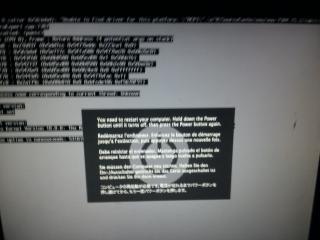
|
|
|
Dec 11 2012, 01:10 PM
Return to original view | Post
#6
|
|
Junior Member
115 posts Joined: Jan 2010
|
i just snap 1 picture bro. sorry for that. do u know why that occur?
|
|
|
|
|
|
Dec 11 2012, 01:18 PM
Return to original view | Post
#7
|
|
Junior Member
115 posts Joined: Jan 2010
|
This is the best i can snap..
Added on December 11, 2012, 1:19 pm QUOTE(wiraone @ Dec 11 2012, 01:14 PM) Please read the first post .. NO DISCUSSION ABOUT ILLEGAL STUFFS HERE PLEASE! So sorry. Added on December 11, 2012, 1:14 pm PLEASE .. PLEASE .. we don't want this thread to be closed by moderators.  This post has been edited by larilagilaju: Dec 11 2012, 01:19 PM Attached thumbnail(s) 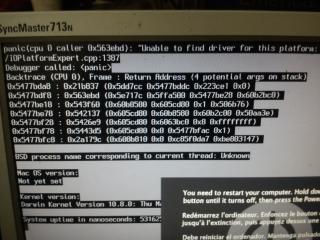
|
|
|
Dec 11 2012, 01:40 PM
Return to original view | Post
#8
|
|
Junior Member
115 posts Joined: Jan 2010
|
QUOTE(digswell @ Dec 11 2012, 01:35 PM) try boot with 32 bit and -v -f -x |
|
|
Dec 11 2012, 01:45 PM
Return to original view | Post
#9
|
|
Junior Member
115 posts Joined: Jan 2010
|
I use Gigabyte GA-B75M-D3V and i5 2500K for this machine..
Added on December 11, 2012, 1:51 pm QUOTE(digswell @ Dec 11 2012, 01:44 PM) Edit bootloader boot.plist Alamak bro, seriously i have no idea how to do that. Can u explain more how to do that?<key>Kernel Flags</key> <string> -v -f -x</string> <key>arch</key> <string>i386</string> This post has been edited by larilagilaju: Dec 11 2012, 01:51 PM |
|
|
Dec 11 2012, 05:22 PM
Return to original view | Post
#10
|
|
Junior Member
115 posts Joined: Jan 2010
|
i use iboot > insert SL > F5 > enter, then kernel panic.
|
|
|
Dec 11 2012, 05:43 PM
Return to original view | Post
#11
|
|
Junior Member
115 posts Joined: Jan 2010
|
I give up la bro
. move on to ML. in ML u boot from usb right? |
|
|
Dec 12 2012, 08:59 PM
Return to original view | Post
#12
|
|
Junior Member
115 posts Joined: Jan 2010
|
My components.
Motherboard : Gigabyte GA B75M-D3V Processsor : Intel Core i5 2500K GFX card : Gigabyte GT520 Wifi : TP link WDN4800 I install mountain lion using unibeast and everything just went smooth. After done, i install the multibeast and i reboot it with unibeast. After that it stuck at the spinning wheel apple logo. I take out the GFX card and i boot from the unibeast and i insert this -v -f GraphicsEnabler=No PCIRootUID=0 May i know how to put back my graphic card? what i need to do to make it work and this machine still don't have sound. and lastly, how to make it boot itself without unibeast? |
|
|
Dec 12 2012, 09:23 PM
Return to original view | Post
#13
|
|
Junior Member
115 posts Joined: Jan 2010
|
[quote=wiraone,Dec 12 2012, 09:15 PM]
What you need to do is to run the latest multibeast and under bootloader, choose Chimera. This will install the bootloader so you don't need to boot using unibeast. Already try that and nothing happen. Still need to boot from unibeast. Do i need a fresh install to do that? Added on December 12, 2012, 9:30 pm[quote=digswell,Dec 12 2012, 09:16 PM] take a photo shoot on last msg is stuck -v -f GraphicsEnabler=yes PCIRootUID=1 [/quote] i need to insert my graphic card or not? Added on December 12, 2012, 9:33 pmVery tiring job to do a hackintosh. I feel like to give up already. Is there anyone willing to do this for me? . I'll pay u la.  This post has been edited by larilagilaju: Dec 12 2012, 09:33 PM |
|
|
|
|
|
Dec 12 2012, 10:26 PM
Return to original view | Post
#14
|
|
Junior Member
115 posts Joined: Jan 2010
|
I insert the graphic card and your command.
Just black screen with white text and none of it are Kernel Extention in Backtrace? Added on December 12, 2012, 10:27 pmtiring bro. Sunday to Tuesday try SL. today try ML. It all ok. only can't boot itself, graphic card and sound. HAHAHAHAHAHA..Help me la..i pay u maaa. This post has been edited by larilagilaju: Dec 12 2012, 10:27 PM |
|
|
Dec 13 2012, 02:38 AM
Return to original view | Post
#15
|
|
Junior Member
115 posts Joined: Jan 2010
|
not so far, i stay at shah alam..
When can we finish this project?? |
|
|
Dec 14 2012, 01:43 PM
Return to original view | Post
#16
|
|
Junior Member
115 posts Joined: Jan 2010
|
credit to wiraone.
Many-many thanks to him to realize the dream  This post has been edited by larilagilaju: Dec 14 2012, 01:44 PM |
|
|
Dec 17 2012, 01:00 PM
Return to original view | Post
#17
|
|
Junior Member
115 posts Joined: Jan 2010
|
I've Google and YouTube before unfortunately couldn't understand it.
 Kinda newbies here. |
|
|
Mar 27 2014, 12:26 PM
Return to original view | Post
#18
|
|
Junior Member
115 posts Joined: Jan 2010
|
Hi, currently I'm using hackintosh Mountain Lion (Thanks to wiraone).
Is it any good to upgrade to OSX Mavericks? Current setup. Proc: i5 2500K Mobo: Gigabyte GA-B75M-D3V HD: WD Caviar Blue 1TB GPU: Nvidia GTX650 RAM: 2 x 4gb 1600MHz |
|
|
Oct 14 2014, 12:43 PM
Return to original view | Post
#19
|
|
Junior Member
115 posts Joined: Jan 2010
|
Hye. My Apple keyboard broken last week. So I'm thinking instead of buying another Apple Keyboard, I want to buy mechanical keyboard.
My question is, do mechanical keyboard work out of the box? |
|
|
Oct 14 2014, 01:00 PM
Return to original view | Post
#20
|
|
Junior Member
115 posts Joined: Jan 2010
|
QUOTE(wiraone @ Oct 14 2014, 12:46 PM) As long as it is using the normal USB and no special driver needed, it should. Thank you. |
| Change to: |  0.0579sec 0.0579sec
 0.22 0.22
 7 queries 7 queries
 GZIP Disabled GZIP Disabled
Time is now: 7th December 2025 - 05:50 PM |
 Quote
Quote