Outline ·
[ Standard ] ·
Linear+
Hardware Hackintosh Thread V2.0, The Official OSX86 Thread (Hardware)
|
TSwiraone
|
 Oct 5 2015, 06:54 PM Oct 5 2015, 06:54 PM
|

|
QUOTE(skitZo` @ Oct 4 2015, 09:32 AM) Nice install there. Fresh install is better since get to free up space. How you manage to get TRIM to work? Mine didnt work out of the box. Starting from Yosemite, Apple has provided a utility to enable TRIM on 3rd party SDD. Use terminal and run the following command: $ sudo trimforce enable |
|
|
|
|
|
TSwiraone
|
Oct 5 2015, 06:55 PM
|
|
|
QUOTE(skitZo` @ Oct 5 2015, 02:23 PM) Nice! Fresh install would be perfect. Clover configurator really helps ease things out. Any of you guys manage to get imessages and facetime working with the installs? I've just tried facetime, it doesn't work, the verification failed. |
|
|
|
|
|
TSwiraone
|
Oct 13 2015, 05:25 PM
|
|
|
QUOTE(zenix @ Oct 13 2015, 04:54 PM) hackintosh isn't for AMD's That is a graphics card lah, not processor  |
|
|
|
|
|
TSwiraone
|
Oct 15 2015, 12:10 PM
|
|
|
QUOTE(zenix @ Oct 15 2015, 09:06 AM) maybe my luck but ATI/AMD gc for hackintosh were always spotty for me Been using my XFX Radeon HD 5770 for many years for Hackintosh and have never had any problem. |
|
|
|
|
|
TSwiraone
|
Oct 20 2015, 09:26 PM
|
|
|
For some reason, I am getting a lot of lockups / freezes on el capitan today. I was getting few before and I thought it was the cloveralc that causes it. I have removed the alc extension from my clover directory, the audio doesn't get loaded up but the lockup problem is still there.
-
Latest update, reinstall again el capitan and will see how it goes.
|
|
|
|
|
|
TSwiraone
|
Oct 28 2015, 06:34 PM
|
|
|
Did an update to 10.11.1 today, everything went smoothly well. Just need to reinstall the alc892 extension and that all.
|
|
|
|
|
|
TSwiraone
|
Dec 23 2015, 08:41 AM
|
|
|
QUOTE(jichuen @ Dec 23 2015, 12:59 AM) bro able to install those but cant get sound to work For ALC892, I couldn't use multibeast to install the driver, I was using the installer from here: http://www.insanelymac.com/forum/topic/307...el-capitan-usb/Run the app, choose "Clover Post", choose the Audio->ALC892 and install. |
|
|
|
|
|
TSwiraone
|
Jan 29 2016, 11:14 PM
|
|
|
QUOTE(crazy142857 @ Jan 29 2016, 10:01 PM) Dear ---------- Wiraone, please advice if my PC system is compatible for hackintosh El Cap. Friend suggested to post here to help. Thank you. [attachmentid=5939507] I'm not that great, all the information in building the hackintosh are available online. I'm just helping out if you guys stuck on something Anyway, the specs look okay to me. Why not try it out first and if you're stuck, tell us where/what and we'll try to help out. I haven't try other way of installing hackintosh other than using tonymacx86's unibeast. Give it a go. |
|
|
|
|
|
TSwiraone
|
Jul 23 2016, 04:06 PM
|
|
|
Probably because it is so easy to build one now, there is no more thrills Anyway, my build I did 4 years ago still working great and has gone many OS upgrades and updates without much hassle. |
|
|
|
|
|
TSwiraone
|
Sep 21 2016, 11:24 AM
|
|
|
Anybody dare to update to macOS Sierra? |
|
|
|
|
|
TSwiraone
|
Sep 21 2016, 08:21 PM
|
|
|
Tried to upgrade to Sierra and failed big time and screwed up the boot-up for el-cap too. Luckily managed to downgraded the Clover to -1 release. Anyone using Clover Legacy, do not upgrade to the latest release or you'll get a red screen of death. 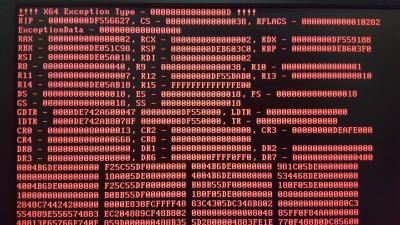
|
|
|
|
|
|
TSwiraone
|
Sep 23 2016, 09:38 PM
|
|
|
The last Clover version has bug, there was a new one released few days ago which fix this. I'm on my way installing macOS Sierra now, 28 minutes to complete. Wish me luck!
|
|
|
|
|
|
TSwiraone
|
Sep 26 2016, 10:32 PM
|
|
|
QUOTE(wanna be hi-tech @ Sep 26 2016, 09:43 PM) Ok.....i see tha u hv got over it...... So is it running ? Working just fine after they fixed the Clover. |
|
|
|
|
|
TSwiraone
|
Sep 29 2016, 12:46 PM
|
|
|
QUOTE(zenix @ Sep 29 2016, 12:42 PM) osx vs linux.....bincangkan Oit, not here!   |
|
|
|
|
|
TSwiraone
|
Jan 30 2017, 09:30 AM
|
|
|
QUOTE(yvliew @ Jan 29 2017, 01:43 AM) Guys.. I'm interested to try hackintosh.. can my system install it? CPU : Core i5 2500 MB : Gigabyte B75M-D2V RAM : Apacer 8gb 1600 ( running 1333 limited by Sandy Bridge ) GPU : Radeon HD 7770 HDD : Corsair SSD Force LS 120GB Wifi : USB dongle Aztech WL562USB Will it work? Is this new build or existing hardware? If new build, I'll suggest that you follow what Mavik has suggested, take a look at the URL link and try to match as much as possible to already tested hardware and you'll not have much trouble installing OSX. |
|
|
|
|
|
TSwiraone
|
Jan 30 2017, 11:00 AM
|
|
|
QUOTE(yvliew @ Jan 30 2017, 10:51 AM) This is existing system I have now. If that the case, your DLINK USB is not supported. You may be able to install into the existing system but I've no idea if the Radeon HD 7770 will be a straight forward installation. If installation failed with HD 7770, you may want to remove it first, use the on board graphics during installation and install the correct driver afterward. |
|
|
|
|
|
TSwiraone
|
Mar 30 2017, 11:31 AM
|
|
|
Gosh, stupid me, didn't read the forum before updated to the latest 10.12.4 and now my machine boot up to a blank screen. They've mentioned that I need to update to the latest clover (well, read it after I did my update) and now I don't remember how to recover by booting clover from USB. Grrr.. How do I update my Clover without booting into OSX? Anyone...! Update: Finally, managed to continue by following the instruction here: https://www.tonymacx86.com/threads/solved-u...-screen.217975/1. Boot up into single user mode 2. Mount EFI partition 3. Edit config.plist as per the above 4. Boot up normally This post has been edited by wiraone: Mar 30 2017, 01:40 PM |
|
|
|
|
|
TSwiraone
|
Apr 5 2017, 04:18 PM
|
|
|
QUOTE(gengstapo @ Apr 5 2017, 02:50 PM) Long time did not play Hacintosh How the installation for latest Mac OS upon generic machine now? Is it much easy now? Almost a no-brainer now with Clover & Tonymacx86 installer |
|
|
|
|
|
TSwiraone
|
Apr 5 2017, 06:21 PM
|
|
|
QUOTE(gengstapo @ Apr 5 2017, 04:40 PM) Ahha, thx bro U still active in here? Not really I've just updated the thread with my problem with the latest update. Solved it by updating the Clover. My build has been running strong for I believe 5 years now. |
|
|
|
|
|
TSwiraone
|
Jul 3 2017, 05:34 AM
|
|
|
QUOTE(simon82 @ Jul 3 2017, 12:09 AM) Hi, I'm trying to install hackintosh on with my i5 pc. I used the latest unibeast to install the sierra os. It went halfway through the apple logo then just hang. How do I capture the previous error logs and post here? It's too fast... During the boot up, I believe clover will come up with what partition you want to boot from, use arrow key to select (by default it should select the macosx install), then press a space bar and there is option to boot in verbose mode. If you're stuck in Apple logo, do check your BIOS configuration and your graphics card. You may want to use the internal gpu first for installation. |
|
|
|
|



 Quote
Quote
 0.0475sec
 0.54
0.54
 7 queries
 GZIP Disabled