Welcome Guest ( Log In | Register )

102 Pages « < 10 11 12 13 14 > » Bottom

Outline · [ Standard ] · Linear+

Hardware Hackintosh Thread V2.0, The Official OSX86 Thread (Hardware)

views
     
TSwiraone
post Sep 26 2011, 10:52 AM

Who cares about all the stars?
*******
Senior Member
3,892 posts

Joined: Jan 2003
From: Back on earth!
QUOTE(amenlo9 @ Sep 25 2011, 03:50 PM)
anyone know where can buy usb bluetooth doogle is compatible with apple wireless keyboard and mouse in lowyat plaza?
*
No idea, but read up this thread:

http://www.insanelymac.com/forum/index.php?showtopic=194808

Or .. if you're a bit techie .. go for the original Apple bluetooth module but need a bit of work..

http://www.insanelymac.com/forum/index.php...e=post&id=89531


Added on September 26, 2011, 10:57 amPrasys in the old thread said that any bluetooth dongle should work .. but since I don't use any bluetooth devices, I've no idea really..

This post has been edited by wiraone: Sep 26 2011, 10:57 AM
thx
post Sep 27 2011, 10:20 PM

Getting Started
**
Junior Member
152 posts

Joined: Jun 2005
i'm also looking to buy bluetooth usb doogle ...
i bought AVF model (recommended by my friend) .. both of us using same mobo for our hackintosh .. somehow his can work without no issue and mine cannot ...

cannot play with my new magic trackpad because of this sad.gif

any suggestion ... i'm using GIGABYTE GA-X58A-UD3R ... with Lion

tq
TSwiraone
post Sep 28 2011, 08:29 AM

Who cares about all the stars?
*******
Senior Member
3,892 posts

Joined: Jan 2003
From: Back on earth!
@thx, swap the AVF dongle with your friend and see if it works, if not, then you may need to do something with your setup.
annoymous1234
post Sep 28 2011, 07:31 PM

Look at all my stars!!
*******
Senior Member
7,616 posts

Joined: Mar 2009

guys!!! is this hardware compatible for hackintosh

AMD phenom II x4 955
ASUS MB-A-M4A77TD
palit GTX460 768MB
550W PSU
4GB RAM
WD desktop sata 500GB
TSwiraone
post Sep 28 2011, 08:57 PM

Who cares about all the stars?
*******
Senior Member
3,892 posts

Joined: Jan 2003
From: Back on earth!
@annoy, for AMD, you may need to find a specific kernel hack to get it running. You can't use the stock kernel.. someone here might have hackintosh running on AMD platform.. but, sorry, I couldn't help much.
annoymous1234
post Sep 28 2011, 09:27 PM

Look at all my stars!!
*******
Senior Member
7,616 posts

Joined: Mar 2009

QUOTE(wiraone @ Sep 28 2011, 08:57 PM)
@annoy, for AMD, you may need to find a specific kernel hack to get it running. You can't use the stock kernel.. someone here might have hackintosh running on AMD platform.. but, sorry, I couldn't help much.
*
awwww man sad.gif
digswell
post Sep 29 2011, 01:16 AM

Look at all my stars!!
*******
Senior Member
2,484 posts

Joined: Nov 2007
From: Nilai,N.S.D.K
@annoy
I do hv AMD rig running mac OSX 10.5.X and 10.6.X last time b4 i move to intel
is quit hard to install ...u need hack kernel for amd proc .MB sata chipset kext driver , lan and sound card depend on ur luck no sure can find it on net or not

Last time i using biostart TA770A2+ mobo ..leopard 10.5.X almost fully work only shut down and sleep no work
on SL 10.6.X only can run 32bit , shut down, sleep and sound no work

if u really wan to try ..beter go try some hack version leopard 10.5.X like iDeneb v1.4 or 1.5 and Leo4all v3 or v4

This post has been edited by digswell: Sep 29 2011, 01:18 AM
TSwiraone
post Oct 4 2011, 07:23 AM

Who cares about all the stars?
*******
Senior Member
3,892 posts

Joined: Jan 2003
From: Back on earth!
Anybody want to share their build here? Probably a guide on your own build and what needs to get things working on your build?
annoymous1234
post Oct 5 2011, 11:55 AM

Look at all my stars!!
*******
Senior Member
7,616 posts

Joined: Mar 2009

QUOTE(digswell @ Sep 29 2011, 01:16 AM)
@annoy
I do hv AMD rig running mac OSX 10.5.X and 10.6.X last time b4 i move to intel
is quit hard to install ...u need hack kernel for amd proc .MB sata chipset kext driver , lan and sound card depend on ur luck no sure  can find it on net or not

Last time i using biostart TA770A2+ mobo ..leopard 10.5.X almost fully work only shut down and sleep no work
on SL 10.6.X only can run 32bit , shut down, sleep and sound no work

if u really wan to try ..beter go try some hack version leopard 10.5.X like iDeneb v1.4 or 1.5 and Leo4all v3 or v4
*
this is so rclxub.gif technical
cloudstrife07
post Oct 5 2011, 12:08 PM

I'm back, beaches!
*******
Senior Member
4,688 posts

Joined: Jan 2003
From: http://127.0.0.1


guys, can my PC spec run hackintosh?

Intel Core i3 2100 processor
Gigabyte H61M-D2-B3 motherboard
4GB RAM
1TB SATA hard disk on AHCI mode
Sapphire AMD Radeon 5770 graphics

DarkNite
post Oct 5 2011, 12:54 PM

ФĻĐ ИΞШB!Ξ
********
All Stars
11,058 posts

Joined: Jun 2008
QUOTE(cloudstrife07 @ Oct 5 2011, 12:08 PM)
guys, can my PC spec run hackintosh?

Intel Core i3 2100 processor
Gigabyte H61M-D2-B3 motherboard
4GB RAM
1TB SATA hard disk on AHCI mode
Sapphire AMD Radeon 5770 graphics
*
Have seen somebody claim it can be done.
http://www.tonymacx86.com/viewtopic.php?f=168&t=33555
register if you can access the above site.
amenlo9
post Oct 5 2011, 02:28 PM

Look at all my stars!!
*******
Senior Member
2,627 posts

Joined: Jan 2003
From: Sepang,Cheras,Jupiter


guys,besides usb bluetooth dongle, anybody using any usb wifi dongle as well? want to know which brand can be support in Lion or SL
TSwiraone
post Oct 5 2011, 03:22 PM

Who cares about all the stars?
*******
Senior Member
3,892 posts

Joined: Jan 2003
From: Back on earth!
QUOTE(cloudstrife07 @ Oct 5 2011, 12:08 PM)
guys, can my PC spec run hackintosh?

Intel Core i3 2100 processor
Gigabyte H61M-D2-B3 motherboard
4GB RAM
1TB SATA hard disk on AHCI mode
Sapphire AMD Radeon 5770 graphics
*
Looks good for Hackintosh ..


Added on October 5, 2011, 3:24 pm
QUOTE(amenlo9 @ Oct 5 2011, 02:28 PM)
guys,besides usb bluetooth dongle, anybody using any usb wifi dongle as well? want to know which brand can be support in Lion or SL
*
I'm using D-Link DWA140.

This post has been edited by wiraone: Oct 5 2011, 03:24 PM
izzi_guy
post Oct 5 2011, 05:46 PM

Casual
***
Junior Member
444 posts

Joined: Jul 2007
From: ampang


i think any usb dongle will do/work for us..im using microsoft wireless keyboard and mouse..packaged in set with the usb dongle. it works.
maybe you guys can try it out..


my biggest concern now is to use mic.wanna use skype..ultimately all mic available in the store is way too expensive..

whats the best suggestion for it?
TSwiraone
post Oct 5 2011, 06:05 PM

Who cares about all the stars?
*******
Senior Member
3,892 posts

Joined: Jan 2003
From: Back on earth!
QUOTE(izzi_guy @ Oct 5 2011, 05:46 PM)
i think any usb dongle will do/work for us..im using microsoft wireless keyboard and mouse..packaged in set with the usb dongle. it works.
maybe you guys can try it out..
my biggest concern now is to use mic.wanna use skype..ultimately all mic available in the store is way too expensive..

whats the best suggestion for it?
*
Eh.. still using hackintosh? smile.gif I bought a chepo HP headset from HarveyNorman and it works great.
izzi_guy
post Oct 5 2011, 06:23 PM

Casual
***
Junior Member
444 posts

Joined: Jul 2007
From: ampang


hehe..how much you bought t?harvey norman where?got somewhere nearby in KL?
TSwiraone
post Oct 5 2011, 06:36 PM

Who cares about all the stars?
*******
Senior Member
3,892 posts

Joined: Jan 2003
From: Back on earth!
QUOTE(izzi_guy @ Oct 5 2011, 06:23 PM)
hehe..how much you bought t?harvey norman where?got somewhere nearby in KL?
*
You can find it in any HarveyNorman stores, MidValley, Sunway Pyramid, TheCurve ..

http://h10010.www1.hp.com/wwpc/my/en/ho/WF...03-4276317.html

Don't remember exactly the price, but it way cheaper than the one listed in the HP website.
cloudstrife07
post Oct 6 2011, 02:14 PM

I'm back, beaches!
*******
Senior Member
4,688 posts

Joined: Jan 2003
From: http://127.0.0.1


QUOTE(DarkNite @ Oct 5 2011, 12:54 PM)
Have seen somebody claim it can be done.
http://www.tonymacx86.com/viewtopic.php?f=168&t=33555
register if you can access the above site.
*
QUOTE(wiraone @ Oct 5 2011, 03:22 PM)
Looks good for Hackintosh ..


Added on October 5, 2011, 3:24 pm

I'm using D-Link DWA140.
*
thanks guys.

btw there's no need to change the mouse and keyboard right?
TSwiraone
post Oct 6 2011, 02:27 PM

Who cares about all the stars?
*******
Senior Member
3,892 posts

Joined: Jan 2003
From: Back on earth!
QUOTE(cloudstrife07 @ Oct 6 2011, 02:14 PM)
thanks guys.

btw there's no need to change the mouse and keyboard right?
*
Nope, I'm still using my Logitech K200 keyboard/mouse.
skitZo`
post Oct 7 2011, 04:54 PM

Enthusiast
*****
Senior Member
748 posts

Joined: Jan 2003
From: Subang Jaya


Simple guide to software RAID in hackintosh Lion:-

Things that you`ll need

1) A working hackintosh with the necessary kexts (FakeSMC , etc…) , a working DSDT for your motherboard, latest Chameleon (at least 1200) org.chameleon.Boot.plist and 2 new drives to set up the RAID drive. (SSD's would be perfect)

2) Fire up disk utility, create your raid disk by selecting RAID and add the disk you want to add to your RAID array. Create Raid Disk, name it what ever you want it, i named mine LionRaid

Attached Image

3) Select your volume "LionRaid" and click Information , copy your RAID Identifier "xxxxxxxx-xxxx-xxxx-xxxx-xxxxxxxxxxxx" add this string in your org.chameleon.Boot.plist

Attached Image

<key>RootUUID</key>
<string>xxxxxxxx-xxxx-xxxx-xxxx-xxxxxxxxxxxx</string>

4) Also add the UseKernelCache flag to your org.Chameleon.Boot.plist

<key>UseKernelCache</key>
     <string>Yes</string>

Your org.chameleon.Boot.plist should look something like this
CODE
∑<?xml version="1.0" encoding="UTF-8"?>
<!DOCTYPE plist PUBLIC "-//Apple//DTD PLIST 1.0//EN" "http://www.apple.com/DTDs/PropertyList-1.0.dtd">
<plist version="1.0">
<dict>
<key>Boot Banner</key>
<string>No</string>
<key>GenerateCStates</key>
<string>Yes</string>
<key>GeneratePStates</key>
<string>Yes</string>
<key>Kernel Flags</key>
<string>npci=0x2000</string>
<key>Kernel</key>
<string>mach_kernel</string>
<key>Graphics Mode</key>
<string>1680x1050x32</string>
<key>GraphicsEnabler</key>
<string>Yes</string>
<key>EthernetBuiltIn</key>
<string>Yes</string>
<key>USBBusFix</key>
<string>Yes</string>
<key>UseKernelCache</key>
<string>Yes</string>
<key>RootUUID</key>
<string>xxxxxxxx-xxxx-xxxx-xxxx-xxxxxxxxxxxx</string>
<key>Theme</key>
<string>bootcamp</string>
<key>Timeout</key>
<string>1</string></dict>
</plist>


5) Clone your working install to the new Raid Volume via Carbon Copy Cloner.

6) Copy all Kext from Extra/Extensions to the System/Library/Extensions folder on your RAID disk

Bootloader

1) Now we need to install the boot loader (Chameleon) on each of the RAID slice disk boot partition named "Boot OS X"
*"Boot OS X" is the 3rd partition on each of the RAID slice disk, this is where were going to put our Extra folder in it.

2) Copy Chameleon i386 folder(refer attached for Chameleon) and Extra folder (contains DSDT.aml, org.Chameleon.Boot.plist, smbios.plist, Themes) to desktop

3) Fire up terminal and Type: diskutil list

4) Locate your raid slice disk , Look for "Boot OS X" and its IDENTIFIER diskXs3 , where X is the disk number for first drive. 2nd drive should be diskYs3 (where X and Y is the disk number in your build)

5) Navigate to cd ~/Desktop/i386

6) Install boot0 to MBR of both disk:

CODE
sudo fdisk -f boot0 -u -y /dev/rdiskX
sudo fdisk -f boot0 -u -y /dev/rdiskY


7) Install boot1h to the boot sector of each "Boot OS X" partition

CODE
sudo dd if=boot1h of=/dev/rdiskXs3
sudo dd if=boot1h of=/dev/rdiskYs3


13) Copy boot and Extra Folder to both "Boot OS X" partition

1st Partition

CODE
sudo diskutil mount diskXs3
sudo cp boot /Volumes/Boot\ OS\ X/
sudo cp -R ~/Desktop/Extra /Volumes/Boot\ OS\ X/
sudo diskutil unmount diskXs3


2nd Partition

CODE
sudo diskutil mount diskYs3
sudo cp boot /Volumes/Boot\ OS\ X/
sudo cp -R ~/Desktop/Extra /Volumes/Boot\ OS\ X/
sudo diskutil unmount diskYs3


Once the boot loader is installed on both of the RAID slice disk, run KextWizard tick
a) System/Library/Extensions
b) Repair Permissions
c) Rebuild cache
Target disk : choose your new Raid Disk
Click "Execute"

Once finish shutdown and remove your current boot drive or change the boot order to boot your RAID drive. At chameleon boot screen choose
the raid disk and boot into Lion.

Eveytime you add kext to /S/L/E remember to repair permissions.

Enjoy.

Thank you to vboyz and nathan7 from insanelymac forums link here and here, also to Janek for the KextWizard.

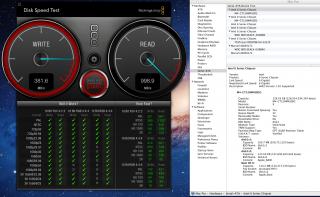
Some Benchies
read and write results with Crucial M4 RAID 0
Boot times improve tremendously.
Specs for my build
i72600k , Gigabyte Z68XP-UD3P, 8GB RAM, GTX 260+
Attached Image

This post has been edited by skitZo`: Oct 7 2011, 04:55 PM


Attached File(s)
Attached File  i386_Chameleon_2.1svn_1565.zip ( 263.59k ) Number of downloads: 16

102 Pages « < 10 11 12 13 14 > » Top
 

Change to:
| Lo-Fi Version
0.2337sec    0.40    6 queries    GZIP Disabled
Time is now: 8th December 2025 - 07:03 AM