Welcome Guest ( Log In | Register )

3 Pages  1 2 3 >Bottom

Outline · [ Standard ] · Linear+

 HTC Desire S Official Thread V2, Quietly Brilliant

views
     
TSnodeffect
post Jul 10 2011, 03:42 PM, updated 13y ago

Your past does not equal your future.
******
Senior Member
1,281 posts

Joined: Jan 2003
From: Private


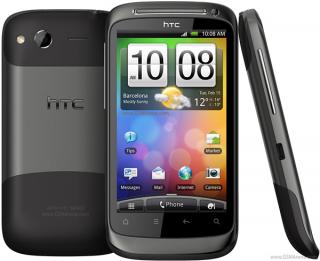
HTC Desire S Official Thread Version 2

Attached Image

Reviews:
1. GSMArena: http://www.gsmarena.com/htc_desire_s-review-590.php
2. Engadget: http://www.engadget.com/2011/04/10/htc-desire-s-review/
3. Slashgear: http://www.slashgear.com/htc-desire-s-review-28142921/
4. Techradar: http://www.techradar.com/reviews/phones/mo...s-930920/review
5. Phonearena: http://www.phonearena.com/reviews/HTC-Desire-S-Review_id2702


Pictures:
» Click to show Spoiler - click again to hide... «


Specifications:
» Click to show Spoiler - click again to hide... «


HTC Desire S Guide for Newcomers to Android:
This guide will guide you throughout your Desire S phone. What's the best app to use it on your phone, some tweaks and more!
http://forum.xda-developers.com/showthread.php?t=1097538


How To: Check if your phone is S-OFF or S-ON and your HBOOT version
1. Disable Fast Boot. (Setting > Power > uncheck Fast Boot)
2. Turn off your phone.
3. Turn on your phone by pressing the power button and volume down button together.
4. You will see a white screen with "S-OFF" or "S-ON" and your hboot version on top of the screen.
NOTE: If your phone is S-ON, you won't be able to root or flash custom ROMs to your phone. To make it S-OFF, follow the guide below.


How To: S-Off your device with Revolutionary: S-OFF & Recovery Tool
Unrevoked and Alpharev present: Revolutionary Tool
Please also read the documentation page for this tool: http://unrevoked.com/rootwiki/doku.php/public/revolutionary
Does Revolutionary give me root?No. You will need to flash this zipfile from recovery.
NOTE: For HBOOT 0.98.0002, please use this guide: http://forum.xda-developers.com/showthread.php?t=1194488. Thanks to slvrbllt
S-OFF your phone using Ubuntu:
1. Download Ubuntu 11.04 from the Ubuntu site.
2. Burn image onto DVD/CD or create a USB Stick (I suggest creating USB stick since it loads faster, for me). (Follow instructions provided at the website to create a bootable CD or a USB Stick).
3. Reboot computer. Allow Bootup popup menu (usually F8?).
4. Select DVD/CD-drive or USB Stick to boot Ubuntu.
5. Wait a bit for things to load. Choose "Try Ubuntu".
6. Now, Ubuntu should load up successfully. (see screenshot)
7. Connect phone to your computer and make sure that Debugging Mode is enabled on your phone. Download the tool from http://revolutionary.io/ for Linux (Firefox included with Ubuntu). Keep that browser window open.
8. Extract the downloaded file and put it into the root directory (in Ubuntu, that's Ubuntu/Ubuntu, if I recall correctly).
9. Search for the Terminal (Windows key pops up the search, I think; otherwise, it's the icon on the top left corner of your screen), run Terminal.
10. Type in "sudo ./revolutionary" at Terminal.
11. It'll provide a key. Go back to the browser window where you downloaded Revolutionary tool - there's a form to fill out. Type in the key. It'll generate a second key. Type that key into the Terminal.
12. Make sure it says that everything is successful. It'll ask if you want to flash Clockwork. Type in "Y".
13. Once it shows success, reboot phone.

S-OFF your phone using Windows:

1. Download Revolutionary tool for Windows from http://revolutionary.io/ (Keep the browser open)
2. Extract the zip file to a new folder.
3. Connect phone to your computer and make sure that Debugging Mode is enabled on your phone.
4. Open the new folder and right click on "revolutionary.exe" and select run as administrator.
5. Follow steps from Step 11 above.
WARNING: S-OFF your device will void your phone's warranty. You will need to turn it back to S-ON for warranty. (I don't have a guide to make it back to S-ON right now, so do it as you wish).
S-OFF Video Below:


How to: Root your device
1. You can achieve root by using Gingerbreak. Follow this link and guide below:
http://forum.xda-developers.com/showthread.php?t=1044765
2. Or, you can flash this zipfile from recovery (Source: http://unrevoked.com/rootwiki/doku.php/public/revolutionary).
(You can skip this if you're about to flash a custom ROM since custom ROM are pre-rooted. Unless you want to keep your original ROM, use this to root your device.)


Custom ROMS:
Virtuous Unity Sense 3.0 based on Pyramid
SAGA LBC MOD (Sense 2.1+3.0/OC/UV/FAST/STABLE
CoreDroid Desire S GB 2.3.3 |SENSE|STABLE & FAST|MDJ Kernel|ONLINE
CyanogenMOD 7.1 from Inc-S
MIUI ROM
BeatMod FlyerSense
(Most of these ROMs are pre-rooted which means you don't need to root your phone. It's already rooted once you flash these ROMs.)


How To: Flash Custom ROMs using Recovery (Method 1)
(You can use your default recovery from Alpharevx but I recommend using 4EXTRecovery)
1. Copy your custom ROM "zip" file to your SD card (Root directory).
2. Turn off your phone.
3. Turn on your phone by holding the power button and the volume down button together.
4. Once you see the white screen, choose "Recovery"
5. Make a full wipe/format and clear all cache.
6. Choose "install from sdcard/zip file" and then choose your Custom ROM zip file from your SD card to flash your Custom ROM.


How To: Flash Custom ROMs using ROM Manager (Method 2)
(This method might be easier for flashing ROM updates or add-ons)
1. Go to ROM Manager (You can install this software from the Android Market.)
2. If you want to use 4EXTRecovery, please follow steps below, and if you're not using 4EXTRecovery, please skip to step 6)
3. Press your phone's option's button and choose Manual Flash Override.
4. Press OK and choose your phone model.
5. Choose ClockworkMod 3.x (After these steps, your ROM Manager won't ask you to flash new recovery again when flashing new a ROM)
6. Reboot into Recovery and make a full wipe/format and clear all cache then reboot.
7. Now, from your ROM Manager, choose Install ROM from SD Card.
Note: Flashing ROMs can be vary, some custom ROMs may require you to flash some of their own file first. Eg, The LBC Mod ROM requires you to flash "WIPE zip file" before flashing the ROM. Read their instructions to know better.

NOTE: I am not responsible for any faulty or bricked devices after S-OFF or flashing new ROMs. Do it at your own risk.

Video Flashing Custom ROM below:


How to: Flash Radios
1. Download your Radio zip package.
2. Copy your Radio zip package to your SDcard root directory and rename it to PG88IMG.zip.
3. Turn off your phone and turn it back on by pressing volume down and power button together (You need to turn off fastboot under phone settings > power options).
4. Once you're in hboot, the bootloader will ask you if you want to install radio.img.
5. Press confirm and reboot your device.
Note: You must delete your Radio zip package or rename it to something else when booting your phone after flashing new radio image since the bootloader will always try to flash if a PG88IMG.zip file is on your SDcard.


Where to buy?
From Maxis: http://www.maxis.com.my/personal/android/A..._WhereToBuy.asp
Market Price for AP set should be around RM1300 or less and RM1600+ for original if you don't want to get it from Maxis. (Correct me if I'm wrong.) Based on current price date at 10, July 2011.


FAQs:
1. What's S-OFF and S-ON?
- If your phone is S-ON, you won't be able to root or flash custom ROMs to your phone. S-OFF let's you to have full control of your phone.
(NOTE: S-OFF is not ROOT, S-OFF your device does not mean that your device is Rooted. They are totally two different things.)

2. How can I backup all my apps and apps' data files before flashing a new ROM and wiping all my datas?
- You will need to root your device first using Gingerbreak(see above). And then, install Titanium Backup and use that to backup all your apps and your apps' data files.

3. I have WiFi death grip/Wifi signal drops when I hold my phone in certain ways.
- There are no 100% right fixes yet for this issue but give it a look here: http://forum.xda-developers.com/showthread.php?t=1175646

4. Is it possible to install 4EXTRecovery/Flashing ROMs/ROOT on Desire S with S-ON?
- No, it is not possible. You must/need "S-OFF" to customize your device.

5. I've just received this system update OTA - 1.47.61.1 or later. If I install it, will I loose my S-OFF and root?
- Yes, you will lose both S-OFF and root once you update because it will update the hboot to 0.98.0002. However, you can try following this guide http://forum.xda-developers.com/showpost.p...608&postcount=5 to update the OTA but not the hboot. Check this one out also http://forum.xda-developers.com/showthread.php?t=1190992 and http://forum.xda-developers.com/showthread.php?t=1194488 to S-OFF and root if you have updated the OTA.


Final Notes:

Can't find the right guide? Request it here. Any Problems or Questions? Ask around this thread. But please read the FAQ first before asking, it usually helps.
I also want to say thanks to those people who contributed to this thread. Enjoy your phone! wink.gif Guide ported from XDA, it may contain errors on this thread, check out my official thread on XDA for more.

WARNING: Please follow those steps carefully, it usually works if you do it properly. However, I am not responsible for any faulty or bricked devices. Do it at your own risk.

This post has been edited by nodeffect: Sep 27 2011, 03:32 PM
TSnodeffect
post Jul 10 2011, 08:37 PM

Your past does not equal your future.
******
Senior Member
1,281 posts

Joined: Jan 2003
From: Private


QUOTE(Minds2 @ Jul 10 2011, 08:34 PM)
Thanks smile.gif that worked for me. But S-OFF is not a must is it? (Just making sure..) Its unless i want to Rom right?
*
unless u need a custom ROM or you want your phone to be rooted.
TSnodeffect
post Jul 11 2011, 09:45 AM

Your past does not equal your future.
******
Senior Member
1,281 posts

Joined: Jan 2003
From: Private


S-ON means that it is locked by HTC and you can't root your phone or install custom ROM into your phone, basically you're stuck with their stock ROM and not able to root it at all.

You can only make video calls through using apps...
TSnodeffect
post Jul 11 2011, 11:39 AM

Your past does not equal your future.
******
Senior Member
1,281 posts

Joined: Jan 2003
From: Private


DIGI service is moderate, you can notice that 3G is disable on most places even at MidValley, it's not using 3G for data. But for some places it is working well. Depends on your preferences.

Regarding the battery, it can last me for 2 days for normal usage. When I first bought it, I full charged it and use it all until the phone shut down itself and then fully charged it again. Repeated it for 2-3 days.

The mobile data does not turn back on on me after restarts. I don't know whats the problem but you can try flashing a custom ROM.

Hope this helps.

QUOTE(gaarared @ Jul 11 2011, 09:49 AM)
Thanks for the answer
*
You can try "Tango" or "skype" which is available for both iPhone and android, download from the Market.

This post has been edited by nodeffect: Jul 11 2011, 01:04 PM
TSnodeffect
post Jul 11 2011, 03:20 PM

Your past does not equal your future.
******
Senior Member
1,281 posts

Joined: Jan 2003
From: Private


QUOTE(Atsutane-Shirane @ Jul 11 2011, 03:12 PM)
This current S-Off method can S-On back..? If i not mistaken it is not and TS should put some kind of warning...

Correct me if i'm wrong...
*
Thanks for your advices... added warning message.
TSnodeffect
post Jul 11 2011, 04:06 PM

Your past does not equal your future.
******
Senior Member
1,281 posts

Joined: Jan 2003
From: Private


QUOTE(jenwww @ Jul 11 2011, 04:00 PM)
if i failed during the rooting progress will it brick?? and if it bricked can i redo the progress to un brick the phone?? .

if the rooting same like flashing cfw into nokia phone then i dont have to worry  biggrin.gif cause i can keep flash until it work
*
as far as I know, rooting won't brick your device, if rooting fails you can always try to root your phone again.
TSnodeffect
post Jul 11 2011, 08:12 PM

Your past does not equal your future.
******
Senior Member
1,281 posts

Joined: Jan 2003
From: Private


QUOTE(Joseph Hahn @ Jul 11 2011, 07:30 PM)
Well that was easy LOL. Now to root!


Added on July 11, 2011, 7:41 pmAnd done rooting with Gingerbreak!  icon_rolleyes.gif


Added on July 11, 2011, 8:04 pmSorry if i'm too excited but can't help it since it's just too easy even if i was a virgin to Android rooting! biggrin.gif
user posted image
*
Congratz!!! Have you flashed a custom ROM yet ? or you just s-off your phone and root it ?
TSnodeffect
post Jul 12 2011, 09:35 AM

Your past does not equal your future.
******
Senior Member
1,281 posts

Joined: Jan 2003
From: Private


Custom ROM tweaks the original ROM and add in more functions like, making the wifi better, able to overclock the CPU(you can do this by rooting also), and much more... read their features on their forum, you can find the links at first page. I recommend using Virtuous Unity 1.27.0 Sense 3.0 based on Pyramid... which is a quite stable ROM... read their forum to know more...

jenwww, this ROM can go to 1.7 GHZ but not very stable..... you can read more on their official forum.

This post has been edited by nodeffect: Jul 12 2011, 09:36 AM
TSnodeffect
post Jul 13 2011, 09:21 PM

Your past does not equal your future.
******
Senior Member
1,281 posts

Joined: Jan 2003
From: Private


QUOTE(crane @ Jul 13 2011, 02:32 AM)
I've got some questions.
Basically I've flashed the virtuous unity rom on my DS.
But I also like the lock screen animation on the LBC rom. How can I put that on my DS?

Another thing, there's this widget I really like from the stock - notepad by HTC
Can't seem to download that here. Anyway I can install this too?

Lastly, how do I get this on the virtuous unity rom?

http://forum.xda-developers.com/showthread.php?t=1088877
*
Hmm, Im not sure man, for that you will need to ask the creator.... btw, I thought the lock screen animation is the same for both ROMs ?
TSnodeffect
post Jul 14 2011, 12:42 PM

Your past does not equal your future.
******
Senior Member
1,281 posts

Joined: Jan 2003
From: Private


QUOTE(yobbapak @ Jul 13 2011, 11:09 PM)
i'm sorry,i cant see anything either S-off or S-on after i turned off and turned back on my phone.anyone? icon_question.gif
*
Remember to "Disable fast boot first".... then when u turn back on, press the power and the volume down button together.... until there's a white screen. wink.gif
TSnodeffect
post Jul 16 2011, 09:40 AM

Your past does not equal your future.
******
Senior Member
1,281 posts

Joined: Jan 2003
From: Private


QUOTE(Joseph Hahn @ Jul 15 2011, 09:44 AM)
In the end i'm using Saga LBC Mod. I guess i still prefer 2.1 home screen. Some tweaks already built in like the CRT effects and circular battery indicator with percentage.
*
hey man, are you using LBC v0.5.3? In terms of performance, which u prefer? Virtous or LBC? and how's the wifi fix man, does the wifi getting better on LBC? Give us some reviews on both ROMs man, thanks wink.gif
TSnodeffect
post Jul 16 2011, 01:00 PM

Your past does not equal your future.
******
Senior Member
1,281 posts

Joined: Jan 2003
From: Private


nice screenshots man, looks cool...and thanks for your info, I might try the LBC then..
TSnodeffect
post Jul 19 2011, 09:58 PM

Your past does not equal your future.
******
Senior Member
1,281 posts

Joined: Jan 2003
From: Private


QUOTE(Joseph Hahn @ Jul 16 2011, 09:33 PM)
System Panel. I really like it. The interface is nice to view system info. Not free though. tongue.gif
*
hey man, what version of LBC are you using? I tried downloading the latest version but the connection is really god damn slow....
TSnodeffect
post Jul 26 2011, 11:01 AM

Your past does not equal your future.
******
Senior Member
1,281 posts

Joined: Jan 2003
From: Private


The LBC custom ROM is awesome!, you guys should try that.. loving the sense 3.0 lockscreen...

p.s Updated new ROM, more info will be added soon... more on first page.

This post has been edited by nodeffect: Jul 26 2011, 11:07 AM
TSnodeffect
post Jul 26 2011, 11:58 AM

Your past does not equal your future.
******
Senior Member
1,281 posts

Joined: Jan 2003
From: Private


QUOTE(moko82 @ Jul 26 2011, 11:43 AM)
how to update to sense 3.0???
*
you will need to flash custom ROM... if you want fully sense 3.0 u can try virtous utility... if u want half 3.0 and half 2.1, try LBC mod... I personally recommend LBC mod.. cuz it's stable and fast.
TSnodeffect
post Jul 26 2011, 03:32 PM

Your past does not equal your future.
******
Senior Member
1,281 posts

Joined: Jan 2003
From: Private


QUOTE(kept @ Jul 26 2011, 01:58 PM)
hi. if factory reset my ds, will my updated hboot version 0.98.0002 change back to its original hboot version 0.98.0000?
*
nope, it won't.. factory reset just removes all your files and programs.

p.s. Updated new guide for flashing ROMs and new custom ROMs added to first page.


TSnodeffect
post Jul 28 2011, 11:45 AM

Your past does not equal your future.
******
Senior Member
1,281 posts

Joined: Jan 2003
From: Private


QUOTE(jenwww @ Jul 27 2011, 05:56 PM)
@nodeffect can you help me ask 1 question on xda devolopers??  biggrin.gif i dont have permission to ask at that thread .

http://forum.xda-developers.com/showthread.php?t=1187231

i saw you wrote something there . i so wanna know .

ok my question is .
hope you can help me  tongue.gif i really wan chinese language and test out asian software can fix my gps problem
*
hey jen wink.gif

Actually, u can create new post on the general section. You only can't create new post on the development section. wink.gif
TSnodeffect
post Jul 30 2011, 10:21 AM

Your past does not equal your future.
******
Senior Member
1,281 posts

Joined: Jan 2003
From: Private


thanks man, it is more active over there... I guess there are very less users in Malaysia?
TSnodeffect
post Aug 1 2011, 11:26 AM

Your past does not equal your future.
******
Senior Member
1,281 posts

Joined: Jan 2003
From: Private


QUOTE(abuhanif81 @ Jul 30 2011, 10:56 AM)
Sori.. I'm still not clear regarding video call from Desire S? Can I make video call to.. let say Nokia E71... from Desire S or vice versa?
*
nope, u can only use applications to make video calls... like if ure using tango... the other party needs to use tango also..
TSnodeffect
post Aug 9 2011, 11:01 AM

Your past does not equal your future.
******
Senior Member
1,281 posts

Joined: Jan 2003
From: Private


QUOTE(chotsa87 @ Aug 9 2011, 10:17 AM)
Hi All, wanted to ask sumthing about this phone. is it true the HTC DS data keep on running even if we disable the mobile network setting? Last week my data usage  went out to almost rm2k!im using celcom exec 50(no data plan). i've install the 3G watchdog apps on my DS...the 3g usage very little..but celcom bill charge me like crazy! when i ask the lady @ celcom centre she told me " the data for this HTC model memang keep on running even if you disable everything " . is it true? if yes.  is there any solution for this?  im new in this smartphone thingy. pls help me.  sad.gif ...

note: most of the apps i install using wifi network and tru apk. file on pc download.

when i ask other ppl:
some say the free apps is not giving the right count. apps tipu.
some say apps eat data alot when running it.(without internet access.can meh?)
some say some apps use alot of data when download and install tru market.(mobile network or free wifi also charge)auto charge data.huh?
some say celcom suka hati charge me in the bill..then they will waive everythig..give me the fix an reasoable price for it.
some say tukar hp lain laa...
*
Only this is correct : "some say celcom suka hati charge me in the bill..then they will waive everythig..give me the fix an reasoable price for it. "

no extra data charges on DS. Watchdog is promising. I don't really know how you use it, this is weird

3 Pages  1 2 3 >Top
 

Change to:
| Lo-Fi Version
0.0370sec    0.43    7 queries    GZIP Disabled
Time is now: 10th December 2025 - 06:44 AM