

how to remove home screen accidentally added widget?
Samsung Galaxy S i9000 Official Thread V19, Super AMOLED Screen with Gorilla Glass!
Samsung Galaxy S i9000 Official Thread V19, Super AMOLED Screen with Gorilla Glass!
|
|
 Aug 6 2011, 07:01 PM Aug 6 2011, 07:01 PM
Return to original view | Post
#1
|
 
Junior Member
107 posts Joined: Nov 2008 From: UKM Bangi  
|
how to remove home screen accidentally added widget?
|
|
|
|
|
|
Aug 6 2011, 07:44 PM
Return to original view | Post
#2
|
|
Junior Member
107 posts Joined: Nov 2008 From: UKM Bangi
|
QUOTE(fuadsyazwan @ Aug 6 2011, 07:06 PM) long press on that widget till got dustbin icon, drag the widget to it. hahaa..TQ!! noob..jz got da phone today..   Added on August 6, 2011, 7:49 pmn..can we organize all da games in a folder? This post has been edited by profdrahhen: Aug 6 2011, 07:49 PM |
|
|
Aug 8 2011, 11:09 PM
Return to original view | Post
#3
|
|
Junior Member
107 posts Joined: Nov 2008 From: UKM Bangi
|
ok..now 3rd day of owning this beast..
firmware 2.3.3 baseband i9000dxjv9 kernel 2.6.35.7-i9000dxjv9-cl216763root@se-s604#2 *rooted just yesterday...now want to tweak it, but cant understand...any help?? |
|
|
Aug 8 2011, 11:45 PM
Return to original view | Post
#4
|
|
Junior Member
107 posts Joined: Nov 2008 From: UKM Bangi
|
QUOTE(ic3joker @ Aug 8 2011, 11:26 PM) flash a kernel? what you wanna tweak? emmm...i mean flash rom.. how to choose correct n stable version? |
|
|
Aug 9 2011, 12:37 AM
Return to original view | Post
#5
|
|
Junior Member
107 posts Joined: Nov 2008 From: UKM Bangi
|
QUOTE(ic3joker @ Aug 8 2011, 11:48 PM) custom rom? stock rom is much more stable than custom rom. try to find any rom you like here and flash. can i just install any rom w/o care abt firmware version, like now 2.3.3 but choose 2.3.4 rom? |
|
|
Aug 9 2011, 04:51 PM
Return to original view | Post
#6
|
|
Junior Member
107 posts Joined: Nov 2008 From: UKM Bangi
|
QUOTE(ic3joker @ Aug 9 2011, 03:39 AM) yes as long as you have GingerBread bootloader or you are on Gingerbread rom. ok..i chose ur setting~[Android Version] : 2.3.5 [ROM]: CyanogenMod 7 #81[Kernel]: NEO 09-redux_V5 [Baseband] : XXJVQ [Theme]: Mixer 7 can i jz flash using Odin after downloaded all three files needed?? |
|
|
|
|
|
Aug 9 2011, 05:12 PM
Return to original view | Post
#7
|
|
Junior Member
107 posts Joined: Nov 2008 From: UKM Bangi
|
[Android Version] : 2.3.5 [ROM]: CyanogenMod 7 #81[Kernel]: NEO 09-redux_V5 [Baseband] : XXJVQ [Theme]: Mixer 7
can i jz flash using Odin after downloaded all three files needed?? Current, PDA: i9000DXJV9 Phone: i9000DXVV9 CSC: i9000LBJV9 |
|
|
Aug 9 2011, 05:38 PM
Return to original view | Post
#8
|
|
Junior Member
107 posts Joined: Nov 2008 From: UKM Bangi
|
QUOTE(ic3joker @ Aug 9 2011, 05:19 PM) 1. Flash with re-partition using 513.pit. what files do i need for the re-partition using 513.pit? *jz finish downloaded pit 513.pit and cm_galaxysmtd_full-812. You will see a lot of red text after the flash is done, don't panic, just do a 'wipe data/factory reset' and reboot the device when done. 3. Let the device boot all the way then turn it off. 4. Re-enter Download Mode and re-flash only the CSC file without pit and without re-partition. |
|
|
Aug 9 2011, 06:28 PM
Return to original view | Post
#9
|
|
Junior Member
107 posts Joined: Nov 2008 From: UKM Bangi
|
QUOTE(ic3joker @ Aug 9 2011, 05:57 PM) you need pit 513 only. where to get CSC file? been searching around but cant found... |
|
|
Aug 9 2011, 06:36 PM
Return to original view | Post
#10
|
|
Junior Member
107 posts Joined: Nov 2008 From: UKM Bangi
|
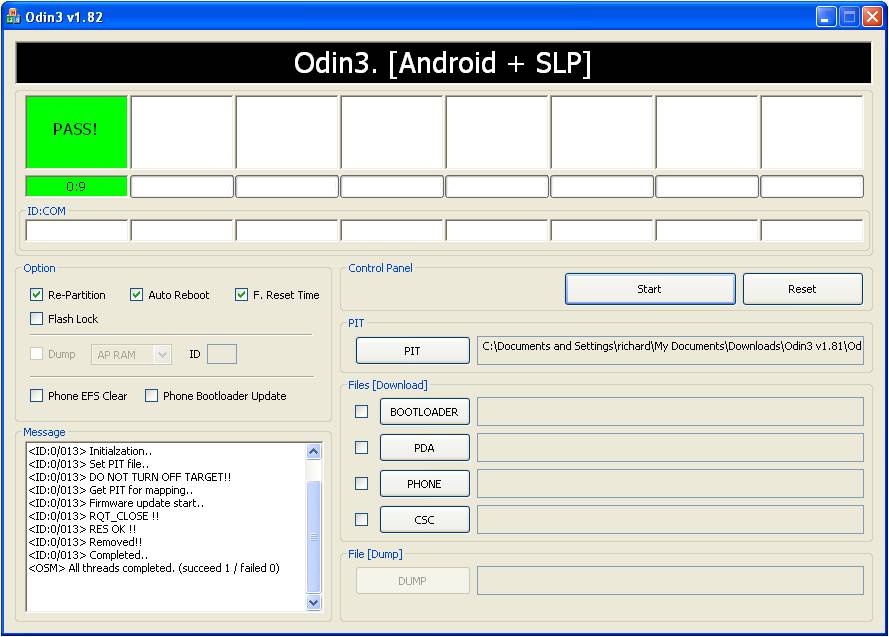 help....  my phone cant turn on after flash with pit513 only! |
|
|
Aug 9 2011, 06:42 PM
Return to original view | Post
#11
|
|
Junior Member
107 posts Joined: Nov 2008 From: UKM Bangi
|
QUOTE(ic3joker @ Aug 9 2011, 05:57 PM) you need pit 513 only. now HOW??? |
|
|
Aug 9 2011, 06:44 PM
Return to original view | Post
#12
|
|
Junior Member
107 posts Joined: Nov 2008 From: UKM Bangi
|
QUOTE(ic3joker @ Aug 9 2011, 06:43 PM) can go into download mode? if can then re flash everything. DEAD liao... huhuhuu...  Added on August 9, 2011, 6:46 pmjust now took out batt, now can go download mode.. how to flash correctly? This post has been edited by profdrahhen: Aug 9 2011, 06:46 PM |
|
|
Aug 9 2011, 06:48 PM
Return to original view | Post
#13
|
|
Junior Member
107 posts Joined: Nov 2008 From: UKM Bangi
|
QUOTE(ic3joker @ Aug 9 2011, 06:47 PM) steps to flash DXJV9 ok...i havent download the pda, phone csc...link please?1. put pda, phone, csc and 513pit with repartion in odin3. 2. You will see a lot of red text after the flash is done, don't panic, just do a 'wipe data/factory reset' and reboot the device when done. 3. Let the device boot all the way then turn it off. 4. Re-enter Download Mode and re-flash only the CSC file without pit and without re-partition. 5. Enjoy |
|
|
|
|
|
Aug 9 2011, 06:52 PM
Return to original view | Post
#14
|
|
Junior Member
107 posts Joined: Nov 2008 From: UKM Bangi
|
QUOTE(ic3joker @ Aug 9 2011, 06:49 PM) huhuu..my 4th day of using android...read many thread/forum but all confusing... |
|
|
Aug 9 2011, 07:27 PM
Return to original view | Post
#15
|
|
Junior Member
107 posts Joined: Nov 2008 From: UKM Bangi
|
QUOTE(ic3joker @ Aug 9 2011, 06:47 PM) steps to flash DXJV9 after that how to flash to CyanogenMod 7?1. put pda, phone, csc and 513pit with repartion in odin3. 2. You will see a lot of red text after the flash is done, don't panic, just do a 'wipe data/factory reset' and reboot the device when done. 3. Let the device boot all the way then turn it off. 4. Re-enter Download Mode and re-flash only the CSC file without pit and without re-partition. 5. Enjoy |
|
|
Aug 9 2011, 07:36 PM
Return to original view | Post
#16
|
|
Junior Member
107 posts Joined: Nov 2008 From: UKM Bangi
|
QUOTE(ic3joker @ Aug 9 2011, 07:30 PM) flash a speedmod kernel then flash latest nightly. i see..tq~ |
|
|
Aug 9 2011, 07:48 PM
Return to original view | Post
#17
|
|
Junior Member
107 posts Joined: Nov 2008 From: UKM Bangi
|
QUOTE(nokiaXP @ Aug 9 2011, 07:42 PM) speedmod k15i-t2 can overclock your sgs any down side for this overclock thingy? |
|
|
Aug 9 2011, 07:57 PM
Return to original view | Post
#18
|
|
Junior Member
107 posts Joined: Nov 2008 From: UKM Bangi
|
QUOTE(ic3joker @ Aug 9 2011, 07:50 PM) if you unlucky it will fried your motherboard. fuhh...better dont then.. i dun think got significant effect leh.. maybe can try too! LOLany personal review on this CM7? |
|
|
Aug 9 2011, 08:06 PM
Return to original view | Post
#19
|
|
Junior Member
107 posts Joined: Nov 2008 From: UKM Bangi
|
QUOTE(ic3joker @ Aug 9 2011, 06:47 PM) steps to flash DXJV9 besides, the 4th instruction1. put pda, phone, csc and 513pit with repartion in odin3. 2. You will see a lot of red text after the flash is done, don't panic, just do a 'wipe data/factory reset' and reboot the device when done. 3. Let the device boot all the way then turn it off. 4. Re-enter Download Mode and re-flash only the CSC file without pit and without re-partition. 5. Enjoy Re-enter Download Mode and re-flash only the CSC file without pit and without re-partition mean no need put pda, phone and pit? or just no pit? but with all the pda, phone and csc This post has been edited by profdrahhen: Aug 9 2011, 08:07 PM |
|
|
Aug 9 2011, 08:10 PM
Return to original view | Post
#20
|
|
Junior Member
107 posts Joined: Nov 2008 From: UKM Bangi
|
QUOTE(ic3joker @ Aug 9 2011, 08:07 PM) yes without anything only csc ok..jz hope i wont brick it...LOL |
|
Topic ClosedOptions
|
| Change to: |  0.0215sec 0.0215sec
 0.46 0.46
 7 queries 7 queries
 GZIP Disabled GZIP Disabled
Time is now: 7th December 2025 - 06:16 AM |
 Quote
Quote
