Outline ·
[ Standard ] ·
Linear+
Want to lower the factory OCed GC
|
TSwkkm007
|
 Jun 24 2011, 04:44 PM, updated 15y ago Jun 24 2011, 04:44 PM, updated 15y ago
|

|
Hi, my Nvidia Asus EN9500GT TOP default core clock @ 700MHz. Not much playing 3D game edi. How to lower the core clock and can load back the same clock speed during next start-up?
This post has been edited by wkkm007: Jun 24 2011, 04:46 PM
|
|
|
|
|
|
ne0cz
|
Jun 24 2011, 05:06 PM
|
|
|
use MSI AfterBurner... it works
|
|
|
|
|
|
TSwkkm007
|
Jun 24 2011, 05:54 PM
|
|
|
And oso control the gpu fan speed? current using asus smart doctor don't like cause always pop up the annoying Asus OSD not install thing during start up. Even Asus OSD already install.
Added on June 24, 2011, 5:56 pmQUOTE(ne0cz @ Jun 24 2011, 03:06 PM) use MSI AfterBurner... it works MSI software can on Asus board and card? Scare not compatible. This post has been edited by wkkm007: Jun 24 2011, 05:56 PM |
|
|
|
|
|
SUS~min~
|
Jun 24 2011, 06:29 PM
|
|
|
asus got asus smart doctor right? use that software easy
|
|
|
|
|
|
saturn85
|
Jun 25 2011, 01:47 AM
|
|
|
QUOTE(wkkm007 @ Jun 24 2011, 05:54 PM) MSI software can on Asus board and card? Scare not compatible. i think can use la.  |
|
|
|
|
|
TSwkkm007
|
Jun 25 2011, 07:06 PM
|
|
|
QUOTE(~min~ @ Jun 24 2011, 04:29 PM) asus got asus smart doctor right? use that software easy How to save core clock speed. after next start up load the same speed back? |
|
|
|
|
|
saturn85
|
Jun 26 2011, 03:55 AM
|
|
|
see any setting like apply overclocking at system start up.  |
|
|
|
|
|
SUS~min~
|
Jun 26 2011, 08:54 PM
|
|
|
QUOTE(wkkm007 @ Jun 25 2011, 07:06 PM) How to save core clock speed. after next start up load the same speed back? last time i use smart doctor, just right click at smart doctor, tick - apply setting at startup new version ikd. look like many change already |
|
|
|
|
|
1024kbps
|
Jun 26 2011, 10:45 PM
|
|
|
MSI afterburner can use on almost any gaming GPU, tried with my old Gecube 4890 and now the Asus 560GTX Ti, because it is based on the old "RivaTuner" GPU tweaking software  MSI iirc is co-developing this software with rivatuner developer, the "MSI" name has nothing to do with the hardware compatibility. |
|
|
|
|
|
DG41
|
Jun 27 2011, 11:11 PM
|
|
|
rivatuner. if not working don bother take other alternative way, 9500gt can considerd very low end gc already
|
|
|
|
|
|
TSwkkm007
|
Jun 29 2011, 04:56 PM
|
|
|
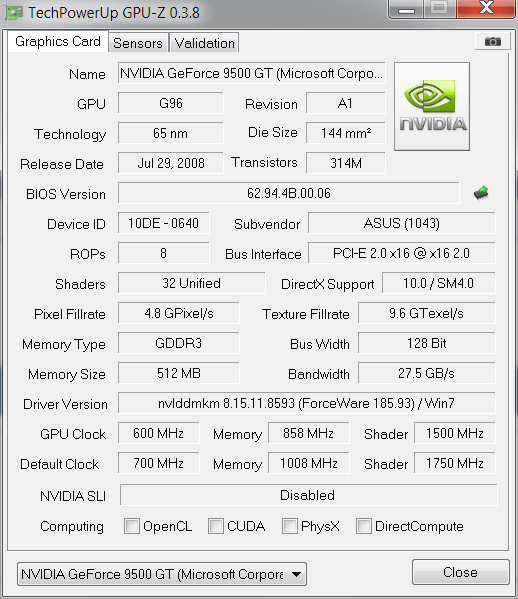
Added on June 29, 2011, 4:58 pmDone. Upgrade to Asus SmartDoctor 5.59. No more annoying Asus OSD not install thing during start up  Thank You all man  cheer This post has been edited by wkkm007: Jun 29 2011, 04:59 PM |
|
|
|
|





 Quote
Quote







 0.0217sec
 0.22
0.22
 5 queries
 GZIP Disabled