Welcome Guest ( Log In | Register )

Bump Topic Topic Closed RSS Feed

Outline · [ Standard ] · Linear+

 HP Pavillion DV6-6XXX series Owners Lounge V2, - 91 owners!! FUUUUUUUUUUUUU!!

views
     
JYwang
post Jun 21 2011, 03:54 AM

New Member
*
Junior Member
40 posts

Joined: Jun 2010
Bros, I got a big problem. Please please help advice me on what I should do to save my new dv6-6001TX!! sad.gif

I just bought this new baby 2 days ago. So far here are the symptoms:
1)gpu has crashed a couple of times
2)I've got a blue screen (BSOD) once
3)i mysteriously get disconnected while i play WoW as if someone is trying to log in
4)My boot time is about one minute+

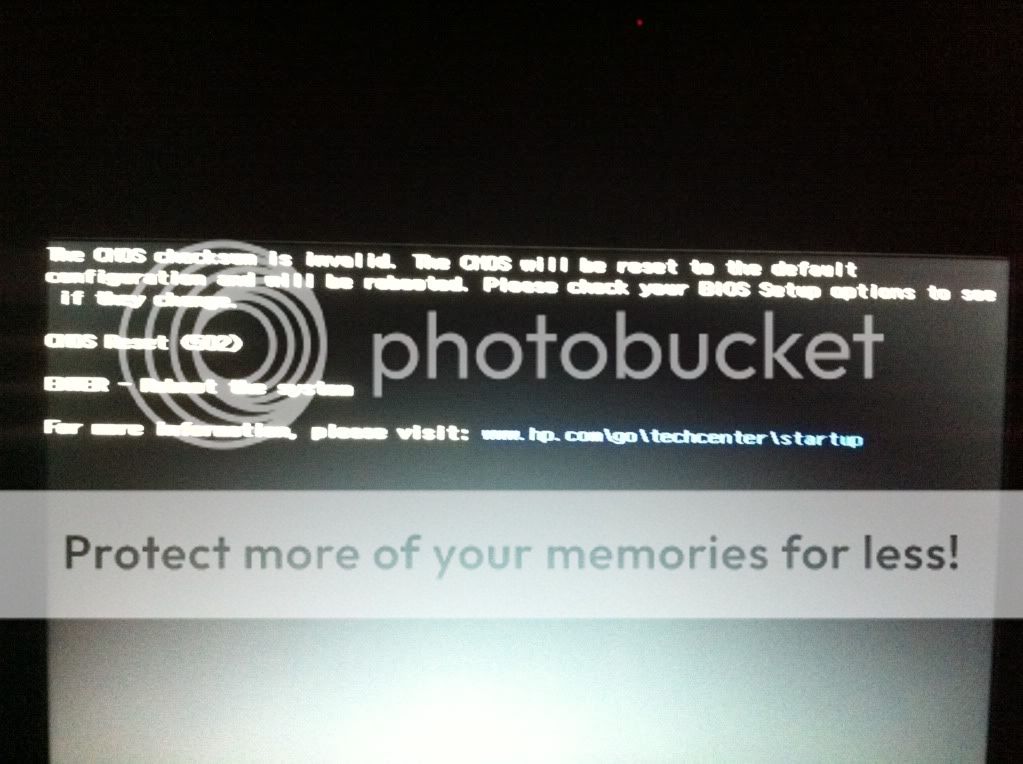
5)MOST CRUCIAL: Everytime I take out my battery without the power supply connected, or even without the battery and i just shut down the laptop and disconnect the power supply and put it back again, I get some kind of CMOS/BIOS error and I think it reverts back to origin (the time and date of my laptop gets reset to 12.00AM 1/1/10)

Here's a pic of what the screen that shows at startup looks like (sorry for lousy blurry photograph):

» Click to show Spoiler - click again to hide... «


help me please bros i'm begging you!! sad.gif

This post has been edited by JYwang: Jun 21 2011, 04:19 AM
JYwang
post Jun 21 2011, 12:31 PM

New Member
*
Junior Member
40 posts

Joined: Jun 2010
QUOTE(Efalex @ Jun 21 2011, 04:36 AM)
First of all, have created your recovery disc? You better do it first.
1) Which GPU is the one crashed and did you install any new driver in the last 2 days? How's the temp? There is a new driver update released in the past week, maybe you can try to download it and update you driver.
2) Your laptop comes with 4 or 8GB RAM? BSOD can be causes by hardware (such as RAM incompatibility, HD failure) or software (driver, corrupted Windows files). There is a software out there (bluescreen viewer, or something like that), download it and check the minidump file to identify the culprit.
3) Try update your Wireless card driver. Please check you wireless card brand before you download the appropriate update. Check also your Internet connection. The problem could be originated from your ISP too.
4) Looks normal to me.
5) Please read Checksum is Invalid
  Or it could be that motherboard battery is dead. You could either replace it yourself or bring it back to the shop you bought from and launch a complaint to them to replace it for you. To replace it yourself, first get a replacement battery (CR2032 button battery) and a "-" screwdriver. Open the backplate (careful, this is one of the trickiest part) and once you've open it, you should be able to see the battery near the harddisk. Replace the battery, and close the backplate (the second trickiest part).

For 1,2 and 3, if the problem persist, you could opt to do recovery using the recovery disc you've created. If all else fail, bring it back to where you bought it from and demand a solution from them (warranty or a new unit, perhaps)

These are my opinion and you should wait for other user for their opinion on these matters.

Editted: added HP technical support website
*
Efalex, thank you so much.
Regarding the recovery disc, actually i'm really noob with computers, sorry for that. When you say recovery disc, is it the same with system restore?
I've installed a couple of programs into this laptop so is the recovery disc to reset your laptop to factory conditions or is it to reset your system to how it was exactly at the time of the creation of the disks?

1)I am pretty sure it's the Radeon HD as I've only been running on power supply all these while.
2) It originally came with 4GB, then I got an extra 4GB and installed it when I brought this baby home. The salesman wanted to give me an apacer RAM but I demanded for a Kingston. Erm, I'm not too sure bout the harddrive. Is there a way to check it's brand without removing the back panel?
3)Okies will try this.
4)I was reading on this threadd V1 how others have been showing their boot time to be around 23 secs plus minus. was hoping since mine is brand new it should be around there as well? haha tongue.gif
5)ok will read the link and will try to update the BIOS first.

THANK YOU SO MUCH FOR YOUR ADVICE!! you're AWESOME!

JYwang
post Jun 21 2011, 03:44 PM

New Member
*
Junior Member
40 posts

Joined: Jun 2010
Hmm...

I did wat the HP support website told me to and ran the HP Support Assistant, ran a health analysis, installed updates, etc.
and when I disconnected and reconnected the power supply, the same problem persists.

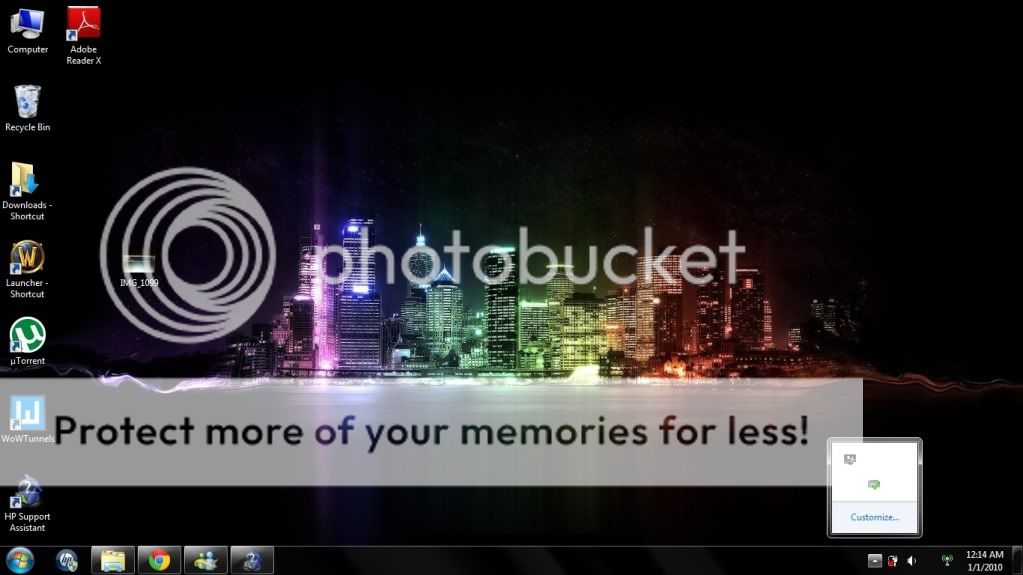
Everytime this happens and I get into windows, this is how it looks like:

» Click to show Spoiler - click again to hide... «


For the above pic, notice that most of the taskbar icons are blank (missing AVG, grapics controller, etc. Even the wireless connectivity bars are missing, just an empty space between my speaker icon and the HP wireless assistant icon.)

And what's worse, I've done all the software update and stuff through the HP Support Assistant, and then I shutdown my laptop to install the updates and crap and I disconnected and connected the power supply again with the CMOS problems and crap but the updates should still have been done right? WRONG.

Just to be sure I re-ran the HP Support Assistant after reconnecting the power supply and BOOM! The system health analysis asks me to redownload and install the same updates again!

» Click to show Spoiler - click again to hide... «


Am I the only unlucky sob experiencing this hell? What did I ever do to deserve this cry.gif
This is a brand new laptop which blew a gigantic hole in my pocket against the advice of my friend because almost everyone in Lowyat is rooting for the DV6 lol.

Do you think it's possible for me to go and get a 1 for 1 exchange? I bought it at gadgetzone One Stop Penang.

DV6-6001TX + 4GB Ram + HP Carepack (No beats headphones or freebies) = RM3290 sweat.gif

I wanted a DV6-6114TX but I need a laptop desperately for work and it's either drive to KL or wait a month through HP online rclxub.gif

So what should I do now? Take it back to the shop?

This post has been edited by JYwang: Jun 21 2011, 03:49 PM
JYwang
post Jun 21 2011, 06:19 PM

New Member
*
Junior Member
40 posts

Joined: Jun 2010
QUOTE(Dackson @ Jun 21 2011, 05:27 PM)
For the above pic, notice that most of the taskbar icons are blank (missing AVG, grapics controller, etc. Even the wireless connectivity bars are missing, just an empty space between my speaker icon and the HP wireless assistant icon.)

Eh... this issue i dnt think related to Hp. It's software problem. I believe u can customize the icons setting. Why dnt u update the window or reformat ? Hv new BIOS to update ?? Some time i also facing such issue too but it's rare.

For HP Support Assistant, I think u should try reinstall the software or dnt need to use it. For me it's just wasting memory and spaceĀ  tongue.gif

By the way, hv u using any software which will roll back ur window into previous one ? Such asĀ  Returnil Virtual System, if do, pls un-click the function and update ur window and turn it back when everything has done.

If not mistaken RM3290 without beats headphones one~ It's hard to exchange to a new one for software problem. If it's still there, i think u can send it to HP service center at pinang, Their service good unlike Mlc service ^.^
Driver
*
Dackson, i don't think it's just software problem it only happens when I reconnect my power supply without the battery in the laptop. Please refer to one of my previous posts to see the CMOS error screen that pops up when reconnecting power supply. (I only use the battery when I go out and dont leave it in the laptop all the time fearing I might wear it out fast, and I always disconnect my power supply when I turn off my lappy for fear of lightnings)

Anyway, after I reconnect the power supply and boots it up with the CMOS error and everything and then restart the laptop without removing the power cable, the laptop boots up normally and the taskbar would turn out the way it should:

» Click to show Spoiler - click again to hide... «


So what do you think about that?

And no, I am not using any software to rollback windows or the system, at least none that i'm aware of. hmm.gif

This post has been edited by JYwang: Jun 21 2011, 06:21 PM
JYwang
post Jun 22 2011, 11:24 AM

New Member
*
Junior Member
40 posts

Joined: Jun 2010
Guys, does anyone know why we can only create ONE set of recovery media (Notice from the HP Recovery Assistant). Is there anyway to bypass that?

I mean I prefer to have two (one on a set of dvd and one on a thumbdrive) on hand just for safety precautions.

Topic ClosedOptions
 

Change to:
| Lo-Fi Version
0.0515sec    0.71    7 queries    GZIP Disabled
Time is now: 5th December 2025 - 01:56 PM