dammit, im receiving my dv6 tmrw! can't wait....fakkkk YEAHHHHHH
This post has been edited by babyrabies: Jun 21 2011, 04:40 PM
HP Pavillion DV6-6XXX series Owners Lounge V2, - 91 owners!! FUUUUUUUUUUUUU!!
HP Pavillion DV6-6XXX series Owners Lounge V2, - 91 owners!! FUUUUUUUUUUUUU!!
|
|
 Jun 21 2011, 04:33 PM Jun 21 2011, 04:33 PM
|
 
Junior Member
281 posts Joined: Aug 2006 
|
dammit, im receiving my dv6 tmrw! can't wait....fakkkk YEAHHHHHH
This post has been edited by babyrabies: Jun 21 2011, 04:40 PM |
|
|
|
|
|
Jun 21 2011, 05:27 PM
|

Senior Member
6,439 posts Joined: Oct 2008 From: Mlc to PP ?  
|
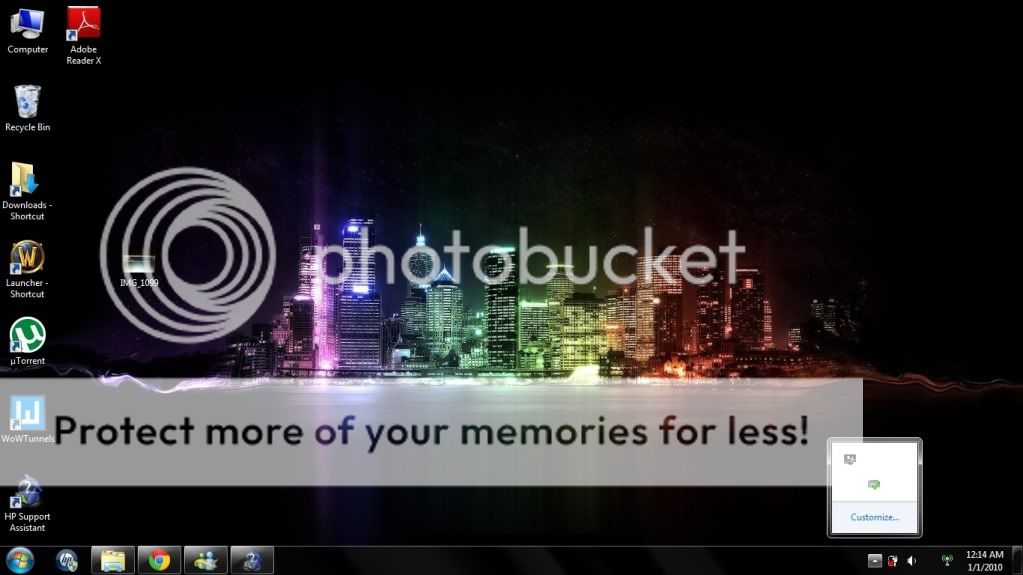
QUOTE(JYwang @ Jun 21 2011, 03:44 PM) » Click to show Spoiler - click again to hide... «  Eh... this issue i dnt think related to Hp. It's software problem. I believe u can customize the icons setting. Why dnt u update the window or reformat ? Hv new BIOS to update ?? Some time i also facing such issue too but it's rare. For HP Support Assistant, I think u should try reinstall the software or dnt need to use it. For me it's just wasting memory and space  By the way, hv u using any software which will roll back ur window into previous one ? Such as Returnil Virtual System, if do, pls un-click the function and update ur window and turn it back when everything has done. If not mistaken RM3290 without beats headphones one~ It's hard to exchange to a new one for software problem. If it's still there, i think u can send it to HP service center at pinang, Their service good unlike Mlc service ^.^ Driver This post has been edited by Dackson: Jun 21 2011, 05:33 PM |
|
|
Jun 21 2011, 05:27 PM
|
|
Junior Member
224 posts Joined: Nov 2005 From: Singapore
|
QUOTE(christina1 @ Jun 21 2011, 03:20 PM) How you managed to install SSD ? From my understanding your notebook warranty will be VOID if you install SSD in it fren,its easy. just take out the bottom cover,take out the hdd then replaced with the ssd,just 5min work.anything happen need send back to repair,just do the reverse job,how to void the warranty?  |
|
|
Jun 21 2011, 05:28 PM
|
|
Senior Member
6,439 posts Joined: Oct 2008 From: Mlc to PP ?
|
QUOTE(kelvinsin @ Jun 21 2011, 05:27 PM) fren,its easy. just take out the bottom cover,take out the hdd then replaced with the ssd,just 5min work. yup~anything happen need send back to repair,just do the reverse job,how to void the warranty? how much u get SSD ? |
|
|
Jun 21 2011, 05:31 PM
|
|
Junior Member
224 posts Joined: Nov 2005 From: Singapore
|
QUOTE(Dackson @ Jun 21 2011, 05:28 PM) yup~ few months ago lor. S$269. how much u get SSD ?  |
|
|
Jun 21 2011, 05:34 PM
|
|
Senior Member
6,439 posts Joined: Oct 2008 From: Mlc to PP ?
|
QUOTE(kelvinsin @ Jun 21 2011, 05:31 PM) few months ago lor. S$269. oh~ i see ~Added on June 21, 2011, 5:34 pmby the way, hv any nice theme from dv6 ? This post has been edited by Dackson: Jun 21 2011, 05:34 PM |
|
|
|
|
|
Jun 21 2011, 05:47 PM
|

Senior Member
2,104 posts Joined: Sep 2008
|
QUOTE(kelvinsin @ Jun 21 2011, 05:27 PM) fren,its easy. just take out the bottom cover,take out the hdd then replaced with the ssd,just 5min work. I know is 5 minutes job...but i was told by HP customer Service warranty be void if replaced the current hard disk with SSD.I know once u installed SSD on DV6001TX will be brilliant. Btw how long is ur warranty period for notebook?anything happen need send back to repair,just do the reverse job,how to void the warranty? This post has been edited by christina1: Jun 21 2011, 05:49 PM |
|
|
Jun 21 2011, 05:53 PM
|
|
Junior Member
270 posts Joined: Jun 2011
|
QUOTE(christina1 @ Jun 21 2011, 05:47 PM) I know is 5 minutes job...but i was told by HP customer Service warranty be void if replaced the current hard disk with SSD.I know once u installed SSD on DV6001TX will be brilliant. Btw how long is ur warranty period for notebook? miss... people here already told you many time ~!!  when you want to claim warranty, just put your original HD back into the laptop~~~ clear? |
|
|
Jun 21 2011, 05:55 PM
|
|
Junior Member
224 posts Joined: Nov 2005 From: Singapore
|
QUOTE(christina1 @ Jun 21 2011, 05:47 PM) I know is 5 minutes job...but i was told by HP customer Service warranty be void if replaced the current hard disk with SSD.I know once u installed SSD on DV6001TX will be brilliant. Btw how long is ur warranty period for notebook? aik,how i gonna to explain...just make sure the hardware is the same as original when u bring back to HP,so,change back to the ori hdd when need send back to HP, then who will know you are using ssd???  3 years warranty.  |
|
|
Jun 21 2011, 05:59 PM
|
|
Senior Member
2,104 posts Joined: Sep 2008
|
QUOTE(kelvinsin @ Jun 21 2011, 05:55 PM) aik,how i gonna to explain... Is there any form of warranty sticker when u removed HDD and replaced with SSD?just make sure the hardware is the same as original when u bring back to HP,so,change back to the ori hdd when need send back to HP, then who will know you are using ssd??? 3 years warranty. |
|
|
Jun 21 2011, 06:19 PM
|
|
Junior Member
40 posts Joined: Jun 2010
|
QUOTE(Dackson @ Jun 21 2011, 05:27 PM) For the above pic, notice that most of the taskbar icons are blank (missing AVG, grapics controller, etc. Even the wireless connectivity bars are missing, just an empty space between my speaker icon and the HP wireless assistant icon.) Dackson, i don't think it's just software problem it only happens when I reconnect my power supply without the battery in the laptop. Please refer to one of my previous posts to see the CMOS error screen that pops up when reconnecting power supply. (I only use the battery when I go out and dont leave it in the laptop all the time fearing I might wear it out fast, and I always disconnect my power supply when I turn off my lappy for fear of lightnings)Eh... this issue i dnt think related to Hp. It's software problem. I believe u can customize the icons setting. Why dnt u update the window or reformat ? Hv new BIOS to update ?? Some time i also facing such issue too but it's rare. For HP Support Assistant, I think u should try reinstall the software or dnt need to use it. For me it's just wasting memory and space By the way, hv u using any software which will roll back ur window into previous one ? Such as Returnil Virtual System, if do, pls un-click the function and update ur window and turn it back when everything has done. If not mistaken RM3290 without beats headphones one~ It's hard to exchange to a new one for software problem. If it's still there, i think u can send it to HP service center at pinang, Their service good unlike Mlc service ^.^ Driver Anyway, after I reconnect the power supply and boots it up with the CMOS error and everything and then restart the laptop without removing the power cable, the laptop boots up normally and the taskbar would turn out the way it should: » Click to show Spoiler - click again to hide... « So what do you think about that? And no, I am not using any software to rollback windows or the system, at least none that i'm aware of.  This post has been edited by JYwang: Jun 21 2011, 06:21 PM |
|
|
Jun 21 2011, 06:21 PM
|
|
Junior Member
224 posts Joined: Nov 2005 From: Singapore
|
QUOTE(christina1 @ Jun 21 2011, 05:59 PM) Is there any form of warranty sticker when u removed HDD and replaced with SSD? Nope.Dun worry,i will not simply void my 3 years warranty. |
|
|
Jun 21 2011, 07:29 PM
|
|
Senior Member
2,104 posts Joined: Sep 2008
|
QUOTE(kelvinsin @ Jun 21 2011, 06:21 PM) Nope. I am thinking of installing SSD in my notebook since it is very slow with my current HD 5400 rpm...how is the performance with SSD?Dun worry,i will not simply void my 3 years warranty. |
|
|
|
|
|
Jun 21 2011, 07:30 PM
|
|
Junior Member
224 posts Joined: Nov 2005 From: Singapore
|
QUOTE(christina1 @ Jun 21 2011, 07:29 PM) I am thinking of installing SSD in my notebook since it is very slow with my current HD 5400 rpm...how is the performance with SSD? check out thishttp://www.youtube.com/watch?v=fAU7GlTUGnQ |
|
|
Jun 21 2011, 07:36 PM
|
|
Senior Member
2,104 posts Joined: Sep 2008
|
QUOTE(kelvinsin @ Jun 21 2011, 07:30 PM) Thnx for the video...after installing SSD did u format it with recovery CD? I mean how u managed to install 7 home premium on it. |
|
|
Jun 21 2011, 07:39 PM
|

Senior Member
1,719 posts Joined: Feb 2006 From: Kuala Lumpur
|
QUOTE(kelvinsin @ Jun 21 2011, 07:30 PM) How's your boot up time? |
|
|
Jun 21 2011, 08:18 PM
|
|
Newbie
1 posts Joined: Apr 2011
|
Even on a HDD, my boot time is about 40 secs. More than fast enough for average use. SSD's also have limited number of writes because they never use SLC chips.
The best deal is still the Seagate Momentus XT. I'm getting one very soon. 500GB HDD + 4GB SSD. Best of both worlds. |
|
|
Jun 21 2011, 08:19 PM
|
|
Senior Member
2,104 posts Joined: Sep 2008
|
QUOTE(powerpack240v @ Jun 21 2011, 08:18 PM) Even on a HDD, my boot time is about 40 secs. More than fast enough for average use. SSD's also have limited number of writes because they never use SLC chips. How much this cost?The best deal is still the Seagate Momentus XT. I'm getting one very soon. 500GB HDD + 4GB SSD. Best of both worlds. |
|
|
Jun 21 2011, 09:07 PM
|
|
Newbie
1 posts Joined: Apr 2011
|
QUOTE(christina1 @ Jun 21 2011, 08:19 PM) How much this cost? According to C-ZONE's latest pricelist, it costs RM419. It is slightly more expensive than the cheapest SSD, but those are just like 60GB, pure useless, even windows 7 is nearly 20GB.Plus, all the SSD's dont use SLC chips so the number of writes is about 10 000, whereas the Momentus XT uses SLC, 10x the number of writes supported |
|
|
Jun 21 2011, 09:07 PM
|
|
Newbie
0 posts Joined: May 2011
|
Hello guys,
Reciving my Dv6 on 2molo. Is there anything i need to do before I install every pc games i have and Adobe Design Premium??? Sorry, I am a PC noob. Hopefully some1 can guide me a little bit, thanks. |
|
Topic ClosedOptions
|
| Change to: |  0.0177sec 0.0177sec
 0.33 0.33
 6 queries 6 queries
 GZIP Disabled GZIP Disabled
Time is now: 8th December 2025 - 07:16 AM |
 Quote
Quote