Welcome Guest ( Log In | Register )

Bump Topic Topic Closed RSS Feed
126 Pages « < 111 112 113 114 115 > » Bottom

Outline · [ Standard ] · Linear+

 HP Pavillion DV6-6XXX series Owners Lounge V2, - 91 owners!! FUUUUUUUUUUUUU!!

views
     
TSAcid_RuleZz
post Aug 2 2011, 05:15 PM

ミウ ❤
*******
Senior Member
6,612 posts

Joined: Jan 2003
From: Tomorrow


QUOTE(spicediablo @ Aug 2 2011, 05:12 PM)
I just checked using HP assistant, but din get any BIOS updates?
*
Check HP driver download page.


Added on August 2, 2011, 5:17 pmFIXES:
- Fixes an intermittent issue where the battery does not property recharge.
- Adds support for switchable graphics fixed mode

This post has been edited by Acid_RuleZz: Aug 2 2011, 05:17 PM
Efalex
post Aug 2 2011, 05:17 PM

Casual
***
Junior Member
361 posts

Joined: Jun 2007
QUOTE(spicediablo @ Aug 2 2011, 05:12 PM)
I just checked using HP assistant, but din get any BIOS updates?
*
Direct download from the website.
You have to enter the BIOS to switch the Graphic option to fixed mode.
Someone tested it and said that Photoshop can recognised the presence of 6770M, while another user can play Minecraft at 90fps.
Will update mine this weekend.
SUSngkhanmein
post Aug 2 2011, 05:18 PM

カラカラ Karakara
*******
Senior Member
7,727 posts

Joined: Jan 2010
From: Ara Damansara, Petaling Jaya & Batu Pahat, Johor.


might new bios solved the driver issue.. congrats!
rurushu
post Aug 2 2011, 05:21 PM

Look at all my stars!!
*******
Senior Member
2,021 posts

Joined: Jun 2011
From: Shah Alam


QUOTE(Acid_RuleZz @ Aug 2 2011, 05:15 PM)
Check HP driver download page.


Added on August 2, 2011, 5:17 pmFIXES:
- Fixes an intermittent issue where the battery does not property recharge.
- Adds support for switchable graphics fixed mode
*
QUOTE(Efalex @ Aug 2 2011, 05:17 PM)
Direct download from the website.
You have to enter the BIOS to switch the Graphic option to fixed mode.
Someone tested it and said that Photoshop can recognised the presence of 6770M, while another user can play Minecraft at 90fps.
Will update mine this weekend.
*
Fixed mode is that you forced the laptop to use only radeon right? Cannot switch in-between right?
TSAcid_RuleZz
post Aug 2 2011, 05:28 PM

ミウ ❤
*******
Senior Member
6,612 posts

Joined: Jan 2003
From: Tomorrow


Nobody dare to try it now? tongue.gif
Efalex
post Aug 2 2011, 05:30 PM

Casual
***
Junior Member
361 posts

Joined: Jun 2007
QUOTE(rurushu @ Aug 2 2011, 05:21 PM)
Fixed mode is that you forced the laptop to use only radeon right? Cannot switch in-between right?
*
I think fixed mode is that you choose which graphic card to use and it will stay on until you decide to change to another graphic card, just like manual switching.
The caveat is you have close all application that utilising the previous graphic card before you initiate a switch and the screen will blink/turn dark for a few seconds during switching.

SUSngkhanmein
post Aug 2 2011, 05:33 PM

カラカラ Karakara
*******
Senior Member
7,727 posts

Joined: Jan 2010
From: Ara Damansara, Petaling Jaya & Batu Pahat, Johor.


is fine if got blink if no mistake..
louisfjh
post Aug 2 2011, 05:41 PM

Getting Started
**
Junior Member
257 posts

Joined: May 2008


QUOTE(ngkhanmein @ Aug 2 2011, 04:52 PM)
Binary Codec Packages > Windows x86 20071007 > FTP > direct dl!!! windows-essential-20071007.zip & just copy those files only..


Added on August 2, 2011, 4:52 pmjust copy to system32 is more than enough..
*
copy whole windows-essential-20071007 or those dll file in it??? then replace all?? will cause error anot??? blink.gif
rurushu
post Aug 2 2011, 05:41 PM

Look at all my stars!!
*******
Senior Member
2,021 posts

Joined: Jun 2011
From: Shah Alam


QUOTE(Efalex @ Aug 2 2011, 05:30 PM)
I think fixed mode is that you choose which graphic card to use and it will stay on until you decide to change to another graphic card, just like manual switching.
The caveat is you have close all application that utilising the previous graphic card before you initiate a switch and the screen will blink/turn dark for a few seconds during switching.
*
Hmm.... but it is enabled in the BIOS settings.... Efalex, you trying? If you do, please list the steps when done testing can? Last time i tried to get the action keys disabled took me 1 hours + coz i cannot get to the bios page.... now forgot how to go already.... icon_question.gif
TSAcid_RuleZz
post Aug 2 2011, 05:45 PM

ミウ ❤
*******
Senior Member
6,612 posts

Joined: Jan 2003
From: Tomorrow


QUOTE(rurushu @ Aug 2 2011, 05:41 PM)
Hmm.... but it is enabled in the BIOS settings.... Efalex, you trying? If you do, please list the steps when done testing can? Last time i tried to get the action keys disabled took me 1 hours + coz i cannot get to the bios page.... now forgot how to go already....  icon_question.gif
*
After you run the BIOS update it will reboot your pc. After that you can enter BIOS by pressingspamming F10 button.
Efalex
post Aug 2 2011, 05:52 PM

Casual
***
Junior Member
361 posts

Joined: Jun 2007
QUOTE(rurushu @ Aug 2 2011, 05:41 PM)
Hmm.... but it is enabled in the BIOS settings.... Efalex, you trying? If you do, please list the steps when done testing can? Last time i tried to get the action keys disabled took me 1 hours + coz i cannot get to the bios page.... now forgot how to go already....  icon_question.gif
*
Will try this Sunday. Laptop, no time to on now. Remember to plug in your battery and power supply together when flashing BIOS.
To enter BIOS, just do as what Acid said.
If you think you have change something you're not suppose to, just exit without saving.

Now the question is will enable auto switching in the 6001TX??

This post has been edited by Efalex: Aug 2 2011, 05:54 PM
TSAcid_RuleZz
post Aug 2 2011, 06:21 PM

ミウ ❤
*******
Senior Member
6,612 posts

Joined: Jan 2003
From: Tomorrow


Ayam Jelly. I hope we can play this with at least medium setting. drool.gif


Added on August 2, 2011, 6:22 pm
QUOTE(Efalex @ Aug 2 2011, 05:52 PM)
Now the question is will enable auto switching in the 6001TX??
*
I don't think auto switch is possible with multiplexer. hmm.gif
I see nothing new in BIOS too.

This post has been edited by Acid_RuleZz: Aug 2 2011, 06:22 PM
louisfjh
post Aug 2 2011, 06:31 PM

Getting Started
**
Junior Member
257 posts

Joined: May 2008


i video still not solve after do wat u all said ><


Added on August 2, 2011, 6:34 pm
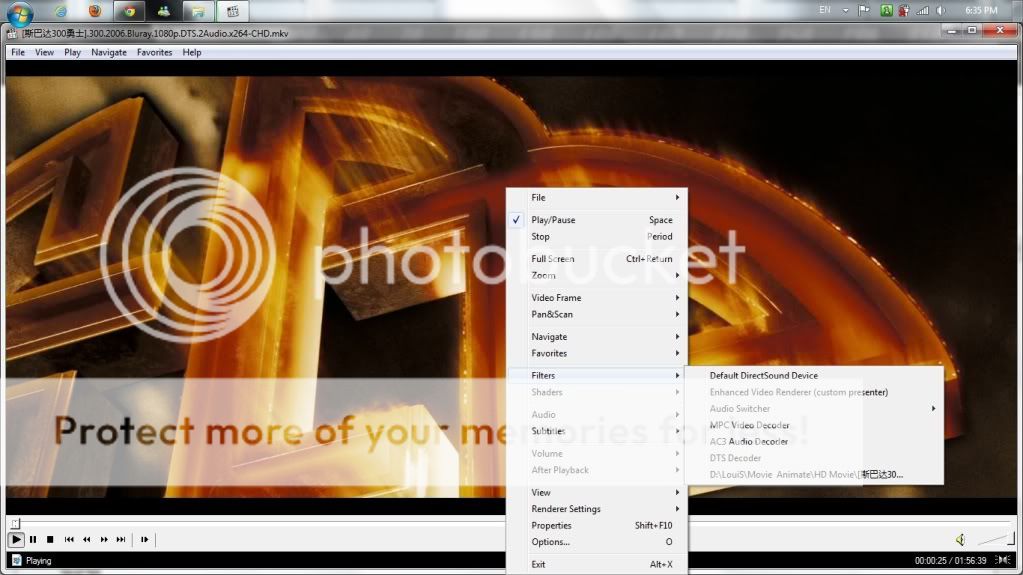
QUOTE(lee_what2004 @ Aug 2 2011, 05:13 PM)
when play rmvb, right click mpc, filters. What do you have?
*
my rmvb cant play at MPC


Added on August 2, 2011, 6:39 pm
QUOTE(lee_what2004 @ Aug 2 2011, 01:48 PM)
Install this.
http://www.microsoft.com/download/en/details.aspx?id=8109

have you done the instruction I mentioned before ?
When you play the MKV, can you right click the MPC, Filters, give screenshot of what it have.
*
user posted image
this is wif MKV format movie

This post has been edited by louisfjh: Aug 2 2011, 06:39 PM
lee_what2004
post Aug 2 2011, 06:43 PM

*stare* ji--------
Group Icon
Elite
14,813 posts

Joined: Nov 2006


When you play rmvb, it come out like this ?


Attached thumbnail(s)
Attached Image
reevephon
post Aug 2 2011, 06:47 PM

I'm a tech Freak
******
Senior Member
1,719 posts

Joined: Feb 2006
From: Kuala Lumpur


So how do we permanently fixed the Intel GPU mode as default after updating the latest BIOS?
louisfjh
post Aug 2 2011, 07:00 PM

Getting Started
**
Junior Member
257 posts

Joined: May 2008


QUOTE(lee_what2004 @ Aug 2 2011, 06:43 PM)
When you play rmvb, it come out like this ?
*
yea... RMVB show this...
then MKV lag & hang

now i install old version k lite mega code... play all video wif WMP... but MKV will still abit lag.. better than all other player la.. but still lag... i gonna crazy rclxub.gif shocking.gif

lee_what2004
post Aug 2 2011, 07:03 PM

*stare* ji--------
Group Icon
Elite
14,813 posts

Joined: Nov 2006


If RMVB shows that. means the Real Alternative is not installed..
louisfjh
post Aug 2 2011, 07:08 PM

Getting Started
**
Junior Member
257 posts

Joined: May 2008


but i already installl the real alternative lite wo... weird then @@


Added on August 2, 2011, 7:09 pmthen the MKV format lag & hang is wat problem?

This post has been edited by louisfjh: Aug 2 2011, 07:09 PM
lee_what2004
post Aug 2 2011, 07:15 PM

*stare* ji--------
Group Icon
Elite
14,813 posts

Joined: Nov 2006


Open the MKV again, press Ctrl + J when playing the movie.
Open task manager, Performance tab to check the CPU usage.
Give screenshot.

Have you installed the DirectX ?
RiverDrifte
post Aug 2 2011, 07:25 PM

Getting Started
**
Junior Member
56 posts

Joined: Jan 2005
From: Pee Jay


louis you got install real player?

126 Pages « < 111 112 113 114 115 > » Top
Topic ClosedOptions
 

Change to:
| Lo-Fi Version
0.0193sec    0.22    6 queries    GZIP Disabled
Time is now: 3rd December 2025 - 01:59 AM