Welcome Guest ( Log In | Register )

Bump Topic Topic Closed RSS Feed
16 Pages « < 8 9 10 11 12 > » Bottom

Outline · [ Standard ] · Linear+

 HP Pavillion DV6-6XXX series Owners Lounge V2, - 91 owners!! FUUUUUUUUUUUUU!!

views
     
TSAcid_RuleZz
post Jul 23 2011, 05:01 AM

ミウ ❤
*******
Senior Member
6,612 posts

Joined: Jan 2003
From: Tomorrow


QUOTE(amos_ong37 @ Jul 23 2011, 04:28 AM)
how much is the laptop alone? where is the fair?
*
Actually that is an online promotion. You can check it here.
Link: Online Exclusive PC Fair Packages


Added on July 23, 2011, 5:05 am
QUOTE(louisfjh @ Jul 22 2011, 08:43 PM)
» Click to show Spoiler - click again to hide... «

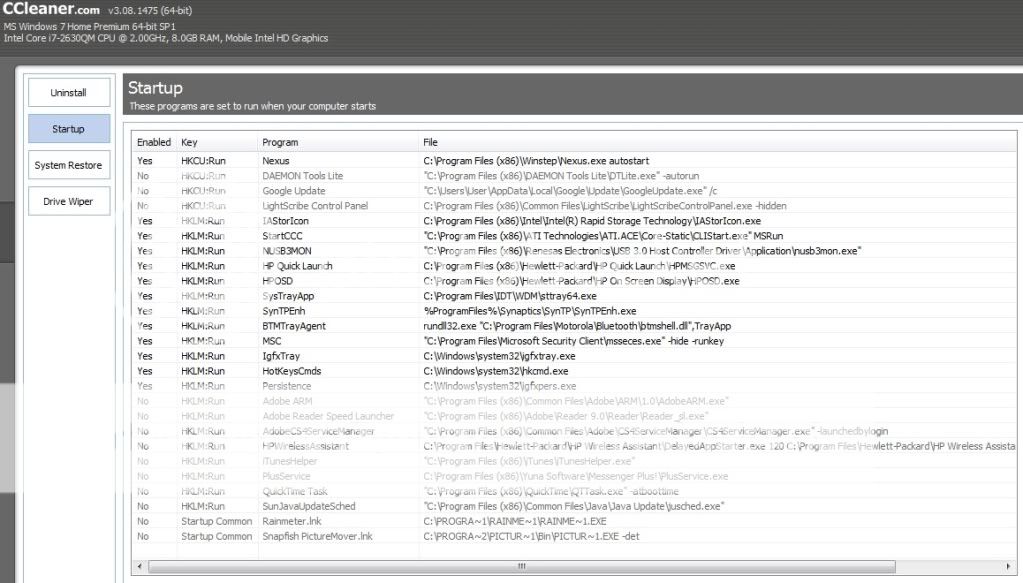
anything i can stop ar???
*
Boss, which one to disable is actually depend on your usage.
Like me i don't use HP Quick Launch, HP OSD, BeatsAudio Control Panel, Igfxtray, HotkeysCmds, Persistence, Bluetooth and USB 3.0 Host Controller. I disabled them all.

This post has been edited by Acid_RuleZz: Jul 23 2011, 05:05 AM
TSAcid_RuleZz
post Jul 23 2011, 04:18 PM

ミウ ❤
*******
Senior Member
6,612 posts

Joined: Jan 2003
From: Tomorrow


QUOTE(T0mmytky @ Jul 23 2011, 03:18 PM)
I think this is a little abnormal.... I played crysis2 for 1 hour also doesnt shoot up to 90+ maximum 85...
and depends on your surrounding condition, if no fan, no air-con and no cooling pad, it might shoot up to 90+ (that should be normal)
if not, like akash said, go to service centre smile.gif
*
Yours is DV6? 6001TX or 6114TX?
TSAcid_RuleZz
post Jul 24 2011, 02:25 AM

ミウ ❤
*******
Senior Member
6,612 posts

Joined: Jan 2003
From: Tomorrow


QUOTE(louisfjh @ Jul 24 2011, 01:48 AM)
which is to stop beat audio control panel?? i cant find it @@
*
sttray64.exe = BeatsAudio tray icon.
hkcmd.exe = Hotkey Command for Intel graphic.
igfxtray.exe = Intel Graphic tray icon.
igfxpers.exe = Only useful with Nvidia graphic. (not so sure about this)

TSAcid_RuleZz
post Jul 24 2011, 04:46 AM

ミウ ❤
*******
Senior Member
6,612 posts

Joined: Jan 2003
From: Tomorrow


yo, i'm free and bored. doh.gif
TSAcid_RuleZz
post Jul 24 2011, 05:14 AM

ミウ ❤
*******
Senior Member
6,612 posts

Joined: Jan 2003
From: Tomorrow


QUOTE(louisfjh @ Jul 24 2011, 05:04 AM)
sleep lo...LOL
*
knot.. lol.

QUOTE(lee_what2004 @ Jul 24 2011, 05:11 AM)
Still playing? laugh.gif
*
no.. weird enuff.. i didn't play games for >2 weeks already. sweat.gif
TSAcid_RuleZz
post Jul 24 2011, 05:25 AM

ミウ ❤
*******
Senior Member
6,612 posts

Joined: Jan 2003
From: Tomorrow


QUOTE(louisfjh @ Jul 24 2011, 05:21 AM)
just saw u always mid nite also on @@ noned sleep?
*
ninja don't sleep. tongue.gif
TSAcid_RuleZz
post Jul 24 2011, 06:41 AM

ミウ ❤
*******
Senior Member
6,612 posts

Joined: Jan 2003
From: Tomorrow


Nothing better to do... so i did a nuublittle test on video players.
Currently in my system i use 3 video players. Splash Pro, Media Player Classic - Home Cinema and Window Media Player.

Test Setup:
Proc: i7-2630QM
GPU: AMD HD6770M
CoolSense: Performance
PowerPlan: HP Recommended
Monitoring Tools: OpenHardwareMonitor, MSI Afterburner & Windows Task Manager
Test video: Girls' Generation - Genie 3D Music Video(in 2D) [Format: BDAV | Bitrate: 30MB | Filesize: 815MB | Length: 3m 49s]
MPC-HC: Video filter=Microsoft DTV-DVD Video Decoder
Splash Pro: BestQuality=On, iMotion²=10, Hardware Acceleration=On, Motion² Ultra 1080P=On
WMP: Default


-Splash Pro
Pros: The image quality is definitely the best and it can force the video to be play @ 60fps without frame drop and most of the time it works. If you're a K-Pop fans who downloaded alot of Mpeg-TS video format like me, this is the player to use. Splash Pro has Advanced Power Management mode which i'm not able to test it yet.
Cons: With most eyecandy turned ON, this player is the most demanding among all 3. It can't play some video formats, for example FLV video.
» Click to show Spoiler - click again to hide... «


-Media Player Classic - Home Cinema
Pros: The most versatile video player of all 3. It can play ALL video formats i have at the moment. The performance is average and not so demanding on resources. It can play the video @ 60fps.
Cons: In term of image quality, this placed 3rd. Not as smooth as Splash Pro and i noticed some frame drops.
» Click to show Spoiler - click again to hide... «


-Windows Media Player
Pros: The least demanding and image quality is quite good. If you are on a go and need the most of your battery life while watching some movies, this is the player to use. Before i can squeeze almost 4 hours of battery life while watching video using this player with HD3000 on. Smooth playback without noticeable frame drops.
Cons: You can't really tweak WMP to get the best performance on specific video format and some videos can't even play properly while the other 2 players got no problem playing it. Not as smooth as Splash Pro.
» Click to show Spoiler - click again to hide... «


This post has been edited by Acid_RuleZz: Jul 24 2011, 12:17 PM
TSAcid_RuleZz
post Jul 24 2011, 06:41 AM

ミウ ❤
*******
Senior Member
6,612 posts

Joined: Jan 2003
From: Tomorrow


QUOTE(louisfjh @ Jul 24 2011, 05:55 AM)
@@|||

cooler use U3 better huh?? or U2 is enuff?
*
U have U2 right now? If not, get the U3. laugh.gif
TSAcid_RuleZz
post Jul 24 2011, 12:17 PM

ミウ ❤
*******
Senior Member
6,612 posts

Joined: Jan 2003
From: Tomorrow


QUOTE(RiverDrifte @ Jul 24 2011, 10:23 AM)
Acid, good work with recommending the media player for us. was wondering, can you share with us the setting and tools used to optimize our media player for HD3000/HD6770M for each player as mpc-hc can allow us to have many customization based on our hardware. so us having the same hardware so will most probably have the same setting too?
*
My bad, MPC-HC can't be tweak to specific video format but FFDshow codec can.

QUOTE(lee_what2004 @ Jul 24 2011, 10:52 AM)
@Acid_RuleZz, if video is forces @60 fps, won't the video seems faster pace ?
*
No.. it get smoother in Splash player.
TSAcid_RuleZz
post Jul 24 2011, 01:12 PM

ミウ ❤
*******
Senior Member
6,612 posts

Joined: Jan 2003
From: Tomorrow


QUOTE(lee_what2004 @ Jul 24 2011, 12:20 PM)
hmm, last time tried MPC-HC with ReClock to suit the screen refresh rate, the video become faster...
*
Never try ReClock before but i experienced the same when i try to force 60fps using ffdshow. sweat.gif
This is the setting that did the magic in Splash Pro.
» Click to show Spoiler - click again to hide... «

You can check the comparison between iMotion² enabled and disabled from their official website here.

QUOTE(avengers88 @ Jul 24 2011, 12:36 PM)
Guys, the HP power manager does it really help ? If i choose high performance , will it only change the brightness of the screen , and when to put computer to sleep and stuff, that's all ? Besides that, is there any hidden configuration upon choosing between power saver, HP recommended and high performance ? I thought if i choose high performance then they will use the 6770m GC LOL ~ Then even when i plug in HDMI to my HD TV , it still uses the Intel GC instead of the 6770 right ?
*
No, its not just the display brightness. You can see the differences between each powerplan in Power Options Advanced Settings.
Yes it still use iGPU. Check image below to get the idea on how BACON work.
» Click to show Spoiler - click again to hide... «

Btw, BACON is what AMD call for their autoswitching feature.


Added on July 24, 2011, 1:17 pm
QUOTE(Momojii @ Jul 24 2011, 12:49 PM)
BTW why is my battery wear level at 3% after 5 charges ...
*
Maybe sifu lee can help to explain this. sweat.gif

This post has been edited by Acid_RuleZz: Jul 24 2011, 01:59 PM

TSAcid_RuleZz
post Jul 24 2011, 04:20 PM

ミウ ❤
*******
Senior Member
6,612 posts

Joined: Jan 2003
From: Tomorrow


QUOTE(louisfjh @ Jul 24 2011, 02:22 PM)
i dun have any cooler pad at the moment.. where can get cheapest price???


Added on July 24, 2011, 2:24 pm
100% mean battery life end??? sweat.gif

5 charge 3%
10 charge 6%
100 charge 60%
150 charge 90%

wow.. very fast can change battery edy lo
*
I saw some guy said got one shop at lowyat selling for RM79

No.. 100% = battery life end.
TSAcid_RuleZz
post Jul 24 2011, 05:11 PM

ミウ ❤
*******
Senior Member
6,612 posts

Joined: Jan 2003
From: Tomorrow


QUOTE(chahupping @ Jul 24 2011, 04:49 PM)
my temp after playing crysis 2 under normal fan with u3 and coolest mode.
i knw its quite high compare to others, but can i still play?? will it affect my laptop??
*
When the CPU temp reach 100c it will throttled down to prevent damage.


Added on July 24, 2011, 5:14 pm
QUOTE(avengers88 @ Jul 24 2011, 04:40 PM)
That guy is me la lol I got the u3 for 79 and u2 for my gf for 59. Got free memory card reader which the sales lady said inside the box already but when I'm back home, checked it and there was none. D
*
LOL.. too busy trolling until forgot which thread i read it before. tongue.gif

Btw, how is your 6114TX temps?

This post has been edited by Acid_RuleZz: Jul 24 2011, 05:14 PM
TSAcid_RuleZz
post Jul 24 2011, 06:39 PM

ミウ ❤
*******
Senior Member
6,612 posts

Joined: Jan 2003
From: Tomorrow


QUOTE(louisfjh @ Jul 24 2011, 06:16 PM)
yea la... 100% mean battery life end.. so less than 200 time charge can change battery  sweat.gif

Added on July 24, 2011, 6:22 pm
watwill happen if it throttled down?? the game will stop?? laptop will off or???
*
You'll see wear level varied everytime you recharge. rclxub.gif

The performance will drop when throttled down.

QUOTE(chahupping @ Jul 24 2011, 06:26 PM)
When the CPU temp reach 100c it will throttled down to prevent damage.

so means be4 100c, the temp is still acceptable?? will it have any side effect on long term??
*
Yes. Side effect.. maybe the components around it will degrade faster. sweat.gif

Other 6114TX owner also having high temps like you? If only you better go to HP service centre to check. Previously joonwei sent his laptop to repair his speaker and it took 1 week. reevephon sent to service centre to repair his keyboard and it only took 30mins i think. Applying thermal paste is a quick job.. maybe u'll get the laptop on the same day.

This post has been edited by Acid_RuleZz: Jul 24 2011, 06:40 PM
TSAcid_RuleZz
post Jul 24 2011, 07:14 PM

ミウ ❤
*******
Senior Member
6,612 posts

Joined: Jan 2003
From: Tomorrow


on traybar right click BatteryCare>Show>Detailed Information.
TSAcid_RuleZz
post Jul 24 2011, 07:40 PM

ミウ ❤
*******
Senior Member
6,612 posts

Joined: Jan 2003
From: Tomorrow


Yea.. i use BatteryCare to check my wear level.
TSAcid_RuleZz
post Jul 24 2011, 08:12 PM

ミウ ❤
*******
Senior Member
6,612 posts

Joined: Jan 2003
From: Tomorrow


sweat.gif

open HP Support Assistant to check.
» Click to show Spoiler - click again to hide... «


Added on July 24, 2011, 8:14 pmRight click on desktop and click Configure Switchable Graphic.
If you can manually choose between High-Performance GPU and Power-Saving GPU mean u have 6001TX.

This post has been edited by Acid_RuleZz: Jul 24 2011, 08:15 PM
TSAcid_RuleZz
post Jul 24 2011, 08:23 PM

ミウ ❤
*******
Senior Member
6,612 posts

Joined: Jan 2003
From: Tomorrow


You can try stressing the CPU with wPrime while monitoring the temps.. brows.gif
I completed 1024M run in 5mins with max temp reach 92c.

Link: wPrime


Added on July 24, 2011, 8:25 pmYou can edit your power plan to switch off the screen after 1min. nod.gif

This post has been edited by Acid_RuleZz: Jul 24 2011, 08:28 PM
TSAcid_RuleZz
post Jul 24 2011, 10:32 PM

ミウ ❤
*******
Senior Member
6,612 posts

Joined: Jan 2003
From: Tomorrow


QUOTE(SRLee @ Jul 24 2011, 10:26 PM)
HP Service Center offered to replace my laptop with a new one due to some problems.

Will the new one be a recon unit?
*
w00tz.. what problem u having?
TSAcid_RuleZz
post Jul 24 2011, 10:45 PM

ミウ ❤
*******
Senior Member
6,612 posts

Joined: Jan 2003
From: Tomorrow


bad luck for you. sad.gif

i don't know and don't want to speculate whether they'll replace it with a recon unit or not.
TSAcid_RuleZz
post Jul 25 2011, 02:39 AM

ミウ ❤
*******
Senior Member
6,612 posts

Joined: Jan 2003
From: Tomorrow


QUOTE(avengers88 @ Jul 24 2011, 11:25 PM)
Mine is 91c but uses 9 minutes. Why mine slower 4 minutes than urs ? Is it because i put power saver mode ? LOL !

Btw mine is without cooler. Just on the table lol.
*
click Set Thread Count and put 8 and my coolsense setting is at performance. tongue.gif


Added on July 25, 2011, 6:13 amI saw few guys with 6100TX in NBR forum get new windows update for their 6770M graphic and it has new option in the Switchable Graphic section. Still need to wait for the BIOS from HP for it to work properly tho... but this is a good progress.

user posted imageuser posted image


For those who still don't know how to configure the switchable graphic can refer to this article from HP.
Link: How to Configure ATI Mobility Radeon Switchable Graphics

This post has been edited by Acid_RuleZz: Jul 25 2011, 06:13 AM

16 Pages « < 8 9 10 11 12 > » Top
Topic ClosedOptions
 

Change to:
| Lo-Fi Version
0.0549sec    0.36    7 queries    GZIP Disabled
Time is now: 9th December 2025 - 12:44 AM