

Large file test: 1 movie file (1,587,277KB)
R: 47 sec, 33,771KB/sec
W: 71 sec, 22,356KB/sec
Sandra XI SP3 result:
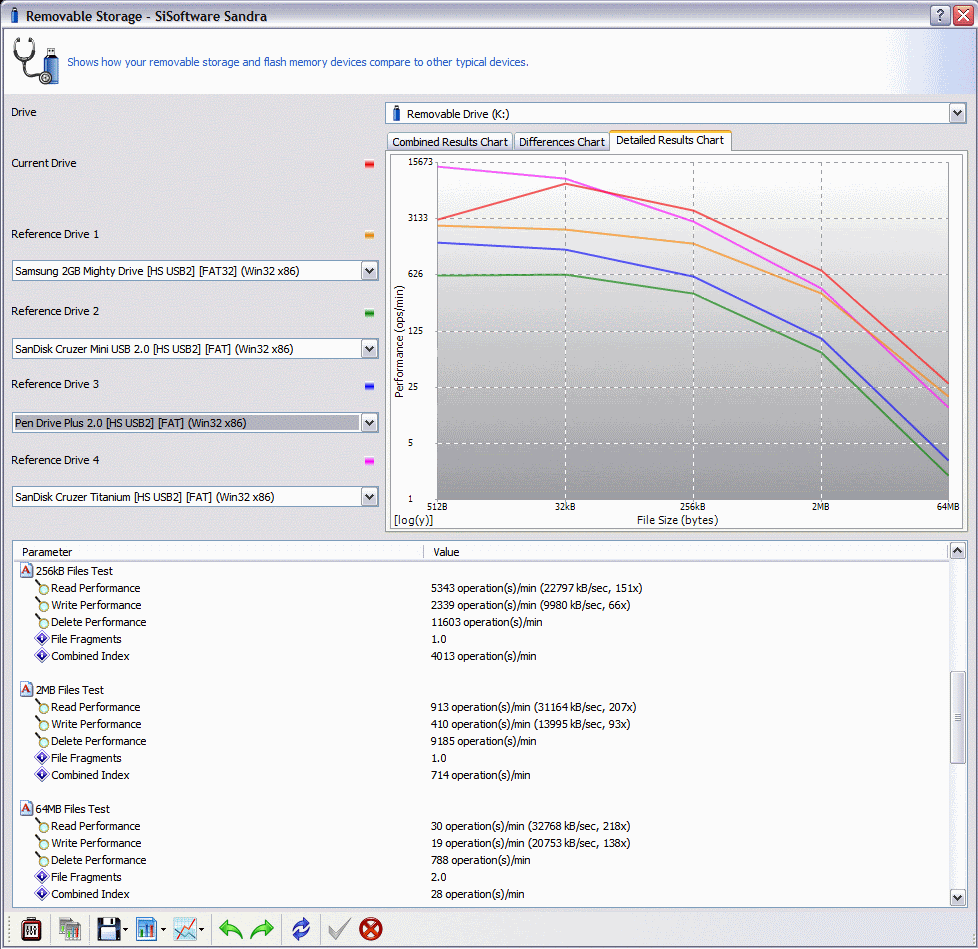
This post has been edited by jchong: Jun 10 2007, 12:58 PM
The USB Drive / Thumb Drive Performance Thread, Pls Contribute !!
|
|
 Jun 9 2007, 09:24 PM Jun 9 2007, 09:24 PM
Return to original view | Post
#1
|
 
Senior Member
5,989 posts Joined: Nov 2005 
|
I bought the Corsair Flash Voyager GT 8GB today and did some preliminary testing using actual data transfer.
Large file test: 1 movie file (1,587,277KB) R: 47 sec, 33,771KB/sec W: 71 sec, 22,356KB/sec Sandra XI SP3 result: This post has been edited by jchong: Jun 10 2007, 12:58 PM |
|
|
|
|
|
Jun 16 2007, 06:19 PM
Return to original view | Post
#2
|
|
Senior Member
5,989 posts Joined: Nov 2005
|
ozak,
The read performance is good but the write speed is so-so only. I do know the Flash Voyager 16GB is using MLC chips. |
|
|
Jul 17 2007, 04:09 PM
Return to original view | Post
#3
|
|
Senior Member
5,989 posts Joined: Nov 2005
|
QUOTE(ozak @ Jun 17 2007, 01:27 AM) Is that mean this kind of chip is fast or slow? I guess it is speed vs capacity. You want high capacity, you got to be slow down. MLC chips will be slower than SLC chips. Of course even within the MLC category there are different grades, resulting in different speeds. Added on July 17, 2007, 4:12 pmBTW, link to my review of the Voyager GT which gives performance figures: http://forum.lowyat.net/index.php?showtopic=473774 This post has been edited by jchong: Jul 17 2007, 04:12 PM |
|
|
Jul 31 2007, 07:03 PM
Return to original view | Post
#4
|
|
Senior Member
5,989 posts Joined: Nov 2005
|
QUOTE(Dannyl @ Jul 31 2007, 12:22 PM) Guys, I have this free Pendrive Mini 1GB stick. It's partitioned to 2 drives. Drive A is 2MB in size and has some Flash presentation inside that launches itself automatically (got autorun.inf). The drive is read-only and shows as a CD-ROM drive. Drive B is the remaining of the drive capacity. Any way I can merge these partitions or delete the Flash thing? Whenever I plug in the thumbdrive, the Flash thing just launches itself. Yes you can delete the 2 partitions and then create a single one. See here: http://www.microsoft.com/resources/documen...n.mspx?mfr=true |
|
|
Dec 24 2013, 12:56 PM
Return to original view | Post
#5
|
|
Senior Member
5,989 posts Joined: Nov 2005
|
QUOTE(HMMaster @ Oct 6 2013, 07:51 AM) Make sure that it is running in super speed (USB3.0 speed) if you are using Windows. Yes, this happen to my USB3.0 external hard drive that not running in super speed mode due to driver problem... Hi, how to ensure it is using super speed USB3.0?I'm running Win XP with an older PC which is natively USB2.0. I have a MSI USB3.0 card, which is working fine for my USB3.0 HDD dock. However, when I plug in a USB3.0 Sandisk pendrive into the MSI, I'm not getting full USB3.0 speed. And I get a pop up message saying the pendrive can perform faster if I use USB3.0. |
|
|
Dec 24 2013, 01:44 PM
Return to original view | Post
#6
|
|
Senior Member
5,989 posts Joined: Nov 2005
|
QUOTE(zeustronic @ Oct 4 2013, 01:32 PM) My new Verbatim OTG 16Gb USB Drive 3.0 - For Smartphones Tablets Laptop & PC. Thanks for the benchmark numbers.Read speed is fair, but the write speed is slow. I find that most pendrive like to quote read speed, but write speed is just as important since we often copy files to the pendrive. |
| Change to: |  0.0430sec 0.0430sec
 0.36 0.36
 7 queries 7 queries
 GZIP Disabled GZIP Disabled
Time is now: 18th December 2025 - 10:37 PM |
 Quote
Quote