Outline ·
[ Standard ] ·
Linear+
Kaspersky downloading itself, Is it true?
|
TSseatux
|
 Jun 10 2011, 12:31 AM, updated 15y ago Jun 10 2011, 12:31 AM, updated 15y ago
|
Getting Started


|
I was stopping all my downloads to sleep for the night, but then i found out from my network meter that my PC is still downloaded something.
I checked all the self update suspects, AV, google chrome, win update but when i hit resource meter, i see that Kaspersky is the one doing the downloading.
Opened the program and saw that it was not downloading new updates at all.
So I wonder now, am I alone or are there people out there with the problem?
|
|
|
|
|
|
XeactorZ
|
Jun 10 2011, 03:27 PM
|
|
|
u means update is it ??
if yes is true,it will auto update for ur computer ~
|
|
|
|
|
|
mikicun
|
Jun 10 2011, 03:29 PM
|
|
|
kaspersky sucks... its a hdd space hogger...
check it yourself in ur appdata folder..
|
|
|
|
|
|
Seybold
|
Jun 11 2011, 10:03 AM
|
Getting Started
|
QUOTE(mikicun @ Jun 10 2011, 03:29 PM) kaspersky sucks... its a hdd space hogger... check it yourself in ur appdata folder..  You means all the windows application also space hogger?  Thank for sharing. I should uninstall all the Microsoft Windows things right? Will my Computer become blue screen? |
|
|
|
|
|
mikicun
|
Jun 12 2011, 01:37 AM
|
|
|
QUOTE(Seybold @ Jun 11 2011, 10:03 AM) You means all the windows application also space hogger? Thank for sharing. I should uninstall all the Microsoft Windows things right? Will my Computer become blue screen? yes... u should delete windows folder system32 also for being ignorant and stupid... and change to linux... oh wait... u still sucks at windows os... darn it... 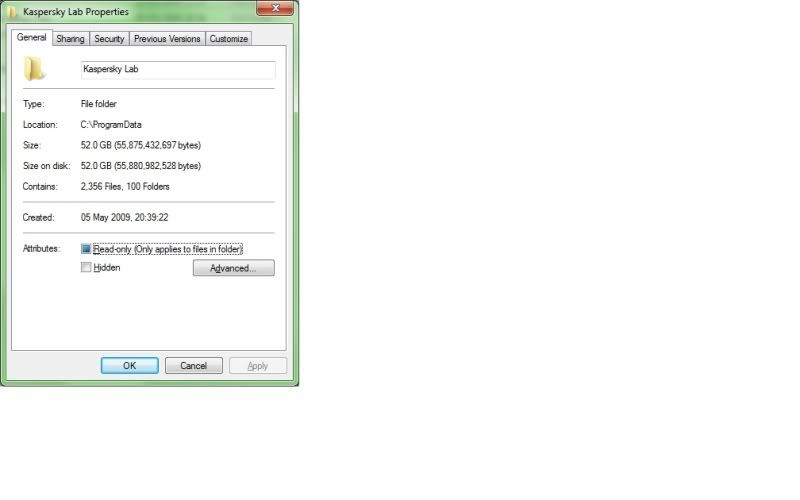 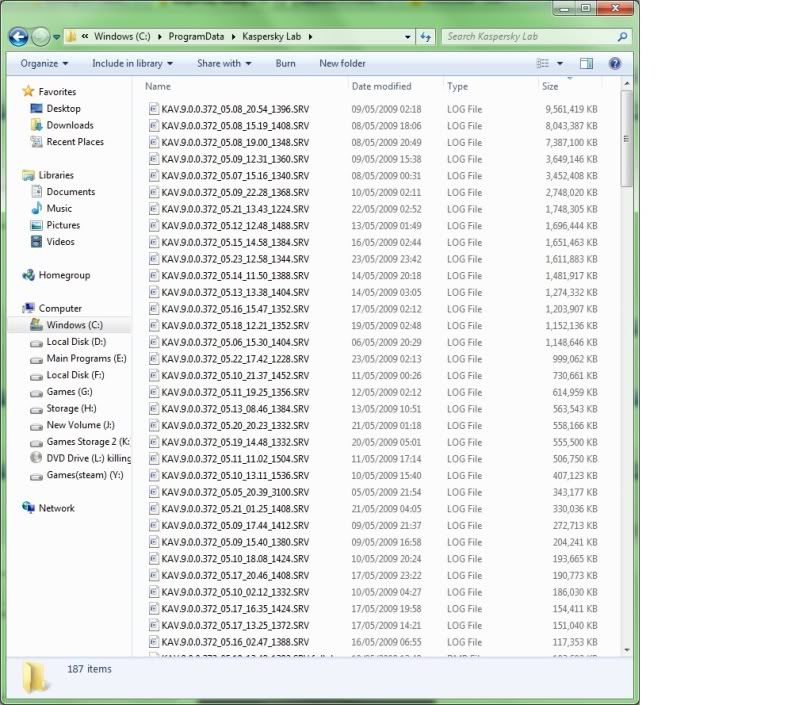 QUOTE April 10, 2010 Reply Birddog @ 5:30 pm # @Watching The Net: "Watching" U R DA BEST!, I can't thank you enuf. I've spent the last seven hours trying to figure out why I lost 57Gigs of disk space after a restore. I mean my disk space went to ZERO. I downloaded TreeSizeFree and within ten minutes it ZEROED in on the problem, which was 57 Gigs of Kaspersky files that should have been deleted from Program Data Folder. Thanks Again!!!! QUOTE • Memory Use: Kaspersky 2011 uses 20.3 MB of memory. #7 rated of the 15 Antivirus programs tested.
• Reboot Time: Kaspersky added 22.9 seconds to our test computer's reboot time. #12 rated of the 15 Antivirus programs tested. Last year, Kaspersky 2010 finished #5 in this test.
• Installation Size: Kaspersky Antivirus 2011 takes 641 MB of hard-drive space for installation. #14 rated of the 15 Antivirus programs tested - Kaspersky requires the second-largest installation size of any Antivirus program we tested.
• Initial Scan Speed: Kaspersky scans files the first time at a speed of 26.1 MB/s. #9 rated program we tested.
• Subsequent Scan Speed: Kaspersky performs subsequent scans at a speed of 213.3 MB/s. #3 rated program we tested.
• Initial Application Launch: Kaspersky added 0.761s to launch a web browser for the first time after a reboot. #10 rated program we tested.
• Subsequent Application Launch: Kaspersky added 0.417s on average for subsequent web browser launches. This was the #13 rated program tested, and another regression from Kaspersky's #6 rating last year.
• File Conversion Time: Kaspersky added only 0.38s on average to convert a MP3 file to four other file types. #5 rated of the 15 Antivirus programs tested (finished slightly better at #3 last year).
• System Impact Score: The "System Impact Score" is a comparative score tallied from the above 8 Antivirus tests. Kaspersky 2011 only scored a total of 55 out of 120 points when compared to the other Antivirus programs. This placed Kaspersky 10th overall - quite the fall from Kaspersky's 5th place finish last year. Definitely a disappointing set of results for a program once known for its speedy performance. This post has been edited by mikicun: Jun 12 2011, 01:52 AM |
|
|
|
|
|
Seybold
|
Jun 12 2011, 12:45 PM
|
Getting Started
|
QUOTE(mikicun @ Jun 12 2011, 01:37 AM) yes... u should delete windows folder system32 also for being ignorant and stupid... and change to linux... oh wait... u still sucks at windows os... darn it... » Click to show Spoiler - click again to hide... « Lol... I have no offence. btw misleading ppl delete system32 is bad people does. Those files in the folder was created by you when you enable trace in Kaspersky 2010 on 2009 for Kaspersky support to investigate your issue and it can be deleted. Kaspersky already move forward with better engine and Windows still Rock! Edit-delete unnecessary word.This post has been edited by Seybold: Jun 12 2011, 01:07 PM |
|
|
|
|
|
pilot8
|
Jun 25 2011, 02:07 AM
|
Getting Started
|
Can try the latest released Kaspersky antivirus
|
|
|
|
|
|
giveme5
|
Jun 28 2011, 08:59 AM
|
Getting Started
|
KAV2012 rocks!
|
|
|
|
|



 Quote
Quote


 0.0160sec
 1.14
1.14
 5 queries
 GZIP Disabled